|
VOOZH | about |
|
VOOZH | about |
Linking Google My Business (GMB) with Google Ads is a powerful strategy to boost your online visibility and drive more local traffic to your business. By connecting these two essential tools, you can enhance your Google Ads campaigns with location-based targeting, showcase your business information directly in ads, and attract customers who are nearby and ready to engage. In this article you are going to learn the simple steps to link Google My Business and Google Ads, helping you leverage the full potential of local advertising.
Learn how to optimize your local SEO, increase your AdWords ROI, and make your business stand out in local searches. Discover how this integration can boost your marketing efforts, increase foot traffic, and ultimately grow your business by ensuring your ads reach the right audience at the right time. Learn the process and explore the benefits of combining Google My Business with Google Ads for maximum impact!
Table of Content
Google My Business (GMB) is a free tool provided by Google that allows businesses to create and manage their online presence across Google Search and Maps. With GMB, businesses can:
Google Ads is an online advertising platform by Google where businesses can create and run ads that appear on Google Search, YouTube, and other websites within the Google Display Network. With Google Ads, businesses can:
Together, Google My Business and Google Ads help businesses enhance their online presence, attract more customers, and grow their business.
| Aspect | Google My Business | Google Ads |
|---|---|---|
| Purpose | Manages online presence for local businesses | Creates online advertising campaigns |
| Main Function | Displays business info in Google Search & Maps | Shows ads on Google Search, YouTube, and websites |
| Price | Free | Pay-per-click (PPC) or other bidding models |
| Target Audience | Local customers searching for your business | Targeted audience based on keywords, demographics, interests |
| Setup | Create and verify your business profile | Create ad campaigns, select target audience, and set budget |
| Visibility | Visible in local search results and Maps | Visible in search results, websites, and YouTube |
| Key Features | Reviews, business info, posts, photos | Text ads, display ads, video ads, remarketing |
| Analytics | Insights on searches, views, and actions | Detailed performance metrics and conversion tracking |
| Control Over Content | Direct control over business information | Creative control over ad content and targeting |
| Local SEO Impact | Enhances local search visibility | Does not directly impact SEO, but increases visibility through ads |
Creating an account in Google Ads and Google My Business is much easier, but if you go one step ahead, you will get many benefits from the interconnection of these two. To boost your business, you must take this step. The following section highlights how to connect Google My Business and Google Ads.
First of all, make sure that you have a Google My Business Profile and Google Ads Account on the same Gmail. If you have both accounts on the same Gmail, it is the simplest way to link Google My Business and Google Ads. After following this point, you can continue the steps below.
Integrating The Google My Business Location Into Google Ads
After logging in to Google Ads, you must click on tools and settings, as shown in the image below.
A new window will open, from where you must click on Location groups, as shown in the image below.
Now, you have to click on the add (plus) icon, as done in the image below.
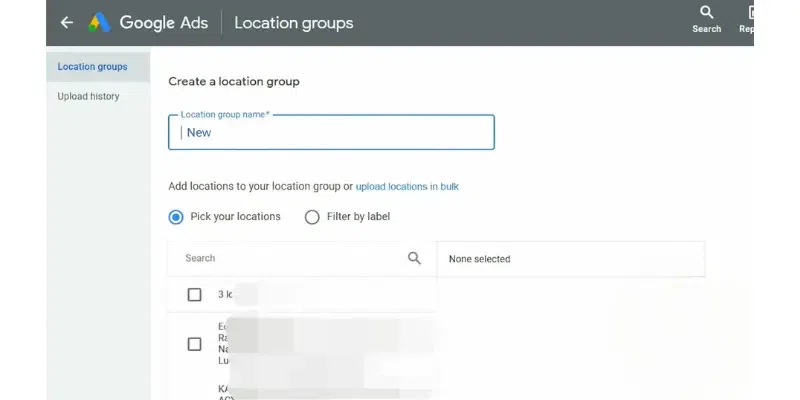
You need to name a location group now; in this case, let’s consider the name – new.
Once you enter the name of your location group, you have to select the business location available on your Google My Business.
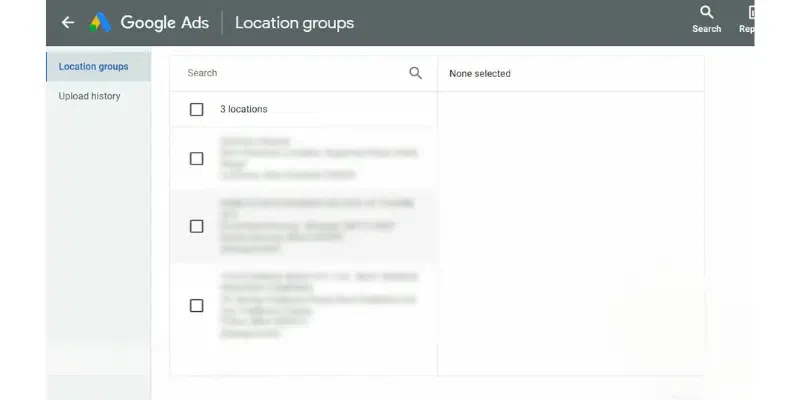
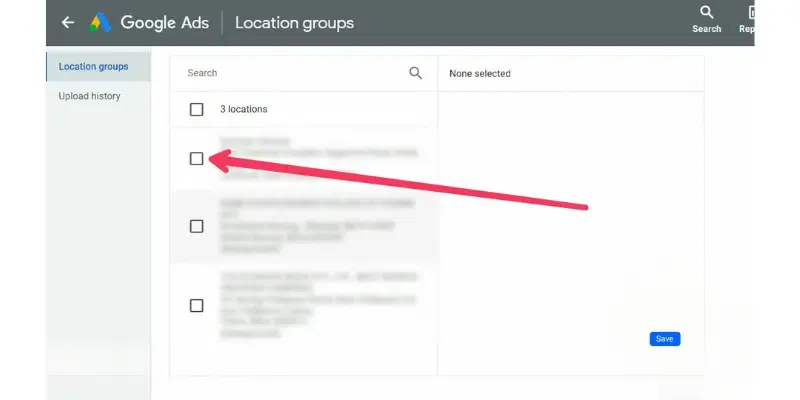
As you can see in the image below, three addresses are fetched from the Google My Business Profile; similarly, if you have added any or multiple locations, click on the one to which you want to integrate with Google Ads.
After picking the location, click on save
Now you will be redirected to the main page where you will see a new location group has been created with the name (in this case: new). Now, you can run ads in correspondence with Google My Business Profile.
Location assets are the information fetched from the Google My Business Profile that contains each of the details provided under location details. These may include location on the map, opening and closing hours, contact information, etc. Adding a location asset is extremely useful for any business on Google. Below is how you can create a location asset.
Location assets are vital to increase the visibility of your business. Today, if a customer is looking for any service on Google, they will undoubtedly find a list, but only some will possess a proper location. The one with the area will surely attract the customer. So, there must be dedicated location assets on your profiles, and you can create them by following the steps below.
Log in to the Google Ads account and click on campaigns as shown below
Now click on plus icon (create asset) as shown below
Now click on the location as shown in the screenshot.
Here, you would get an option to ‘Link to business profile manager account that I know’; click on it.
Below, you will see your GMB’s profile; select the one
Click on continue option
On the next page, choose the location that you want to add
After selecting the location, click on Finish
By linking your GMB and Google Ads profiles, you can optimize your local advertising efforts, attract more customers, and grow your business efficiently. Linking your Google My Business (GMB) and Google Ads (formerly AdWords) profiles offers several significant benefits:
Linking Google My Business and Google Ads is a powerful way to enhance your online presence and drive more traffic to your business. By integrating these platforms, you can improve your local search visibility, target the right audience with precision, and track performance metrics effectively. Follow our step-by-step guide to easily connect your accounts and maximize your advertising efforts. Boost your local marketing strategy today by linking Google My Business with Google Ads, and watch your business grow!
Will My Ad Performance Be Affected After Linking Google My Business And Google Ads Accounts?
No, your ad will improve in performance after linking these two elements.
Is It Mandatory To Have A Google My Business Verified Profile To Link It To Google Ads?
Yes, it is mandatory to have a Google My Business Verified Profile in order to link it to Google Ads.
What are the benefits of linking Google My Business to Google Ads?
Boost Visibility: Your ads can show your address, a map, or distance to your business.
Improve Ad Relevance: Your ads are more likely to appear in relevant search results.
Enhance Local Ads: It’s beneficial if you want to drive customers to a physical location.
Manage Easily: Manage your online presence and ads from one place.
Gain Insights: Get valuable performance insights to improve your ads.
How do I Create a Smart Campaign?
- Sign In
- Go to Google Ads
- Start a Campaign
- Set Your Goal
- Enter Business Info
- Create Your Ad
- Target Your Audience
- Set Budget
- Review and Publish