|
VOOZH | about |
|
VOOZH | about |
In developing unit tests frequently includes aspects where you must adjust or define specific environmental conditions. Mocking dates appear regularly in situations. Various systems and components rely on the present date and time; in testing that is reliable and repeatable, the current date must persist each time tests run. In your tests on Jest, you easily create mocks for dates due to its position among the superior JavaScript frameworks.
The guide explains how to establish and replicate a date in Jest addressing setup and real-life examples.
These are the following topics that we are going to discuss:
Dates are often used for time-sensitive features like:
Fixing dates or counting on today's time could cause tests to either succeed or fail unpredictably as they are run. By using mocks for dates you can maintain test execution consistency and eliminate unexpected test outcomes.
Let's examine how to set up a project that implements Jest for date jesting.
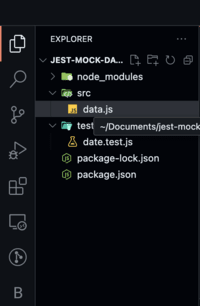
Begin by forming a fundamental Node.js project then introducing Jest.
mkdir jest-mock-date-example
cd jest-mock-date-example
npm init -ynpm install --save-dev jest"scripts": {
"test": "jest"
},
{
"name": "jest-mock-date-example",
"version": "1.0.0",
 "scripts": {
 "test": "jest"
 },
"devDependencies": {
"jest": "^29.0.0"
}
}
Now, let’s create a simple code example where you will mock dates.
function getCurrentDate() {
 return new Date();
}

module.exports = getCurrentDate;
const getCurrentDate = require('../src/date');

describe('Mocking Date in Jest', () => {
 beforeAll(() => {
 const mockDate = new Date(2022, 0, 1); // Mock date: Jan 1, 2022
 jest.spyOn(global, 'Date').mockImplementation(() => mockDate);
 });

 afterAll(() => {
 jest.restoreAllMocks(); // Reset the Date object after tests
 });

 it('should return the mocked date', () => {
 const currentDate = getCurrentDate();
 expect(currentDate).toEqual(new Date(2022, 0, 1));
 });
});
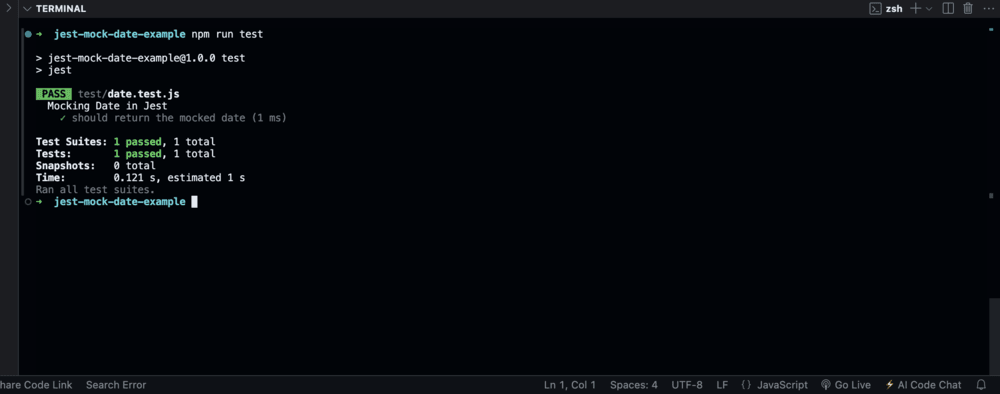
The Jest test suite will execute and show the results in the console.
npm run testOutput: Once the test runs, you should see an output like this:
PASS tests/date.test.js
Mocking Date in Jest
✓ should return the mocked date (1 ms)
Passing the test occurs as a result of the getCurrentDate returning the faked date for January 1st.
To effectively test time-sensitive features; it is essential to mock dates in Jest. Incorporating time management in your test makes it trustworthy and repeatable at every phase from mocking just Date.now() to Jerusalem footing every state method with jest.useFakeTimers(). Treat forgotten reset of mocked objects as important so as not to disrupt future test runs.