|
VOOZH | about |
|
VOOZH | about |
If you want to create a machine learning model but say you don't have a computer that can take the workload, Google Colab is the platform for you. In this article, we'll learn how to use google colab.
Google Colab, short for Colaboratory, is a free cloud-based platform provided by Google that allows users to write and execute Python code collaboratively in a Jupyter Notebook environment. Google Collaboratory notebook, is designed to facilitate machine learning (ML) and data science tasks by providing a virtual environment, Google colab python with access to free GPU resources.
Google Colab offers several benefits that make it a popular choice among data scientists, researchers, and machine learning practitioners. Key features of Google Collaboratory notebook include:
To start working with Google Collaboratory Notebook you first need to log in to your Google account, then go to this link https://colab.research.google.com// .
On opening the website you will see a pop-up containing the following tabs -
Else you can create a new Jupyter Notebook by clicking New Python3 Notebook or New Python2 Notebook at the bottom right corner.
On creating a new notebook, it will create a Jupyter notebook with Untitled0.ipynb and save it to your google drive in a folder named Colab Notebooks .
Now as it is essentially a Jupyter Notebook, all commands of Jupyter Notebooks will work here. Though, you can refer to the details in Getting Started with Jupyter Notebook .
Let's talk about what is different here:
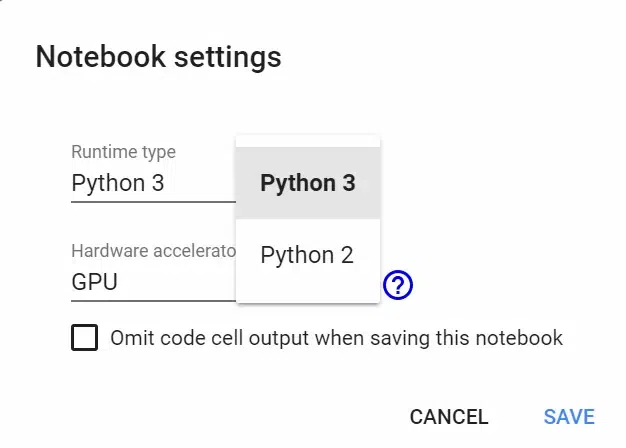
Change Runtime Environment: Click the "Runtime" dropdown menu. Select "Change runtime type" . Select python2 or 3 from the "Runtime type" dropdown menu.
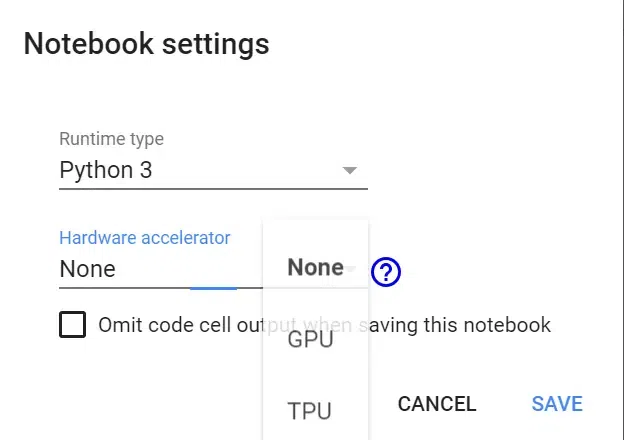
Click the "Runtime" dropdown menu. Select "Change runtime type" . Now select anything(GPU, CPU, None) you want in the "Hardware accelerator" dropdown menu.
If GPU is connected it will output the following -
'/device:GPU:0'
Otherwise, it will output following
''
If GPU is connected it will output following
Connected to TPU
Otherwise, it will output following
Not connected to TPU
Use can use pip to install any package. For example:
Use the git clone command. For example:
Select "Choose file" and upload the file you want. Enable third-party cookies if they are disabled.
Then you can save it in a dataframe.
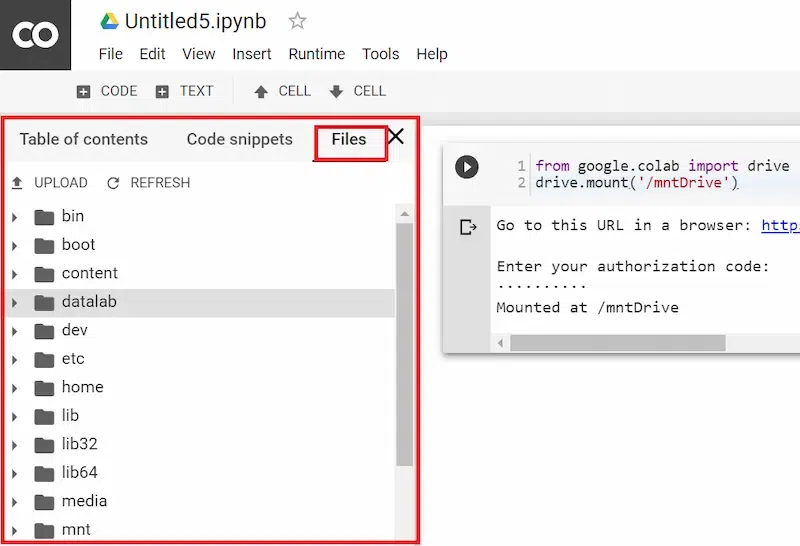
To mount your drive inside the "mntDrive" folder execute the following -
Then you’ll see a link, click on the link, then allow access, copy the code that pops up, and paste it at "Enter your authorization code:". Now to see all data in your google drive you need to execute the following:
You can also see the file hierarchy by clicking ">" at the top left below the control buttons (CODE, TEXT, CELL).
Let's say you want to download "file_name.csv". You can copy the file to your google drive (In "data" folder, you need to create the "data" folder in google drive) by executing this:
The file will be saved in the "data" folder with the "renamed_file_name.csv" name. Now you can directly download from there, Or, you can just open the file hierarchy and right-clicking will give a download option. Download Jupyter Notebook: Click the "File" dropdown menu at the top left corner. Choose "download .ipynb" or "download .py"
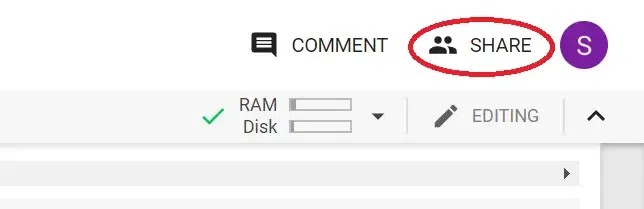
Share Jupyter Notebook: You can share your notebook by adding others' email addresses or by creating a shareable link.
In conclusion, Google Colab stands out as a versatile and accessible platform for Python coding.


.webp)

.webp)