 |
VOOZH | about |
|
VOOZH | about |
Masking and clipping is an advanced technique used in Figma to control the visibility of elements in a particular design to give the design an aesthetic touch. masking and clipping techniques are essential for a complete design these techniques allow designers to creatively change and constrain how content is displayed to the user which is very necessary for creating polished, clean, and attractive designs.
The mask is a shape in which the user wants to display a particular object, so a mask is placed on top of the object and when we cut the object will come in the form of a mask. This simple technique of reshaping the object or group of objects in the form of a mask is called masking.
Choose or Create Shape according to requirements.
Insert image that you want to mask.
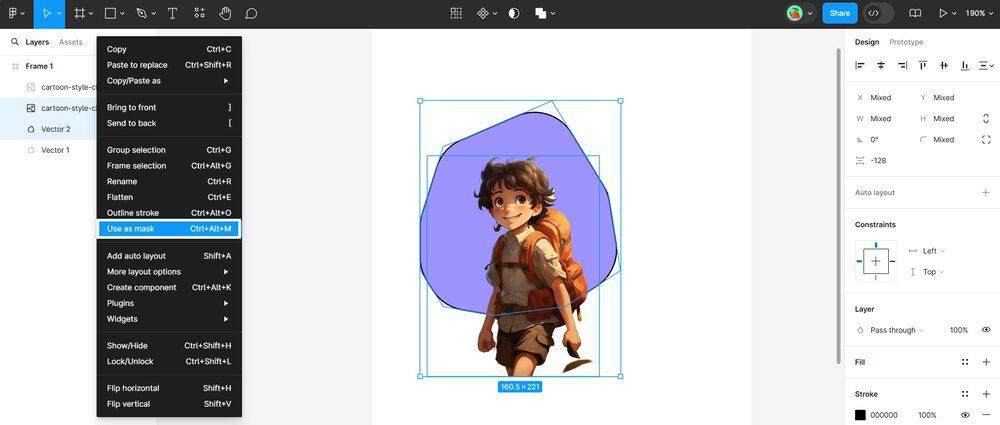
Select the middle layer one of image and other layer of Shape.
Click mouse right button and select option use as Mask.
Select the unmasked image layer and crop to the size of shape by pressing ctrl.
Final Result after cropping unmasked Image layer.
Clipping is a technique in Figma which is mostly similar to masking. In clipping, we use frames to limit the visibility of content within it. In clipping simply, we can view only the content that is in the frame and the remaining content can be visible by scrolling.
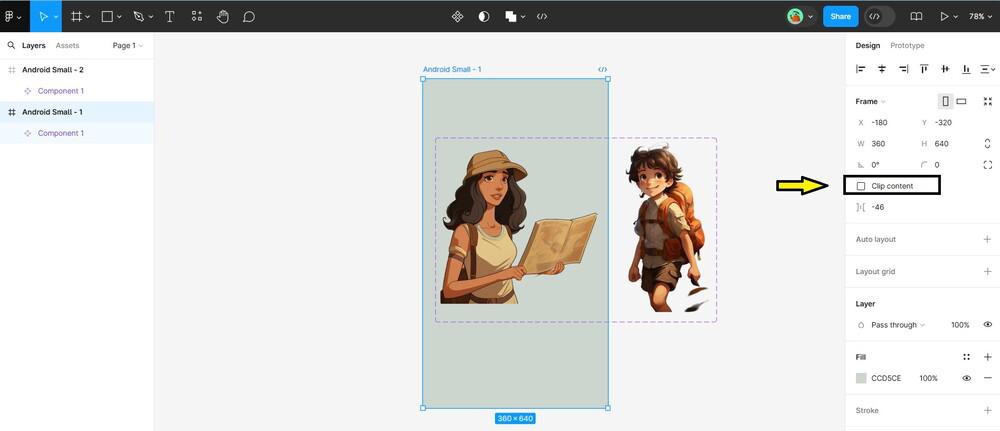
Select or create a frame for your content.
There is check box for clipping content in Right side in black border box.
The techniques of Masking and clipping are powerful techniques in Figma that allow designers to control the visibility of content with their creative design frames and thought processes. When we understand how to use this techniques then we can make our design look good and professional. These also help us to create unique elements for our design which attract more users.




.gif)