|
VOOZH | about |
|
VOOZH | about |
10 min
read
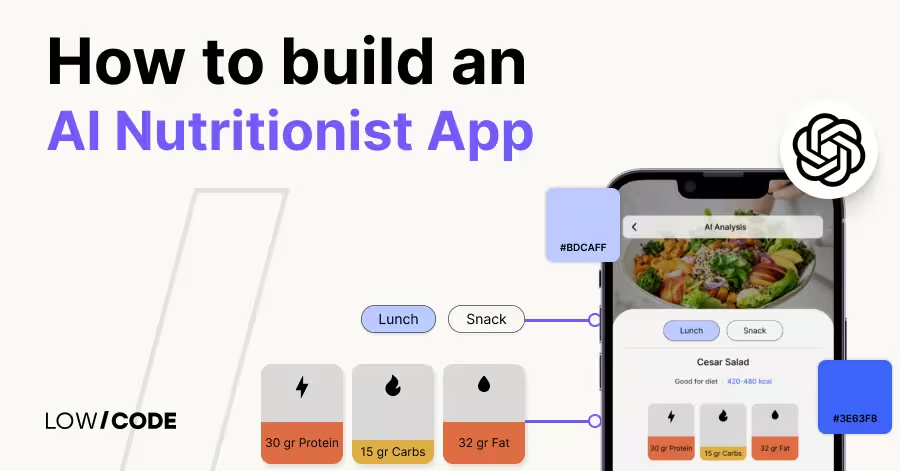
Build an AI nutritionist app without coding using tools like Bubble or Glide. Automate meal tracking, GPT advice, and food analysis with no-code platforms
By
Jesus Vargas
Updated on
May 29, 2026
.
Reviewed by
Real-World Experience with No-Code Tools: With over 320 apps built, we know firsthand what works—and what doesn't—when using no-code platforms like Glide, Bubble, FlutterFlow and Webflow.
Expert Team with 40+ Years of Combined Experience: Our team has deep technical knowledge, with experts who use no-code tools to solve real-world problems for clients every day, ensuring our advice is actionable and reliable.
Detailed Guides Based on Actual Projects: We don’t just talk about no-code; we use it daily to solve real business problems for our clients, from MVPs to complex automations.
Take a deeper look at our editorial guidelines
Over 70% of users abandon generic health apps within the first month due to lack of personalization. That’s where AI nutritionist apps stand out. These apps use artificial intelligence to offer meal advice, analyze eating habits, and build customized nutrition plans based on user goals, preferences, and health data.
An AI nutritionist app goes beyond logging meals. It can suggest better food options, detect ingredients from images using computer vision, and respond to user queries with GPT-powered explanations. For example, users can ask, “What’s a low-carb alternative to this meal?” and get instant, personalized answers.
These apps can be built quickly and affordably using no-code platforms like Bubble, Glide, or FlutterFlow for mobile-first experiences. Combined with automation tools like Make or n8n, they deliver a powerful, custom-built health solution without needing a developer.
Traditional nutrition apps offer static plans and limited tracking but people’s diets and goals change constantly. That’s where AI steps in. It personalizes, adapts, and scales nutrition guidance in real time, giving users a smarter way to eat better without needing a human coach.
AI makes nutrition advice smarter, faster, and more personal, redefining how users engage with health.
Read more | AI App Development Guide
To truly help users improve their eating habits, an AI nutritionist app must do more than just log food. It should understand what users eat, respond with smart advice, and guide them toward healthier choices, all in real time.
These features make the app functional, engaging, and deeply personalized.
With these features, your app becomes a proactive nutrition coach, smart, responsive, and tailored to real-life needs.
Read more | AI Business Trends and Challenges
Choosing the right no-code platform is key to building a nutrition app that’s smart, fast, and scalable. Each tool offers unique strengths for different types of AI-powered features.
Bubble is ideal for building full-featured nutritionist apps that require custom dashboards, secure user data, and deep personalization. You can use GPT for meal suggestions, OCR for scanning food labels, and Firebase for secure data storage.
Bubble gives you full control over your app’s logic, layout, and database, making it a great choice for web-based platforms. Build features like user-specific nutrition plans, dynamic recipe suggestions, and chat-style GPT responses.
Add role-based permissions for coaches, clients, and admins to view or manage different content. For large-scale platforms or B2B health apps, Bubble is the most powerful and customizable no-code option.
Read more | AI Contract Management
FlutterFlow is the best choice for mobile-first AI nutritionist apps. It lets you create sleek, native Android and iOS apps that run smoothly on any device. It integrates well with Firebase for secure user login and real-time data sync, and with n8n for backend automations. You can build meal trackers, food scan interfaces, push alerts, and goal-based recipe flows with ease.
For AI features, FlutterFlow connects well with GPT for instant meal suggestions and can display dynamic content based on user progress. Nutritionists and fitness coaches can use FlutterFlow to build professional, client-facing apps without needing a mobile developer.
Read more | AI No-code Inventory Management Tools
Glide is perfect for quickly building MVPs or lightweight nutritionist apps using Google Sheets as the backend. It’s ideal for solo founders, wellness coaches, or small teams who want to test an idea fast.
Glide supports user authentication, daily tracking, goal progress, and habit streaks. With its AI column feature and Make integration, you can run GPT-powered meal analysis and food feedback directly from user input.
Read more | Build AI-Powered Mobile Apps
You can also let users upload food photos and send them to OCR tools via Make for macro calculation. Glide is best for simple, fast-launch apps that focus on food journaling and basic personalization.
Read more | AI-Powered App for Lawyers (No-code)
These automation platforms are essential for adding intelligence and efficiency to your nutritionist app. Use them to link OpenAI (for GPT-based suggestions), Google Sheets (for food logs), Firebase (for user data), and OCR tools (for image analysis).
You can create workflows like sending a personalized meal plan each morning, reminding users to log dinner, or summarizing daily nutrient intake.
Make and Zapier are ideal for quick integrations, while n8n offers advanced logic and self-hosting options for teams that need more control. These tools handle everything from chat responses to compliance reminders, all without writing backend code.
Read more | Can You Build an AI SaaS with No-code?
Custom Automation Solutions
Save Hours Every Week
We automate your daily operations, save you 100+ hours a month, and position your business to scale effortlessly.
Building a smart nutrition app starts with clear goals, the right tech stack, and thoughtful testing. Here’s a practical guide to help you move from idea to launch.
The first step is deciding who the app is for and what problem it solves. Is it a personal health tracker, a client tool for your wellness practice, or a public app for hundreds of users? Your use case defines the features, layout, and scale of the app.
Knowing your use case upfront helps you choose the right platform, features, and flow – saving time and rework later.
Read more | How to build a FlutterFlow AI-powered app
The platform you choose should match your technical needs and end-user experience. Don’t just choose based on popularity; choose based on what the app must do well.
Each platform supports AI and automation through integrations like GPT, OCR, and Make. Choose the one that fits your audience and content style.
Read more | How to hire AI app developers
Even with no-code tools, building a successful AI nutritionist app requires deep product thinking, clean UX, and the right automation stack. At LowCode Agency, we don’t just build apps — we create digital products designed to work in the real world from day one.
If you're serious about launching a reliable, scalable AI nutritionist platform, we’re your product team — not just your developers.
Read more | How to build an AI agent in Slack
Even the smartest nutrition app needs real-world testing. What looks good on paper often reveals issues during actual use. Run feedback cycles with target users to catch missing features, confusing flows, or weak AI logic.
Continuous improvement ensures your app not only functions well but feels helpful and human—exactly what users want from an AI nutritionist.
Read more | How to build an AI project manager app using no-code
AI nutritionist apps can be incredibly powerful but only when built with the right balance of technology, design, and user experience. Many apps fail not because of the idea, but because of poor execution.
Here are the most common mistakes to avoid if you're serious about building something that works.
Avoiding these mistakes means building a smarter, safer, and more user-friendly nutrition platform from the start.
Read more | How we build an AI-powered app with Bubble
AI-powered nutrition apps are redefining how people manage food, health, and fitness goals. Instead of relying on generic meal plans or manual tracking, users now expect personalized, intelligent guidance — delivered in real time. With no-code platforms like Bubble, FlutterFlow, and Glide, you can build these smart solutions without writing code.
Whether you're creating a personal nutrition tracker, a client-facing app, or a public platform, the right mix of AI, automation, and design makes all the difference. From GPT-powered advice to photo-based food logging and habit tracking, these features are now accessible with the right tools.
But great products need more than ideas. Partner with experts who know how to design, automate, and scale. That’s how you move from prototype to a real, working app that delivers results.
Read more | 9 Best Generative AI Development Companies
AI App Development
Your Business. Powered by AI
We build AI-driven apps that don’t just solve problems—they transform how people experience your product.
At LowCode Agency, we specialize in building powerful, user-friendly nutrition apps using no-code tools and AI. Whether you're launching a personal health tracker, a client-facing tool for your wellness practice, or a scalable public platform, we help turn your vision into a real, functional product — faster and smarter.
We specialize in:
With a proven track record of building all types of applications, our team of expert project managers, no-code developers, and designers is committed to delivering top results. We focus on speed, quality, and long-term value, helping businesses turn ideas into real products twice as fast and at half the cost of traditional development.
📌 Check out our case studies and book a free discovery call to see how we can turn your vision into reality.
Last updated on
May 29, 2026
.
Jesus Vargas
-
Founder
Jesus is a visionary entrepreneur and tech expert. After nearly a decade working in web development, he founded LowCode Agency to help businesses optimize their operations through custom software solutions.
Custom Automation Solutions
Save Hours Every Week
We automate your daily operations, save you 100+ hours a month, and position your business to scale effortlessly.
Our AI — trained on 300+ shipped products — tells you what to build, what to skip, and what it'll actually cost. No fluff.
Assess My Idea"Working with LowCode Agency was the best decision I made in 2025"
Franklin Frith
CEO at HRM
An AI nutritionist app uses artificial intelligence to provide personalized meal suggestions, track food intake, analyze photos of meals, and offer smart feedback based on user goals. It acts like a digital health coach, combining tools like GPT and computer vision to support better eating habits through real-time, adaptive recommendations.
Yes, you can build an AI-powered nutrition app without coding using no-code tools like Bubble, Glide, or FlutterFlow. These platforms let you design interfaces, track meals, and integrate AI features like GPT, OCR, or automation tools such as Make. With the right setup, even complex logic and personalization can be handled without writing code.
Bubble is great for custom dashboards and user-specific plans, FlutterFlow is ideal for mobile-first apps with camera or scan features, and Glide is perfect for quick food tracking and GPT integrations via Make. Your choice depends on whether you prioritize mobile use, speed, or backend flexibility.
You can connect GPT or computer vision tools using automation platforms like Make, Zapier, or n8n. These tools allow your no-code app to send data (like text or food images) to GPT or OCR services, then return smart responses or analysis to display inside your app—no custom backend required.
Yes, no-code apps can safely collect health-related data when built properly. Platforms like Bubble and FlutterFlow support secure login, data encryption, and role-based access. You should also follow privacy standards, limit data collection, and integrate with secure backends like Firebase or Xano for added control and compliance.
Building AI nutrition apps without code is faster but designing a scalable, secure, and well-structured product still requires expertise. An agency like LowCode Agency handles everything from UX to automation and AI integration, ensuring your app works well and meets real user needs. It saves time, avoids rework, and delivers a better result.
AI
AI Employee for Veterinary Clinics: Do More
Send appointment reminders, handle routine inquiries, and follow up after visits. An AI Employee helps vet clinics improve patient care and reduce front desk load.
AI
AI Employee for Software Development Agencies
Automate client updates, project reporting, and new business outreach. An AI Employee helps dev agencies stay organized and land more contracts.
AI
Using AI to Check Medical Documentation Compliance
Learn how AI helps identify compliance issues in medical documents quickly and accurately for better healthcare management.
AI
AI Agents Use Cases That Drive Real ROI
Explore real-world AI agent use cases that deliver measurable ROI across sales, support, marketing, and operations for modern businesses.
AI
Claude
What Is Claude Code Channels? (Complete Explanation)
Understand Claude Code channels, how they work, channel types, and real workflows. Learn when they matter and how to use them effectively.
AI
Dental AI Receptionist: Stop Missing Patient Calls
Discover how a dental AI receptionist answers patient calls, books appointments, and handles inquiries 24/7, helping dental clinics reduce missed calls and improve patient scheduling efficiency.