|
VOOZH | about |
|
VOOZH | about |
Many organizations running in the cloud are shifting to EKS for greater elasticity, scalability, and resource optimization. As EKS becomes one of the biggest items on your AWS bill, prioritizing its cost-optimization is imperative.
Cluster Autoscaler, the most widely-used solution for EKS, directly impacts costs through scaling decisions. At nOps, we oversee over a billion dollars in AWS spend and have gained some valuable insights into the technology.
That’s why we wrote this guide to using Cluster Autoscaler efficiently — including practical how-to information, screenshots, and best practices to reduce costs.
Cluster Autoscaler automatically scales your Kubernetes clusters based on the metrics you define. It monitors the resource utilization of nodes in your EKS/Kubernetes Cluster, and adjusts the number of nodes in a node group to accommodate changes in resource requirements.
When a scaling decision is made, Cluster Autoscaler communicates with the associated Auto Scaling Group (ASG) to adjust the DesiredCapacity, prompting the ASG to scale the cluster nodes automatically.
In the context of Cluster Autoscaler and EKS, cost is determined by the decision to scale out or scale in the number of nodes. Inefficient resource allocation occurs when an existing node is not fully utilized or when a new node is added with excess capacity for incoming pods — causing waste and unnecessary expense.
Cluster Autoscaler can help with cloud cost management by automatically scaling clusters up or down based on demand, optimizing your resource usage. Let’s discuss some ways to do this effectively.
It is often more cost-efficient to consolidate resources into larger NodeGroups. This generally reduces overall infrastructure costs and management overhead compared to managing a larger number of smaller Node Groups.
With more nodes available in a single group, the risk of underutilized nodes is minimized, ensuring the cluster operates closer to its capacity. The risk of encountering situations where one node group requires more computational power while others remain idle is significantly reduced.
The optimization technique for efficiently allocating containers or workloads onto nodes within a cluster is known as bin packing. The term “bin packing” is borrowed from the classic optimization problem where items of different sizes are placed into bins to minimize wasted space.
Kubernetes uses a scheduler that makes decisions about where to place pods based on various factors like resource requests and limits, node affinity, and anti-affinity rules. Here are some key concepts and settings you might consider for influencing scheduling decisions:
resources: requests: memory:"64Mi" cpu:"250m" limits: memory:"128Mi" cpu:"500m"
affinity: nodeAffinity: requiredDuringSchedulingIgnoredDuringExecution: nodeSelectorTerms: -matchExpressions: -key:example.com/zone operator:In values: -us-west1-a
tolerations: -key:"example.com/special" operator:"Equal" value:"true" effect:"NoSchedule"
apiVersion:kubescheduler.config.k8s.io/v1 kind:KubeSchedulerConfiguration profiles: -pluginConfig: -args: scoringStrategy: resources: -name:cpu weight:1 -name:memory weight:1 -name:intel.com/foo weight:3 -name:intel.com/bar weight:3 type:MostAllocated name:NodeResourcesFit
For more information about scheduling concepts, please refer to the Kubernetes documentation.
The Horizontal Pod Autoscaler (HPA) plays a crucial role in ensuring that the application itself scales effectively by dynamically adjusting the number of running pods based on defined metrics. To achieve effective autoscaling, it’s common to use both Cluster Autoscaler and Horizontal Pod Autoscaler (HPA) together to ensure (1) there is enough infrastructure capacity (nodes) to support the application, and (2) that the application scales horizontally by managing the number of pod replicas.
If only a Cluster Autoscaler is used, the cluster size might scale up or down to handle resource demands, but it doesn’t directly influence the application’s scalability. For the application to dynamically adjust its capacity, the HPA must be configured appropriately.
Below are additional details on the role each play in effective autoscaling:
While Kubernetes provides built-in metrics like CPU and memory usage for scaling decisions, there are cases where custom metrics become necessary for a more tailored and application-specific scaling approach.
Let’s take a practical example to illustrate this concept. Imagine you have a custom metric called “queue_length,” representing the number of messages awaiting processing in a queue. When this metric surpasses a defined threshold, you want to dynamically scale your application by adding more pods to efficiently handle the incoming workload. Kubernetes is not aware of your queue length without a custom metric.
For more information on how to configure an HPA and custom metrics, please refer to the Kubernetes documentation.
Optimizing your ASGs only goes so far — for the biggest discounts, moving your usage onto discounted Spot instances can help you save significantly. AWS Spot instances can save you up to 90% in costs compared to On-Demand instances. And contrary to common belief, it is possible to use Spot instances reliably in workloads beyond stateless workloads.
However, there are challenges involved in using Spot, such as handling interruptions, knowing how much to use with your existing Reserved Instance and Savings Plan commitments, and more. Let’s discuss how you can handle some of these challenges effectively while using Cluster Autoscaler.
Using Managed Node Groups is generally better when leveraging Spot instances in an EKS cluster because they provide built-in support for diversifying Spot instance types within the same node group. By spreading the workload across different instance types, you can reduce the impact of Spot instance interruptions on your application for better reliability.
To create a Managed Node Group you can use the eksctl CLI and define the necessary parameters like instance type, minimum and maximum nodes, etc., in a YAML configuration file. Here’s an example for reference:
apiVersion:eksctl.io/v1alpha5
kind:ClusterConfig

metadata:
name:your-eks-cluster
region:your-region

managedNodeGroups:
-name:managed-ng
minSize:2
maxSize:5
instanceTypes:
   - t3.small
   - t3.medium
To apply the configuration and create the Managed Node Group, you can run the following eksctlcommand:
eksctlcreatenodegroup-fyour-config.yaml
When you create a Managed Node Group using the eksctlCLI, an Auto Scaling Group (ASG) is created automatically as part of the Managed Node Group configuration. The ASG is responsible for managing the underlying EC2 instances that constitute the nodes in the managed node group. Cluster Autoscaler communicates with the ASG to adjust the DesiredCapacity and perform scaling operations.
apiVersion:eksctl.io/v1alpha5
kind:ClusterConfig
metadata:
name:your-eks-cluster
region:your-region
managedNodeGroups:
–name:managed-spot-ng
instanceTypes:[“c3.large”,”c4.large”,”c5.large”,”c5d.large”]
spot: true
In this file, we just set the Spot option to true for the node group in which you want to use Spot Instances. You can tweak other settings like desiredCapacity and instanceType based on your specific needs.
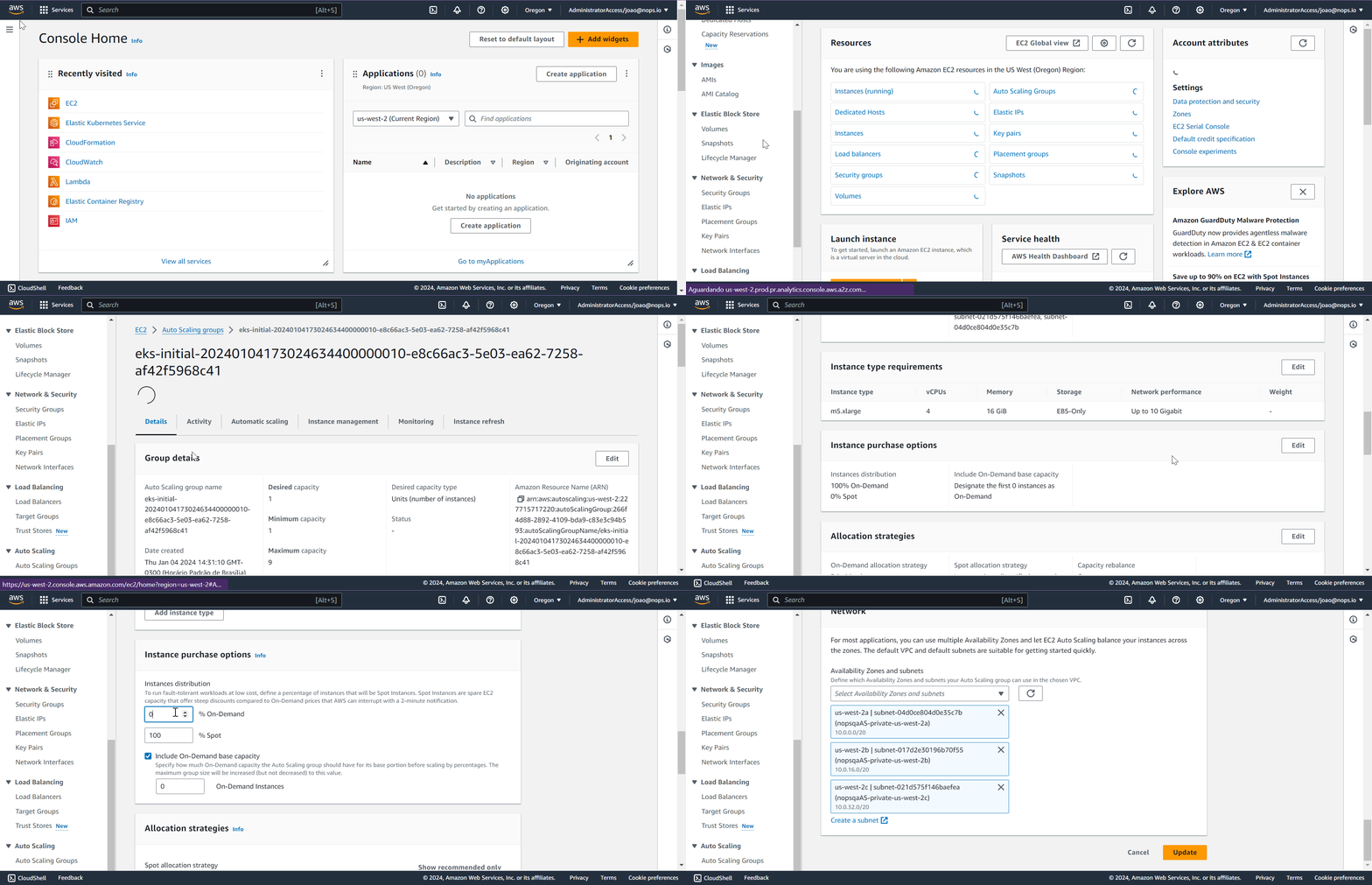
To accomplish this, you’ll need to update the Auto Scaling Group associated with your node group. In the AWS Console, navigate to EC2 Auto Scaling Groups, and specify the percentage of Spot and On-demand Instances in the Instance Purchase Options section.
When implementing the MixedInstancePolicy, ensure the selection of a diverse range of instance types that demonstrate uniformity in terms of CPU, memory, and GPU configurations.
When scaling the ASG, instances are added or removed based on demand. It can be problematic when instances have different capacities — leading to uneven distribution on workloads and overloading or underutilizing specific instances. This can impact the overall performance and responsiveness of the applications running on the EKS cluster, as well as lead to wasteful spending when the cluster could be using cheaper instances instead.
While uniformity in terms of CPU, memory, and GPU configurations is essential, embracing a diverse range of instance types is also crucial for cost savings, especially when incorporating Spot instances into the cluster. Selecting only one instance type, or a small number of instance types, might mean that you don’t have adequate options available in the Spot market to leverage for reliable cost savings.
In sum, you can combine Cluster Autoscaler and Pod Disruption Budgets to balance efficient resource utilization and high availability. The Autoscaler ensures that your cluster has the right amount of resources, and PDBs ensure that the removal of nodes doesn’t impact the availability of your applications.
A Pod Disruption Budget is especially beneficial when running workloads on Spot, because it can minimize the impact of Spot instance interruptions for the same reasons detailed above.
To configure a Pod Disruption Budget, you can use a YAML file to define the desired specifications. Below is an example YAML snippet illustrating a basic Pod Disruption Budget configuration:
apiVersion:policy/v1beta1
kind:PodDisruptionBudget
metadata:
name:example-pdb
spec:
minAvailable:2
selector:
matchLabels:
app:your-app-label
Basic Pod Disruption Budget Configuration
In this example, the minAvailable field sets the minimum number of pods that must remain available during disruptions. The selector field specifies the labels used to select the pods affected by the disruption budget. Replace “your-app-label” with the appropriate label for your pods. This YAML snippet provides a foundation for configuring a PDB tailored to your specific deployment needs. Other important configurations that you might need to use are:
spec:
maxDisruptions:1
spec:
disruptionsAllowed:0
Implementing efficient and cost-effective EKS clusters using Cluster Autoscaler involves navigating many complexities. For the biggest discounts, moving your usage onto cheaper Spot instances can help you save significantly. However, there are challenges involved in this approach:
That’s why nOps created Compute Copilot — simply integrate it with your Cluster Autoscaler and let nOps handle the rest.
Leveraging historical and current Spot data based on the $1 billion+ in cloud spend we manage, our solution employs a comprehensive scoring system for each instance. This scoring considers factors such as Spot lifetime in the region, Availability Zone, price, capacity, and more. In real-time, scores are assigned to every Spot market instance based on these factors.
Copilot’s AI uses this scoring to manage instances for the best price in real time. It continually analyzes market pricing and your existing commitments to ensure you are always on the best blend of Spot, Reserved, and On-Demand.
Here are the key benefits of delegating the hassle of cost optimization to nOps.
nOps was recently ranked #1 in G2’s cloud cost management category. Join our customers using nOps to slash your cloud costs by booking a demo today!
Moreover, when Compute Copilot Lambda needs to replace an On-Demand instance associated with an EKS Cluster, it communicates with the Compute Copilot Agent running in the cluster. This ensures a graceful removal of pods from the node before termination, preserving the integrity of your EKS environment. To achieve this, the process involves ‘cordon’ and ‘drain’ operations, where ‘cordon’ prevents new pods from being scheduled to the node, and ‘drain’ ensures the existing pods are gracefully evicted from the node prior to its termination.
For more information on optimizing your EKS costs with Copilot, please consult the documentation.
Last Updated: May 27, 2025, EKS Optimization
Last Updated: May 27, 2025, EKS Optimization
AI-powered rate optimization with risk-free guarantee