




Salesforce’s Summer ’26 release is now live, bringing a set of thoughtful updates that focus less on a flashy overhaul and more on improving the day-to-day experience of users.
While this release may feel lighter at first glance, the changes included are the kind that quickly add up in practice: clearer visibility into pipeline activity, more flexible reporting, smoother collaboration in list views, and tighter integration between Salesforce and Slack workflows. There’s also a noticeable push toward making AI more practical and embedded, especially in meeting capture, task surfacing, and productivity tools. In this article, I’ve picked out seven of the most useful features to share with your users right away.
1. See Engagement Levels at a Glance With Activity Heatmap
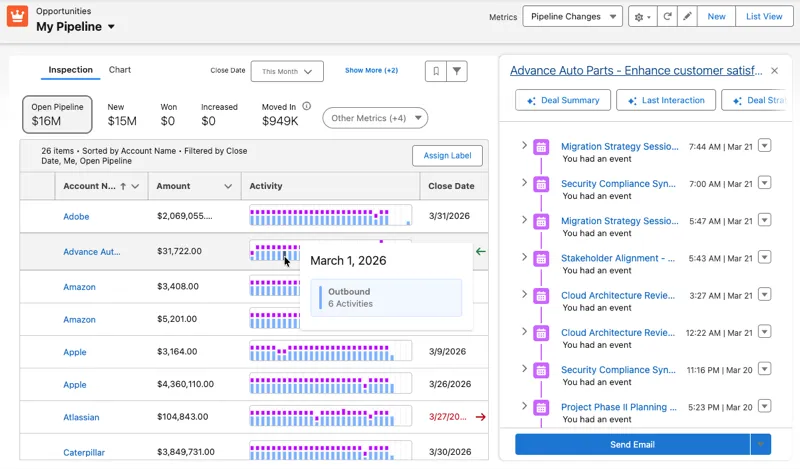
Pipeline Inspection just got a really helpful upgrade with a new Activity column powered by a heatmap view.
Instead of digging through endless rows of emails, calls, meetings, and events, sellers can now see engagement levels at a glance over a rolling 30-day window. It covers both inbound and outbound activity, including voice calls, video calls, events, and emails.
The result is instant clarity. You can quickly spot where relationships are warming up or cooling down without having to piece everything together manually.
A couple of things to note before enabling it:
- Users need Einstein Conversation Insights and Einstein Activity Capture.
- Data must be stored natively on the Salesforce Platform.
2. Expanded Reporting Capabilities With More Row-Level Formulas
If your users or power users spend a lot of time in reports, this is one of those updates that quietly makes their lives easier (and yours!).
You can now add up to two row-level formulas in a single Salesforce report. This means you can calculate values directly in the report without needing to create extra formula fields on the object.
For example, you could calculate both commission rate and time to close in the same report, side by side, without jumping through hoops or creating additional fields just to support reporting.
Previously, we only had one row-level formula to work with, which often meant compromises. Now, you’ve got a bit more flexibility to answer real business questions in one place.
3. Allow More Users to Collaborate on List Views
This is one of those updates that feels small at first glance but has a big impact on collaboration.
Now, in Setup, on the User Interface page, there is a new option that allows shared list views to be edited. This means users can edit shared list views if they also have the Create and Customize List Views permission.
There is also a new permission called Manage Shared List Views. This allows users to:
- Share personal list views
- Share with roles, groups, and territories they belong to
- Do all of this without needing full admin-level access
Previously, sharing list views required Manage Public List Views, which came with broader permissions than most users needed.
4. Manage Approvals in Slack
Approvals just got a lot more flexible thanks to deeper integration with Slack. You can now run approval workflows directly inside Slack, allowing users to:
- Approve or reject requests
- Add comments in real time
- Stay in the flow of work without switching tools
Submitters also get real-time notifications when requests are submitted and when decisions are made, which makes the whole process feel faster and more transparent.
On the Salesforce side, the Approval Trace component keeps everything visible on the record, including Slack activity, so you still have full auditability.
A few key requirements:
- Users need the Connect Salesforce with Slack permission.
- Both approvers and submitters need Read access to the Approval Submission object.
- Available in Lightning Experience for Enterprise, Performance, Unlimited, and Developer editions.
- Works with Advanced Approvals or Flow Approval Processes.
5. Apply Branding Across Reports and Dashboards With Brand Color Palettes
If you care about clean, consistent reporting, this one is a real treat. You can now apply your organization’s brand color palette directly to reports and dashboards. No more manually adjusting chart colors one by one.
As the admin, you’ll first need to set up your theme:
- Go to Setup
- Search for Themes and Branding
- Create or update a theme
- Define and activate your brand colors
Now that you’ve done that, you’re ready to show your users how to apply it to reports and dashboards:
- In reports, go to chart properties and select Brand
- In dashboards, choose Branding in the palette options
The impact is bigger than it sounds:
- Faster dashboard building
- More consistent reporting
- Better accessibility and readability
- A more polished overall experience
This is one of those updates that quietly improves everything it touches. And once your users see it, they will not want to go back.
6. Start Your Day the Right Way With Today in Slack
One of the most useful productivity updates in this release is a new experience in Slack called Today.
Today is a personalised, AI-powered landing page that gives users a clear view of their day as soon as they open Slack. It brings together upcoming meetings, key action items, and team highlights in one place so users can quickly understand what needs attention.
The experience is designed to be the starting point for the workday. Instead of jumping straight into channels and messages, users can begin in Today to get oriented on priorities.
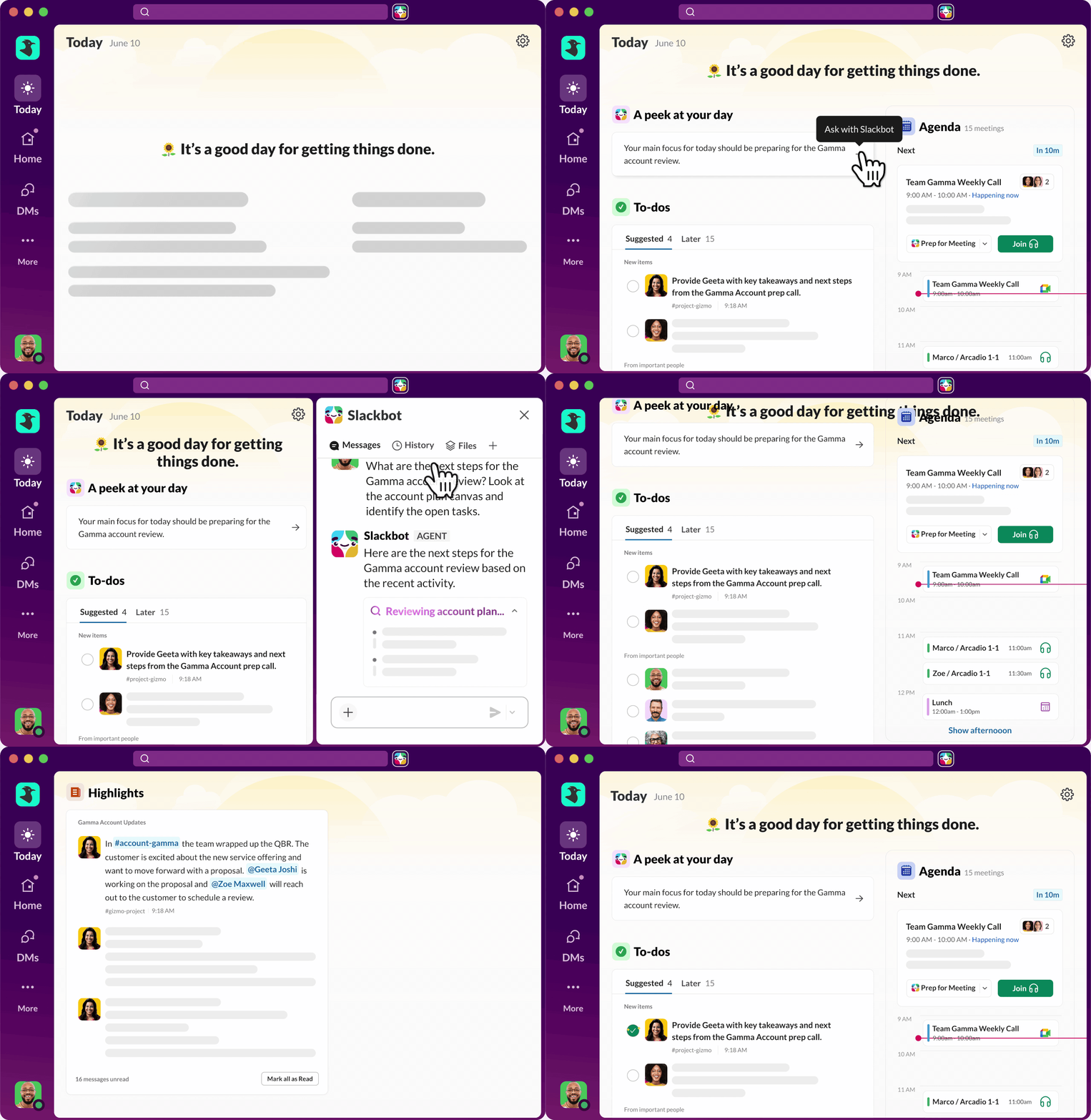
The to-dos section uses AI to surface messages that may need a response or were missed. Users can work through these items and mark them off as they go to stay organized.
In the Agenda section, users can select Prep for meeting to gather context and discussion points before joining a call. This helps improve meeting readiness without extra effort.
Users can also customise the experience by hiding sections that are not relevant to their role, keeping the view focused and useful.
The more users interact with Today, the more relevant it becomes, with feedback helping improve what is surfaced over time.
7. Turn Every In-Person Meeting Into Instant Insights With Mobile AI Transcription
This is a really strong productivity upgrade for field sellers and anyone spending time in face-to-face conversations.
In-person meetings no longer need manual note-taking. With the Salesforce mobile app, sales teams can now capture meetings directly on their device and have them processed automatically using Einstein Conversation Insights.
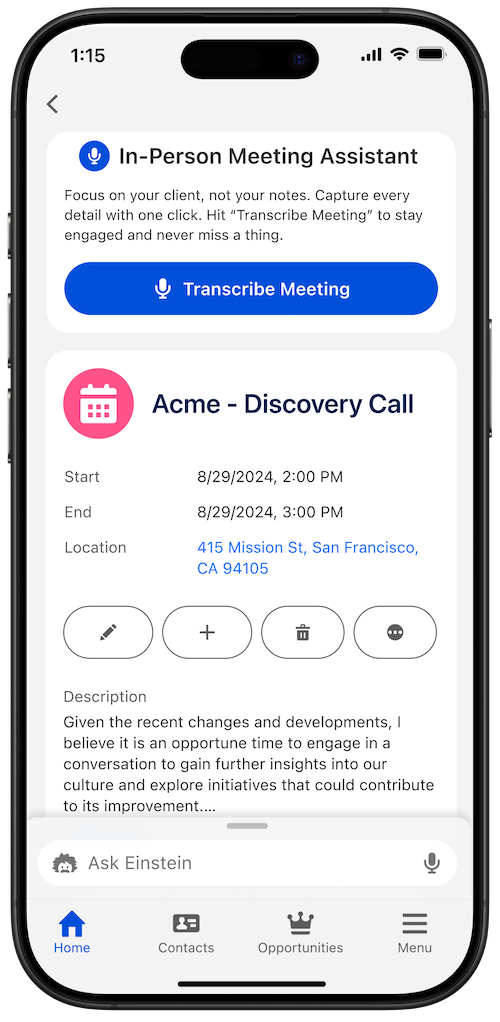
Instead of typing notes while trying to stay present in the conversation, users can focus fully on the customer. The meeting is securely recorded, transcribed, and then turned into structured insights, summaries, and action items.
This is powered by Einstein Conversation Insights (ECI), which means meetings are not just captured; they are analyzed in a meaningful way that can feed directly into follow-up activity and pipeline management.
To enable it, admins can go to Salesforce Go, search for Einstein Conversation Insights under Features, and switch on In-Person Meetings.
A few key points to keep in mind:
- Available in Starter, Pro, Enterprise, Performance, Unlimited, and Agentforce 1 Sales editions
- Requires access to Einstein Conversation Insights and the Salesforce mobile app
Final Thoughts
The Summer ‘26 release felt relatively “light” on user-facing enhancements, but those that were there are thoughtful improvements that make everyday Salesforce work smoother, more intuitive, and more connected.
If you still need to catch up on the latest release, then fear not! We’ve got everything you need right here:
- Salesforce Summer ‘26 Release: Everything You Need to Know Before Go‑Live
- Top 11 Salesforce Summer ‘26 Features for Admins
- Top 8 Salesforce Summer ’26 Features for Developers
- Sales Cloud: Top Salesforce Summer ‘26 Features
- Service Cloud: Top Salesforce Summer ’26 Features
- 10 New Salesforce Flow Features in Summer ‘26
- Top 9 Summer ‘26 Updates for Salesforce Marketers
The Author
Christine Marshall
Christine is a 12x certified Salesforce Hall of Fame MVP and leads the Bristol Admin User Group.

Leave a Reply Cancel reply