
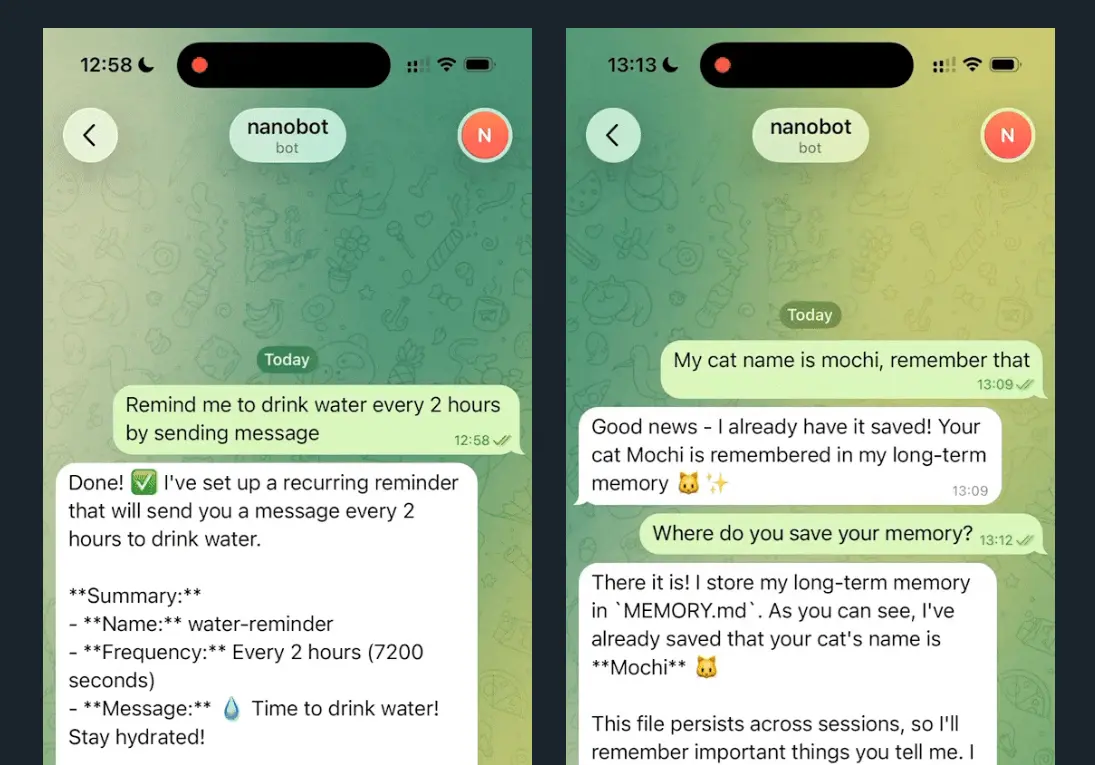
Nanobot is a free, open-source personal AI agent and CLI assistant from the Data Intelligence Lab at the University of Hong Kong. It gives you a small Python-based agent that can chat, run tasks, call tools, use scheduled jobs, connect to chat channels, and work with cloud or local LLM providers.
The project began as a lightweight alternative to OpenClaw and Clawdbot-style agent systems. Its main appeal is still the same: you get a readable codebase and a working agent without adopting a large multi-language framework.
Nanobot is now broader than a simple Telegram or WhatsApp helper. Recent releases added a packaged WebUI, long-running goal workflows, stronger session durability, CLI Apps, MCP-related extension workflows, more provider routes, image generation support, and additional channels such as Signal, Discord, Matrix, Teams, Weixin, and web-based access through WebSocket.
The useful part is control. You can run Nanobot from a terminal, expose it through chat apps, connect it to OpenRouter or another provider, point it at a local vLLM or OpenAI-compatible server, and keep the setup small enough to inspect.
Features
- Lightweight Python agent: Nanobot keeps the agent core small compared with larger OpenClaw-style systems, which makes the project easier to read, audit, and modify.
- CLI and WebUI access: You can use Nanobot from the terminal or run the packaged WebUI through the WebSocket channel and gateway.
- Multiple LLM providers: The assistant works with providers such as OpenRouter, Anthropic Claude, OpenAI, Groq, Google Gemini, AWS Bedrock Converse, NVIDIA NIM, LongCat, Atomic Chat, MiMo, and OpenAI-compatible local servers.
- Local model support: You can run Nanobot with vLLM, Ollama image generation routes, or other OpenAI-compatible inference servers when you want more control over model hosting.
- Chat platform integration: Nanobot supports channels such as Telegram, WhatsApp, WebSocket, Discord, Feishu, Slack, Teams, Matrix, Signal, Weixin, WeCom, QQ, DingTalk, and email across recent releases. Use allowlists and channel-specific settings before exposing a bot outside your own account.
- Task scheduling with cron: You can create recurring tasks with standard cron syntax or interval-based scheduling.
- Voice and media handling: Recent releases improved voice transcription, image uploads, video rendering, document extraction, and channel media behavior. Exact support depends on the channel and provider configuration.
- Goal and long-task workflows: The
/goalworkflow and long-task handling help the agent keep a sustained objective across turns, compaction, and longer tool chains. - Memory and session durability: Dream memory, AutoCompact, atomic session writes, replay-window controls, and archive fixes help Nanobot keep useful context without relying on a single long chat transcript.
- Skills, CLI Apps, and MCP workflows: Nanobot can use reusable skills, CLI-native apps, and MCP-related extension workflows so the agent can connect to local tools and external capabilities in a more structured way.
- Real-time web search: Optional web search providers such as Brave Search, Olostep, and Kagi can give the agent access to current information when configured.
See It In Action
Nanobot vs. OpenClaw
| Aspect | Nanobot | OpenClaw |
|---|---|---|
| Core type | Personal AI agent and CLI assistant | Larger agent automation framework |
| Language core | Python-centered | Multi-language architecture |
| System footprint | Small and easier to inspect | Larger and more complex |
| Installation | Install from source, uv, or pip | Usually more setup work |
| User interface | CLI, chat channels, WebSocket, packaged WebUI | Broader workspace and automation surface |
| Extension model | Skills, CLI Apps, MCP-related workflows, provider routes | Larger plugin and automation ecosystem |
| Best fit | Developers, researchers, and self-hosters who want a small agent they can inspect | Power users who want a broader automation system |
Nanobot works best when you want a personal agent that you can understand and adapt. OpenClaw aims at a larger automation surface. If you care most about a small codebase, local deployment, provider flexibility, and channel-based interaction, Nanobot is the more practical starting point.
- Resource efficiency: Nanobot can run on modest hardware, especially when you use a hosted LLM provider instead of local inference.
- Architectural transparency: The agent loop, providers, channels, memory, and tools are easier to inspect than a large monolithic system.
- Feature scope: Nanobot focuses on agent interaction, tool calling, provider routing, channels, WebUI access, memory, and scheduled work rather than a full desktop automation workspace.
- Deployment style: You can start with local CLI use, then add WebUI, chat channels, Docker, and provider-specific configuration as needed.
Use Cases
- Market research and analysis: Set up scheduled jobs to fetch information, analyze trends, and deliver daily reports through a channel such as Telegram or the WebUI.
- Software development assistant: Run Nanobot with your preferred model to inspect code, edit files, manage tasks, and connect to local CLI Apps or repository workflows.
- Daily routine automation: Create cron jobs for morning briefings, reminders, recurring checks, or end-of-day summaries.
- Personal knowledge assistant: Use memory and session history to preserve useful details across conversations, then ask the agent to continue work without repeating every instruction.
- Privacy-focused AI assistant: Run Nanobot with local models through vLLM or another OpenAI-compatible endpoint when you do not want every request to go to a hosted model provider.
- Team or channel-based agent: Connect Nanobot to approved chat channels with allowlists, access controls, and token-based WebSocket settings when you need a shared assistant.
How to Use Nanobot
Table Of Contents
Installation
You have three installation options. From source works best when you want the newest code or plan to modify the project:
git clone https://github.com/HKUDS/nanobot.git
cd nanobot
pip install -e .
The uv tool installer gives you a fast install path for command-line use:
uv tool install nanobot-aiPyPI gives you the standard Python package approach:
pip install nanobot-aiInitial Setup
Run the onboard command to initialize your configuration:
nanobot onboardThis creates ~/.nanobot/config.json. Open the file and add your provider keys. OpenRouter requires an API key from openrouter.ai/keys. Web search is optional, but you need a configured search provider before the agent can retrieve current web information.
{
 "providers": {
 "openrouter": {
 "apiKey": "sk-or-v1-xxx"
 }
 },
 "agents": {
 "defaults": {
 "model": "anthropic/claude-opus-4-5"
 }
 },
 "webSearch": {
 "apiKey": "BSA-xxx"
 }
}
Using Local Models
Start your local vLLM server:
vllm serve meta-llama/Llama-3.1-8B-Instruct --port 8000Update your config to point Nanobot at the local OpenAI-compatible endpoint:
{
 "providers": {
 "vllm": {
 "apiKey": "dummy",
 "apiBase": "http://localhost:8000/v1"
 }
 },
 "agents": {
 "defaults": {
 "model": "meta-llama/Llama-3.1-8B-Instruct"
 }
 }
}
Chat Interface
Send a single message from the terminal:
nanobot agent -m "What is 2+2?"Start an interactive CLI session:
nanobot agentWebUI Setup
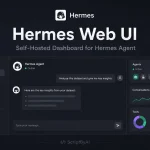
Nanobot now ships the WebUI inside the Python package. After you install nanobot-ai, enable the WebSocket channel in your config, run the gateway, and open the WebUI in your browser. The WebUI is the better choice when you want visible tool traces, markdown rendering, project workspaces, model controls, and a browser-based chat surface.
nanobot gatewayIf you expose the WebUI beyond your local machine, set access controls and token issuance carefully. Recent security changes require authentication for WebSocket token issuance and improve validation around fetches and media handling.
Model Presets and Runtime Switching
Recent versions added model preset support. You can define provider and model bundles, then switch between them at runtime through /model or the WebUI model badge. This is useful when you want one route for low-cost routine work, another route for stronger reasoning, and a local route for private tasks.
Fallback models also help long tasks survive provider failures. If the primary model fails, Nanobot can move to a secondary model listed in your configuration instead of ending the turn immediately.
Telegram Setup
Open Telegram and search for @BotFather. Send /newbot and follow the prompts. Copy the token you receive.
Add Telegram configuration:
{
 "channels": {
 "telegram": {
 "enabled": true,
 "token": "YOUR_BOT_TOKEN",
 "allowFrom": ["YOUR_USER_ID"]
 }
 }
}
Get your user ID from @userinfobot on Telegram. Start the gateway:
nanobot gatewayTelegram also gained webhook mode, inline keyboard support, quieter unauthorized-sender handling, media improvements, and better group or thread behavior across recent releases. Keep allowFrom narrow unless you intentionally want a shared bot.
WhatsApp Setup
WhatsApp requires Node.js 18 or higher. Link your device first:
nanobot channels loginScan the QR code in WhatsApp under Settings, then Linked Devices.
Configure WhatsApp in config.json:
{
 "channels": {
 "whatsapp": {
 "enabled": true,
 "allowFrom": ["+1234567890"]
 }
 }
}
Run two terminals simultaneously:
Terminal 1:
nanobot channels loginTerminal 2:
nanobot gatewayOther Channels
Nanobot has grown beyond Telegram and WhatsApp. Depending on the release and configuration, you can also connect through WebSocket, Discord, Feishu, Slack, Teams, Matrix, Signal, Weixin, WeCom, QQ, DingTalk, and email. Each channel has its own authentication, allowlist, media, threading, and deployment behavior, so read the channel configuration before exposing it to a group or public server.
Scheduled Tasks
Add a daily job at 9 AM:
nanobot cron add --name "daily" --message "Good morning!" --cron "0 9 * * *"Add an interval-based job that runs every hour:
nanobot cron add --name "hourly" --message "Check status" --every 3600List all jobs:
nanobot cron listRemove a specific job:
nanobot cron remove <job_id>Cron storage has received several reliability fixes, including atomic writes, corrupt-store handling, duplicate-job fixes, and workspace-scoped behavior. That matters if you use Nanobot for recurring reports or background checks.
Docker Deployment
Build the container:
docker build -t nanobot .Initialize configuration:
docker run -v ~/.nanobot:/root/.nanobot --rm nanobot onboardEdit the config file on your host machine:
vim ~/.nanobot/config.jsonRun the gateway:
docker run -v ~/.nanobot:/root/.nanobot -p 18790:18790 nanobot gatewayThe -v ~/.nanobot:/root/.nanobot flag mounts your local config directory into the container for persistence. Recent Docker and WebUI deployment fixes make this route more practical for always-on use.
Nanobot CLI Commands
| Command | Purpose |
|---|---|
nanobot onboard | Initialize config and workspace |
nanobot agent -m "message" | Send one message to the agent |
nanobot agent | Start interactive CLI chat mode |
nanobot gateway | Launch the gateway for channels and WebUI access |
nanobot status | Display runtime and system status |
nanobot channels login | Link a channel that needs device or QR login, such as WhatsApp |
nanobot channels status | Show channel connection status |
nanobot cron add | Create a scheduled task |
nanobot cron list | Display scheduled tasks |
nanobot cron remove <id> | Delete a scheduled task |
/goal | Mark a thread as a sustained objective in supported chat surfaces |
/model | Switch configured model presets in supported chat surfaces |
/history | Review recent messages in supported chat surfaces |
Pros
- Open-source and self-hostable: You can inspect the code, run it locally, and choose your own provider route.
- Good fit for local or private workflows: Local model support through vLLM or OpenAI-compatible servers can reduce reliance on hosted model providers.
- Flexible access surfaces: You can use the CLI, WebUI, WebSocket, or chat channels depending on the workflow.
- Useful for long tasks: Goal mode, memory, AutoCompact, session locks, and archive fixes make Nanobot better suited to multi-turn work than early versions.
- Research and developer friendly: The module boundaries around agents, providers, channels, skills, memory, and tools make the project easier to adapt.
Cons
- Technical setup is still required: You need to edit JSON config, manage API keys, understand providers, and run gateway or channel processes.
- Channel behavior varies: Telegram, WhatsApp, Discord, Matrix, Teams, and other channels do not expose the same features or media behavior.
- Security depends on configuration: You should use allowlists, token controls, local binding, container isolation, and provider key hygiene before deploying Nanobot beyond your own machine.
- Provider quality can vary: Different model providers handle tool calls, reasoning controls, streaming, image inputs, and OpenAI-compatible fields differently.
Related Resources
- Nanobot GitHub Repository: Official source code, issues, documentation links, and release activity.
- OpenRouter: Unified API access to multiple hosted LLM providers, including Claude, GPT, Gemini, and other models.
- vLLM Documentation: Learn how to run a local OpenAI-compatible inference server for self-hosted model use.
- Brave Search API: One option for adding current web search to a Nanobot instance.
- Telegram Bot Tutorial: Official guide for creating and managing Telegram bots.
- OpenClaw Alternatives: More open projects about lightweight alternatives to OpenClaw-style agent systems.
- Automate Anything: 10 Best & Open-source AI Agents.
More OpenClaw Alternatives
- NanoClaw: Lightweight, secure OpenClaw alternative.
- CoPaw: Personal AI Agent You Can Host, Extend, and Actually Control.
FAQs
Q: Is Nanobot free?
A: Nanobot is an open-source project that you can install from source or through the Python package. Hosted LLM providers, search APIs, cloud servers, and SMS or chat infrastructure may still cost money depending on your setup.
Q: Can I run Nanobot completely offline?
A: You can run the agent locally with a local model server such as vLLM, but web search and hosted-provider models require network access. Channel integrations such as Telegram, WhatsApp, Discord, or Teams also require their respective networks.
Q: Does Nanobot have a WebUI?
A: Yes. Recent releases package the WebUI with the Python wheel. Enable the WebSocket channel, run nanobot gateway, and open the browser interface. The WebUI now supports a more complete chat workspace with model controls, project workspaces, tool traces, source links, and better markdown rendering.
Q: How does Nanobot compare to OpenClaw in performance?
A: Nanobot is smaller and easier to inspect, so it is usually easier to start, modify, and deploy on modest hardware. OpenClaw targets a larger automation surface. Choose Nanobot when you want a compact personal agent and choose OpenClaw-style systems when you need a broader automation platform.
Q: What happens if my API key runs out of credits?
A: Requests to that provider will fail when credits expire or quota limits are reached. Add credits, switch to another configured provider, use a fallback model, or route the agent to a local OpenAI-compatible server.
Q: Can I use multiple LLM providers?
A: Yes. Nanobot supports multiple provider routes and recent versions added model presets and fallback models. You still need to configure each provider correctly and choose the active model route for a session or workflow.
Q: What security measures should I take when deploying Nanobot?
A: Use allowlists for channel access, keep API keys out of public files, set strict file permissions on config files, use token controls for WebSocket access, bind services locally when possible, and prefer containers or limited system accounts for always-on deployment.
Changelog
06/01/2026
- Update




Leave a ReplyCancel Reply