
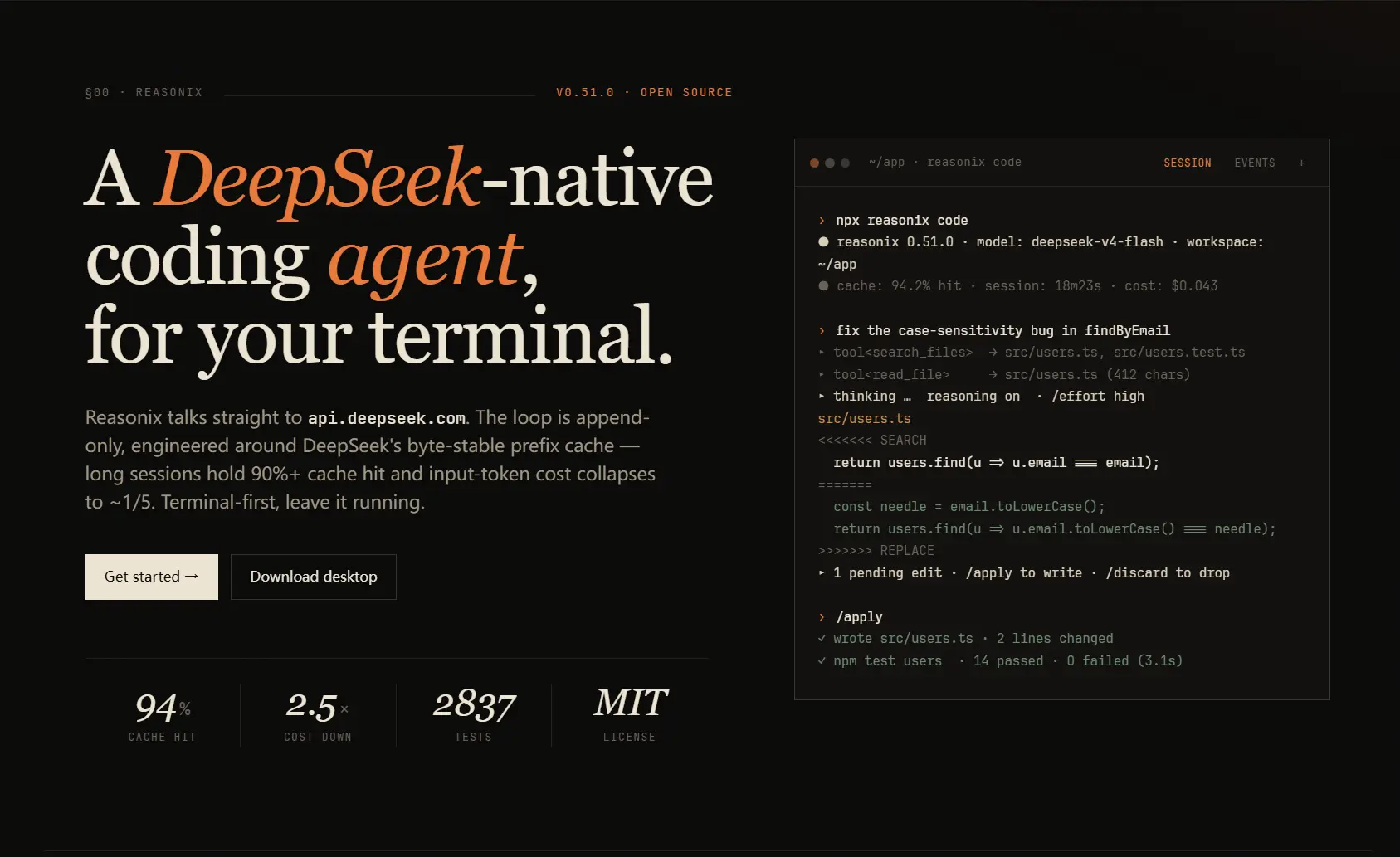
Reasonix is a free, open-source AI coding agent for developers who want to use DeepSeek inside a terminal-first workflow. It can edit code, run shell-assisted tasks, connect MCP servers, use project memory, load skills, and keep long coding sessions in a terminal or desktop app.
Reasonix becomes more useful as a coding session gets longer. Its session design keeps DeepSeek’s byte-stable prefix cache central, so repeated work inside the same codebase can reuse more context and reduce the cost of later turns.
A real-world case study shows why that design matters. Reasonix processed 435 million input tokens in a single day at a 99.82% cache hit rate. The reported cost was roughly $12, compared to an estimated $61 for the same workload before cache optimization.
Features
- Runs as a terminal AI coding agent, with a Wails desktop client for users who prefer a GUI.
- Ships as a static Go binary for macOS, Linux, and Windows on amd64 and arm64.
- Uses DeepSeek Flash and Pro presets, with MiMo presets and configurable OpenAI-compatible providers available in the Go line.
- Runs built-in tools for reading, writing, editing, multi-editing, listing files, searching files, running shell commands, fetching web pages, managing todos, and launching subagents.
- Gates write operations and shell commands through allow, ask, and deny rules.
- Confines file-writing tools to the configured workspace sandbox by default.
- Connects MCP servers through stdio and Streamable HTTP, with
.mcp.jsonsupport for Claude-style MCP configuration. - Loads Markdown skills as inline prompts or isolated subagent skills.
- Uses
REASONIX.mdhierarchy and auto-memory for project instructions. - Supports hooks, plan mode, custom slash commands,
@filereferences, MCP resources, session persistence, and low-frequency context compaction. - Uses CodeGraph for symbol and call-graph indexing instead of an embedding-only semantic index.
Reasonix vs Claude Code
Reasonix and Claude Code can both inspect code, propose edits, run commands, and work through multi-step development tasks. The choice comes down to backend preference, product maturity, extension model, and how much you care about DeepSeek cache behavior.
Choose Claude Code when you want the official Anthropic product, broader IDE and cloud surfaces, and Claude model quality as the main priority.
Choose Reasonix when you want an open-source, terminal-first coding agent built around DeepSeek cost control, MCP, skills, hooks, local configuration, and long-running project sessions.
| Reasonix 1.0 | Claude Code | |
|---|---|---|
| Primary backend | DeepSeek-first, with configurable OpenAI-compatible providers in the Go line. | Claude models through Anthropic or supported access paths. |
| License | MIT open source. | Proprietary product. |
| Runtime shape | Static Go binary distributed through npm, Homebrew, source builds, and release archives. | Official Anthropic product with its own install and platform flows. |
| Cost model | You bring API keys. DeepSeek prefix-cache behavior can reduce long-session cost when cache hit rates stay high. | Cost depends on Claude subscription, Anthropic API access, or supported provider access. |
| Best fit | You want a DeepSeek-native terminal agent with open-source control. | You want the most mature Claude coding experience across more official surfaces. |
| Primary interface | Terminal CLI, headless run mode, and desktop client. | Terminal, web, desktop, IDE, Slack, and related official surfaces. |
| File editing | Uses built-in file tools with permission and sandbox controls. | Edits files with Anthropic’s permission and review workflows. |
| Shell commands | Uses permission rules and workspace sandboxing. | Uses command permissions and safety controls. |
| MCP support | Supports MCP through stdio and Streamable HTTP, with .mcp.json compatibility. | Supports MCP and Anthropic’s official MCP workflows. |
| Skills | Supports Markdown skills, inline execution, and subagent mode. | Supports skills, custom commands, bundled skills, and official extension patterns. |
| Memory | Uses REASONIX.md hierarchy plus auto-memory. | Uses Claude memory files and Anthropic-supported project memory patterns. |
| Code intelligence | Uses CodeGraph for tree-sitter symbol and call graph analysis. | Uses Claude Code’s own project understanding and context tools. |
| Main limitation | You still need paid model API access, and the product is less mature than Claude Code. | You stay inside a proprietary Claude-centered ecosystem. |
Reasonix is not a full Claude Code replacement for every team. Use it when DeepSeek-native economics, open-source control, and terminal operation matter more than official Anthropic product coverage.
Use Reasonix when these points match your work:
- You already use the DeepSeek API for coding tasks.
- You prefer terminal sessions over IDE-first assistants.
- You want an open-source agent harness that you can inspect and build from source.
- You care about MCP, hooks, skills, project memory, and custom slash commands.
- You want CodeGraph-style code intelligence without paying for embedding calls.
- You work on long coding sessions where prefix-cache stability can change the cost profile.
Use Claude Code when these points matter more:
- You want Claude models as the default coding backend.
- You need stronger official IDE or cloud-product coverage.
- You prefer a more mature commercial product with broader documentation and support.
- Your tasks depend more on Claude’s reasoning quality than DeepSeek API cost.
How to Use Reasonix
Install Reasonix globally when you want the reasonix command on your PATH.
npm i -g reasonixYou can also install the Go-line binary on macOS through Homebrew.
brew install esengine/reasonix/reasonixRun the first setup flow before serious use. The 1.0 Go line reads configuration from reasonix.toml, ~/.config/reasonix/config.toml, and built-in defaults, with command-line flags taking the highest priority.
reasonix setupSet a DeepSeek API key through the environment or a local .env file when you use the Go-line TOML configuration.
export DEEPSEEK_API_KEY=sk-...Start a chat session when you want a lighter model session without treating the current directory as an editable coding workspace.
reasonix chatRun a one-shot task from the terminal when you want output to stream and then exit.
reasonix run "implement the TODOs in main.go"Use npx when you want to try Reasonix without a global install. For this path, install Node.js 20.10+ and run the command from inside your project directory.
cd /path/to/my-project
npx reasonix code
Build from source if you want the repository version instead of a packaged binary.
git clone https://github.com/esengine/DeepSeek-Reasonix
cd DeepSeek-Reasonix
make build
Free Access and Limits
Reasonix is free to install and MIT licensed. It is not free to run unless the model endpoint you configure is free. For the default DeepSeek path, you need a DeepSeek API key, and token usage is billed by DeepSeek according to its current pricing.
You can define OpenAI-compatible providers in configuration, including the project’s DeepSeek and MiMo presets. That does not make Reasonix an air-gapped local coding agent. Choose SmallCode, Pi Coding Agent, Aider with Ollama, or another local-model workflow when offline use or zero model cost matters more than DeepSeek-native cache behavior.
Quick Reference
Table Of Contents
Installation Commands
| Command | Purpose |
|---|---|
npm i -g reasonix | Install Reasonix globally through npm. |
brew install esengine/reasonix/reasonix | Install Reasonix on macOS through Homebrew. |
npx reasonix code | Try Reasonix in a project without a global install. |
reasonix setup | Run the setup wizard. |
make build | Build the binary from source. |
make cross | Create cross-platform builds for release packaging. |
Main CLI Commands
| Command | Purpose |
|---|---|
reasonix chat | Start the interactive chat TUI. |
reasonix run "task" | Run one task from the shell and exit. |
reasonix run --model mimo-pro "task" | Run a task with a configured model reference. |
reasonix setup | Create or update local configuration. |
reasonix mcp | Inspect connected MCP servers from the interactive session. |
reasonix codegraph install | Install CodeGraph ahead of first use when you do not want it fetched on demand. |
Slash Commands Mentioned
| Command | Purpose |
|---|---|
/init | Generate project memory such as AGENTS.md or Reasonix project instructions. |
/compact | Compact older session context. |
/new | Start a fresh conversation branch. |
/tree | Show saved conversation branches. |
/branch | Fork the current or earlier conversation point. |
/switch | Load another branch. |
/todo | Work with task tracking inside a session. |
/model | Switch model references when configured. |
/effort | Adjust reasoning effort. |
/mcp | List connected MCP servers and their exposed tools, prompts, or resources. |
/memory | List, show, forget, or clear memory entries. |
/skill | List, show, create, or run skills. |
/help | Show the in-session command reference. |
Configuration Files and Paths
| Path or File | Purpose |
|---|---|
./reasonix.toml | Project configuration for the Go line. |
~/.config/reasonix/config.toml | User configuration for the Go line. |
.env | Optional local environment variables such as model API keys. |
.mcp.json | Claude-style MCP server configuration that Reasonix 1.0 can read. |
REASONIX.md | Project memory and repository instructions. |
.reasonix/commands/ | Project custom slash commands. |
~/.config/reasonix/commands/ | User custom slash commands. |
.reasonix/skills/ | Project skills. |
~/.reasonix/skills/ | Global skills path used by the older line and still useful for Claude-format compatibility in some flows. |
.claude/skills/ | Claude-format project skills that Reasonix can load alongside native skills. |
Top-Level Config Concepts
| Config Area | Use |
|---|---|
default_model | Selects the executor model reference. |
[agent] | Controls planner model, subagent model, and auto-plan behavior. |
[[providers]] | Defines model providers such as DeepSeek, MiMo, or another OpenAI-compatible endpoint. |
[tools] | Controls enabled built-in tools. |
[skills] | Adds custom skill roots or disables specific skills. |
[permissions] | Sets allow, ask, and deny rules for tool calls. |
[sandbox] | Defines the workspace write boundary for file tools. |
[[plugins]] | Connects MCP-compatible external tools. |
MCP Plugin Formats
| Format | Use |
|---|---|
type = "stdio" | Launch a local subprocess as an MCP server. |
type = "http" | Connect to a remote Streamable HTTP MCP server. |
command, args, env | Declare local stdio server execution. |
url, headers | Declare a remote HTTP server and optional request headers. |
${VAR} | Pull secrets from the environment rather than hard-coding them in config. |
.mcp.json | Reuse existing Claude-style MCP server declarations. |
Skill Frontmatter
| Key | Purpose |
|---|---|
name | Skill name. |
description | Short description shown in skill lists. |
runAs | Runs as inline or subagent. |
allowed-tools | Restricts tools available to a subagent skill. |
model | Optional model override for a subagent skill. |
max-iters | Tool-call budget for a subagent skill. |
Pros
- MIT open-source license.
- DeepSeek-native cache design for long sessions.
- Static Go binary in the 1.0 line.
- Terminal-first workflow with a desktop option.
- MCP, skills, hooks, memory, custom commands, and subagents.
- CodeGraph avoids embedding API cost for code intelligence.
- Supports GBK and GB18030 file handling in the 1.0 release.
Cons
- Paid model API access is still required for the default DeepSeek path.
- Older Reasonix setup instructions may not match the current configuration paths.
- The desktop app is less mature than the CLI.
- It is not an IDE replacement.
- It is not an offline local-model agent by default.
Alternatives and Related Resources
- 7 Best CLI AI Coding Agents in: Compare Reasonix with other popular AI coding agents.
- Free AI Coding Agents: Browse more free and open-source AI coding agents.
- DeepSeek TUI: Try another DeepSeek-focused AI coding agent.
- Claude Code Resource List: Explore Claude Code tools, skills, SDKs, and related projects.
- MCP Servers: Find MCP servers for agent workflows.
- Reasonix GitHub Repository: Open the code, issues, releases, and project files.
- Reasonix Official Website: Open the official project site and documentation links.
- DeepSeek Reasonix Integration: Review DeepSeek’s official setup page for the
npx reasonix codepath.
FAQs
Q: Is Reasonix free?
A: Reasonix is free to install and MIT licensed. You still pay for model API usage unless your configured provider gives you free quota. The default DeepSeek path requires a DeepSeek API key.
Q: Why do older Reasonix setup instructions look different?
A: Reasonix 1.0 changed several setup details. Current instructions should use the native binary package, TOML configuration, CodeGraph, MCP configuration through [[plugins]] or .mcp.json, and the current file paths listed above.
Q: Do you need Node.js to run Reasonix?
A: The 1.0 binary itself is a Go executable, but npm and npx remain common install and trial paths. If you use npx reasonix code, follow the Node.js requirement listed by DeepSeek’s integration page.
Q: What operating systems does Reasonix support?
A: Reasonix distributes builds for macOS, Linux, and Windows across amd64 and arm64 release targets. On Windows, install Git for Windows if you follow the DeepSeek npx setup flow.
Q: Can Reasonix connect to MCP servers?
A: Yes. Reasonix 1.0 works as an MCP client through stdio and Streamable HTTP. It can also read a Claude-style .mcp.json file from the project root.
Q: Is Reasonix a local model coding agent?
A: No. Reasonix is an agent harness that talks to configured model providers. It is built around DeepSeek by default, and the Go line can define OpenAI-compatible providers. Use a local-model tool if offline inference is required.
Changelog
June 3, 2026
- Updated installation notes for the current npm, Homebrew, npx, and source build paths.
- Replaced outdated configuration details with the current
reasonix.toml,~/.config/reasonix/config.toml, environment key, and.mcp.jsonreferences. - Updated code intelligence details to reflect CodeGraph instead of embedding-based semantic search.
- Updated MCP details for stdio and Streamable HTTP connections.




Leave a ReplyCancel Reply