

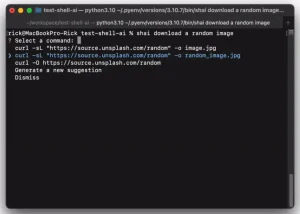
Englishell is a tiny and open-source shell script that enables you to execute shell commands in natural language.
It uses ChatGPT (requires OpenAI API KEY) to analyze plain English instructions and suggest the appropriate shell commands to accomplish the task described.
This enables users to perform common operations like launching processes, manipulating files, and administering systems without having to memorize arcane syntax.
For instance, if you type:
$ englishell kill the process that listens to port 8080
It smartly translates your request to:
lsof -i :8080 | awk '{print $2}' | tail -n 1 | xargs kill -9How to use it:
1. To get started with Englishell, install it with NPM:
$ npm i -g englishell
2. Insert your OpenAI API key into the .env file.
OPENAI_API_KEY=<your OPENAI_API_KEY goes here>
3. Now you can use it using the global shell command Englishell:
$ englishell 'your prompt'
Tags



Leave a ReplyCancel Reply