VOOZH about

URL: https://www.tecmint.com/find-processes-by-memory-usage-top-batch-mode/

⇱ Find Top 15 Processes by Memory Usage with 'top' in Batch Mode


Skip to content

Similarly to the previous tip about find out top processes by RAM and CPU usage, you can also use top command to view the same information. Perhaps there’s an extra advantage of this approach when compared to the previous one: the “header” of top provides extra information about the current status and usage of the system: the uptime, load average, and total number of processes, to name a few examples.
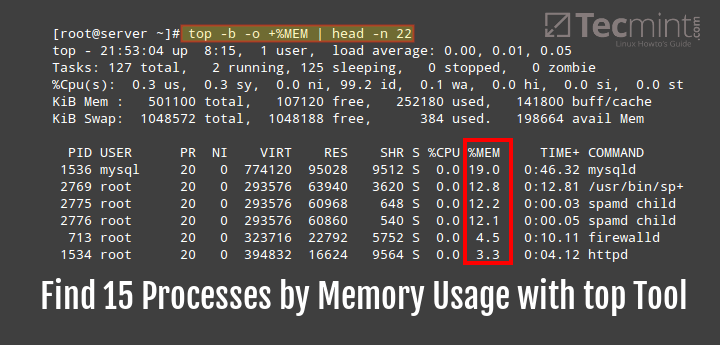
👁 Find Processes By Memory Usage with top
Find Processes By Memory Usage with top

To display the top 15 processes sorted by memory use in descending order, do:

# top -b -o +%MEM | head -n 22

As opposed to the previous tip, here you have to use +%MEM (note the plus sign) to sort the output in descending order:
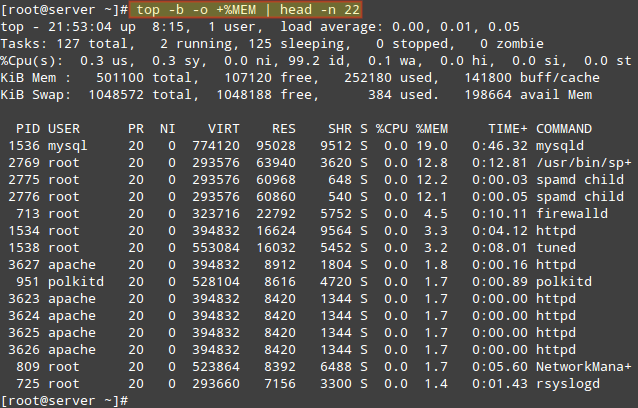
👁 List Top 15 Processes By Memory Usage
List Top 15 Processes By Memory Usage

From the command above, the option:

  1. -b : runs top in batch mode
  2. -o : used to specify fields for sorting processes
  3. head utility displays the first few lines of a file and
  4. the -n option is used to specify the number of lines to be displayed.

Note that head utility, by default displays the first ten lines of a file, that is when you do not specify the number of lines to be displayed. Therefore, in the example above, we displayed the first 22 lines of top command output in batch mode.

Redirect or Save ‘top’ Output to File in Linux

Additionally, using top in batch mode allows you to redirect the output to a file for later inspection:

# top -b -o +%MEM | head -n 22 > topreport.txt

As we have seen, the top utility offers us more dynamic information while listing processes on a Linux system, therefore, this approach has an extra advantage compared to using ps utility which we covered in tip one.

But most importantly, you must always run top in batch mode to redirect its output to a file or another process. Additionally, if you have any tips regarding use of top, you can also share them with us via the feedback form below.

If this article helped, share it with someone on your team.
TecMint Weekly Newsletter
Get the Learn Linux 7 Days Crash Course free when you join 34,000+ Linux professionals reading every Thursday.
Check your email for a magic link to get started.
Something went wrong. Please try again.
TecMint has been free for 14 years. Help keep it that way.
Google AI Overviews and tools like ChatGPT have cut into search traffic for independent tech sites like TecMint. Running this site costs over $2,000 every month for hosting, infrastructure, and paying authors to keep the content accurate and tested.

If this article helped you solve a problem, consider buying a coffee. It helps keep TecMint free, supports the authors, and keeps the project going.
☕ Buy Me a Coffee
Gabriel Cánepa
Gabriel Cánepa is a GNU/Linux sysadmin and web developer from Villa Mercedes, San Luis, Argentina. He works for a worldwide leading consumer product company and takes great pleasure in using FOSS tools to increase productivity in all areas of his daily work.

Each tutorial at TecMint is created by a team of experienced Linux system administrators so that it meets our high-quality standards.

8 Comments

Leave a Reply
  1. Linux system in so far good system for user interaction between good work and development of the same things as spacial awareness.

    Reply
  2. The following command not working.

    [root@models ~]# top -b -o +%MEM | head -n 22
     top: unknown argument 'o'
    usage: top -hv | -abcHimMsS -d delay -n iterations [-u user | -U user] -p pid [,pid ...]
    
    [root@models ~]# top -v
     top: procps version 3.2.8
    usage: top -hv | -abcHimMsS -d delay -n iterations [-u user | -U user] -p pid [,pid ...]
    

    [root@models ~]# uname -r
    2.6.32-504.3.3.el6.x86_64
    [root@models ~]# uname -mrs
    Linux 2.6.32-504.3.3.el6.x86_64 x86_64
    [root@models ~]# cat /etc/redhat-release
    CentOS release 6.6 (Final)

    Reply
  3. top v3.3.10 works fine.
    btw: chrome, xorg, chrome, chrome, meld, chrome, chrome, chrome, java, chrome, chrome, chrome, chrome, chrome, chrome
    it seems I have too much chrome tabs (74 btw)

    Reply
  4. hi, thank you for your good post. when i run bellow command

    # "top -b -o +%MEM | head -n 22" 
    

    I get bellow error :

    [root@mohammad~]# top -b -o +%MEM | head -n 22
     top: unknown argument 'o'
    usage: top -hv | -abcHimMsS -d delay -n iterations [-u user | -U user] -p pid [,pid ...]
    
    Reply
    • @Mohammad,
      1) What distribution and version are you using?
      2) What does top -v return?

      Reply
      • i have centos 6.7 final.
        top version is 3.2.8

        Reply
      • I have the exact same problem, My distro is Centos 5.8

        Reply
        • @Leonardo,

          I run the same command on my Centos 6.3 and it worked perfectly, here are the result of command.

          top - 10:31:45 up 7:41, 6 users, load average: 0.03, 0.11, 0.37
          Tasks: 242 total, 4 running, 238 sleeping, 0 stopped, 0 zombie
          %Cpu(s): 2.1 us, 0.7 sy, 0.0 ni, 93.5 id, 3.3 wa, 0.0 hi, 0.3 si, 0.0 st
          KiB Mem : 2400608 total, 76864 free, 1887976 used, 435768 buff/cache
          KiB Swap: 2097148 total, 1631500 free, 465648 used. 305364 avail Mem 
          
           PID USER PR NI VIRT RES SHR S %CPU %MEM TIME+ COMMAND
           2600 root 20 0 4426780 753484 4872 S 0.0 31.4 10:56.10 java
          30694 tecmint 20 0 1556112 290780 17792 S 0.0 12.1 1:04.00 gnome-shell
           9435 tecmint 20 0 915932 96032 53688 R 0.0 4.0 0:09.01 chrome
           891 gdm 20 0 1392976 81972 9016 S 6.2 3.4 6:49.64 gnome-shell
           9680 tecmint 20 0 846812 45624 24120 S 0.0 1.9 0:00.26 chrome
          27554 apache 20 0 598760 41080 720 S 0.0 1.7 0:01.49 httpd
          14467 apache 20 0 684580 39840 860 S 0.0 1.7 0:02.38 httpd
          30958 tecmint 20 0 1101144 38096 1000 S 0.0 1.6 0:00.36 evolution-calen
           2267 mysql 20 0 1038432 37196 288 S 0.0 1.5 0:15.07 mysqld
          14468 apache 20 0 681692 36264 796 S 0.0 1.5 0:01.03 httpd
          27468 apache 20 0 685060 34836 508 S 0.0 1.5 0:02.60 httpd
          27498 apache 20 0 594544 34584 548 S 0.0 1.4 0:00.60 httpd
          27494 apache 20 0 667764 34488 540 S 0.0 1.4 0:00.57 httpd
           9446 tecmint 20 0 486468 30632 21588 S 0.0 1.3 0:00.18 chrome
          27493 apache 20 0 590188 29604 748 S 0.0 1.2 0:00.46 httpd
          
          Reply

Got Something to Say? Join the Discussion... Cancel reply

Free Course
Get a free Linux course before you go.
Subscribe to TecMint Weekly and get the Learn Linux 7 Days Crash Course free. Read by 34,000+ Linux professionals every Thursday.
Check your email for a magic link to get started.