VOOZH about

URL: https://www.tecmint.com/setup-mysql-replication-rhel-rocky-almalinux/

⇱ How to Setup MySQL Replication in RHEL, Rocky and AlmaLinux


Skip to content

Data replication is the process of copying your data across multiple servers to improve data availability and enhance the reliability and performance of an application. In MySQL replication, data is copied from a database from the master server to other nodes in real-time to ensure consistency of data and also to provide backup and redundancy.

In this guide, we demonstrate how you can set up MySQL (Master-Slave) replication in RHEL-based distributions such as CentOS, Fedora, Rocky Linux, and AlmaLinux.

MySQL Replication Setup

So, here is our MySQL replication lab setup.

MySQL Master - 10.128.0.14
MySQL Slave - 10.128.15.211

Let’s get started…

Step 1: Install MySQL on Master and Slave Server

We will start off by installing the MySQL database on both the master and slave servers.

$ sudo dnf install @mysql
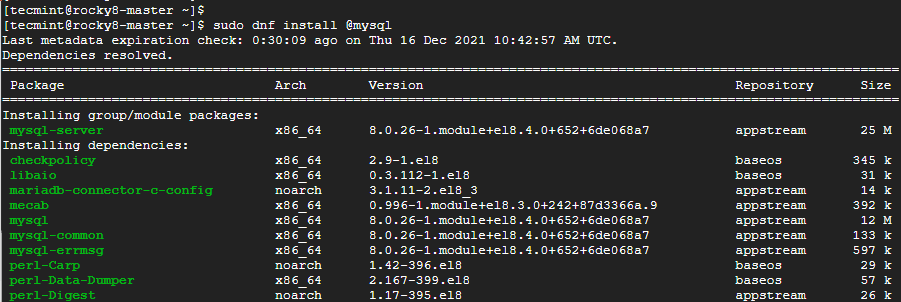
👁 Install MySQL in Rocky Linux
Install MySQL in Rocky Linux

Once the installation is complete, make a point to start the database server.

$ sudo systemctl start mysqld

Then enable it to start to system startup or upon reboot.

$ sudo systemctl enable mysqld

Thereafter, confirm that the MySQL database server is running as shown:

$ sudo systemctl status mysqld
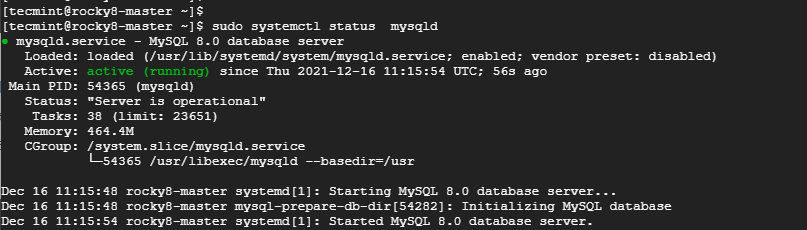
👁 Check MySQL Running Status
Check MySQL Running Status

Step 2: Secure MySQL on Master and Slave Server

The next step is to secure the MySQL database on both the master and slave servers. This is because the default settings are insecure and present some loopholes which can easily be exploited by hackers.

So, to harden MySQL, run the command:

$ sudo mysql_secure_installation

First, you will be required to set the MySQL root password. Be sure to provide a strong root password, preferably with more than 8 characters which are a mix of uppercase, lowercase, special and numeric characters.
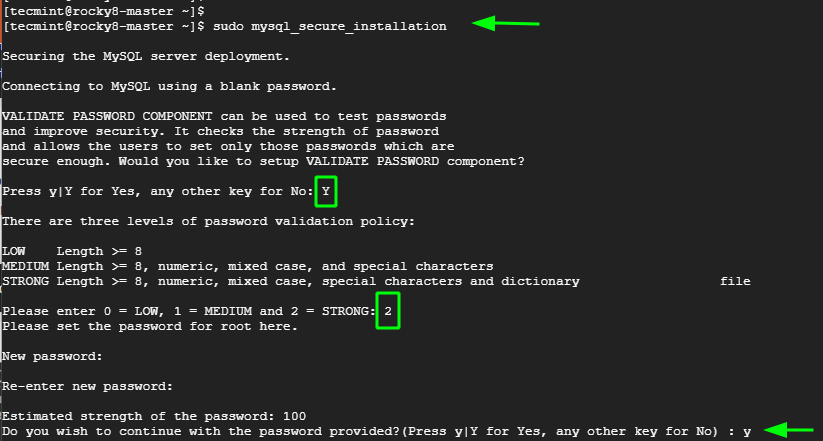
👁 Secure MySQL in Rocky Linux
Secure MySQL in Rocky Linux

For the remaining prompts, type in 'Y' to tweak the database server to the recommended settings.
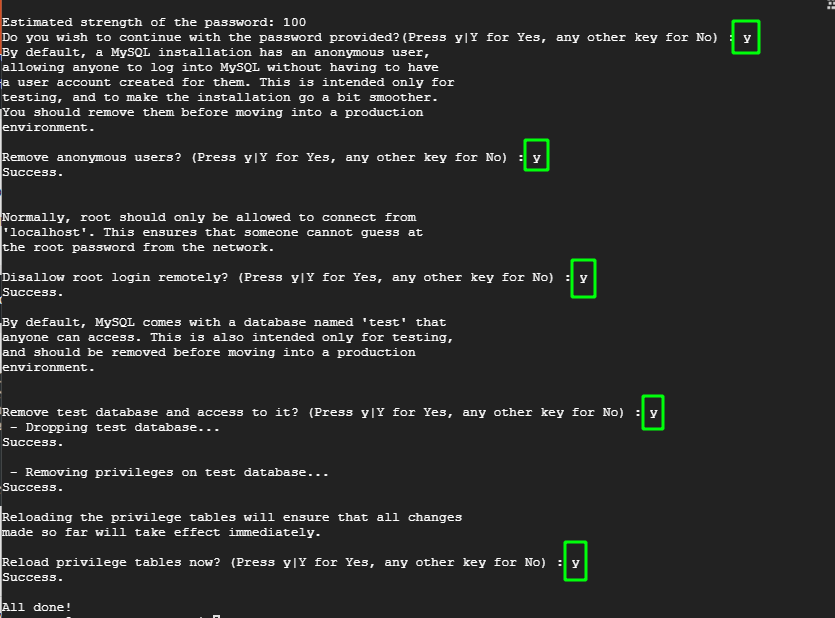
👁 Confirm MySQL Settings
Confirm MySQL Settings

Once you have finished installing and hardening MySQL on the master and slave node, the next is to configure the master node.

Step 3: Configure the Master Node (Server)

The next step is to configure the Master node and grant the slave node access to it. First, we need to edit the mysql-server.cnf configuration file.

$ sudo vim /etc/my.cnf.d/mysql-server.cnf

Add the following lines under the [mysqld] section.

bind-address	 = 10.128.0.14
server-id 	 = 1
log_bin		 = mysql-bin

Once done, save the changes and exit. Then restart the MySQL server.

$ sudo sysemctl restart mysqld

Next, log into MySQL shell.

$ sudo mysql -u root -p

Execute the following commands to create a database user that will be used to bind the master and slave for replication.

mysql> CREATE USER 'replica'@'10.128.15.211' IDENTIFIED BY 'P@ssword321';
mysql> GRANT REPLICATION SLAVE ON *.*TO 'replica'@'10.128.15.211';
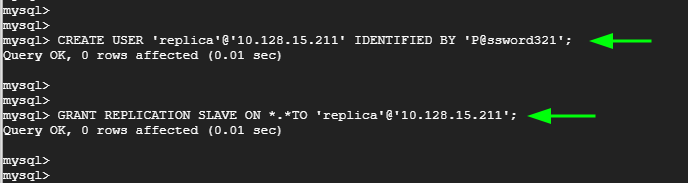
👁 Create Database Replication User
Create Database Replication User

Apply the changes and exit the MySQL server.

mysql> FLUSH PRIVILEGES;
mysql> EXIT;

Verify the status of the master.

mysql> SHOW MASTER STATUS\G
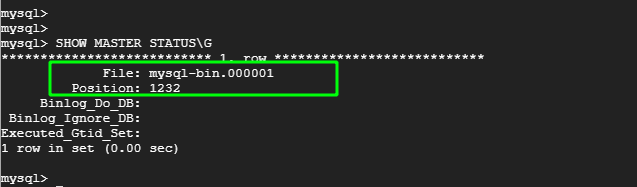
👁 Verify MySQL Status
Verify MySQL Status

Take note of the Filename and Position. You will need this later on when setting up the slave for replication. In our case, we have the filename as mysql-bin.000001 and Position 1232.

Step 4: Configure the Slave Node (Server)

Now, head back to the Slave node. Once again, edit the mysql-server.cnf configuration file.

$ sudo vim /etc/my.cnf.d/mysql-server.cnf

As before, paste these lines under the [mysqld] section. Change the IP address to correspond to the slave’s IP. Also, assign a different server-id. Here we have assigned it the value of 2.

bind-address	 = 10.128.15.211
server-id	 = 2
log_bin 	 = mysql-bin

Save the changes and exit the file. Then restart the database server.

$ sudo systemctl restart mysqld

To configure the Slave node to replicate from the Master node, log in to the Slave’s MySQL server.

$ sudo mysql -u root -p

First and foremost, stop the replication threads:

mysql> STOP SLAVE;

👁 Stop MySQL Slave
Stop MySQL Slave

Then execute the following command to configure the slave node to replicate databases from the master.

mysql> CHANGE MASTER TO
 MASTER_HOST='10.128.0.14' ,
 MASTER_USER='replica' ,
 MASTER_PASSWORD='P@ssword321' ,
 MASTER_LOG_FILE='mysql-bin.000001' ,
 MASTER_LOG_POS=1232;

Note that the MASTER_LOG_FILE and MASTER_LOG_POS flags correspond to the file and Position values from the Master node at the end of Step 1.

The MASTER_HOST, MASTER_USER, and MASTER_PASSWORD correspond to the Master IP address, the replication user, and the replication user’s password respectively.
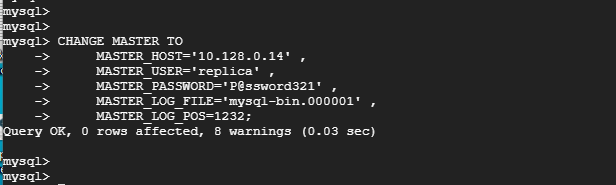
👁 Configure MySQL Slave Replication
Configure MySQL Slave Replication

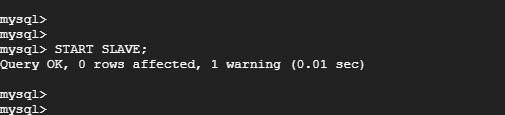
Then start the slave replication threads:

mysql> START SLAVE;
👁 Start MySQL Slave
Start MySQL Slave

Step 4: Testing MySQL Master-Slave Replication

Now, to test if replication between the master and slave node is working, log in to the MySQL database server on the master node:

$ sudo mysql -u root -p

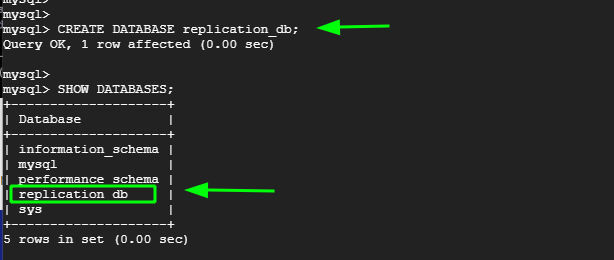
Create a test database. Here, our test database is called replication_db.

mysql> CREATE DATABASE replication_db;
Verify the existence of the database.
mysql> SHOW DATABASES;
👁 Create Database on MySQL Master
Create Database on MySQL Master

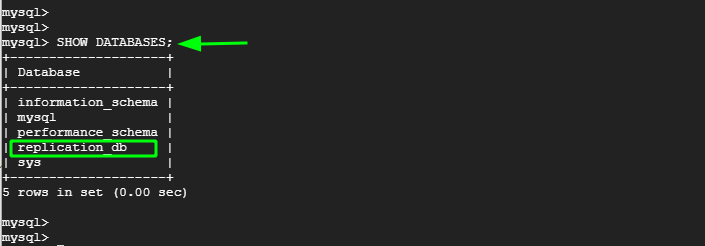
Now, head over to the slave node, log in to the MySQL server and confirm that the replication_db database is present. From the output below, we can see that the database is present. This is confirmation that replication has taken place from the Master to the slave node.

mysql> SHOW DATABASES;
👁 Check MySQL Master Slave Replication
Check MySQL Master-Slave Replication

And that’s it, we have successfully demonstrated how you can set up a MySQL master-slave replication model that can replicate databases from the master node to the slave node.

If this article helped, share it with someone on your team.
TecMint Weekly Newsletter
Get the Learn Linux 7 Days Crash Course free when you join 34,000+ Linux professionals reading every Thursday.
Check your email for a magic link to get started.
Something went wrong. Please try again.
TecMint has been free for 14 years. Help keep it that way.
Google AI Overviews and tools like ChatGPT have cut into search traffic for independent tech sites like TecMint. Running this site costs over $2,000 every month for hosting, infrastructure, and paying authors to keep the content accurate and tested.

If this article helped you solve a problem, consider buying a coffee. It helps keep TecMint free, supports the authors, and keeps the project going.

☕ Buy Me a Coffee
James Kiarie
This is James, a certified Linux administrator and a tech enthusiast who loves keeping in touch with emerging trends in the tech world. When I'm not running commands on the terminal, I'm taking listening to some cool music. taking a casual stroll or watching a nice movie.

Each tutorial at TecMint is created by a team of experienced Linux system administrators so that it meets our high-quality standards.

164 Comments

Leave a Reply
  1. bind-address	 = 10.128.0.14
    server-id 	 = 1
    log_bin		 = mysql-bin
    

    When I tried to add the above lines under [mysqld] the replication is working fine but my syslog-ng.service is getting stopped.

    is there any solution for this?

    Reply
  2. its working fine. thanks for ur help.

    Reply
  3. Hello, Thank for this Tutorial, but it doesn’t work for me, I followed all steps, but sadly i can’t find the database that I create on Master in the other one. Please Contact me

    Reply
    • @Memmiche,

      It should work, please follow the instructions carefully..

      Reply
      • Hi Ravi

        Thanks for the knowledge on mysql-master and slave and
        can I have a reference article if present based on the mysql-cluster setup.

        Thanks in advance!

        Reply
  4. I get following error, how can resolve this issue?

    [root@client ~]# mysql -u root -p < /root/dbdump.db
    error: Found option without preceding group in config file: /etc/my.cnf at line: 11
    Fatal error in defaults handling. Program aborted
    
    Reply
    • @Umesh,

      There is error in your MySQL my.conf file at line 11. Please correct and re-run the command.

      Reply
      • After running following command, following output coming

        MariaDB [(none)]> show master status;
        Empty set (0.01 sec)
        
        Reply
  5. After changing slave server changes on my.cnf and restore the required database. Then slave server mysql service is not starting.

    Reply
  6. Hi,

    MySQL service failed on Slave node when trying to configure CentOS 6.3 with MYSQL Server version: 5.7.22-log MySQL Community Server (GPL).

    Reply
  7. Hi, I am getting error, status show connecting and last i/o shows error connecting to master ip address.

    Please help me..

    Reply
  8. So like the simplicity of the setup. However it did not work and was frustrating as everything seemed to be set up correctly. Took some time to find the problem is due to the “binlog-do-db“.

    Problem for me was there was a “test” DB and even though I was creating a “test” table in different DB it wasn’t being replicated. Read this post about why it’s dangerous: https://www.percona.com/blog/2009/05/14/why-mysqls-binlog-do-db-option-is-dangerous/ . Other than that thanks for your contributions

    Reply
  9. my master slave was running perfectly but once master got shutdown due to power failure (breakdown ) and it stop replication how to overcome this situation ? or restart replication with minimum downtime

    Reply
    • @Prashant,

      Never faced such power failure issues, but I think there nothing to worry, once you master started its automatically starts replicating to slave..

      Reply
  10. To put master host and so on slave in /etc/my.cnf is officially deprecated.

    Instead run in mysql

    Extract from official website
    “2.2.5.2 Setting the Master Configuration on the Slave

    To set up the slave to communicate with the master for replication, configure the slave with the necessary connection information. To do this, execute the following statement on the slave, replacing the option values with the actual values relevant to your system:

    mysql> CHANGE MASTER TO
     -> MASTER_HOST='master_host_name',
     -> MASTER_USER='replication_user_name',
     -> MASTER_PASSWORD='replication_password',
     -> MASTER_LOG_FILE='recorded_log_file_name',
     -> MASTER_LOG_POS=recorded_log_position;
    
    Reply
  11. I got the same error..

    ERROR 1794 (HY000) at line 22: Slave is not configured or failed to initialize properly. You must at least set –server-id to enable either a master or a slave. Additional error messages can be found in the MySQL error log

    Reply
  12. mysql -u root -p < /root/dbdump.db
    Enter password:
    ERROR 1794 (HY000) at line 22: Slave is not configured or failed to initialize properly. You must at least set –server-id to enable either a master or a slave. Additional error messages can be found in the MySQL error log.

    I got this when I tried to do the restore on the slave.

    Reply
    • @James,

      Have you properly configured Slave server? added correct server-id in slave my.cnf file? please check and confirm..

      Reply
      • Hi Ravi,

        I have followed your article its good, I have done the configuration in Master no issue but getting an error on slave while importing DB

        ERROR 1794 (HY000) at line 22: Slave is not configured or failed to initialize properly. You must at least set –server-id to enable either a master or a slave. Additional error messages can be found in the MySQL error log.

        Reply
        • @Gulab,

          Have you added master server-id to to slave mysql configuration? Please check and confirm..

          Reply
  13. Good Job Buddy! It really helped me.

    Reply
  14. Sir what if i have to replicate more than one database from same same master server to slave.

    Reply
    • @Anshul,

      You can create x number MySQL clusters, just make sure you’ve mentioned correct MySQL id in /etc/my.conf file for each node..

      Reply
  15. Failed to import dbdump file on slave side….

    Getting error while running the command….

    # mysql -u root -p < /root/dbdump.db (On the slave node)

    ERROR 2002 (HY000): Can't connect to local MySQL server through socket '/var/lib/mysql/mysql.sock' (2)

    I have same os on both machine (i.e. Rhel7)

    Plz.. give complete solution

    Reply
    • @Gulshan,

      Please make sure that MySQL started and running, if not you can start it using:

      # service mysqld restart
      OR
      # systemctl restart mysqld
      
      Reply
  16. Thankyou so much pals for this superb great tutorial. It really helpful.

    Reply
  17. Hi,

    Getting error while running the command….

    # mysql -u root -p < dbstore.db (On the slave node)

    ERROR 2002 (HY000): Can't connect to local MySQL server through socket '/var/lib/mysql/mysql.sock' (2)

    Reply
    • @Tapas,

      Make sure your MySQL is started and running, use netstat command to find out all running process.

      Reply
  18. I’ve two VM located on Digital Ocean and Microsoft Azure, I use my Digital Ocean as master and Microsoft Azure as slave. Can I implement replication in different server like Digital Ocean and Azure?

    Reply
    • @Muhammad,

      Not possible, both servers must be same Linux OS to do database Master/Slave replication…

      Reply
      • Hi Ravi,

        I mean same OS (linux) but different server. I’ve ubuntu in DO and Azure, so can I do master-slave replication?

        Reply
        • @Muhammad,

          As fas as both machine with different Linux OS will work without any issues, yes you can do a master-slave MySQL replication without any doubt…:)

          Reply
  19. thanks for reply..can u please make tutorial on or write blog for how to use replication for wamp server one slave and multiple masters.Thanks.

    Reply
  20. nice post..I am using master on windows,and my server is on cent-OS..whenever I try to run CHANGE MASTER TO…. this gives me error like slave is not configured or server_id is not set on master or slave…Thanks

    Reply
    • I am doing this with WAMP3 Server.

      Reply
      • @Yogesh,

        If am not wrong WAMP means Windows, Apache, MySQL and PHP? if yes, then how come these commands work on Windows? better have a Linux..

        Reply
    • @Yogesh,

      I don’t think it will work that way, both machines must be Linux OS.

      Reply
      • Slave is not configured or failed to initialize properly. You must at least set –server-id to enable either a master or a slave.
        now I am getting this error..1st time its work after second time when I try to look out through START SLAVE…STOP SLAVE its produced this error..can u explain why?

        +—————+——-+
        | Variable_name | Value |
        +—————+——-+
        | server_id | 11 |
        +—————+——-+

        my.cnf file has
        server_id = 11
        replicate_do_db = dbname

        Reply
        • pls reply I stuck on this error…

          Reply
          • @Yogesh,

            Sorry, as I said it’s difficult to answer you question, as you’re using two different OS’s for same purpose, and I don’t think it work that way, both machine must be Linux operating systems, in order to work properly…..

  21. Great Article. Works Fine.. Thanks so much. Appreciate !

    Reply
  22. Awesome!!!! Really thanks for the post,, and its working perfectly

    Reply
  23. mysqld service is not starting
    below is my my.cnf fine of slave side:

    [mysqld]
    datadir=/var/lib/mysql
    socket=/var/lib/mysql/mysql.sock
    # Disabling symbolic-links is recommended to prevent assorted security risks
    symbolic-links=0
    # Settings user and group are ignored when systemd is used.
    # If you need to run mysqld under a different user or group,
    # customize your systemd unit file for mysqld according to the
    # instructions in http://fedoraproject.org/wiki/Systemd

    server-id = 2
    master-host=172.31.28.246
    master-connect-retry=60
    master-user=repl
    master-password=repl
    replicate-do-db=chetan
    relay-log = /var/lib/mysql/mysql-relay-bin
    relay-log-index = /var/lib/mysql/mysql-relay-bin.index
    log-error = /var/lib/mysql/mysql.err
    master-info-file = /var/lib/mysql/mysql-master.info
    relay-log-info-file = /var/lib/mysql/mysql-relay-log.info
    log-bin = /var/lib/mysql/mysql-bin

    [mysqld_safe]
    log-error=/var/log/mysqld.log
    pid-file=/var/run/mysqld/mysqld.pid
    ~

    Reply
    • @Chetan,
      Is there any error message appears during mysql start? if yes, could you please post here..

      Reply
  24. Hi Team,

    Good Day…!!!

    Above Steps are not working, kindly check and do the needful.

    Reply
  25. Great tutorial…. might want to mention / mark in red on the Slave my.cnf file to change “binlog_do_db” to “replicate_do_db” took me forever to figure that out.

    Reply
  26. Hi,

    Sometime ago now we managed to set-up master/slave replication and everything has been working fine with no issues. Just one question really… How do you go about safely rebooting the master or slave server ?

    Reply
  27. Hi Ravi,
    Thank you very much for this post, but i am facing one issue.
    when i restart the mysqld service on slave, it doesn’t start.
    Would you please help me? explanation is given below.

    I have a mysql master server-192.168.56.5 and a slave server-192.168.56.6.
    Master COnfiguration:

    [mysqld]
    server-id = 1
    binlog-do-db=khandu
    relay-log = /var/lib/mysql/mysql-relay-bin
    relay-log-index = /var/lib/mysql/mysql-relay-bin.index
    log-error = /var/lib/mysql/mysql.err
    master-info-file = /var/lib/mysql/mysql-master.info
    relay-log-info-file = /var/lib/mysql/mysql-relay-log.info
    log-bin = /var/lib/mysql/mysql-bin

    datadir=/var/lib/mysql
    socket=/var/lib/mysql/mysql.sock
    user=mysql
    # Disabling symbolic-links is recommended to prevent assorted security risks
    symbolic-links=0

    [mysqld_safe]
    log-error=/var/log/mysqld.log
    pid-file=/var/run/mysqld/mysqld.pid

    Slave configuration:
    [mysqld]
    datadir=/var/lib/mysql
    socket=/var/lib/mysql/mysql.sock

    server-id=2
    master-host=192.168.56.5
    master-connect-retry=60
    master-user=slave_user
    master-password=khandu
    replicate-do-db=khandu
    relay-log = /var/lib/mysql/mysql-relay-bin
    relay-log-index = /var/lib/mysql/mysql-relay-bin.index
    log-error = /var/lib/mysql/mysql.err
    master-info-file = /var/lib/mysql/mysql-master.info
    relay-log-info-file = /var/lib/mysql/mysql-relay-log.info
    log-bin = /var/lib/mysql/mysql-bin

    # Disabling symbolic-links is recommended to prevent assorted security risks
    symbolic-links=0

    # Settings user and group are ignored when systemd is used (fedora >= 15).
    # If you need to run mysqld under a different user or group,
    # customize your systemd unit file for mysqld according to the
    # instructions in http://fedoraproject.org/wiki/Systemd
    user=mysql

    [mysqld_safe]
    log-error=/var/log/mysqld.log
    pid-file=/var/run/mysqld/mysqld.pid

    i have configured from shell like below .
    CHANGE MASTER TO MASTER_HOST=’192.168.56.5′, MASTER_USER=’slave_user’, MASTER_PASSWORD=’khandu’, MASTER_LOG_FILE=’mysql-bin.000001′, MASTER_LOG_POS=329;

    up to this step replication works perfectly, but when i restart the mysql on slave side, it generates the error

    150318 12:00:06 mysqld_safe mysqld from pid file /var/run/mysqld/mysqld.pid ended
    150318 12:00:56 mysqld_safe Starting mysqld daemon with databases from /var/lib/mysql
    150318 12:00:56 [Note] Plugin ‘FEDERATED’ is disabled.
    150318 12:00:56 InnoDB: The InnoDB memory heap is disabled
    150318 12:00:56 InnoDB: Mutexes and rw_locks use GCC atomic builtins
    150318 12:00:56 InnoDB: Compressed tables use zlib 1.2.3
    150318 12:00:56 InnoDB: Using Linux native AIO
    150318 12:00:56 InnoDB: Initializing buffer pool, size = 128.0M
    150318 12:00:56 InnoDB: Completed initialization of buffer pool
    150318 12:00:56 InnoDB: highest supported file format is Barracuda.
    150318 12:00:56 InnoDB: Waiting for the background threads to start
    150318 12:00:57 InnoDB: 5.5.36 started; log sequence number 1618405
    150318 12:00:57 [ERROR] /usr/libexec/mysqld: unknown variable ‘master-host=192.168.56.5′
    150318 12:00:57 [ERROR] Aborting

    150318 12:00:57 InnoDB: Starting shutdown…
    150318 12:00:58 InnoDB: Shutdown completed; log sequence number 1618405
    150318 12:00:58 [Note] /usr/libexec/mysqld: Shutdown complete

    150318 12:00:58 mysqld_safe mysqld from pid file /var/run/mysqld/mysqld.pid ended

    again i need to reconfigure this via shell:- CHANGE MASTER TO MASTER_HOST=’192.168.56.5′, MASTER_USER=’slave_user’, MASTER_PASSWORD=’khandu’, MASTER_LOG_FILE=’mysql-bin.000001′, MASTER_LOG_POS=329;

    please help.

    Thanks!!

    Reply
    • @Ravi,
      I think you’ve syntax error in your command, use the correct single quotes as described in this following command.

      CHANGE MASTER TO MASTER_HOST='192.168.56.5', MASTER_USER='slave_user', MASTER_PASSWORD='khandu', MASTER_LOG_FILE='mysql-bin.000001', MASTER_LOG_POS=329;
      
      Reply
  28. I have tried the same but getting mention error. Unable to sync database

    *************************** 1. row ***************************
    Slave_IO_State: Waiting for master to send event
    Master_Host: 192.168.1.25
    Master_User: root
    Master_Port: 3306
    Connect_Retry: 60
    Master_Log_File: mysql-bin.000003
    Read_Master_Log_Pos: 106
    Relay_Log_File: mysql-relay-bin.000004
    Relay_Log_Pos: 251
    Relay_Master_Log_File: mysql-bin.000003
    Slave_IO_Running: Yes
    Slave_SQL_Running: Yes
    Replicate_Do_DB: testing,test
    Replicate_Ignore_DB:
    Replicate_Do_Table:
    Replicate_Ignore_Table:
    Replicate_Wild_Do_Table:
    Replicate_Wild_Ignore_Table:
    Last_Errno: 0
    Last_Error:
    Skip_Counter: 0
    Exec_Master_Log_Pos: 106
    Relay_Log_Space: 406
    Until_Condition: None
    Until_Log_File:
    Until_Log_Pos: 0
    Master_SSL_Allowed: No
    Master_SSL_CA_File:
    Master_SSL_CA_Path:
    Master_SSL_Cert:
    Master_SSL_Cipher:
    Master_SSL_Key:
    Seconds_Behind_Master: 0
    Master_SSL_Verify_Server_Cert: No
    Last_IO_Errno: 0
    Last_IO_Error:
    Last_SQL_Errno: 0
    Last_SQL_Error:
    1 row in set (0.00 sec)

    mysql> use testing;
    Database changed
    mysql> SELECT * FROM employee;
    ERROR 1146 (42S02): Table ‘testing.employee’ doesn’t exist
    mysql>

    Reply
    • @Suraj,
      Your replication is working fine, but I think you need to first dump the mysql databases from master to slave server and then take the master binlog to slave server and restart the mysql at slave..

      Reply
  29. hi ravi boss this its very good boos i have some issue second behind master null after i log out my application

    Reply
  30. Hello Ravi,

    Thanks for your suggestion.
    I would also want to know how to make slave server as a master in case master gets down. Please assist we want to implement this environment in our data center.

    Thanks in advance.
    Regards,
    Yogesh P.

    Reply
    • @Yogesh,
      you need to manually change the settings of MySQL in your application and point to Slave server. This is the only option..

      Reply
      • Hello sir,

        i want to set up multiple master server & one slave server in mariaDB 10.0.0 , how can i do this.

        Reply
        • @Amita
          Follow the same insturctions, just give the “server-id” to each server…

          Reply
  31. Hi,

    Nice article.

    We are trying to create new database but it wont replicate. It is showing old database which we have tested during the installation.

    Actually we want to replicate multiple databases so is it necessary to mention each databaase name and database username in my.cnf file ?

    If no, how can we mention the parameter in my.cnf file.

    Please update.
    Thanks
    Yogesh P.

    Reply
    • @Yogesh,
      You must specify each database name in master my.cnf file to do replication..

      Reply
  32. Find below my.cnf for my Master server

    server-id = 1
    binlog-do-db=shaqib1
    binlog-to-db=shaqib2
    binlog-to-db=shaqib3
    relay-log = /var/lib/mysql/mysql-relay-bin
    relay-log-index = /var/lib/mysql/mysql-relay-bin.index
    log-error = /var/lib/mysql/mysql.err
    master-info-file = /var/lib/mysql/mysql-master.info
    relay-log-info-file = /var/lib/mysql/mysql-relay-log.info
    log-bin = /var/lib/mysql/mysql-bin

    i save and then i restart mysql, i got the following errors.

    141015 11:33:00 mysqld started
    141015 11:33:00 [ERROR] /usr/libexec/mysqld: unknown variable ‘binlog-to-db=shaqib2’
    141015 11:33:00 mysqld ended

    pls urgent.

    Reply
    • Sorry i notice my mistake.

      I correct it and my mysqld service start successfully.

      Now I am getting another problem, i created a table on my master, but is is not replicated on my slave. where i might be wrong?

      Reply
      • Please check the status on the slave server and look for errors if any…

        Reply
  33. Hi ravi,

    I just need to replicate some table only , is this possible , How can i do this , please advice me.

    Regards,
    Shufil

    Reply
    • Sorry brother, you can’t replicate tables only databases can be replicated..

      Reply
  34. Hi,

    can we able to replication server in different location..?

    Reply
    • Yes you can as long as both server connected to each other on the network..

      Reply
      • Ravi!
        can you help me how to replicate mysql database as a backup at a different location and different network

        looking forword!!!!

        thanks

        Reply
        • @Frajasa,
          You can use any network, but make sure both servers communicate each other…follow the instructions as instructed in the article…there is no issue using different network, but ports should be opened for connections on both end..

          Reply
  35. I am creating a database on master server but cannot create slave server.please give me the suggatation.

    Reply
    • Please follow the instruction carefully, it will work surely.

      Reply
  36. how to replicate multiple database in master/slave replication???

    Reply
    • Just add the new database in Master MySQL configuration file and copy the bin log file to slave..

      Reply
      • Just add the new database in Master MySQL configuration file and copy the bin log file to slave..??
        Mr Ravi ,

        binlog-do-db=tecmint

        here only this tecmint database only replicated my question is suppose i have 3 database how can i replicate all three databases in slave at same time
        what all the statements i add in master mysql config file and slace config file
        pls reply with some example cause iam fresher in mysql
        thanks….

        Reply
        • You should follow same instruction to replicate multiple databases on slave. For example, like this way.

          binlog-do-db=db1
          binlog-do-db=db2
          binlog-do-db=db3
          
          Reply
  37. Hi,

    My master running on AWS :3306 port and slave running in my office at port 3306 but i am using port forward on my firewall 556 kindly reply how to sync both server

    Reply
  38. Can u look into this.. I’m trying in my local network.

    Server IP :192.168.1.222

    Slave IP :192.168.1.19

    I’m not figure out where could be the issue?

    Can u help to fix this?

    *************************************

    server-id = 2
    master-host=192.168.1.222 ( My server master IP)
    master-connect-retry=60
    master-user=slave_user — (MY username ex: root)
    master-password=yourpassword (MY passwd ex: ramalingam)
    replicate-do-db=tecmint (MY db ex: ramalingam)
    relay-log = /var/lib/mysql/mysql-relay-bin
    relay-log-index = /var/lib/mysql/mysql-relay-bin.index
    log-error = /var/lib/mysql/mysql.err
    master-info-file = /var/lib/mysql/mysql-master.info
    relay-log-info-file = /var/lib/mysql/mysql-relay-log.info
    log-bin = /var/lib/mysql/mysql-bin

    Reply
    • Bro, Can I have access to your machine, to check what’s the exact problem.

      Reply
  39. Hi, at the time of configure slave server, I made changes into slave my.cnf.
    After that slave mysql not working. Service fails to start.

    Reply
    • Simple, your my.cnf was misconfigured. Check what you’ve added correctly and replace with them correct parameters.

      Reply
  40. Hello Ravi Sir,

    mysql> SHOW MASTER STATUS;

    Empty set (0.00 sec)

    mysql>

    I have used exact steps, which you provided, but when i run above mention command it’s showing empty set.

    I am using Centos 6.5 64 bit.

    Kindly help me.

    Regards,
    Manoj Gupta

    Reply
    • No idea man, but seems your configuration was unsuccessful and might you have missed some steps, please try to follow again.

      Reply
  41. Superb tutorial. Works like a charm.

    Reply
  42. I have came problem.
    Last_IO_Error: error connecting to master ‘[email protected]:3306’ – retry-time: 60 retries: 86400

    Reply
    • It seems your slave is not connecting to your Master MySQL server, have you opened port 3306 and the slave user has proper permission to talk with master server?

      Reply
  43. Ravi,
    Dose thee any value to set the replica frequency? Mean, in my case it’s not really necessary to get replica in realtime, and overload network, for example, it’s fine to try to replicate every one hour, it’s possible that??

    Else, the master-connect-retry directive is unknown in mysql 5.5.38-cll-lve, I was googling, but can’t find,… this maybe fit to fix my question, right?

    regards,

    Reply
  44. After setting up both master and slave configuration as mentioned here, I am getting the following error in the slave

    mysql> show slave status\G
    *************************** 1. row ***************************
    Slave_IO_State: Connecting to master
    Master_Host: 192.168.11.251
    Master_User: slave_test
    Master_Port: 3306
    Connect_Retry: 60
    Master_Log_File: mysql-bin.000007
    Read_Master_Log_Pos: 331
    Relay_Log_File: mysql-relay-bin.000004
    Relay_Log_Pos: 4
    Relay_Master_Log_File: mysql-bin.000007
    Slave_IO_Running: No
    Slave_SQL_Running: Yes
    Replicate_Do_DB: hadoop
    Replicate_Ignore_DB:
    Replicate_Do_Table:
    Replicate_Ignore_Table:
    Replicate_Wild_Do_Table:
    Replicate_Wild_Ignore_Table:
    Last_Errno: 0
    Last_Error:
    Skip_Counter: 0
    Exec_Master_Log_Pos: 331
    Relay_Log_Space: 106
    Until_Condition: None
    Until_Log_File:
    Until_Log_Pos: 0
    Master_SSL_Allowed: No
    Master_SSL_CA_File:
    Master_SSL_CA_Path:
    Master_SSL_Cert:
    Master_SSL_Cipher:
    Master_SSL_Key:
    Seconds_Behind_Master: NULL
    Master_SSL_Verify_Server_Cert: No
    Last_IO_Errno: 2013
    Last_IO_Error: error connecting to master ‘[email protected]:3306’ – retry-time: 60 retries: 86400
    Last_SQL_Errno: 0
    Last_SQL_Error:
    1 row in set (0.00 sec)

    Note: The Firewall is stopped and SELINUX is set to disabled in the Master server.

    Please suggest me what could be the reason behind.

    Reply
    • The error clearly saying, that slave is not reaching to master, and you also specified that Firewall and SELinux both are disabled. It seems to me something strange, have your master mysql is running? are you able to telnet to master on port 3306 from slave?

      Reply
      • i want to config multil master – 1 slave .
        can you have me

        Reply
  45. Please, dismiss my last comment, i have solve it myself, the issue was that I have import the dump file into a specific DB which I have created in the slave, and I shouldn’t dump it so, but, should just do it in the whole sql as: mysql -u root -p < dump.sql…
    regards,

    Reply
  46. Awesome tutorial. Got replication setup real quick. One thing I did have to change that may help others was my firewall. Had to add and exception for port 3306 then it worked great.

    Reply
  47. HI Ravi Saive,

    I just removed
    relay-log = /var/lib/mysql/mysql-relay-bin
    relay-log-index = /var/lib/mysql/mysql-relay-bin.index
    log-error = /var/lib/mysql/mysql.err
    master-info-file = /var/lib/mysql/mysql-master.info
    relay-log-info-file = /var/lib/mysql/mysql-relay-log.info
    log-bin = /var/lib/mysql/mysql-bin

    only added server-id = 1
    log-bin=mysql-bin.log
    binlog-do-db=testDBname

    And slave side only added server-id = 2

    now its working with out any error .

    can you find out what is exact problem . i added all file under mysql with correct permission like mysql-relay-bin .

    I have another doubt is i create mysql user and permission is *.* username@ slave ip also sameusername@localhost . also i added master my.cnf binlog-do-db=replicationDBname , and the problem is both server running lot of site so when we changed slave server mysql from master to slave is this effect all the site ?

    Regards,
    Shufil

    Reply
  48. Hello sir,

    I have complete two server replication through this artical. but when i have run “service mysqld restart” then replication work stop. because when server restart then file “File = mysql-bin.000010” and position = 701765 is change.

    please help me for this issue.

    Thanks

    Reply
    • No, idea it shouldn’t happen, I regulary restart mysql whenever needed, but never faced such issue, I think you should check mysql logs to find out what was causing.

      Reply
      • Hi,

        I am also facing the same issue, after changing anything in the conf file, I restart mysql service, but replication stops working because log file and position gets changed. I have to run CHANGE MASTER TO MASTER_HOST command again to start replication.
        Is there anyway to permanently add log file and position anywhere?

        Thank you,
        Umaimath

        Reply
  49. Hello Sir,

    This artical is good for replication on master to slave Database. It is working fine.

    But, when i have edit slave server Database master server Database is not update automatic. it is possible or not.

    Thanks

    Reply
    • I didn’t get you, can you clarify your question more clearly..

      Reply
      • Dear Sir,

        when i edit master server database then slave server database automatic update. Or If I edit slave server database then master server database is not update.

        It is possible.

        Thanks.

        Reply
        • Its one way sync only from Master to Slave, not vice-versa…

          Reply
          • dear sir,

            Have you any idea about vice-versa replication between two server database.

            Thanks

          • Mysql replication won’t work vice-versa unfortunately.

  50. Hi Ravi,

    Thanks for reply .

    I checked the status both are running please see below details .
    [root@localhost ~]# service mysqld status
    mysqld (pid 1628) is running…
    [root@localhost ~]# netstat -tln | grep 3306
    tcp 0 0 192.168.2.21:3306 0.0.0.0:* LISTEN

    Regards,
    Shufil

    Reply
    • Can you able to connect from localhost like, if yes, please post me the output here. or you should add –skip networking in my.cnf file.. try these both..

      mysql -u root -p
      
      Reply
      • HI Ravi ,

        Thanks for reply , I added skip networking in my.cnf, then restart mysql service , also we can login locally without any error . please see below output.

        [root@localhost ~]# mysql -u root -p
        Enter password:
        Welcome to the MySQL monitor. Commands end with ; or \g.
        Your MySQL connection id is 5
        Server version: 5.1.73-log Source distribution

        Copyright (c) 2000, 2013, Oracle and/or its affiliates. All rights reserved.

        Oracle is a registered trademark of Oracle Corporation and/or its
        affiliates. Other names may be trademarks of their respective
        owners.

        Type ‘help;’ or ‘\h’ for help. Type ‘\c’ to clear the current input statement.

        mysql>

        Regards,
        Shufil

        Reply
  51. HI Ravi,

    master ip 192.168.2.21 slave 192.168.2.22, same mysql user and password user master and slave .
    Master and slave working fine, and getting master status correctly , but slave status seems a error , that is “Last_IO_Error: error connecting to master”.
    below you can see slave status .
    also we are try to connect manually from slave to master,
    [root@localhost ~]# mysql -u test_user -h 192.168.2.21 -p
    Enter password:
    ERROR 2003 (HY000): Can’t connect to MySQL server on ‘192.168.2.21’ (113).

    We are already allow port number 3306 from 192.168.2.0/24 in iptable.
    ___________________________________________________________________________________
    mysql> show slave status\G
    *************************** 1. row ***************************
    Slave_IO_State: Connecting to master
    Master_Host: 192.168.2.21
    Master_User: test_user
    Master_Port: 3306
    Connect_Retry: 60
    Master_Log_File: mysql-bin.000009
    Read_Master_Log_Pos: 483
    Relay_Log_File: mysql-relay-bin.000002
    Relay_Log_Pos: 4
    Relay_Master_Log_File: mysql-bin.000009
    Slave_IO_Running: No
    Slave_SQL_Running: Yes
    Replicate_Do_DB: testDB
    Replicate_Ignore_DB:
    Replicate_Do_Table:
    Replicate_Ignore_Table:
    Replicate_Wild_Do_Table:
    Replicate_Wild_Ignore_Table:
    Last_Errno: 0
    Last_Error:
    Skip_Counter: 0
    Exec_Master_Log_Pos: 483
    Relay_Log_Space: 106
    Until_Condition: None
    Until_Log_File:
    Until_Log_Pos: 0
    Master_SSL_Allowed: No
    Master_SSL_CA_File:
    Master_SSL_CA_Path:
    Master_SSL_Cert:
    Master_SSL_Cipher:
    Master_SSL_Key:
    Seconds_Behind_Master: NULL
    Master_SSL_Verify_Server_Cert: No
    Last_IO_Errno: 2013
    Last_IO_Error: error connecting to master ‘[email protected]:3306’ – retry-time: 60 retries: 86400
    Last_SQL_Errno: 0
    Last_SQL_Error:
    1 row in set (0.00 sec).

    Regards,
    Shufil

    Reply
    • The error itself self explanatory, that means your master MySQL service is not running or port 3306 is not opened. Please check both and come back to me with status.

      Reply
      • HI Ravi ,

        Thanks for reply , both are working .

        [root@localhost ~]# service mysqld status
        mysqld (pid 1628) is running…
        [root@localhost ~]#
        [root@localhost ~]# netstat -tln | grep 3306
        tcp 0 0 192.168.2.21:3306 0.0.0.0:* LISTEN

        Regards,
        Shufil

        Reply
  52. If you are running this setup,

    On Master, make sure you use

    sync_binlog=1

    And also add the db’s you don’t want to replicate;

    binlog-do-db=MyForum
    binlog-do-db=MyMMO
    binlog-do-db=MyPlayers

    # Don’t replicate Percona DB’s
    binlog-ignore-db=performance_schema
    binlog-ignore-db=information_schema
    binlog-ignore-db=mysql

    On Slave for Multiple DB’s:

    replicate-do-db = MyForum
    replicate-do-db = MyMMO
    replicate-do-db = MyPlayers

    and then make sure slave can read only, Since this is Master/Slave Setup..

    # Slave only needs to read.
    read_only = 0

    Now I finally am able to keep my Slave database up to date through crashes, reboots or whatever.. This is what was missing but after some research, I found what was missing.

    Chris

    Reply
  53. How exactly do you keep this accurate? I’m running a small mmo and I have to clean up the bin files because they eventually take so much space. I use a script that will clean the files up but after about an hour of a fresh setup, the slave is no longer up to date.. I’d have to re-do this set up each day.. Is there a better way to do master/master that is 100% up to date on both side without the bins?

    Thanks,
    Chris

    Reply
  54. Hello Ravi Saive ,

    We have two server , both of server running with lot of sites , we need to create replication only one DB , with particulate time interval and without , can this possible .

    Regards,
    Shufil

    Reply
    • Yes, it can possible, go ahead…

      Reply
  55. Hi ravi,

    very nice article ……..

    I have a doubt, I already have a database now.I have to set up replication.Now i am not using any password to connect mysql…..just i am typing mysql command to connect database …..in below query which user name and passed i have to use.

    CHANGE MASTER TO MASTER_HOST=’192.168.1.1′, MASTER_USER=’slave_user’, MASTER_PASSWORD=’yourpassword’, MASTER_LOG_FILE=’mysql-bin.000003′, MASTER_LOG_POS=11128001;

    Reply
    • Have you created new slave_user on your Master Server? If yes, use those details here.

      Reply
  56. Hi i made to the end but in the
    Last_IO_Errno:
    Last_IO_Error:
    Last_SQL_Errno: 0
    Last_SQL_Error:

    it throws me an error that says it wasnt able to connect to ‘[email protected]’ can you help me with that?

    Reply
    • Those errors showing nothing, have you checked these two parameters are they are in YES state?

      Slave_IO_Running: Yes
      Slave_SQL_Running: Yes
      
      Reply
      • Hi, you’re incredible! The Slave_IO_Running: parameter is showing NO. So im wondering if it has something to do with the port that im using… Cause apparently by default the port that these connection uses is :3306, should i change it to :80??

        Reply
        • Have you added correct master file along with correct slave user details, that you’ve created on master?

          Reply
          • Well that’s the thing, I’ve done the configuration from the start several times and i dont know what I’m doing wrong… The ip’s are ok and the master file seems to be fine, although I had some problems there cause i wasnt entering mysql as root user so i was setting up a different master file but now everything seems to be ok but i just cant get the Slave_IO_Running to get going

  57. Here’s the whole thing:
    *************************** 1. row ***************************
    Slave_IO_State: Connecting to master
    Master_Host: 192.168.205.3
    Master_User: esclavo
    Master_Port: 3306
    Connect_Retry: 60
    Master_Log_File: mysql-bin.000001
    Read_Master_Log_Pos: 325
    Relay_Log_File: mysql-relay-bin.000001
    Relay_Log_Pos: 4
    Relay_Master_Log_File: mysql-bin.000001
    Slave_IO_Running: No
    Slave_SQL_Running: Yes
    Replicate_Do_DB: Tiquetes
    Replicate_Ignore_DB:
    Replicate_Do_Table:
    Replicate_Ignore_Table:
    Replicate_Wild_Do_Table:
    Replicate_Wild_Ignore_Table:
    Last_Errno: 0
    Last_Error:
    Skip_Counter: 0
    Exec_Master_Log_Pos: 325
    Relay_Log_Space: 106
    Until_Condition: None
    Until_Log_File:
    Until_Log_Pos: 0
    Master_SSL_Allowed: No
    Master_SSL_CA_File:
    Master_SSL_CA_Path:
    Master_SSL_Cert:
    Master_SSL_Cipher:
    Master_SSL_Key:
    Seconds_Behind_Master: NULL
    Master_SSL_Verify_Server_Cert: No
    Last_IO_Errno: 2013
    Last_IO_Error: error connecting to master ‘[email protected]:3306’ – retry-time: 60 retries: 86400
    Last_SQL_Errno: 0
    Last_SQL_Error:
    1 row in set (0.00 sec)

    ERROR:
    No query specified

    mysql>

    Thanks in advance

    Reply
    • It’s something related to permission problem on the master or related to SELinux, please check both.

      Reply
  58. Hi! Im having a problem in the end, it says on “Last_I/O_ERROR: error connecting to master ‘[email protected]:3306 -retry time: 60 retries: 86400” what did I do wrong there? Could it be the user? if so how do I change it again?

    Reply
  59. Dear Sir,

    We have face some issue when we configure the salve and write then unable to restart the mysql service please help me how can do.
    Error :
    [root@localhost ~]# /etc/init.d/mysqld restart
    Stopping mysqld: [ OK ]
    MySQL Daemon failed to start.
    Starting mysqld: [FAILED]

    vi /etc/my.cnf

    [mysqld]
    datadir=/var/lib/mysql
    socket=/var/lib/mysql/mysql.sock
    server-id = 2
    master-host=192.168.1.113
    master-connect-retry=60
    master-user=root
    master-password=dreamsol
    replicate-do-db=dreamsol
    relay-log = /var/lib/mysql/mysql-relay-bin
    relay-log-index = /var/lib/mysql/mysql-relay-bin.index
    log-error = /var/lib/mysql/mysql.err
    master-info-file = /var/lib/mysql/mysql-master.info
    relay-log-info-file = /var/lib/mysql/mysql-relay-log.info
    log-bin = /var/lib/mysql/mysql-bin

    # Disabling symbolic-links is recommended to prevent assorted security risks
    symbolic-links=0

    # Settings user and group are ignored when systemd is used (fedora >= 15).
    # If you need to run mysqld under a different user or group,
    # customize your systemd unit file for mysqld according to the
    # instructions in http://fedoraproject.org/wiki/Systemd
    user=mysql

    # Semisynchronous Replication
    # http://dev.mysql.com/doc/refman/5.5/en/replication-semisync.html
    # uncomment next line on MASTER
    ;plugin-load=rpl_semi_sync_master=semisync_master.so
    # uncomment next line on SLAVE
    ;plugin-load=rpl_semi_sync_slave=semisync_slave.so

    # Others options for Semisynchronous Replication
    ;rpl_semi_sync_master_enabled=1
    ;rpl_semi_sync_master_timeout=10
    ;rpl_semi_sync_slave_enabled=1
    “/etc/my.cnf” 45L, 1418C

    Reply
    • It’s due to configuration error, please correct your my.cnf configuration values.

      Reply
  60. Hi Ravi,

    Nice tutorial, but i want compile MySQL from source with replication (Matser Slave).
    u done this before then please share..

    Devendra Joshi
    08796458877
    Email : [email protected]

    Reply
  61. can you please answer this coment from muhammad

    “would this procedure work without locking the db. I want to do this so the user keeps using the main database and the replication process works in the background, that brings another thing to point. I want to make this process automated so it triggers the replication when an update is made to the database, i know i can do crontab to schedule it but how do i do it on master and slave confused =I
    any help would be appreciated.”

    Thanks

    Reply
  62. hello,
    how can I configure the failover after this configuration ??

    Reply
  63. Hi,

    nice article..

    When I execute this command on slave server :
    mysql -u root -p < /root/dbdump.db

    I got this error :
    ERROR 1198 (HY000) at line 22: This operation cannot be performed with a running slave; run STOP SLAVE first

    can you help me?

    Reply
    • First stop slave and then restore a backup.

      Reply
    • use “slave stop” instead of “stop slave”

      Reply
  64. Hello,

    Can I implement this in two different networks. ?

    Thank You

    Reply
  65. Hi Ravi,

    This is great but i would be much grate full if you can post something on clustering without the master – slave concept. just replicate the same data between two mysql servers. what i am trying to do is load balance mysql serer to make a mysql cluster.

    Thanks in advanced.
    ravi

    Reply
  66. Hello Ravi,
    Thank you so much for this article.

    I was facing some problems like “/usr/libexec/mysqld unknown variable ‘master-host=x.x.x.x” …

    so skip adding master-host and regarding information in my.conf. and directly execute next step. So Its working for me.

    Reply
  67. @ Ravi sir !!

    Very Nice Post : )

    If any one want to just copy and paste :) then He/She need to edit

    /ect/my.cnf file of Master Server

    #bind-address=127.0.0.1
    bind-address=replace with you server IP

    Reply
  68. simple and good steps.working fine.thanks.

    Reply
  69. Hi!
    Thanks for the great article!

    In the “Verifying MySQL Replication on Master and Slave Server” step I see that “On Master Server” you create the database:

    mysql> create database tecmint;

    Is it working all those steps and the replication even on existing database with a lot of data and tables on it or only on a new database?

    Thanks a lot!

    Reply
    • If you’ve properly dumped database on slave and imported bin log file properly it should work correctly..

      Reply
  70. Hi,

    Thanks for the great article. How do I replicate all the databases from my master? Can I just leave out the value “tecmint” in : Replicate_Do_DB: tecmint

    Is the above “row based replication” or “statement based” ?

    Many thanks!

    Reply
    • It’s a row based replication. Please follow the article we’ve already explained clearly everything.

      Reply
  71. I have a database restored by the master and slave server, after they restored, I make the master and slave configurations, the master is ok, but on the slave the mysqld service can’t be up after I edit in its my.cnf.

    What is the problem?

    Reply
    • After making changes in slave my.cnf file have you restarted mysql service?

      Reply
  72. Why does my slave db don’t sync after i add entries on my slave DB if im right i think that my slave db should return its data same with my Master DB.

    Thanks

    Reply
    • Did you followed all the steps correctly?

      Reply
      • Yes my scenario is my two tables and updated slave is same with my master but once i delete a file at my slave the data on my master don’t overwrite my db on slave instead its adding the data the i added on my master db after the deletion of data on slave but the data that i had deleted on my slave db don’t return.

        thanks

        Reply
  73. Hi , I like this tuto it is really useful but i have just one thing that i could not do it . After doing this command in master :
    scp /root/db_dump.sql [email protected]:/salma/
    I got this answer :
    [email protected]‘s password:
    scp: /salma/: Is a directory
    Am i now connected to slave ??
    And in slave i have this :
    [root@localhost salma]# mysql -u root -p < /root/dbdump.db
    bash: /root/dbdump.db: No such file or directory
    How can i solve this problem ? Whould help me please i really need your help . Thank you very much .

    Reply
    • Trying to move dump file in some other location instead of salma directory.

      Reply
  74. Hi , Thanks so much for this tuto . I have one problem when i try this command :

    > GRANT REPLICATION SLAVE ON *.* TO ‘slave_user’@’%’ IDENTIFIED BY ‘your_password’;
    it does not work i don’t no why ? and it displays an error . Can you help me please thank you again .

    Reply
    • What error it displayed can you post here.

      Reply
  75. Hi,

    I am trying to use following in my.cnf but its not working can u help on this.
    replicate-ignore-table=abc.emp112
    replicate-wild-ignore-table=abc.emp112

    Also my BINLOG_DO_DB is not coming
    +——————+———-+————–+——————+
    | File | Position | Binlog_Do_DB | Binlog_Ignore_DB |
    +——————+———-+————–+——————+
    | mysql-bin.000008 | 739 | | |
    +——————+———-+————–+——————+

    Reply
    • Try this and let me know.

      replicate-ignore-table=abc.emp112
      replicate-wild-ignore-table=abc.emp112.%

      Reply
  76. would this procedure work without locking the db. I want to do this so the user keeps using the main database and the replication process works in the background, that brings another thing to point. I want to make this process automated so it triggers the replication when an update is made to the database, i know i can do crontab to schedule it but how do i do it on master and slave confused =I
    any help would be appreciated.

    Reply
  77. Great knowledge bank

    Reply
  78. Now import the dump file that we exported in earlier command and restart the MySQL service.
    # mysql -u root -p < /root/dbdump.db

    ^^ this is showing .. no database selected … do i create a new db on the slave? name it the same as the exported db from master?

    Reply
    • Yes! you need to create same database on the slave and then do import.

      Reply
      • hello
        thank you Mr Saive
        i need MySQL immediately but i use windows and i cant install it.i appreciate any suggestion.HELP ME PLEASE!

        Reply
  79. what is the point of the dump? its not being imported, at any point?

    i cant seem to get this working either, i just get connecting to master, then it errors out after a while when checking for status. followed the guide to the tee.

    Reply
    • Sorry, I forget to mention that we need to import the exported dump file on slave server. I have updated the article follow the guide again. and let me know if it working or not.

      Reply
  80. my Replicate_Do_DB: is not same is the one i have specified in my.cnf file.
    can you advise y?

    Reply
  81. it’s working cheers………..

    Reply

Got Something to Say? Join the Discussion... Cancel reply

Free Course
Get a free Linux course before you go.
Subscribe to TecMint Weekly and get the Learn Linux 7 Days Crash Course free. Read by 34,000+ Linux professionals every Thursday.
Check your email for a magic link to get started.