
As promised in our previous article (How to Perform Internal Redirection with mod_rewrite), in this post we will explain how to display a custom website content using Apache mod_rewrite redirect requests based on the user’s browser criteria.
In theory, all modern browsers should interpret content equally. However, some implement the latest features faster than others. In order to have a fully-functional website that does not break when it is viewed using a certain browser. Unfortunately, this will require a redirection to a different directory or page.
Suggested Read: 5 Tips to Boost the Performance of Your Apache Web Server
The following rewrite rules will redirect requests for tecmint.html to tecmint-chrome.html, tecmint-firefox.html, or tecmint-ie.html depending on the browser being used (Google Chrome, Mozilla Firefox, or Internet Explorer).
To do so, the HTTP_USER_AGENT environment variable is used to identify the browser based on the user-agent string. Here we introduce the RewriteCond directive, which allows us to specify a condition that must be met in order for the redirection to take place.
RewriteCond "%{HTTP_USER_AGENT}" ".*Firefox.*"
RewriteRule "^/tecmint\.html$" 	"/tecmint-firefox.html" [R,L]
RewriteCond "%{HTTP_USER_AGENT}" ".*Chrome.*"
RewriteRule "^/tecmint\.html$" 	"/tecmint-chrome.html" [R,L]
RewriteCond "%{HTTP_USER_AGENT}" ".*Trident.*"
RewriteRule "^/tecmint\.html$" 	"/tecmint-ie.html" [R,L]
Please note that the target page tecmint.html does not necessarily have to exist. First off, let’s create tecmint-firefox.html, tecmint-chrome.html, and tecmint-ie.html with the following contents.
tecmint-firefox.html:
<!DOCTYPE html>
<html>
 <head>
	<meta charset="utf-8">
	<title></title>
 </head>
 <body>
	<h3>Welcome to Tecmint on Firefox!</h3>
 </body>
</html>
tecmint-chrome.html:
<!DOCTYPE html>
<html>
 <head>
	<meta charset="utf-8">
	<title></title>
 </head>
 <body>
	<h3>Welcome to Tecmint on Chrome!</h3>
 </body>
</html>
tecmint-ie.html:
<!DOCTYPE html>
<html>
 <head>
	<meta charset="utf-8">
	<title></title>
 </head>
 <body>
	<h3>Welcome to Tecmint on Internet Explorer!</h3>
 </body>
</html>
we will see the result of browsing to tecmint.html using different browsers:
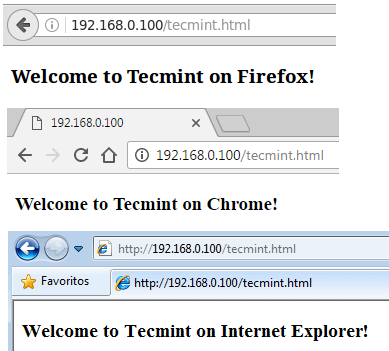
As you can see, requests for tecmint.html were redirected accordingly depending on the browser used.
In this article we have discussed how to do redirect requests based on the user’s browser. To wrap up, I’d highly recommend you take a look at the mod_rewrite cheat sheet and bookmark the redirect and remapping guide in the Apache docs for future reference.
As always, feel free to use the comment form below if you have any questions or feedback about this article. We look forward to hearing from you!
If this article helped you solve a problem, consider buying a coffee. It helps keep TecMint free, supports the authors, and keeps the project going.




Got Something to Say? Join the Discussion... Cancel reply