VOOZH about

URL: https://www.tecmint.com/terminalizer-record-your-linux-terminal-in-gif/

⇱ Terminalizer - Record Your Linux Terminal and Generate Animated GIF


Skip to content

Terminalizer is a free, open source, simple, highly customizable and cross-platform program to record your Linux terminal session and generate animated gif images or share a web player.

It comes with custom: window frames, fonts, colors, styles with CSS; supports watermark; allows you to edit frames and adjust delays before rendering. It also supports rendering of images with texts on them as opposed to capturing your screen which offers better quality.

Read Also: 8 Best Linux Desktop Screen Recording Tools

In addition, you can also configure many other settings such as the command to capture, GIF quality and repeating, cursor style, theme, letter spacing, line height, frames delays and much more.
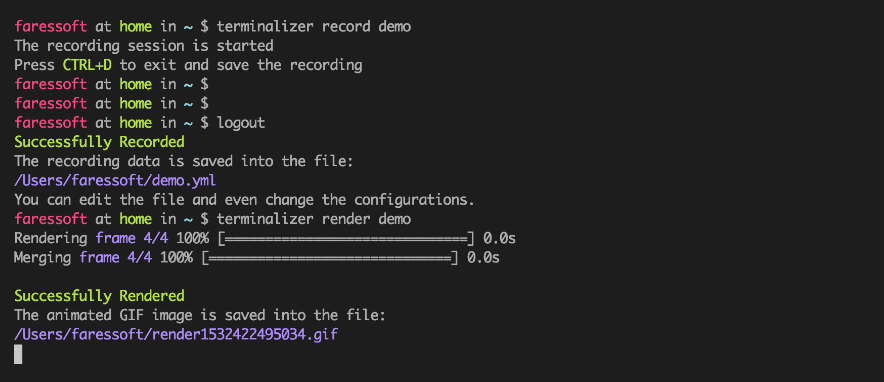
👁 Terminalizer - Record Linux Terminal and Generate Animated Gif Images
Terminalizer – Record Linux Terminal and Generate Animated Gif Images

How to Install and Use Terminalizer in Linux

To install Terminalizer, first you need to install Node.js and then install the tool globally using the following command.

# npm install -g terminalizer
OR
$ sudo npm install -g terminalizer

The installation should be very easy with Node.js v10 or lower. For newer versions, if the installation is failed, you may need to install the development tools to build the C++ add-ons.

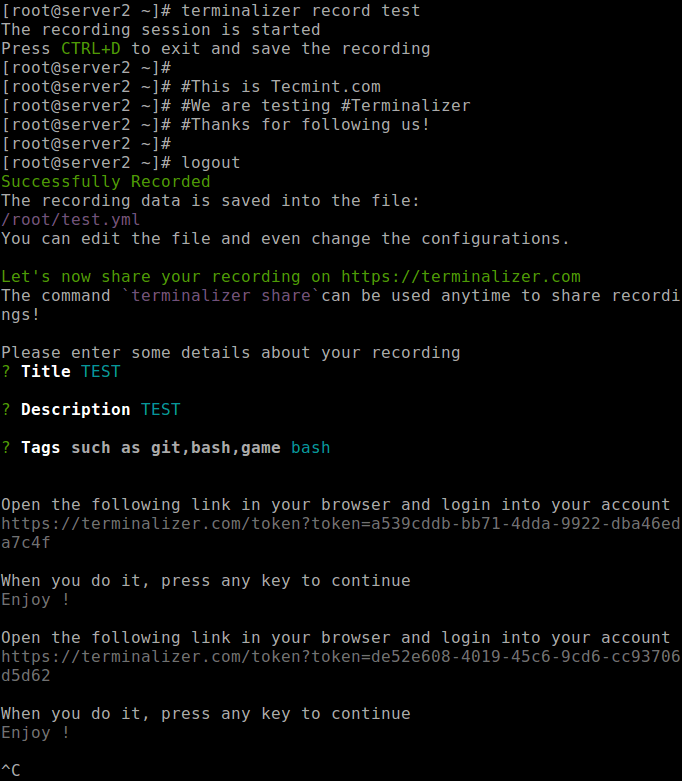
Once the installation completes, you can start recording your Linux terminal using the record command as shown.

# terminalizer record test
👁 Record Linux Terminal Session
Record Linux Terminal Session

To logout of the recording session, press CTRL+D or terminate the program using CTRL+C.

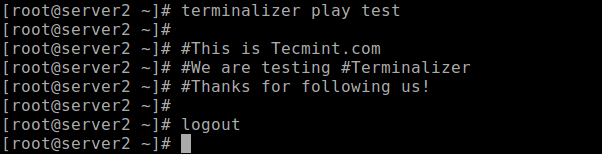
After stopping the recording, a new file called test.yml will be created in the current working directory. You can open it using any editor to edit the configurations and the recorded frames. You can replay your recording using the play command as shown.

# ls -l test.yml
# terminalizer play test
👁 Replay Recorded Linux Terminal Session
Replay Recorded Linux Terminal Session

To render your recording as an animated gif, use the render command as shown.

# terminalizer render test

Use the generate command to create/generate a web player for a recording file.

# terminalizer generate test

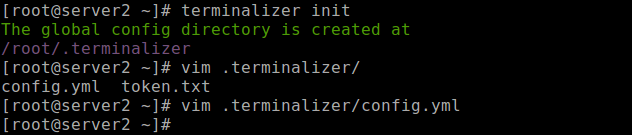
Last but not least, to create a global configuration directory, use the init command. You can also customize it using the config.yml file.

# terminalizer init
👁 Create a global config directory
Create a global config directory

To get more details about all the commands and their options, run.

# terminalizer --help

For more information, go to the Terminalizer Githug repository: https://github.com/faressoft/terminalizer.

That’s all! Terminalizer is a very useful program to record your Linux terminal session and generate animated gif images or share a web player. If you have any questions, feel free to reach us via the comment form below.

If this article helped, share it with someone on your team.
TecMint Weekly Newsletter
Get the Learn Linux 7 Days Crash Course free when you join 34,000+ Linux professionals reading every Thursday.
Check your email for a magic link to get started.
Something went wrong. Please try again.
TecMint has been free for 14 years. Help keep it that way.
Google AI Overviews and tools like ChatGPT have cut into search traffic for independent tech sites like TecMint. Running this site costs over $2,000 every month for hosting, infrastructure, and paying authors to keep the content accurate and tested.

If this article helped you solve a problem, consider buying a coffee. It helps keep TecMint free, supports the authors, and keeps the project going.
☕ Buy Me a Coffee
Aaron Kili
Aaron Kili is a Linux and F.O.S.S enthusiast, an upcoming Linux SysAdmin, web developer, and currently a content creator for TecMint who loves working with computers and strongly believes in sharing knowledge.

Each tutorial at TecMint is created by a team of experienced Linux system administrators so that it meets our high-quality standards.

11 Comments

Leave a Reply
  1. Hi,

    I’m using Fedora Core 30 x86_64… the dev repo has no terminalizer… do you have a site with rpms?

    George…

    Reply
    • @George

      Simply install Nodejs and NPM, then install it via NPM as explained in the article.

      Reply
  2. This sounds like a VERY useful tool but I’m running Fedora Core 30 x86_64 and it’s not in the repository.

    What do I do? Are rpm’s available?

    George…

    Reply
    • @George

      Please, first install Nodejs and NPM, then install it via NPM as explained in the article.

      Reply
  3. Getting following error when try to install

    Node v10.15.1
    Npm 6.4.1
    
    $sudo npm install -g terminalizer
    
    Sample Output
    /usr/local/bin/terminalizer -> /usr/local/lib/node_modules/terminalizer/bin/app.js
    
    > [email protected] install /usr/local/lib/node_modules/terminalizer/
    node_modules/node-pty-prebuilt
    > prebuild-install || node scripts/install.js
    
    prebuild-install WARN install EACCES: permission denied, access '/home/ankur/.npm'
    gyp ERR! configure error 
    gyp ERR! stack Error: EACCES: permission denied, mkdir '/usr/local/lib/node_modules/
    terminalizer/node_modules/node-pty-prebuilt/build'
    gyp ERR! System Linux 4.15.0-45-generic
    gyp ERR! command "/usr/local/bin/node" "/usr/local/lib/node_modules/npm/node_modules/node-gyp/
    bin/node-gyp.js" "rebuild" "--build_v8_with_gn=false"
    gyp ERR! cwd /usr/local/lib/node_modules/terminalizer/node_modules/node-pty-prebuilt
    gyp ERR! node -v v10.15.1
    gyp ERR! node-gyp -v v3.8.0
    gyp ERR! not ok 
    npm ERR! code ELIFECYCLE
    npm ERR! errno 1
    npm ERR! [email protected] install: `prebuild-install || node scripts/install.js`
    npm ERR! Exit status 1
    npm ERR! 
    npm ERR! Failed at the [email protected] install script.
    npm ERR! This is probably not a problem with npm. There is likely additional logging output above.
    
    npm ERR! A complete log of this run can be found in:
    npm ERR! /home/ankur/.npm/_logs/2019-02-02T05_57_42_071Z-debug.log
    
    Reply
    • @Ankur

      Which distro are you using? Ubuntu seems to have issues.

      Reply
  4. There have been tools to do this under Linux for twenty years. Reinventing the wheel yet again.

    Reply
    • Your reply is awful and worthless. Why did you not state the alternative tools if you know some? Otherwise, your reply just makes you look snide and arrogant. Why not be polite?

      Reply
  5. Really thanks for sharing this useful tool, I was looking for such tool since long time to record my Linux terminal courses and lessons in my university.

    thanks again.

    Reply
    • @Suhas

      You are most welcome, we are glad that you have finally got what you were looking for. Many thanks for writing back.

      Reply

Got Something to Say? Join the Discussion... Cancel reply

Free Course
Get a free Linux course before you go.
Subscribe to TecMint Weekly and get the Learn Linux 7 Days Crash Course free. Read by 34,000+ Linux professionals every Thursday.
Check your email for a magic link to get started.