
The PC building process isn't just about the parts you choose, it's also about how you put them together. The symptoms of such mistakes can be various, but the ones that affect performance can be sneaky. There is a right and a wrong way to go about a build, and while not every misstep can affect things like framerate, these four common mistakes can land your high-performance build firmly in middling performance territory.

10 mistakes you should not make when building a new PC for the first time
Look out for these common mistakes before you start working on your new PC
Incorrect CPU cooler installation
Even the best coolers can be made useless
CPU cooler installation is one of the simpler parts of a PC build, but can often times be the most rife for mistakes. A poor installation can result in severe thermal throttling and even overheating to the point of complete system shutdown, depending on how dire the situation is. Neither air nor liquid cooling solutions are safe from mistakes, as both have their own sets of pitfalls.
For air cooling, it mostly comes down to the mount. Failing to remember to take off the protective plastic on the cold plate before mounting is almost like a rite of passage for PC builders at this point. Thermal paste application can be a sticking point for some, but so long as you cover the IHS (integrated heat spreader) adequately, you'll be fine. Following that, making sure all mounting screws are tightened in a cross-like pattern to ensure proper distribution of pressure across the top of the CPU will ensure you have the best thermal transfer possible. For larger, tower-style coolers, having the fans blowing in opposite directions or towards the intake of your case is a recipe for a bad time. If there are two fans on your cooler, pointing them both in the same direction as your intake will give the cool air a clear path through your chassis, resulting in the best possible cooling.
Liquid coolers have all of that to worry about, plus radiator positioning. The push-pull debate about fan orientation has been debated heavily, but what isn't debatable is pump positioning. In an AIO liquid cooler, the pump is contained in the CPU block assembly. Generally speaking, you never want your pump to be the highest point in your cooling loop. Doing so means your pump has to fight gravity and the accumulation of air bubbles over time, which, at best, means your loop will emit a loud, gurgling sound, and at worst, can kill your cooler. Do your best to mount your radiator above the pump assembly. If this isn't possible, mounting it on the front with the tubes down ensures air cannot collect near the barbs of the radiator.

4 easy mistakes to make when installing a CPU cooler
Installing your CPU cooler is one of the trickiest parts of a PC build. Here are some of the most common mistakes we all make when installing them.
Using the incorrect DIMM slots
The slots you use matter
RAM is deceptively simple in terms of its installation. You align the sticks, and press them in. What is there to mess up? In terms of the hardware side, it comes down to the slots you use.
DIMM slots are numbered in a normal counting fashion, most times having the 1st slot (DIMM slot 1) being closest to the CPU, the next slot being DIMM 2, and so on. If you're new to PC building, and you're building a system that doesn't populate all the DIMM slots available, you may be tempted to just use slots 1 and 2, but this is incorrect, and can lead to poor memory performance.
DIMM slots are grouped together by channels, and using the incorrect slots can mean your memory runs in single channel mode, which is half of the bandwidth it's capable of. If you've already made this mistake, it's an incredibly easy fix. Refer to your motherboard manual for which slots to use, but generally it's in an alternating fashion. It's common that they're color-coded as well, but it's best not to rely on this, and double-check your manual.

5 things I wish I knew before spending extra money on faster RAM
Sometimes faster isn't actually faster.
Using an incorrect fan configuration
Especially if you're adding your own additional fans
Cooling can profoundly affect performance, but it's not always obvious that you're leaving potential improvements on the table. An incorrect fan configuration for your case setup can cause multiple degrees of difference in temperature, which can be enough to affect clock speeds, and in turn, real-world performance.
It largely depends on what kind of chassis you have, but in a conventional ATX-tower style case, the simplest configuration is often the best. 2 front intake fans and one rear exhaust is the tried and true method. It creates a positive pressure environment inside the case, which passively repels dust, but also ensures your components have adequate access to cool air. The fan curves are also important, and taking the time to tune the curves for all fans in your system can not only make it run cooler, but quieter as well.
If you're using a more unconventional case, it's worth looking at the manual to see what the manufacturer recommends, as they've often times designed the chassis in a very specific way and changing the path of airflow can be detrimental to cooling, even if you think it may be better. For example, my current system is a full-tower contained in a Fractal Torrent, which comes with 5 of its own fans, all positioned as intake. If I were to try and use the case conventionally, it may actually hurt performance, as they've designed this case with this specific configuration in mind.
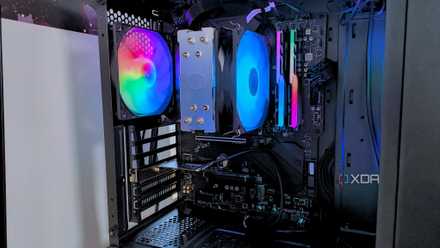
4 tweaks that dropped my PC temps by 20 degrees Fahrenheit
Small changes add up quickly.
Forgetting to turn XMP/EXPO on
We've all done it
Installing the sticks in the correct slots is the first easy pitfall to avoid when it comes to memory, but the second is contained within the BIOS. Failing to turn on XMP (Intel) or EXPO (AMD) means your memory probably isn't running at its rated speed and timings. This results in a real, tangible performance hit on not just productivity apps, but games as well, especially those that are CPU-bound. If your memory bandwidth listed in Task Manager is much lower than what's on the box, then you know something is wrong with your memory profile.

5 mistakes you definitely don't want to make when installing a new CPU
Whatever you do, just don't make these mistakes with a new CPU
Not all pitfalls affect the experience
Obviously, there are some mistakes that can be made during the PC-building process that can result in a system that's completely non-functional, but past that, the potential mistakes that can affect performance are sneaky, and easy to miss. The extra attention to detail in CPU cooler mounting, fan orientation, and RAM installation might not make or break your build, but it can profoundly affect the experience.