
There's nothing better than a shiny new PC, but once it's all up and running, it does beg the question: what do you do with your old one? You could try to recoup some costs by parting it out and trying your luck on the used market, but this can be time-consuming and sometimes not even worth your while. If you're into retro games, turning your old rig into a streaming and emulation machine can be the perfect way to give it a new lease on life, and here are 4 ways you can do just that.

2024 in emulation: Huge progress in multiple platforms, with one major setback
A brief recap of the developments and hinderances to the emulation industry in 2024
4 Put existing parts into a smaller case
Depending on their size, you can get away with a smaller enclosure
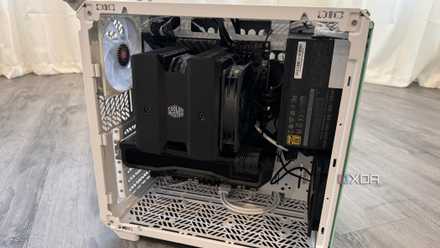
Desktop PC cases can stick out a bit like a sore thumb in a living room setup. If you're willing to doll out a bit of cash for your retro box, putting the parts into a smaller enclosure could be a great way to make the PC blend into the room nicely. If you're stuck with ATX parts this may be a bit of a challenge, but mATX or ITX motherboards are perfect for small HTPC cases. Since older titles don't put a full load on your components, cooling won't be as big of an issue here either, so you can get away with a more low-profile setup.
Don't forget these 5 things before building a small form factor PC
An SFF PC can be an exciting project, but keep these things in mind before you start building one
3 Use RetroArch
An excellent frontend for retro gaming
While you could install different dedicated emulators and navigate to them manually, this can be difficult if you want a controller-only experience. Digging out a keyboard and mouse on the couch can be bothersome, so having a proper graphical user interface to navigate using a controller is a must. RetroArch is just one option for this, but it packs in so many useful features, it’s a must-have for anyone looking to turn their old PC into a retro box.
It runs games inside plugins they call cores, which can be installed for many different types of consoles. This makes switching between titles on different consoles extremely simple, and instead of having to exit a standalone emulator and swap to a different one, you can just select the game you want to play. RetroArch is very customizable, so to get up and running quickly, I’d recommend checking out their docs page.

How I turned my Raspberry Pi into a retro-gaming beast using RetroArch
Name a better duo than old-school games and a small-sized Raspberry Pi.
2 Use Steam's Big Picture mode
With a few tweaks, you can make it great for retro gaming
Steam's Big Picture mode is perfect for couch gaming, and if Steam is your primary platform, it's pretty much the only choice. On its own, however, it's not really suited for storing and playing retro games. With the help of Steam ROM Manager, you can parse through your library of ROMs, set which emulator they should run on, and voilà! The perfect solution for integrating your library of retro games in bulk into Steam.

6 "Overwhelming Positive" Steam games that can run on a potato
Games can be good without being graphically demanding.
1 Turn it into a streaming box using Moonlight
If your old PC is struggling a bit
Some old consoles are quite difficult to emulate, even on more modern hardware. This isn't the case for most consoles running strictly 2D games, but when it comes to some of the newer consoles that came out at the turn of the century, your old rig might have a hard time running them at consistent framerates. An easy, almost turnkey solution is to stream games from beefier hardware over the network using Moonlight and Sunshine. Moonlight is an open-source game streaming client, and Sunshine is its host application that you'd be running on your newer PC. So long as your network can handle the load, this is a great option for those slightly more performance-intensive titles found on the PS3 or Xbox 360.

4 reasons every PC gamer should try Moonlight client for remote gaming
A great way to play all your games remotely.
A great reason to keep old hardware around
Turning your old PC into a retro gaming box is an excellent way to keep it from being e-waste. While there are better, more compact solutions that are designed specifically for this purpose, why spend the extra cash when you have a capable machine right in front of you? Even if it can't handle the games natively, turning it into a streaming box means it could be useful for more than just playing your favorite classics.