
I've written about how I've adjusted and how I interact with the software to improve its performance with each journey. Generally speaking, Android Auto is viewed by many as a way to view everything on the phone while on the move, effectively stretching the phone across the dashboard or infotainment screen. It's just like using a smartphone with widgets and apps galore. It's great to start with, but it can quickly feel overwhelming.
The issue is convenience. The vehicle will more than likely have a large display if it's a modern model. Once the phone connects, Android Auto will display all supported apps, maps, and media, as well as messages and everything else from your digital life. Navigating Android Auto could be problematic, too. Voice assistants are okay at best, but switching between apps on the move can prove more annoying than not. Notifications are distracting, and everything just felt cluttered.
But the problem lies with me and how I treated Android Auto. I viewed Android Auto on the big screen as an extension of my phone, which was the wrong approach.
Android Auto is better with a simpler task
Keep it small, but useful
It's not about whether you should have Android Auto running, but about how best to utilize the available feature set. The best part of Android Auto is the ability to enhance your driving experience through providing navigation and easier media management, things that can be outright terrible with native features from the automobile manufacturer. My Maxus T90 EV has a basic infotainment system, which is actually brilliant since it keeps out of the way and lets me get on with the drive using Android Auto.
Android Auto (and CarPlay) should help you get somewhere safely by letting you listen to something, make an occasional call, and respond to truly necessary messages. Interestingly, the phone and the car are complete opposites. The phone is designed from the ground up to demand attention. Notifications almost call out to you, as do incoming calls. A vehicle is almost built around constraints, both on what you should do and what's physically possible. It's vital this difference is maintained.
When using your smartphone while lounging on a couch, you'll likely scroll for minutes in an app, switch between a few apps, check a notification, and reply to a few messages. This all changes when behind the wheel of a vehicle. The less my truck acts like my phone, the better it becomes as a driving companion, which is precisely what I want to use Android Auto for. Navigation is the centerpiece of Google's Android feature, providing easy access to up-to-date maps with live traffic and alerts.
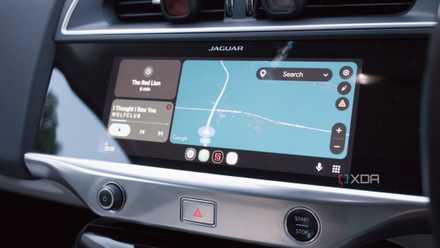
Android Auto is better when you disable most of your smartphone features
Keep your eyes on the road.
Sticking to audio as much as possible
Music streaming, podcasts, and the occasional call
Audio is a must-have in my drives. It drowns out much of the background noise from tires and the road, but it's also great for maintaining focus, achieving something while glued to the road ahead, and helping time pass a little faster. I've found myself browsing too much on the phone. Reddit was my weakness. I'd spend a good half an hour just sitting there while I waited for something or needed to pass the time. I've since changed all that to focus on completing smaller tasks.
That also came to my media consumption. Netflix and other streaming services are notoriously bad for providing too much choice, making it difficult to choose something quickly before the takeaway dinner gets cold, but the same could be said for selecting a specific playlist, album, or podcast in the car. The best approach was to keep it simple while the wheels spun. I now ensure the media I want is prepped and good to go before setting off. Android Auto simply acts as a controller.
And that's where it becomes truly powerful. Once configured before a drive, I now have updated navigation that can reroute when busy, show warnings for obstacles and other road conditions, and provide an accurate ETA so I can let loved ones know when we're arriving. Music plays in the background without requiring any additional input, and generally, the less I interact with the system while driving, the more I appreciate just how capable and feature-rich it all is.

4 Android Auto settings I changed to make it feel truly mine
Night Mode, setting a custom wallpaper, shifting media controls, and more.
Killing notifications was the biggest win
Maintaining maximum focus on the road ahead
Voice commands are useful, but they only go so far. Google has attempted to make a move here by adding Gemini support for Android Auto, but even that has its own problems. And that's the worst kind of experience for driving, since even the smallest deviation from what's expected from a specific device or software will be terribly distracting. I find technologies like this work better when you're using precisely what you need for the journey, rather than what you believe you want from a connected handset.
Deals on Car Accessories: Save on Mounts, Chargers
Notifications are the worst for driving since with a phone you'd almost expect to receive one, especially when in contact with someone or a response comes through. With a car, the mind is focused on everything other than the phone and communication with the outside world. Thankfully, they can be tamed, and Google makes it easy with Android Auto. Messages can be muted entirely, except for contacts deemed important. The same can be done for calls, which is what I did. Only my spouse and immediate family come through. Everyone else has to wait until I park up.
I still love using Android Auto
And that's why I also find Android Auto particularly interesting, especially with updates and changes. I'm quite content with how things are laid out, and everything works. I understand things need to change, the UI will undoubtedly continue to be refined, but so long as more measures are in place to keep the phone from being too distracting, I'm fairly happy to continue using it as the base for all of my journey operations. Because while it will be refreshed, Android Auto doesn't have a notification problem — our phones do.