
Congratulations! You've decided to enter the wonderful world of PC building with hopes of crafting your very own battlestation. As a first-time builder, if you have your eyes on a small form factor (SFF) build, that's commendable, but I would advise you to reconsider. SFF PCs have a unique set of challenges that aren't worth tackling on your first rodeo. The advantages of the compact size, unique aesthetic, and portability are real, but for the PC newbie, the downsides outweigh them easily.
SFF PCs require some experience with PC building before you can confidently take on the challenge. Concerns around the smaller volume, constrained airflow, and limited upgradability can make a compact build a needless undertaking for the average builder. Plus, you might also have to spend more compared to a regular-sized build and sacrifice expansion ports and features at the same time.
Don't forget these 5 things before building a small form factor PC
An SFF PC can be an exciting project, but keep these things in mind before you start building one
5 Less room to build
"I need some space"
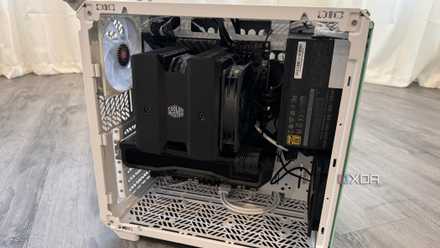
When you don't already have a few builds under your belt, it can be especially challenging working with an SFF case. These cases have a minimal footprint, but the internal volume is equally minimal. Whether it's time to secure the motherboard inside the case, or route the necessary cables to the right spots, you're likely to sigh audibly on each instance. People with larger hands will have even more of a struggle when assembling an SFF PC.
Another challenge that comes with the limited space is that you need to do an even better job of cable management. It's not the best part of the build process anyway, plus if you're building your first PC, you're unlikely to be excellent at it. You'll probably end up with a mess of cables that looks that much more hideous in a mini-ITX case. Lastly, SFF cases are a lot more unforgiving about build mistakes than, say, a micro-ATX or ATX case. If you need to remove a component for some reason, it'll be a real pain inside an SFF case.
The build process is just the first stage where you'll struggle due to the limited room. Even when you need to disassemble the PC down the line, you'll think of excuses not to do it since the task won't be a cakewalk by any means. SFF builds have their place, but only for people who have built regular PCs before, and now want to do something different.

How to pick a PC case: 5 things to consider while buying a chassis for your build
The PC case is the first and the most important thing to consider while building a PC. Here's how to pick a PC case for your next build.
4 Less airflow and possibly more noise
Not what you want to worry about as a first-timer
Building an SFF PC is a balancing act — you can't always cram the latest and beefiest components inside a tiny case. Sure, some compact cases allow triple-slot GPUs, but their vertical footprint is usually much closer to that of a regular case. Most mini-ITX cases are limited to dual-slot GPUs and smaller motherboards. Even if you manage to squeeze larger components inside your SFF case, you could potentially run into cooling challenges due to the restricted airflow and limited slots to mount additional fans.
So, you might be forced to use a less powerful GPU than the one you initially wanted. Similarly, a high-end CPU requiring a 360mm AIO cooler might not be the right fit for every compact build. Another potential downside is a noisier PC due to smaller fans running at high RPMs. The higher the temps inside your PC, the more fans you'll need, and the faster they will need to run, contributing to the decibel levels. You can use a high-end AIO and a blower-style GPU to limit the number of fans, but that will again limit your choice of components.

3 ways to improve your PC's airflow without buying more fans
Not a fan of more fans? Here's how to make the most of the ones you have.
3 Non-standard components can be more expensive
Compact motherboards and PSUs don't come cheap
In a seemingly paradoxical twist, the smaller your PC, the costlier it is to build (generally). This is because you can't always use standard components when it comes to motherboards, power supplies, and potentially, CPU coolers and fans. SFF builds need SFX or SFX-L power supplies that are often more expensive than regular ATX power supplies. These PSUs are usually built with stinger tolerances due to their use in smaller cases, so the manufacturing cost, and consequently, the price for the customer, is higher.
Mini-ITX motherboards are also priced higher than micro-ATX and ATX motherboards since they usually pack the same components on a smaller surface. There are far fewer mini-ITX models on the market, so the lower competition means higher prices. Even SFF cases, especially the ones with the slimmest form factors, cost much more than a budget ATX case. Then, you need to factor in low-profile CPU coolers and fans, which also need to be of a higher quality than regular options due to the higher performance requirements in smaller cases.
Noctua NH-L12 Ghost S1 Edition
The Noctua NH-L12 Ghost S1 Edition is a fan-favorite low-profile CPU cooler for SFF builds.
MSI MPG B650I Edge WiFi
- Brand
- MSI
- Memory Slots
- 2
- Memory Type
- DDR5-6600+
- Form Factor
- Mini-ITX
- CPU Support
- Ryzen 7000+
- Chipset
- B650
The MSI MPG B650I Edge WiFi is a mini-ITX motherboard packing many of the features you expect on larger motherboards.

3 reasons high-end motherboards aren’t always worth the extra cost
Get the most from your motherboard
2 You'll sacrifice ports and features
Corners need to be cut
Even though mini-ITX motherboards are functionally the same as their ATX and micro-ATX brethren, the smaller footprint means you'll definitely sacrifice some or the other port or feature. It might be the RAM slots, M.2 ports, PCIe slots, or ARGB headers. It might not seem a big deal to lose an M.2 port, but for those building an SFF workstation, it can be a deal-breaker. Similarly, using multiple GPUs or RGB components isn't easy on such compact builds.
Even the number of USB ports, SATA ports, and other expansion slots is limited on mini-ITX motherboards. These are things that even the average PC user will find lacking, let alone an enthusiast who needs as many ports and features as possible. The fewer fan headers will also mean you can't install as many fans as you want, and will have to use fan hubs, or manage with fewer fans. Lastly, you'll probably have to make do with a single M.2 slot, which might mean a system with a smaller storage or an expensive high-capacity drive.

5 features on motherboards that are just gimmicks
If you're considering upgrading your motherboard, be wary of misleading marketing gimmicks prevalent in the PC hardware market.
1 Limited upgradability and scope to experiment
Future upgrades and aesthetic possibilities might suffer
I already mentioned how an SFF PC limits your ability to install high-end components (in most cases). What it also limits are future upgrades, whether that's due to physical compatibility or an absence of enough vacant ports. So, an upgrade from, say, a budget dual-slot GPU to a high-end triple-slot card will become more challenging than it needs to be. Similarly, moving from 32GB to 64GB of RAM, or from a single-drive setup to one with two NVMe drives, can become time-consuming challenges instead of seamless upgrades.
Another aspect of committing to an SFF PC is that you don't have the typical freedom that you have with a regular-sized build in terms of esthetics. You have room for fewer components, which means fewer opportunities to add RGB to your cable extensions, fans, SSD heatsinks, and GPU stand. You also don't have the flexibility of multiple GPU orientations — horizontal, vertical, upright — in an SFF case, which you might have in a standard case.
SFF cases can't have dual chambers and can't fit elaborate custom watercooling loops, limiting the kind of design elements you can impart to your PC. SFF PCs have their own minimalist designs, but as a first-time builder, you should be aware of what you're getting into.

7 tips to give your PC an instant makeover
Looks matter just as much as performance
The time for your SFF PC will come
If you're really into the minimalist aesthetic of SFF PCs, you'll find your way to one sooner rather than later. For your first build, however, I would recommend sticking to full-sized parts, such as ATX motherboards and regular-sized cases. You will be able to learn the ropes better, and apply the learnings to your future SFF build. Plus, only after building a few regular-sized PCs will you be able to fully appreciate the benefits of SFF PCs.