
For many people running home servers, the connectivity of your storage is often an afterthought, especially if it's a smaller system or you haven't begun the spiral of expansion yet. If the motherboard has enough SATA ports, that's good enough, and for a lot of cases, that's the end of the conversation.
But once your server does start expanding beyond what your motherboard can handle, an HBA card might become more obvious. And I don't just mean in terms of the number of ports on your board, because you can hit performance limits long before you end up filling every available port. This is where an HBA card can come in clutch. It's not always a magic "make drives go faster" button, but it can be the difference between storage that just functions and storage that stays smooth as butter under load.

Those empty PCIe slots in your server aren't useless, here's 4 things you can fill them with
You bought the entire server. Might as well put its PCIe slots to good use
HBAs improve consistency of overall performance
Takes away the overhead imposed by the motherboard
When most people think of performance boosts with storage, they'll think about significant jumps in sequential throughput, but that's rarely what makes a server feel fast. HBAs won't instantly turn your stack of HDDs into SSDs, either, but it will allow your system to better handle multiple drives doing things at the same time.
On-board SATA controllers, especially those found on consumer gear, will tend to behave just fine with a few drives, but if you add too many and run operations on them concurrently, you can have a lot of issues getting consistent performance out of them. In a real-world scenario, this could result in Jellyfin streams buffering, file transfers stalling, or backups being delayed. An HBA means that background work doesn't have to ruin everything else your server is doing.
A proper HBA will sort out the I/O queue across lots of devices without becoming the bottleneck itself, and generally does a good job at staying responsive under heavy load.

SATA SSDs are the smartest budget upgrade nobody talks about anymore
They are fast enough for most workloads, and more affordable at high capacities
Expansion and drive management is easier
HBAs give you a bit more freedom
Even if you don’t care about performance right now, expansion alone is a compelling reason to stop relying on motherboard SATA. Consumer boards tend to cap out at a few ports, and once you’re out, your upgrade options get weird quickly. People start mixing random add-in SATA cards or questionable port multipliers. It can work in terms of providing connectivity and access to those drives, but it's more of a stopgap than a real solution.
An HBA gives you a clean expansion path that's intentional. Instead of scavenging ports, you add one card that’s designed for connecting eight, sixteen, or more drives, usually through tidy mini-SAS cabling. You end up with fewer cables, fewer points of failure, and a setup that looks and behaves more like a real storage appliance than a pile of compromises. And when things are clean and tidy, you can diagnose and swap out drives a lot easier than fishing through a nest of wires. Even if you don't have a dedicated backplane, an HBA turns your "server that has storage" into a "storage server."
5 PCIe devices that are perfect for your home lab
Those spare PCIe slots aren't going to fill themselves
There are situations where an HBA doesn't make sense
If your setup doesn't demand it, don't bother
There’s a reason not everyone needs one. If your server has two to four SATA drives and its main job is basic file storage, a motherboard controller is unlikely to be what’s holding you back. In those setups, the drives themselves dominate performance, and the bottlenecks you notice are more likely to be network speed, slow clients, or simply the realities of spinning disks.
If your storage is mostly NVMe, an HBA also isn’t the answer. NVMe drives live on PCIe and are handled differently, so you don’t solve an NVMe problem with a SAS/SATA controller. Likewise, if your case and cabling are already a mess, adding an HBA can feel like adding complexity unless you’re also willing to tidy up the rest of the build.
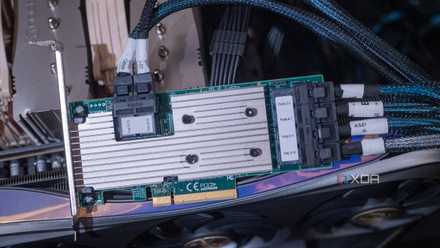
If you don't already have one, an HBA card is a great addition to your home server
A reliable way to add more storage
How to tell if you're leaving performance on the table
If everything feels fine until the load gets turned up
If file sharing slows down dramatically during a parity check, if streaming stutters during a scrub, if VMs get sluggish when backups kick off, or if you’ve started accumulating enough drives that you’re planning around SATA port availability, you’re the target audience for an HBA. The second signal is intent. If you know you’re building toward a bigger array, you’re better off planning for it now than patching it later with a pile of mismatched add-on cards. Storage expansion is one of the few areas where “buy once, cry once” actually has a practical meaning in home labs.

5 things you can do to turn your NAS into a SAN
Transform your everyday NAS setup into a full-on Storage Area Network with these five tips
HBAs are not restricted to enterprise setups
An HBA card won't give you automatic sequential gains, but if you're running out of ports and routinely run into bottlenecks because of your motherboard's SATA controller, it's a very practical add to your home server. They look a bit scary and can have a tiny bit of a learning curve, but it allows your server's storage to behave like it should.