
Rarely would you find a NAS failing unexpectedly. You won’t see it refusing to boot one morning or literally crashing into flames out of nowhere. Instead, it slowly dies down in ways that are easy to ignore over time. You will only notice things like file transfers taking a little longer than usual, and streams buffering maybe once before you start the stream. These don’t seem like too big a problem to be dealt with immediately and are easily forgettable.
That’s exactly why NAS bottlenecks are dangerous. They gradually build up, and you notice them only when there is a significant problem with the device. By the time you realize it, the problem balloons so much that it takes a considerable amount of time to fix it.
The network problem
When one gigabit becomes the ceiling
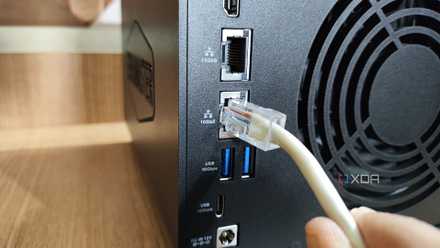
1GbE connections have long felt adequate for a lot of home users, especially those on a basic NAS setup. They are just enough to handle file transfers at the maximum speeds modern hard drives support, manage backups, and stream media over the network without breaking a sweat. But they become a bottleneck the moment you try simultaneous transfers to multiple client devices.
I started with just one PC that backed up its data to the NAS, but soon it grew to include my family’s devices, including their phones and laptops, and all the services that they use. Then came the cloud sync that runs in the background. More recently came my ever-growing media library, which is largely in 4K now. Even upgrading to a 2.5GbE port would ease this bottleneck significantly without burning a hole in your pocket.
5 reasons you should use link aggregation on your NAS
Both home users and businesses can benefit from it
The CPU bottlenecks
Low average usage doesn’t tell the full story
Every once in a while, when I check the NAS dashboard, the CPU usage is well under 20%. That’s plenty of headroom for the NAS to handle heavier tasks, right? That’s partially true, because most NAS workloads aren’t constant at all times. Sometimes they come in bursts and don’t reflect in averages.
For instance, when your file is transferring, encryption kicks in. Thumbnails are generated as you browse files, containers spin up and down, and media servers occasionally scan libraries in the background. These tasks are manageable by the CPU individually, but not when they all come together. That is the very reason you should plan how long you intend to use the NAS while making the purchase, so that you get the correct CPU from the get-go.

7 reasons why drive speed doesn't matter for NAS
Other factors impact NAS performance more than drive speed
The RAM starvation
When everything works, but just not like it used to
If there is one bottleneck that sneaks up without warning, it’s RAM. A NAS with insufficient memory won’t necessarily be a deal-breaker, but you’ll notice some peculiarities. You’ll notice the boot is slow, while services and apps take their own sweet time to open up, and containers feel heavier.
You will notice hiccups here and there across the system when an app freezes for a moment or when opening a file feels sluggish. But you’ll often ignore it as a one-off occurrence because nothing major broke down, and everything seems to be working fine. It’s more like a domino effect, where things start to fall one by one instead of all at once. The worst part about memory insufficiency is that you adapt to the slow workflow by the time you identify the RAM issue.

10 things to know before reusing old PC parts to build a NAS
Building a NAS is an awesome use of old PC parts but there are a few things to keep in mind
Storage layout choices
Early convenience becomes a long-term headache
The way you lay out your storage when you first set up the NAS doesn’t seem too relevant at the time. Mixing drive sizes can save you some cash, while a single big volume makes things simpler. All of it works for a while, but starts to create a problematic scenario as things expand and workloads overlap.
What used to feel smooth becomes erratic, not because the disks are slow, but because everything is literally fighting for the same input-output path. And if the bottleneck is structural, it is particularly painful because you can’t fix it with a setting or upgrade. The solution requires big migrations and sometimes full rebuilds, and they don’t come easy.

ZFS is great for storage, but it can be a maintenance nightmare
ZFS isn't natively supported on Linux.
The backup and sync drag
When protection becomes the heaviest workload
Backup tasks are supposed to run in the background, away from your site, and particularly during off-peak hours, so as not to affect the normal functioning of your NAS. But modern devices often blur those lines, and even our workflows require continuous sync and real-time cloud duplication for the best kind of data parity.
Since these tasks are often labeled as background, we rarely associate them with performance issues. They don’t have that big of an impact either — you only notice slowness while browsing files or some tasks taking longer than usual. The backup isn’t a problem per se — it is something you must have on your system — but you must fine-tune how aggressively your NAS backs up your data and at what interval. Remember, protection shouldn’t come at the cost of performance.
NAS upgrades for peace of mind
Facing performance issues with your NAS, especially one that you have been using for a very long time, is inevitable. The right thing to do here is to identify your long-term needs from day one and plan your NAS setup accordingly. If you know your entire family is going to use the NAS, or you have a large team to manage, going for a higher-capacity LAN port would make the setup more usable for everyone. Even if you need a ton of hardware upgrades, make sure they won’t come at a heavy premium — even small upgrades can make a huge difference in your everyday life.
QNAP TS-464
- Brand
- QNAP
- CPU
- Intel Celeron N5095
- Memory
- 8GB DDR4 (max. 8GB)
- Drive Bays
- 4
- Expansion
- 2x M.2 PCIe 3.0, 1x PCIe Gen 3 x2
- Ports
- 2x 2.5 GbE, 2x USB-A 3.2 Gen 2, 2x USB-A 2.0, 1x HDMI
QNAP's TS-464 is an impressive four-bay NAS with a striking design, powerful internal specs, and IR support for a remote control. If you're looking for the best-equipped NAS for running Plex (or other media solutions) without spending a small fortune, this is the NAS for you.