
The beauty of home servers is that you can arm them with practically any hardware and still get a reliable rig for your self-hosting, data-hoarding, and experimentation needs. During my early years as a tinkerer, I focused all my attention on the CPU cores, RAM modules, NICs, and other “key specs,” while ignoring other components. Graphics cards are a fine example, as I’ve only recently tapped into the productivity-enhancing hack called local LLMs.
However, it wasn’t until early 2025 that I began replacing bulky hard drives in my home servers with their quicker SSD counterparts. And now that the SSD prices have hit the red zone, I really wish I’d grabbed a few more of these blazing-fast drives for my workstation nodes.
I stopped backing up everything and picked an efficient storage strategy
There's no point in backing up non-essential data
SSDs are somewhat infamous in the data-hoarding community
And for good reason
If you venture into NAS forums, you’ll probably hear several folks voice their disgust for SSDs. The thing is, they’re justified in their hatred, as these blazing-fast drives are terrible for long-term storage. By their very design, SSDs store data as electrical charges in NAND flash cells. That’s not really a problem on a normal home server, where you’ll probably keep things operational 24/7. But if you end up leaving your workstation (and by extension, the SSDs) unplugged for a couple of months, their NAND cells can lose charge, and in turn, your precious files.
As if that’s not enough, SSDs have a higher cost per TB ratio. I had a single server as a fledgling home labber, and I used it for everything from experimentation to storing random files. Buying expensive SSDs didn’t make any sense when I could just get higher-capacity HDDs at cheaper rates. For hardcore tinkerers with massive volumes of data, you’ll have a hard time finding a 10TB+ SSD, let alone grabbing one that’s actually somewhat affordable. That said, SSDs have a lot of utility in typical home labs…
But SSDs are ideal for housing server distros
I had to invest in high-endurance drives, though
Besides their extra noise, hard drives tend to be pretty sluggish, all while siphoning a lot of extra power. For server nodes that I plan to run 24/7, the high idle wattages of hard drives would spike my energy bills. Plus, using them as the boot drives for TrueNAS, Proxmox, Debian, and other server-centric platforms (yeah, I use the king of vanilla distros for my workstations) causes certain operations to feel too slow.
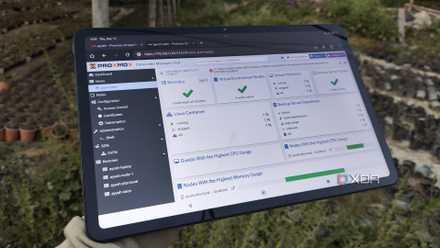
SSDs are a solid alternative, as they not only sip a few watts of energy during the idle state, but also make the overall experience more responsive. I tend to use high-endurance drives for my Proxmox boot drives, just so I don’t have to worry about the degradation caused by certain high-availability services and constant logs. But if you’ve got normal consumer-tier SSDs, you can reduce their wear rate by disabling pve-ha-lrm.service and pve-ha-crm.service, provided you’re on a non-clustered node. I also recommend moving the logs to your RAM, and only writing them to the disks at specific intervals if you want an extra countermeasure against premature wear.
I thought Proxmox would overcomplicate my home lab, but it did the opposite
Proxmox became my home lab.
I also use them as virtual disks for most containers and VMs
But anything involving large media files remains on HDDs
Finally, replacing bulky and noisy HDDs in my server nodes with SSDs made virtual guests, specifically VMs, more responsive. And I don’t just mean the boot times, either. I often work on Visual Studio (the IDE, not the code editor) projects and PowerShell scripting tasks inside a Proxmox-powered dev VM, and moving its virtual disk to an SSD pool made everything feel snappier instantly.
The same holds true for other virtual machines with GUI elements, especially those involving nested virtualization. I’ve also got a couple of templates for disposable machines that I use for experimenting with DevOps projects, and I often deploy them on pools built with old SSDs I’ve salvaged from other devices. While I wouldn’t trust them with essential data, these fast (yet worn) relics from dead systems serve my tinkering needs well, especially since I pair them with virtual guests that aren’t critical for my everyday tasks.
Now, I won’t say that SSDs have replaced their large and slow counterparts for all my server tasks. My primary NAS still consists of HDD pools, with an SSD serving as the boot drive, while another houses some iSCSI shares I use for quirky experiments. Likewise, all the images, ROMs, documents, TV shows, and movies I’ve accumulated over the years are meant for my hard drives. Although I store most virtual guests on SSDs, their snapshots remain safe inside full-fledged hard drives on my Proxmox Backup Server instances.
Crucial T700 NVMe SSD
- Storage capacity
- 1TB, 2TB, 4TB
- Hardware Interface
- PCIe 5.0 (x4) NVMe 2.0
- Brand
- Crucial
- Transfer rate
- Up to 11,700MB/s (read), 9,500MB/s (write)
- TBW
- 600 (1TB), 1200 (2TB), 2400 (4TB)
- DRAM
- 1GB (1TB), 2GB (2TB), 4GB (4TB) LPDDR4