
My home media setup has been a work in progress for years now. I like something, discover something better, break things, and, occasionally, switch back.
And for the longest time, the Nvidia Shield was the backbone of that setup. Between AI upscaling, long-term software support, and generally excellent hardware, everything just worked. That is, until it broke down by itself. Well, not quite as straightforward as that.
Apps stopped working properly, playback often jerked, and the box needed a restart. After half a decade of reliable use, the hardware was finally giving up the ghost. In a bid to get a similar set-up, I thought the solution was to recreate the old Nvidia Shield TV setup using newer hardware. Except that similar hardware is hard, if not impossible, to find. Yes, I tried the Raspberry Pi and Jellyfin/Kodi approach, but it wasn't for me. That approach just doesn't work anymore because you're too accustomed to the conveniences of a commercial streamer.
So, I changed directions and took a different approach. I didn't just replace the Shield altogether; I replaced the idea of a central box. Instead, I started using my television's built-in Google TV operating system to watch everything. All external dependencies, such as streaming, are handled by a separate system. This is predictably a simpler system, but you might be wondering if and how this matches up with my Nvidia Shield setup. Well, here's how.
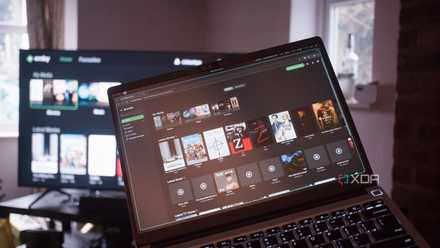
I switched to Emby, and it's way better than Plex and Jellyfin... in some ways
Plex to Jellyfin to Emby.
The Shield did it all, and that approach has its problems
Letting the TV focus on just playback simplifies everything
Part of the reason I stuck to the Nvidia Shield was that it worked like an all-in-one box. Yes, it was a streamer. But it could also run a Plex server. In fact, it was one, if not the only, streaming box to have a dedicated Plex server app. It also had sufficient USB ports to make this feasible. The Shield used to handle everything from streaming apps, to local media, media server duties, and more. It was powerful, but in some ways, it was also a bottleneck. When something went wrong, and it did in this case, it brought down the entire setup.
Now, having segregated the two, the TV works precisely as what it is — a playback surface for media. The built-in Google TV interface handles all the major apps I use. Be it the usuals, like Netflix, Prime Video, and YouTube, they all open quickly, get regular updates, and don't require me to worry about system storage, background services, and more. There's no extra hardware in the chain either. And yes, it supports Plex streaming too.
There's a significant quality-of-life improvement that's hard to ignore, because everything is essentially controlled with a single remote. No input switching is needed. But you might be wondering, how is this a Shield replacement? That's where the other aspect comes in.
I moved the heavy lifting to a dedicated system
Proper separation makes the setup faster and more reliable
Well, that's where the other change comes in and where the real work happens. Effectively, instead of running all my media services on the streaming box itself, I've moved them all to a dedicated device. In my case, that's a NAS running Plex and Jellyfin as a backup. The system also runs Navidrome to stream my local music library and other eBook services. None of which were possible when my system was just a streaming box, paired with a USB hard drive and Plex.
All the grunt work has been handed over to this system. That means, everything from file storage to organization, metadata management, remote access, and transcoding happens on the NAS. Unsurprisingly, moving to a system designed from the ground up for the task has benefits. Meanwhile, the TV just needs to play the file, which requires little processing power. Having that separation between the two tasks has fixed practically every issue I used to face.

NAS over Nvidia Shield
Trivia challenge
Think you know why a NAS might outshine a Shield for home media — put your tech knowledge to the test!
What does the acronym 'Shield' stand for in the Nvidia Shield TV product line?
What does NAS stand for in the context of home networking and storage?
Which media server software is most commonly installed on a NAS to replicate the streaming experience of a device like the Nvidia Shield?
Which feature of the Nvidia Shield TV Pro made it uniquely powerful as a Plex server compared to typical NAS boxes?
Which company makes the Synology NAS line, one of the most popular consumer NAS brands often compared when replacing a Shield setup?
What is one major advantage a NAS has over the Nvidia Shield when it comes to long-term data storage?
When users say they no longer need a Shield after switching to a NAS, which streaming client do they typically still use on their TV to play media served by the NAS?
Why might a NAS consume less power over time compared to leaving an Nvidia Shield running 24/7 as a Plex server?
Your Score
Thanks for playing!
My library is consistent since it's managed in an integrated system. It's also easier to manage because I have a proper interface, Synology's Disk Station Manager, to be specific, to manage those files. And if needed, I can connect to it over LAN and manage files. I can log in from my phone and access the same files, download them, or even stream them. Basically, separating the viewing from the control center opens up a world of possibilities that didn't exist before.
There's also an uplift in performance. All the heavy lifting happens on much more modern hardware with more RAM to boot. Moreover, while the Shield could certainly handle many of these functions, it wasn't exactly designed for them. A NAS, however, is built from the ground up to serve files over a network, stream media, and make storage easy to access. Add to that the additional peace of mind and reliability that comes from a dual-drive array, and you can see why it just makes so much more sense than any other solution I'd have tried out.
The Shield was never the problem. My setup was
I'm not going to say that the Shield was a bad choice all along. Within certain constraints, the Shield pulled off way more than any streaming box around back when it launched, and it remains unmatched even today. It was also much more powerful than NAS boxes of that vintage.
However, while my motivation to switch tools might have been faltering playback, the fact of the matter is that segregating the playback to a TV, and the processing to a dedicated NAS has helped me create a more robust and reliable system. Everything is easier to manage. It works consistently, and that matters more than anything else when all you want to do is kick back, relax, and watch a movie.
Synology DS925+
- CPU
- AMD Ryzen V1500B
- Memory
- 4 GB DDR4 ECC SODIMM
- Drive Bays
- 4 x HDD, 2 x NVMe
- Expansion
- 1 x USB Type C
- Ports
- 2 x 2.5GbE RJ-45; 2 x USB-A 3.2 Gen 1
- OS
- DSM 7.2
The Synology DS925 Plus is a compact and efficient 4 bay NAS built for home users and small businesses. It delivers excellent performance, runs DSM 7.2 with a polished and feature rich interface, offers great mobile app support, and works well as a media server. However, it is limited by its strict drive compatibility requirements and forced automatic updates on newer models.