
For most of us, CPU overclocking has become irrelevant, thanks to modern chips running close to their potential right out of the factory. That said, enthusiasts will always want to extract every ounce of performance from their CPU, which requires motherboards that are up to the task. Although most people only look at the number of VRM phases and the heatsink size on a motherboard to judge its overclocking pedigree, there's far more to the VRM if you're into serious overclocking.
Advanced users should not only look at the phase design but also at the type and quality of the VRM and the amperage of the phases, among other things. If you're investing the big bucks in a high-end motherboard, you might as well do it right.

5 motherboard features that sound premium but are usually pointless
You don't need to spend a lot to get a high-quality motherboard.
5 Dedicated VRM phases for the CPU
It pays to look closer
The VRM phase count that you see on a motherboard's product page is the total number of phases available for the entire system. Generally, the more phases on a motherboard, the lesser the voltage fluctuation, and the higher the TDP the board can handle without thermal throttling. Typically, if a motherboard lists "10+2+1" phases, the first number corresponds to the dedicated phases for the CPU, the second for the memory, and the third for the chipset and other integrated components of the motherboard.
The first number is what you should pay the most attention to if you're after a board built for advanced overclocking. Generally, motherboards with 14 dedicated CPU phases are enough to overclock high-end CPUs like the Ryzen 9 9950X or Core i9-14900K. Only if you aim to push your chip to the extreme will you need 16 or 18 CPU phases for the CPU alone. You should also look at motherboard reviews from creators like Buildzoid to confirm that a manufacturer isn't marketing double the actual number of phases on the board.
Once you cross the $300 mark, almost every motherboard will be able to handle your extreme overclocking needs, provided the number of phases is complemented by high-quality internals and high current handling capacity (which I'll talk about below).
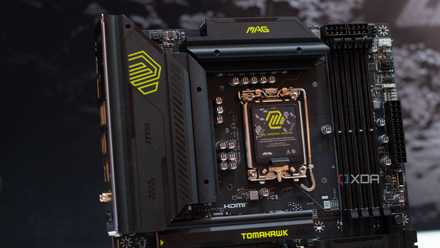
MSI MPG Z890 Carbon WiFi
The MSI MPG Z890 Carbon WiFi is a premium motherboard for Intel's latest CPUs. It sports a 23-phase VRM solution, 5Gbps LAN, Thunderbolt 4, multiple high-speed USB ports, and all the internal headers you'd need for a powerful PC.
3 reasons I won’t spend more than $300 on a motherboard ever again
Don't blow your PC budget on your motherboard. It's almost never worth it and here's why.
4 Capacitor, choke, and transistor quality
Quality matters more than quantity
The VRM or voltage regulator module mainly consists of transistors, chokes, and capacitors that fulfill separate roles in the power delivery pipeline. The higher the quality of these individual components, the more efficient the motherboard is for overclocking. Japanese capacitors, super ferrite chokes (SFCs), and high-quality MOSFETs (transistors) are preferred on high-end motherboards.
While you might not find these details on the product page or even the manufacturer's website, checking the reviews for the specific model you're planning to buy will usually answer all your questions. You should avoid buying motherboards that haven't been well-reviewed yet, especially when investing $350–$500.

Confused by motherboard specs? Here are the most important ones you should know
Choosing a motherboard isn't just about CPU compatibility. There are a lot more aspects you should care about
3 PWM controller quality
Bringing it all together
The VRM is responsible for converting the power coming from the PSU to the lower voltages required by the CPU and other components of the PC. The PWM controller within the VRM further adjusts the current and voltage supplied to the MOSFETs, chokes, and capacitors. Higher-end PWM controllers enable finer voltage control and more stable power delivery, ensuring the other high-end components on the VRM are performing at their maximum.
Again, finding out the details about the PWM controller is almost impossible from the motherboard specs. Consulting motherboard reviews is one of the only reliable sources for judging the overall quality of the motherboard. Generally, if a manufacturer uses higher-end parts in the other areas of the VRM, you can expect the same for the PWM controller.
10 reasons skimping on your motherboard is a false economy
It's always tempting to save money by skipping the flagship motherboards but you might be losing out on features by doing so.
2 DrMOS phases vs. discrete FETs
Get with the times
You might have noticed "DrMOS" power stages on the motherboard product page. Well, DrMOS or Driver-MOSFET is a type of power stage solution that integrates the MOSFETs and the driver into a single module. Every VRM phase traditionally had two discrete transistors (high/low) and a driver IC, which were then integrated into a single package on more modern and high-end motherboards.
The benefits of this integrated solution are higher power efficiency, more control over the design, lower temperatures, and a longer lifespan. Similar to high-end controllers and VRM components, DrMOS phases ensure higher stability and more efficient power delivery for your CPU. Most high-end motherboards will list DrMOS phases on the spec sheet or the product page, but some models might still be using discrete FETs (Field-Effect Transistors), so look carefully before making your choice.

4 overlooked components that can make or break your PC build
High-end CPUs and GPUs need high-quality components to match
1 Phase amperage
Might be more important than the phase count
The phase amperage, or the amount of current the individual phases can handle, is perhaps the most important specification for extreme overclockers. Besides the number of VRM phases on the motherboard, you'll also find the Amperage listed for the different categories of phases. On top-of-the-line motherboards, the dedicated CPU phases are rated for 110A, while the memory and chipset phases are rated for 90A or 80A.
Enthusiasts who're aiming to beat their previous overclocking records will often opt for slightly fewer phases with a higher current-handling capacity. Although both factors are important for stable and efficient power delivery, the amperage can often trump the phase count. If the additional phases on your motherboard can't handle the amount of current required for your high-end CPU, what's the point?
Asus TUF Gaming X870-Plus WiFi
The Asus TUF Gaming X870-Plus WiFi is a premium motherboard that provides you with a 19-phase VRM solution, 80A power stages, enlarged heatsinks, and all other high-end features that most enthusiasts need.

6 “gaming” features on motherboards that are just marketing
These gaming features on your gaming motherboard might not be doing anything at all
Know your VRM
If you're serious about CPU overclocking, no matter the amount of performance boost at stake, then knowing the ins and outs of the motherboard VRM design is indispensable. Having 16 or 18 VRM phases is good, but what's also important is how much current each phase can handle, and the quality of the chokes, transistors, capacitors, and the PWM controller. Everything comes together to ensure the kind of high-end power delivery demanded by today's flagship CPUs.