
-
The latest and greatest
Raspberry Pi 5
- CPU
- Arm Cortex-A76 (quad-core, 2.4GHz)
- Memory
- Up to 8GB LPDDR4X SDRAM
- Operating System
- Raspberry Pi OS (official)
- Ports
- 2× USB 3.0, 2× USB 2.0, Ethernet, 2x micro HDMI, 2× 4-lane MIPI transceivers, PCIe Gen 2.0 interface, USB-C, 40-pin GPIO header
- GPU
- VideoCore VII
- Starting Price
- $60
The Raspberry Pi 5 is the first model to switch to a chiplet architecture, with many of the I/O functions offloaded to a secondary chip. It features a new quad-core Arm Cortex-A76 CPU, a PC-style power button, and a real-time clock for the first time.
Pros & Cons- Real-time clock chip for the first time
- Powerful quad-core Arm Cortex-A76 CPU
- Two MIPI interfaces for cameras or displays
- 4GB or 8GB RAM variants
- No more composite video or audio jack
- Runs hot without cooling
-
Raspberry Pi 4
- Storage
- MicroSD card slot
- CPU
- Arm Cortex-a72 (quad-core, 1.8GHz)
- Memory
- 1GB, 2GB, 4GB, or 8GB of LPDDR4
- Operating System
- Raspberry Pi (Official)
- Ports
- 2x USB-A 3.0, 2x USB-A 2.0, 40-pin GPIO, 2x micro-HDMI, 2-lane MIPI DSI display port, 2-lane MIPI CSI camera port, 4-pole stereo audio and composite port, microSD card slot, USB-C (for 5V power), Gigabit Ethernet
- GPU
- VideoCore VI
The Raspberry Pi 4 might not be as powerful as the newest model, but the quad-core Arm Cortex-A72 is no slouch and is able to power a wide variety of DIY computing projects. It's also the last model with a four-pole audio jack, so that's worth bearing in mind if you need analog audio output.
Pros & Cons- Quad-core Arm Cortex-A72 processor
- Still has a 3.5mm audio port
- Models with 2GB, 4GB or 8GB RAM
- Similar price to the newer model
- 4GB and 8GB versions are hard to find
The Raspberry Pi has invigorated the DIY computing scene since its introduction in 2012, becoming a household name in the years to follow. Now on the fifth-generation of the single-board computer with the largest community of makers, tinkerers, and coders around it, you can use one for a huge variety of DIY computing projects. Even with many competitors bringing out more powerful (and more expensive) alternatives, the Raspberry Pi is still essentially competing with itself. The previous model, the Raspberry Pi 4, is still a capable board, so we wondered if it's worth upgrading to the Raspberry Pi 5 if you had one.

A beginner's guide to programming the Raspberry Pi
Unsure about what you should do after buying your first Raspberry Pi? Check out our in-depth tutorial to familiarize yourself with the SBC.
Price, specs, & availability
The Raspberry Pi 5 was released on October 23, 2023. Two models are on the market: a base model with 4GB of memory at $60 MSRP, and an 8GB model at $80 MSRP. Since the launch, it has suffered from supply shortages, but this seems to be subsiding as most of the major retailers have them in stock currently.
The previous model, the Raspberry Pi 4 Model B, was released in June 2019. Three variants were released to begin with: 1GB of memory for $35, 2GB of memory for $45, and 4GB of memory for $55. In May 2020, a variant with 8GB of memory was released for $75. The 2GB model received a price cut to $35 in February 2020, due to falling RAM prices.
-
Raspberry Pi 5 Raspberry Pi 4 CPU Arm Cortex-A76 (quad-core, 2.4GHz) Arm Cortex-a72 (quad-core, 1.8GHz) Memory Up to 8GB LPDDR4X SDRAM 1GB, 2GB, 4GB, or 8GB of LPDDR4 Operating System Raspberry Pi OS (official) Raspberry Pi (Official) Ports 2× USB 3.0, 2× USB 2.0, Ethernet, 2x micro HDMI, 2× 4-lane MIPI transceivers, PCIe Gen 2.0 interface, USB-C, 40-pin GPIO header 2x USB-A 3.0, 2x USB-A 2.0, 40-pin GPIO, 2x micro-HDMI, 2-lane MIPI DSI display port, 2-lane MIPI CSI camera port, 4-pole stereo audio and composite port, microSD card slot, USB-C (for 5V power), Gigabit Ethernet GPU VideoCore VII VideoCore VI Starting Price $60 From $45 Wireless Connectivity Bluetooth 5.0, Dual-band 802.11ac Wi-Fi 2.4/5GHz Wi-Fi, Bluetooth 5.0
Design and port layout
You win some, you lose some.
👁 A lifestyle image of the Raspberry Pie 5
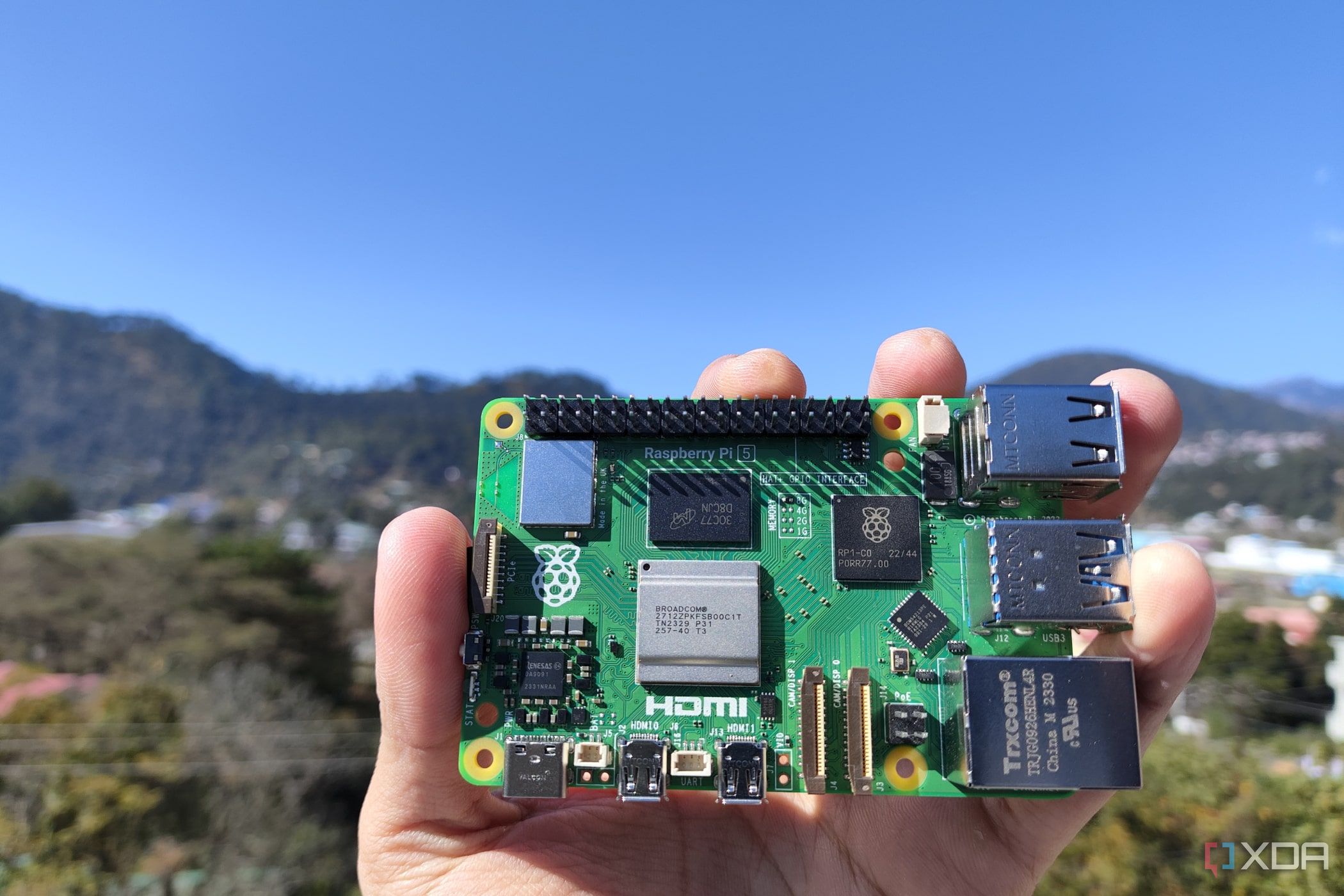
Without having both the Raspberry Pi 5 and Raspberry Pi 4 side-by-side, you might be wondering what's different between the two green, credit card-sized SBCs. The overall design hasn't changed much, with the SoC and other chips near the center of the board and I/O ports around all four edges. The positions of the Ethernet and USB ports have been swapped on the Raspberry Pi 5, giving space for the SD card slot to go on the opposite side and a new PCIe Gen 2.0 interface takes its former place. This means you can use NVMe SSDs for the first time, but you will need a specialized HAT for your Pi 5 to use one.
Some other minor but welcome changes include a four-pin fan connector for variable speed control, a dedicated power button, and a Real Time Clock (RTC). The new quad-core Arm Cortex-A76 CPU is twice as fast as the quad-core A72 used in the Raspberry Pi 4. The GPU was upgraded to a VideoCore VII that can now drive two 4K60 displays at once (the 4 was limited to two at 4K30 or one 4K60), and the LPDDR4X memory is running at 4,267MT/s, over twice the 2,000MT/s of the Raspberry Pi 4. The Raspberry Pi 5 is also the first model to have a chiplet architecture, with the fastest I/O interfaces (SDRAM, HDMI, PCIe) on the Arm chip, and a second I/O chip with all the other I/O functions. That makes it much closer to the motherboard inside your desktop PC, and modernizes the Pi board design.
The Raspberry Pi 5 does remove the four-pole 3.5mm composite video and audio jack. Perhaps that's unsurprising as the headphone jack has been removed from pretty much everything else, but it was a nice feature to have. The space it used to occupy now has a couple of bi-directional MIPI interfaces, which can be used for either a display or a camera. With AI workloads becoming more common, having the ability to run two cameras for image identification is great.
The Raspberry Pi 5 is hands-down the winner here, with a significant uplift in power across every metric. It's sad to see the 3.5mm jack disappear, but it was replaced by some future-forward ports.
Winner: Raspberry Pi 5

Someone made a 65-inch retro gaming magic mirror with a Raspberry Pi, and it looks amazing
This retro gaming project may hurt your neck to play, but it's still an amazing feat.
Performance
All-round improvements👁 Build parts for the Waveshare PCIe to M.2 HAT for the Raspberry Pi 5
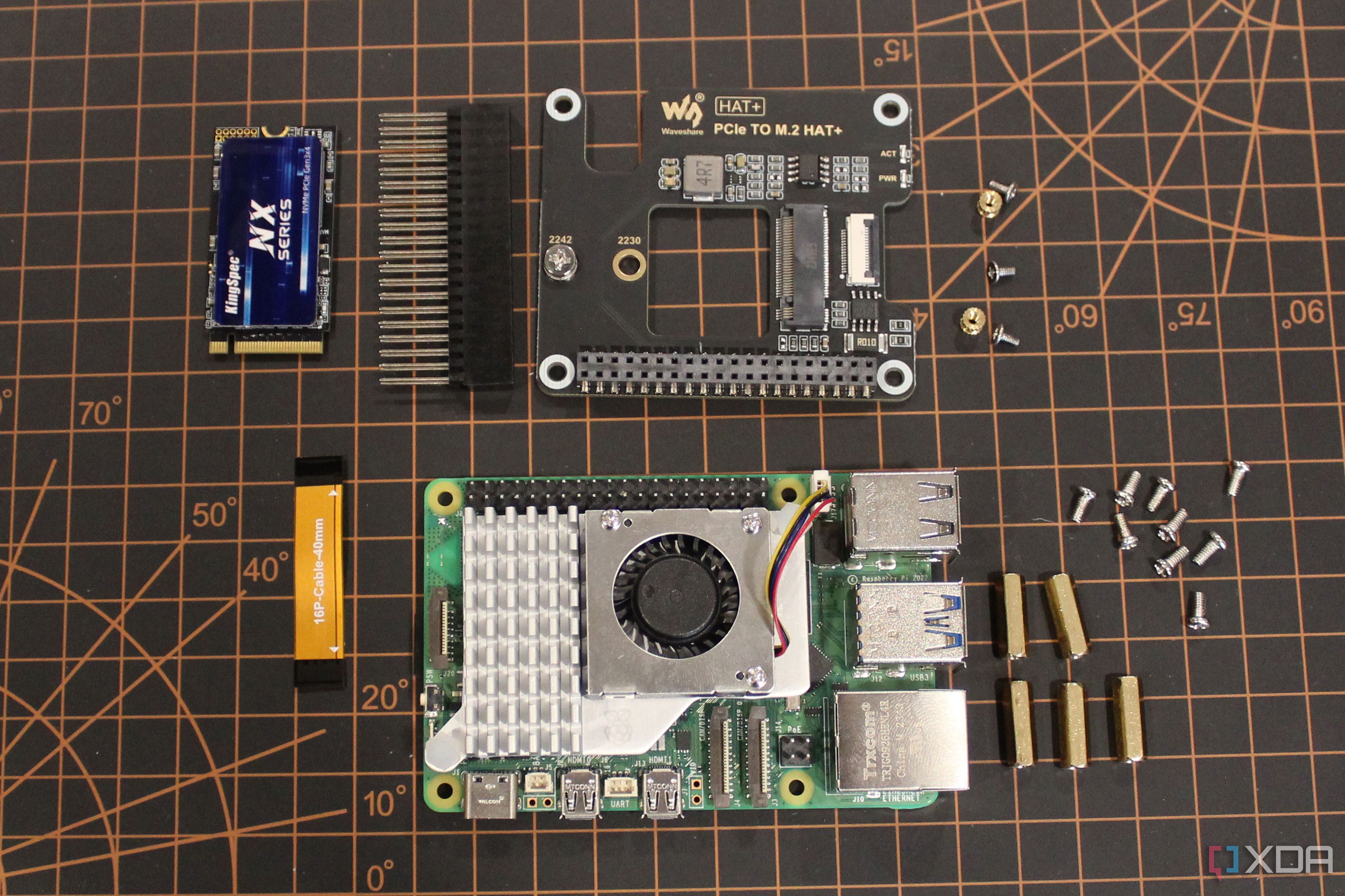
The quad-core Broadcom BCM2712 Arm Cortex-A76 CPU in the Raspberry Pi 5 is clocked at 2.4GHz, a significant boost over the quad-core Cortex-A72 that runs at 1.5GHz on the Raspberry Pi 4. The GPU is also significantly more powerful, running at 800MHz and supporting the OpenGL ES 3.1 and Vulkan 1.2 standards. And the RAM options are improved, with the 1GB and 2GB variants being dropped from the range, and the clock speed significantly increasing by over double between generations. You can also use speedy NVMe storage with the newest model, if you get the correct HAT to do so.
We've extensively tested the Raspberry Pi 5, and it performed admirably at desktop tasks, even at 4K resolution. It was significantly more responsive when turning the resolution down to 1080p, to the point where our reviewer found it almost as responsive as his laptop. The quad-core Arm Cortex-A76 was snappy, as evidenced by these fairly impressive benchmarks. That's about the power of a modern midrange Android phone, for a significantly lower cost.
|
Raspberry Pi 5 (with Active Cooler) |
Raspberry Pi 5 (without Active Cooler) |
|
|---|---|---|
|
Geekbench 6.2 (single-core) |
751 |
695 |
|
Geekbench 6.2 (multi-core) |
1539 |
1514 |
|
glmark2 |
2013 |
1995 |
|
Speedometer |
61.5 |
61.2 |
The Raspberry Pi 5 outclasses the Raspberry Pi 4 with its more powerful components. The only downside is that the improved performance comes with thermal issues to keep managed, so we recommend getting an active cooling solution for the Pi 5.
Winner: Raspberry Pi 5

This Raspberry Pi hacking tool is what the Flipper One could have been
This awesome project was built to give ethical hackers a tool that's both affordable and open-source.
Operating system
Both are supported by the same projects
The Raspberry Pi 5 and Raspberry Pi 4 can both run the same software and operating systems, including Android, Windows, and multiple flavors of Linux. Which is the best operating system for your Raspberry Pi SBC? Well, that depends on what you're going to do with it, and how much tinkering you want to go through to get it installed.
Windows 11 for ARM, for example, has an involved installation process on the Raspberry Pi 5, as you need to install Windows on USB storage, and the Raspberry Pi 5 firmware on an SD card, so you can boot. After all of that tinkering, the Ethernet port on the Raspberry Pi won't be working as it doesn't have Windows drivers. Other things that won't work include the PWM fan controller, the PCIe Express controller, and the thing most people buy a Pi for, the GPIO pins.
While most distros have been ported to work with the Raspberry Pi 5, there are a few exceptions. NixOS won't support the Raspberry Pi 5 until U-Boot and Linux get upstream support for the Pi 5. And OpenVaultMedia also doesn't support the newest Pi. If you need either of these operating systems, stick with the Raspberry Pi 4.
Technically, this category is a tie as both Raspberry Pi models are supported by the same selection of operating systems and potential projects. Whichever OS you pick, it'll be significantly speedier on the Raspberry Pi 5, however, giving it the edge in responsiveness.
Winner: Tie
Channel your inner DIY god by building these 10 complex Raspberry Pi projects
Here are ten complex Raspberry Pi projects to train your tinkering muscles
Is the Raspberry Pi 5 worth the upgrade over the Raspberry Pi 4?
The Raspberry Pi 5 is once again the gold standard that all other single-board computers will be measured against. The SBC that started the category has grown yet again, with a stated doubling of speed over the prior device. That's no small feat, and it's only $5 more. The new board has multiple improvements, including faster Wi-Fi, better Bluetooth, better video output, and the ability to use NVMe storage for the first time. The only potential downside is that it requires active cooling to tame the SoC's thermals, but that's the tradeoff for having more power to play with.
Raspberry Pi 5
- CPU
- Arm Cortex-A76 (quad-core, 2.4GHz)
- Memory
- Up to 8GB LPDDR4X SDRAM
- Operating System
- Raspberry Pi OS (official)
- Ports
- 2× USB 3.0, 2× USB 2.0, Ethernet, 2x micro HDMI, 2× 4-lane MIPI transceivers, PCIe Gen 2.0 interface, USB-C, 40-pin GPIO header
- GPU
- VideoCore VII
- Starting Price
- $60
The Raspberry Pi 5 is the first model to switch to a chiplet architecture, with many of the I/O functions offloaded to a secondary chip. It features a new quad-core Arm Cortex-A76 CPU, a PC-style power button, and a real-time clock for the first time.
That said, the Raspberry Pi 4 is still a capable single-board computer, and if you can find it at lower than retail pricing, it's still worth the pickup. Remember the Raspberry Pi 5 doesn't have a 3.5mm analog audio output, so if you need that for your specific use case, then the prior version is the one to get. Or maybe you have a large-scale project that you designed for the Raspberry Pi 4 and don't want to worry about compatibility issues with the new model. Other than that, the Raspberry Pi 5 is the one to look for (if you can find one in stock).
Raspberry Pi 4
- Storage
- MicroSD card slot
- CPU
- Arm Cortex-a72 (quad-core, 1.8GHz)
- Memory
- 1GB, 2GB, 4GB, or 8GB of LPDDR4
- Operating System
- Raspberry Pi (Official)
- Ports
- 2x USB-A 3.0, 2x USB-A 2.0, 40-pin GPIO, 2x micro-HDMI, 2-lane MIPI DSI display port, 2-lane MIPI CSI camera port, 4-pole stereo audio and composite port, microSD card slot, USB-C (for 5V power), Gigabit Ethernet
- GPU
- VideoCore VI
The Raspberry Pi 4 might not be as powerful as the newest model, but the quad-core Arm Cortex-A72 is no slouch and is able to power a wide variety of DIY computing projects. It's also the last model with a four-pole audio jack, so that's worth bearing in mind if you need analog audio output.