
Summary
- The Raspberry Pi 5 was a big leap forward for the series, but things can get even better with the next model.
- With features like 2.5G Ethernet, hardware encoding, and more RAM, a Raspberry Pi 6 could cater to power-users and versatile projects.
- Adding more USB Type-C ports and an M.2 port could enhance connectivity options, and make the Raspberry Pi 6 an amazing SBC.
The first iteration of the Raspberry Pi was released way back in 2012, and every mainline RPi board since then has featured better hardware than its predecessor(s). The all-powerful Raspberry Pi 5 was no exception to this trend, as the device made several worthwhile additions to the classic Raspberry Pi formula.
Judging by past data, the Raspberry Pi tends to release a mainline entry every 2–4 years, meaning a Raspberry Pi 6 won't be making the rounds anytime soon. As someone who has spent months designing all sorts of projects with the current flagship RPi board, I have to admit that the SBC has its fair share of drawbacks. But if the Raspberry Pi 6 manages to bring these eight features to the table, it might just become the best SBC to grace the DIY project landscape.
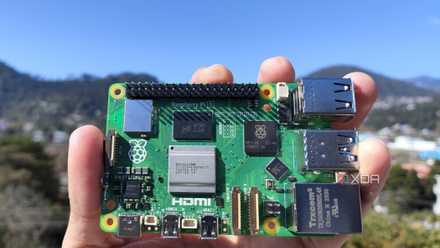
Raspberry Pi 5 review: The holy grail of DIY projects got even better (and rarer)
The Raspberry Pi 5 is one of the most powerful consumer-grade SBCs out there. Sadly, its limited stock means you'll have a hard time finding one.
8 Better Windows support
Hopefully, the Snapdragon X Elite hype will make the WoR project more popular
After years of stagnation, the Windows on Arm community has seen a huge revival over the last few months, largely in part due to the upcoming Snapdragon Elite X laptops. While I doubt the corporation would ever release an ARM version for the Raspberry Pi boards, I sure hope the hype around Windows on Arm brings more traction to the WoR project.
After all, the Raspberry Pi 5, despite all its faults, is fully capable of running light tasks on Windows 11. Sure, there are a ton of driver issues when attempting to run WoR, but the overall performance is really impressive on the latest member of the Raspberry Pi family. Assuming that WoR becomes more ironed out and that the successor to the RPi 5 is armed with an even more powerful processor, the Raspberry Pi 6 has the potential to become the first SBC capable of running Windows 11 (or whichever Windows version is popular at the time) without running into any technical bugs or performance hiccups.
7 A built-in NPU
It's borderline essential for AI projects
If you've ventured into the SBC market recently, you may have noticed that many Raspberry Pi competitors are starting to feature inbuilt Neural Processing Units (NPUs). In fact, some of these, like the Orange Pi 5 Pro can easily hit 6TOPS on their own. In contrast, the Raspberry Pi needs the assistance of a dedicated AI Kit, meaning you'll need to spend another $70 just to integrate better AI processing capabilities into the SBC.
When I previously ran some LLMs on the Raspberry Pi 5, the SBC barely managed to run the simpler models, let alone those with large parameter sizes. A built-in NPU would also be quite useful for non-generative AI tasks, like image recognition in automation-related projects. Plus, I wouldn't need to spend even more than the base model of the Raspberry Pi 5 on another peripheral.
6 2.5G Ethernet
For projects that rely on high-speed data transfer
Following the release of the Raspberry Pi 3 B+, both the Raspberry 4 and 5 have featured 1G Ethernet. Although that’s not a deal-breaker for most users, there are a handful of projects that can benefit from a faster Ethernet connection.
For instance, a Raspberry Pi-flavored NAS may not be able to hold a candle to the premium NAS enclosures available on the market, but it can perform a lot better without the 1G Ethernet cap on current RPi boards. The same thing holds for a media server built using a Raspberry Pi. And speaking of transmitting videos using a media server…

How to turn your Raspberry Pi into a media server
With just a few tweaks, a Raspberry Pi can be added to your home theater setup as an all-in-one media server
5 Hardware encoding
The lack of this capability was my biggest issue with the Raspberry Pi
Having already ranted a lot about the lack of hardware encoding in the Raspberry Pi 5, it’s easily my most-desired feature in the successor to the device. I’ll admit that the software-based encoding has come a long way since the Raspberry Pi 4, but the fact that the RPi 5 drops frames now and then when processing 1080p60fps video on YouTube is quite the buzzkill.
Ideally, I’d love the Raspberry Pi 6 to include support for hardware-based VP9 and H.264 encoding. That way, I can finally fulfill my dream of running transcoding workloads on a Raspberry Pi-powered media server.
4 PCIe interface featuring the newer standards
And more support for external GPUs, please!
With the PCIe socket being one of the most hotly-anticipated additions to the RPi lineup, the Raspberry Pi 5 became a must-buy for anyone looking to pair high-speed peripherals like AI kits and SSDs to the SBC. Unfortunately, the PCIe Gen 2 x1 interface on the latest and greatest Raspberry Pi is crippled with slow bandwidth and limited data transfer speeds. Switching to the newer, high-speed PCIe interfaces is one useful way to alleviate the bottlenecks. This may very well be wishful thinking on my part, but I really hope the Raspberry Pi Foundation upgrades the PCIe slot to the Gen 5.0 standard. With some talented folks managing to connect an external GPU to the SBC using this interface, the sky's the limit with a faster PCIe socket.
While we're on the subject, I'd also love to see more support for external GPUs in the Raspberry Pi 6. Currently, using a discrete graphics card on the RPi5 requires a considerable amount of time and effort to set everything up. Factor in the lack of compatibility with newer GPUs and the limited capacity of the PCIe Gen 2 x1 slot, there's plenty of room for improvement.
3 More RAM
A 16GB model with faster clock frequencies would be perfect for power-users
When the newest iteration of our favorite SBC hit the shelves last year, only 4GB and 8GB RAM variants made the rounds. While the Raspberry Pi Foundation eventually released a 2GB variant, the maximum memory size has remained unchanged since the Raspberry Pi 4.
Assuming the Raspberry Pi 6 has a costlier price tag for the most premium model, I sure hope we get to see more memory on the device. After all, there are plenty of projects, including retro-gaming machines, RPi-powered Windows PCs, and running LLMs on the SBC, that can benefit from larger and faster RAM modules.
2 USB Type-C ports
And an AUX connector as a side dish
Leaving my hatred for the finicky micro-HDMI port aside, it’d be great if the Raspberry Pi 6 were to pack more USB Type-C ports besides the one used for charging the device. Even if the SBC doesn’t feature Thunderbolt support for these ports (and let’s be honest, it definitely won’t), the inclusion of more Type-C sockets will allow high-speed peripherals like portable SSDs to run at their full potential.
Not to mention, it would also let us Raspberry Pi fans connect the SBC to the highly versatile USB Type-C hubs and docking stations. Plus, I’d really appreciate it if the Raspberry Pi Foundation brought back the audio jack. The lack of a dedicated audio port means I’ll either have to deal with the terrible speakers on my monitor or occupy one of the four USB Type-A ports with a USB-to-AUX adapter.
1 M.2 port
PCIe connector was great, but a dedicated M.2 port would be even better
While the PCIe socket on the Raspberry Pi 5 can be used to add several peripherals to the SBC, most RPi owners use it to pair an NVMe SSD with the device. Sadly, you can’t directly insert these SSDs into the PCIe socket, making an expensive NVMe-to-PCIe HAT a mandatory purchase for those who want a faster alternative to the microSD cards.
Meanwhile, competitors like Orange Pi 5 and Odroid H3 have already started shipping with M.2 ports, allowing you to directly plug your favorite NVMe drive into the device without blowing more money on a HAT. As such, it’s about time the Raspberry Pi Foundation began shipping their devices with an M.2 socket.
What do you want to see in the Raspberry Pi 6?
That’s everything on my Raspberry Pi 6 wishlist. Earlier, I’d planned to include better availability and affordable prices in the list, but clearly, that’s just wishful thinking. Judging by past trends, I wouldn't be surprised if the Raspberry Pi Foundation bumped the price of the high-end RPi 6 to $100. And I shudder at the thought of scalpers causing even more mayhem the first couple of months after the RPi 6's release.
Besides lower pricing, a superior processor is the last item on my Raspberry Pi 6. But if past data is anything to go by, the next mainline RPi board will definitely be equipped with a better CPU. That said, I hope that by the time the Raspberry Pi 6 finishes its development cycle, its CPU won't become outdated by the market standards, because that's more-or-less what happened with its predecessor's ARM Cortex A76 chip.

5 devices you can connect to the PCIe slot on the Raspberry Pi 5
The PCIe interface lets you add some cool and wacky peripherals to your Raspberry Pi 5