
It's no secret that I love E Ink, both for reading and for note-taking. I'd love to use it everywhere, but E Ink monitors are sadly expensive and only designed by a few small companies. I've also discovered that I love self-hosting services on Proxmox, which I didn't expect. The one thing I don't like about self-hosting is the noticeable jump in my electricity bill, but E Ink can help with that.
See, unlike a normal monitor, which needs constant power to generate the image you see, E Ink only needs power when the image on screen changes. That makes it perfect for static dashboards, slow-moving RSS feeds, weather monitoring, and seeing what's going on with your servers. I've found I don't need split-second monitoring at all, and a dashboard that updates every 15 seconds or even every minute is fine.
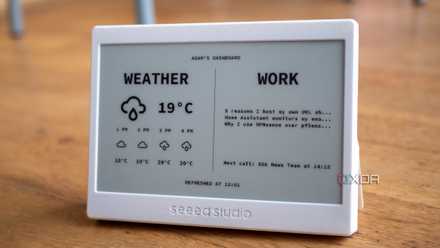
I started using an E Ink display as my second monitor
It may not be a "true" second monitor, but it looks great on my desk and helps keep me on track better than an actual second monitor would.
E Ink is perfect for monitoring use
Your home server probably uses enough power already
The thing I've realized from years of self-hosting is that you don't need to see everything that is going on with your server, every second of the day. You just don't. The enterprise environment doesn't do this either. Sure, they log (almost) everything, but monitoring is automated with clearly defined parameters, so only critical issues are flagged for action.
I like knowing which of my services are running, the temperatures of the CPU and drives on my servers, a representation of storage space, and CPU usage, but that's about all I need to see at a glance. CPU and storage usage show me if there's a runaway service that needs addressing; temperatures show hardware issues. While my services are set to auto-restart, that doesn't always happen, so it's definitely something I need to manage.
E Ink is perfect for this use. It's low-power, easy to read at a glance, and cuts down on distractions which is a big issue for me. For everything else, I have notifications set up that go to a private Discord server where I'm the only member. I could have used email, Telegram, or any other tool I have API access to, but I'm always on Discord, so it made more sense.
Onyx Boox Palma
- Resolution
- 1080p
- Storage
- 128GB
The Boox Palma is a phone-shaped e-reader with a beautiful e-ink screen and running on Android OS, meaning it can run most Android apps.
- Screen Size
- 6.1-inch
- Processor
- Not specified
- RAM
- 6GB
- Audio
- Speakers
- Connections
- WiFi
- Battery
- Not specified
- OS
- Android 11
- Weight
- 170g
- Connectivity
- Wi-Fi
- IP rating
- None
- Camera
- 16MP
- Color
- White, Black
- Ports
- USB-C
- Buttons
- Physical buttons
And it can show more than your server stats
As you can see, my monitoring device isn't a static display. It's an E Ink e-reader running Android, the Durobo Krono. Designed as an e-reader and AI-powered note taker, it's got plenty of processing power to run multiple Android apps at once. I've got Home Assistant on it, and can control my smart home with a few taps, and the E Ink screen means I don't have to worry about the battery running down, as I would with my OLED phone. And I can control my home lab from here, thanks to the Proxmox integrations.
Sure, I wouldn't use it to watch YouTube, but for dashboards and simple text-based apps, it's a perfect match. I was sad when Logitech discontinued the Harmony universal remote line, and this is the next best thing, or possibly slightly better, because I never did like the millions of buttons on those remotes.

5 reasons E Ink displays might be the next big thing for PC setups
Your eye health is important and E Ink might just be the answer.
It's not always plug-and-play
Get ready for some hard work
Unless you're repurposing an old Kindle, many E Ink displays come as kits, often powered by ESP32 boards. That's good news if you're the type that always needs a new project to work on, because while there are tons of tutorials out there, it will take some time and effort to follow along, and you'll need to do your own troubleshooting if things go wrong.
But the investment is worth it, because you'll have a custom monitoring solution for your server that you built. The easiest way I've found to get data across starts with Home Assistant. There's an add-on called Puppet that will take a screenshot of one of your HA dashboards at an interval you choose, and then you link the panel to pull that screenshot across and display it. Couple that with the Proxmox integration for HA and you build your monitoring dashboard, then link it to Puppet.
Or you can pay to play
The other option is to use a ready made E Ink device, whether that's an Android-based tablet or an e-reader that you hack to get custom software on. I've been using an assortment of Android devices, but I've also got a Kindle that can control Home Assistant, and a couple of ReMarkable tablets that have custom software on them that I could use for monitoring, although those would need a little more legwork, as I couldn't find a fully-built solution when I looked recently.

Proxmox made me stop caring what OS my servers run
It also made my DIY projects a lot less painful
The low-power nature of E Ink makes it perfect for always-on monitoring
I love being able to see what state my servers are in at a glance. E Ink makes this possible for me without glare, with minimal power usage, and it also gives me another project to fiddle with when I'm not doing other tasks. I think one future project is going to be mounting an E Ink display in my server chassis so that I always have a view into what's going on. Time to go scour Aliexpress for standalone E Ink panels, I suppose.