
As I grow older, it's been getting tougher to continue gaming at the same level as I always have. I don't mean at the same skill level online, but in terms of the time I can give to my hobby. Between work, social obligations, and a body that now gets sleepy way before midnight, I can't seem to be able to "game the way I used to." Still, I make up for it on the occasional weekend, but a new pet peeve I have no developed is just how much time I have to spend optimizing a new game for my PC.
Somewhere between driver reinstalls and yet another graphics settings rabbit hole, I realized that I've been massively underselling the NVIDIA App. We love to pretend we're all power users. That we enjoy tweaking shadow quality and debating anisotropic filtering like it's a personality trait. But sometimes, you just want your game to run well without sacrificing your entire evening to sliders and benchmarks. That's where this thing quietly shines, and why it deserves far more credit than it gets.
The Nvidia app is living proof that competition is good for us all
Team Green is defending its territory.
The NVIDIA App is quietly doing way more than most people realize
It's your GPU's control center, and not just a launcher replacement
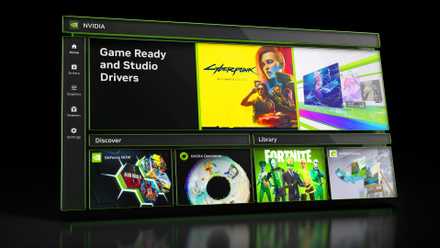
At a glance, the NVIDIA App feels like a modern refresh of old utilities. But under the hood, it's effectively a full command bridge between you and your GPU. You've got per-game optimization, global graphics settings, DLSS overrides, driver updates, performance tuning, and an in-game overlay, all living in one place under a single umbrella.
What surprised me most is how cohesive it finally feels. Instead of juggling half a dozen menus across the Nvidia Control Panel, overlays, and third-party tools, everything now lives inside a single, clean interface. If I want to force low latency globally, I can do it with a single click. If I want to tweak DLSS behavior on a single stubborn title, I can do that, too. Or if I want FPS counters, or intricate system information with the overlay, it's all one toggle away.
It's the kind of consolidation that doesn't sound all that exciting on paper — until you realize how much friction it removes from daily PC gaming.
The Game Optimizer has changed how I approach games
So much time saved with the click of a button
Let's be real: properly optimizing a modern PC game is exhausting. You start with textures, then shadows, then move on to post-processing. The next step is falling into a forum thread arguing about ambient occlusion implementations, and before you know it, an hour of your life is gone. The Game Optimizer cuts straight through that nonsense, thankfully.
With a single click, it analyzes your hardware and applies a balanced preset designed to maximize visual quality without tanking performance, without any guesswork involved, or a twenty-tab-deep research session. What you get is an hour of time saved by not diving through each and every graphics setting. And of course, you also get playable and beautiful results immediately.
I don't think using Nvidia's game optimizer is the lazy way out. These aren't generic presets slapped onto every machine, after all. They're tailored specifically to your GPU, CPU, and your display, pulling from Nvidia's massive dataset of real-world configurations. As someone juggling work, life, and gaming in shrinking windows of free time, this feature has now begun to feel miraculous, and it turns the friction before starting a new game into a one-click solution I can trust blindly.

6 overlooked settings in Nvidia Control Panel for better gaming performance
Nvidia Control Panel is still useful for getting the most out of your GPU and monitor
It has beaten manual tweaking and online guides multiple times
It hurts to admit, but ego doesn't render frames
I used to think automatic optimization was for beginners, and real PC gamers tweaked each setting manually, guided by Reddit posts and optimization guides. Then, I actually started comparing results. The optimizer in the NVIDIA App regularly lands closer to a genuine quality-performance sweet spot than most DIY approaches. It makes sense, too, if you take a minute to think about it. After all, it doesn't rely on anecdotes or one-size-fits-all advice. It's informed by aggregated telemetry across countless similar systems running the same games.
Meanwhile, we're out spending hours toggling volumetric fog on and off, setting ray-tracing to Medium instead of High, convincing ourselves we're doing something meaningful. I do believe manual tuning still has its place, especially if you're chasing a very specific aesthetic or frame target. But for most players, most of the time, NVIDIA's automated profiles get you 90% of the way there in about five seconds. This is just as much about efficiency as it is about convenience, and it quietly makes traditional optimization guides feel... archaic.

Opting out of ray tracing made these 2025 AAA games better for everyone
Big studios are skipping ray tracing — and in doing so, they’re making games better for everyone.
Even the built-in GPU tuning is shockingly competent now
It overclocks, stress-tests, and stays conservative
Buried inside the NVIDIA App is a performance tuning feature that essentially handles GPU overclocking for you. It gradually pushes clocks, monitors stability, checks for artifacting, and backs off automatically if things get sketchy. There are no spreadsheets or notepads involved, and no manual voltage curves to take a few years off your life with the stress involved. There's also no praying during stress tests.
It takes a while, but the end result is a safe, modest performance uplift tailored specifically to your card. Modern GPUs are far more tolerant of automated tuning than they used to be, and the NVIDIA App leans into that. The system stays conservative, pushing just below the limit, prioritizing stability over bragging rights, which is exactly what most people want. You're not turning your card into a benchmark monster. Plus, everyone's results would vary, depending on what their ticket number was in the silicon raffle. Still, the automatic tuning in the app lets you squeeze out free performance with minimal risk, and honestly, you'd be doing yourself a favor by letting it run.
NVIDIA App

I tried overclocking my GPU, but undervolting worked better
Undervolting just does more where it actually matters
The NVIDIA App's game optimization and GPU tuning are my only way forward
PC gaming is notorious for complexity and tinkering fatigue, and the app's competence feels magical.
The NVIDIA App doesn't demand your attention. It's not even required software today, and it doesn't market itself as revolutionary, either. It just quietly removes friction from PC gaming in ways that add up fast. It saves time, it eliminates guesswork, and it rescues broken performance. It even nudges your hardware a little further than stock settings ever would. And it does all of this without asking you to become a part-time graphics engineer.
Maybe that's why it's overlooked. There's no drama in things that simply work. But in a hobby notorious for complexity and tinkering fatigue, that kind of invisible competence feels pretty close to magic, whether we admit it or not.