
For a while now, my home network has felt a bit like an elaborate experiment; mostly stable, occasionally chaotic, and always one poorly timed migration away from my fiancée asking, “Why did the Wi-Fi just die?” My home lab had grown slowly and organically: a Proxmox machine here, a NAS there, a stack of self-hosted services, and whatever Docker container I was testing that week. Individually, they weren’t a problem. Together, they formed a noisy background hum of broadcast traffic, constant updates, and unpredictable workloads.
I assumed the only real way to fix this was to upgrade something expensive. A Wi-Fi 7 router? Maybe. A 2.5GbE core switch? Too expensive for me at the moment. I settled on something a lot cheaper and more practical in the interim: a $20 managed switch, and it made all the difference.
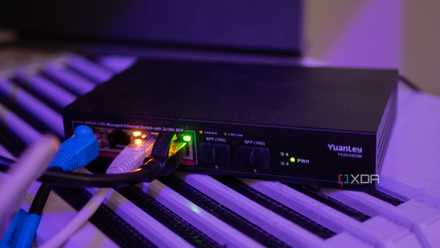
A cheap 2.5GbE managed switch was one of the best home networking upgrades I've made
Cheap doesn't have to mean bad.
My home lab was quietly clogging my home network
It wasn't really a mystery to me
Before segmentation, everything lived on the same, completely flat LAN. Phones, laptops, consoles, smart home devices, and a pile of lab gear that behaved nothing like consumer hardware was a recipe for a bad experience. My NAS pushed out discovery packets constantly. Containers spun up and down. VMs chattered across the network even when I wasn’t actively using them. Scheduled backup jobs and media syncs occasionally caused latency spikes, jitter, or slowdowns that appeared at the worst possible time.
Probably the worst part was the inability to test anything risky. While everything was cordoned off as best as it could be, experimenting with things like DHCP and routing inside containers was living a little too close to the edge for me. My network is mainly gigabit, and while that's more than enough for normal traffic, once you start stacking services, the noise can absolutely affect other things.
Stop believing these 4 network myths — they make your home lab less secure
Busting network myths, one byte at a time
The cure
A $20 managed switch was exactly what the doctor ordered
The term "managed" tends to conjure up a product with a reputation for being enterprise-grade, often overkill, and definitely expensive. The reality is much different, and I was able to find an 8-port managed switch for under $20 quite easily. These cheap "smart" switches from the likes of TP-Link, D-Link, Netgear and others support 802.1Q VLANs, port tagging, storm control, basic QoS, and simple web-based configuration. They’re cheap, quiet, tiny, and shockingly capable.
5 rules I use for sane VLAN design at home (without overcomplicating it)
These keep me sane as well...
I used it to isolate the home lab onto its own VLAN
Setup was easy
Once the switch arrived, the setup was almost embarrassingly simple. I created a new VLAN (VLAN 20 in my case) and moved everything related to the home lab onto it. The switch’s uplink port to the router was tagged so it could carry both the main network and the lab network. The remaining ports were untagged and assigned to VLAN 20, so every device connected to them automatically joined the lab segment without any extra configuration.
Suddenly, all the chatty, loud, unpredictable network behavior of my lab was fenced off. The main network no longer saw discovery packets from containers, ARP floods from virtual NICs, or traffic spikes from backup jobs. And because the routing still happened on the main router, I could apply firewall rules to control exactly how and when the two VLANs were allowed to talk to each other. It was truly the best of both worlds: a completely isolated home lab without losing the right access.

How I used VLANs to separate my smart home devices — and why you should too
Why I now always use VLANs to separate smart home devices.
The improvement was immediate
The difference wasn't subtle at all
My entire network felt like it had been unclogged. Streaming became smoother, even when the NAS was busy. Gaming sessions suddenly stopped experiencing random (albiet, small) bursts of latency. Phones and laptops roamed more reliably. My router stopped showing CPU spikes for no obvious reason. And once I put my IoT devices on their own VLAN, they stayed connected much more consistently.
My ISP's router wasn't capable of this
Doing it on the main router would've been preferable, but still not ideal
What surprised me most about this whole upgrade was that I couldn’t actually do any of it on my router. Like a lot of consumer routers, mine supported the idea of VLANs on paper, but not in any useful, flexible way. Some allow guest networks but not true 802.1Q tagging. Others have VLAN settings buried behind ISP-specific modes. And almost none of them let you assign individual Ethernet ports to specific VLANs without putting the entire device into a weird, restrictive configuration profile.
Buying a dedicated switch for $20 didn't break my heart, and I honestly needed the extra ports, but despite that, I would've liked to have the ability to do it directly on my router anyway.
7 stupid ways your ISP router breaks your home network
For something that's supposed to be the beating heart of your home network, it sure doesn't feel that way
A cheap upgrade that made a big difference
It’s rare that a network upgrade is both cheap and genuinely transformative, but this really was one of them. Segmenting my home lab onto its own VLAN eliminated instability pretty much completely, improved performance across the board, and made my entire setup feel more intentional and reliable. It wasn’t flashy, expensive, or complicated, but it was the right move.