
Putting together a home lab from old PCs, cool networking peripherals, and random hardware components can be quite fun – and the same can be said about arming it with productive containers, useful virtual machines, and wacky distributions. But considering the sheer amount of freedom you get when tinkering with home labs, it’s pretty easy to make mistakes.
And no, I’m not talking about erroneous commands, broken network stacks, misconfigured config files, or other problems that can take your servers out of commission. Rather, I wanted to highlight seemingly minor issues that can cause your experimentation nodes to siphon abysmally high energy.
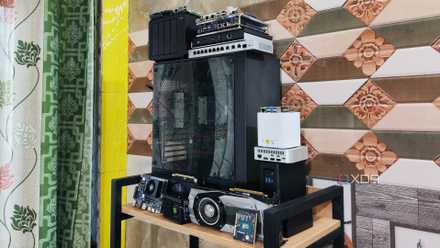
5 signs you've gone too far with your home lab
The desire to buy extra server equipment and provision hundreds of virtual guests is a little too intoxicating
Sticking to massive HDDs when SSDs can serve you well
NAS aside, most self-hosting workstations don’t really need hard drives
Ask any data hoarder about their preferred storage device, and they’re bound to point at hard drives while giving the side-eye to SSDs. Truth be told, I’d agree with them. Between their solid price-per-TB ratio, high capacities, and knack for keeping backups safe for longer periods, HDDs tend to surpass their blazing-fast counterparts for Network-Attached Storage setups. However, things are pretty different when it comes to server nodes and their virtual guests.
Even if you leave the better responsiveness of SSDs out of the equation, hard drives are infamous for their high energy consumption. Bulky 3.5-inch drives, in particular, can guzzle energy like there’s no tomorrow, and their idle wattage can be pretty high when you’ve got multiple HDDs lined up in your home server. Now, I wouldn’t claim that you should ditch them altogether, as hard drives are better for containers and virtual machines meant for storing data and organizing files. But for containers running FOSS tools, general-purpose VMs, and even the underlying server OS, SSDs are the better option from both performance and energy-efficiency standpoints.
Deploying HA clusters when you don’t need to
Running multiple x86 nodes can spike your energy bills
As someone who tinkers with clusters every once in a while, let me add that few things can rival the sheer joy of deploying a high-availability setup and watching your virtual guests automatically migrate to different nodes when a system becomes inaccessible. But I’d be lying if I didn’t admit that clusters are somewhat overkill and (more importantly) massive energy drains, especially when I rely on x86 systems instead of their Arm counterparts.
Rather than running multiple nodes in the hopes that your essential virtual guests will remain operational in case things go south for a node, it’s better to use two independent systems – one for your projects, and another for the mission-critical utilities. You can even rely on mini-PCs with Arm/embedded x86 processors for the former, while leaving your hardcore server responsible for experimental utilities.
Neglecting power-saving settings
No, your server doesn’t need ultra-fast clock speeds
If you’ve repurposed an old system as a server node, you’ve probably got your BIOS settings geared specifically for high frame rates. But unlike its golden gaming days, your PC no longer needs the high CPU or RAM frequencies when running containers or virtual machines. If anything, it will just end up idling for the most part, so you might want to turn down the high-performance settings and cut down on the power drained by the system.
Better yet, most consumer (and even enterprise-centric) motherboards have additional features to reduce the energy-guzzling tendencies of your server. C-states, for example, influence the voltage and clock speeds of your processor in its idle state, and the higher the C-state number, the less energy it consumes when it’s not busy running your virtual guests. While enabling it can add some latency when the CPU gets out of its sleep state, a few milliseconds of extra waiting time are inconsequential for most home labs. Throw in a power-optimized CPU governor profile inside your Linux-based server distro, and you can reduce your server’s idle energy consumption considerably.
Keeping the entire home lab operational 24/7
The combined idle wattage of your equipment can get really high
When you’ve got a battalion of server nodes, NAS units, and networking stacks, watching them chug along in harmony can be quite satisfying… until you get your energy bills. Having gone through the phase of running every repurposed server node 24/7, turning off my rigs when I no longer needed them was the most effective (and disappointing) way to limit my home lab’s energy consumption – even more so than optimizing every system’s idle wattage. After all, the energy consumed by these devices can add up, and you’ve also got the network equipment’s idle power drain to worry about.
In fact, this notion also extends to virtual guests. If you’re running virtual machines for all your projects, it might be a good idea to migrate some workloads to lightweight containers that don’t consume as many resources as their VM counterparts.
You can also try replacing bulky servers and repurposed hardware with mini-PCs
Truth be told, I rely on a Xeon server (and some Arm-based K8s cluster nodes) for my DIY experiments and use simple N100 mini-PCs to self-host essential virtual guests, and my energy prices aren’t all that high even when I use services powered by my local LLMs. But if your energy bills still end up hitting the red zone even after all these tweaks, it might be time to replace your tower rigs with power-efficient mini-PCs, NUCs, and (even) single-board computers. Unlike old components and server hardware, mini-PCs tend to draw significantly fewer watts, though you’ll have to deal with lower system resources and reduced performance in gaming VMs, nested virtualization, and other wacky projects.

4 reasons PCI storage cards are the best upgrade for your home lab
A storage card may not seem all that impressive, but it's a great investment for your server