|
VOOZH | about |
|
VOOZH | about |
Home » Support » Quick Start Guide: Zoom Workplace
SKIP AHEAD TO
Zoom is MIT’s cloud platform for video and audio conferencing, chat, and webinars.
In this guide, you’ll learn how to get started using Zoom Workplace, including how to schedule, host, join, and recording and meetings, share your screen, and more.
Zoom Workplace is available for Mac and PC computers. Log in using your MIT Kerberos username and password.
Zoom is available for iOS and Android devices. Login using your MIT Kerberos username and password.
To access Zoom via the web:
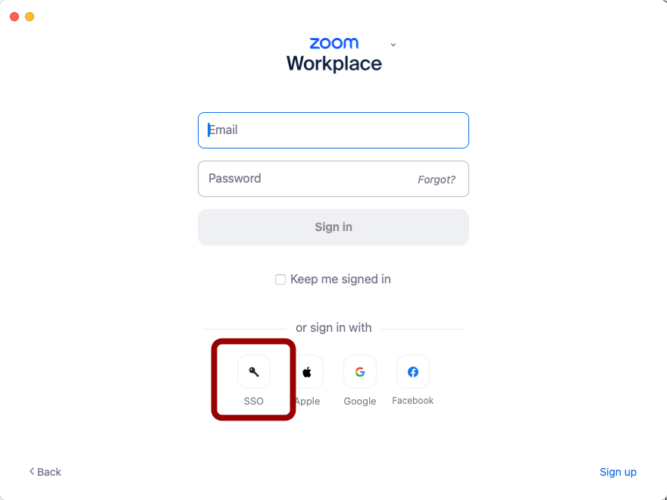
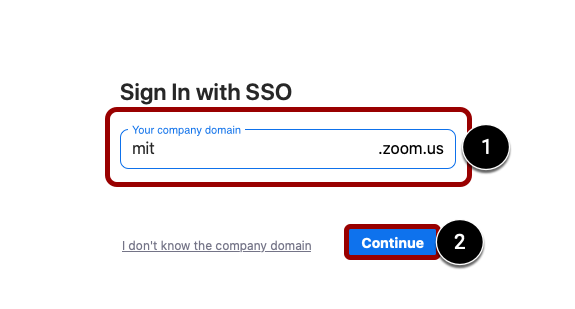
You can also download and install the Zoom Workplace app on your Mac or PC. To login to the app:
Zoom allows you to schedule a meeting using the Zoom Workplace or Mobile app or MIT’s Zoom web portal.
After scheduling a meeting, participants are sent invitations, each with a unique URL for the meeting. You can designate somebody else to host/start the meeting, and you can also set up recurring meetings.
Note: Zoom recommends that all meetings have a Passcode or a Waiting Room enabled.
Submit a support request for any questions related to Zoom in regards to teaching and learning.
© 2026 MIT Sloan Teaching & Learning Technologies.