|
VOOZH | about |
|
VOOZH | about |
Home » Support » End-of-Term Checklist
SKIP AHEAD TO
This End-of-Term Checklist is a road map for teaching teams. It will walk you through tying up loose ends in your Canvas Gradebook, exporting final grades to MIT’s Online Grading System (OGS), unpublishing time-sensitive course content, and keeping or removing the course from your Canvas Dashboard. We’ve also included tips for reflecting on the semester and planning for future iterations of the course. Our team highly recommends using this resource to set yourself up for success—both at the end of the semester and the next time you teach this course.
Note: The steps outlined below are optional. Contact us if you have any questions.
The first step is to verify your students’ grades and then download a copy of your gradebook for temporary review.
Review the grades entered in Canvas and verify that all assignments have been graded for all students.
By default, unsubmitted (missing) assignments are NOT treated as a zero in the Canvas Gradebook and will be ignored by the “Totals” column.
Note: By default, MIT Sloan students cannot see their total grade in the “Totals” column, but they can see grades for individual assignments. Only members of the teaching team can view the “Totals” column in the Gradebook.
If you want to keep a copy of the Gradebook for temporary review, you can export scores from the Gradebook and download them to your computer as a CSV file at the end of the semester.
For step-by-step instructions, see How do I export grades in the Gradebook?
The MITSIS Grade Export tool allows you to export a final grade CSV file from Canvas for submission to MIT’s Online Grading System (OGS).
Note: For questions about grading policies or MIT’s Online Grading System (OGS), contact Sloan Educational Services.
Tip: Once your final grades have been submitted in OGS, consider adding an announcement in Canvas or sending an email to let students know that their final grades have been posted.
If there is any course content that students should not access after the semester ends (e.g., Homework solutions, exam answer keys), you can unpublish modules and files in your Canvas site as needed.
For step-by-step instructions, see:
By default, courses in Canvas inherit MIT’s term start and end dates. After the term ends, your course will close and become “read-only,” which means:
However, you can extend the end date for a course until the last day of the term as needed.
The next step is to keep or remove your course from your Canvas Dashboard.
All courses that you are enrolled in for the current term are available on your Canvas Dashboard. After a term ends, these courses are automatically removed from the Dashboard, but you can access past courses from the All Courses page.
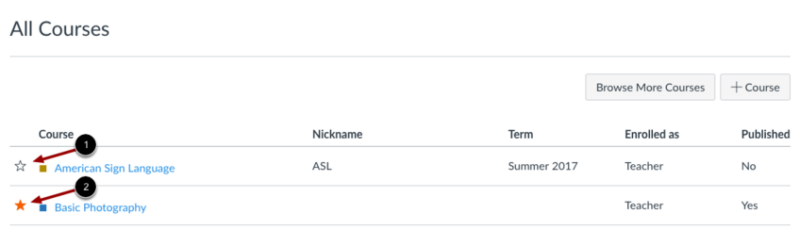
To keep a course on your Canvas Dashboard, mark it as a favorite by clicking on the Star icon [1].
👁 Screenshot of the All Courses page in Canvas
To remove a course from your Canvas Dashboard, unfavorite it by clicking the Star icon [2 – above].
For step-by-step instructions, see:
That’s a wrap! The term just ended and grades are in. Now what?
Here in STS, we’d suggest that you first take some time to celebrate your successes. Then you can take a step back and ask a couple important questions: First, what did you learn from your students and your teaching experiences this term? Second, how will you apply that knowledge to improve your course in the future?
Consider taking a structured approach to reflection. In his book Becoming a Critically Reflective Teacher, Stephen Brookfield proposes four lenses for examining your teaching (adapted from the Berkeley Center for Teaching & Learning’s “Reflective Teaching” post):
Just like your students, you learned and grew over the course of the semester. How will you strategically adjust your teaching methods and approaches based on what you learned? Consider these areas:
The end of the term is a valuable moment for your teaching. You can improve both your and your future students’ class experiences by reflecting on your course and planning for future iterations.
Carnegie Mellon University. (n.d.). Align assessments, objectives, instructional strategies. Eberly Center. https://www.cmu.edu/teaching/assessment/basics/alignment.html/
Instructional moves. (n.d.). Harvard Graduate School of Education. https://instructionalmoves.gse.harvard.edu/
Mcdaniel, R. (1970, January 14). Pedagogies and strategies. Vanderbilt University. https://cft.vanderbilt.edu/teaching-guides/pedagogies-and-strategies/
Reflective teaching. (2020, December 15). Berkeley Center for Teaching & Learning. https://teaching.berkeley.edu/teaching-guides/advancing-equity-and-inclusion/reflective-teaching/
The UDL guidelines. CAST. (2022, September 2). https://udlguidelines.cast.org/
© 2026 MIT Sloan Teaching & Learning Technologies.