|
VOOZH | about |
|
VOOZH | about |
Home » Platforms & Tools » Tool Overview: MITSIS Grade Export
SKIP AHEAD TO
The MITSIS Grade Export tool allows Faculty and Course Admins to export a final grade CSV file from Canvas for submission to MIT’s Online Grading System (OGS).
Faculty and staff.
Yes.
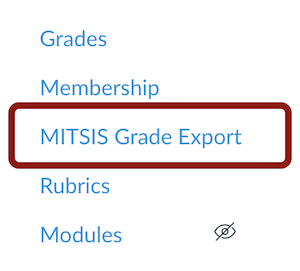
In your Canvas course, click on MITSIS Grade Export in the Course Navigation Menu.
👁 Click MITSIS Grade Export in the Course Navigation Menu
This tool is only accessible to Faculty and Course Admins. Teaching Assistants cannot access this tool. For more information, see How to Export Your Final Grades Using the MITSIS Grade Export Tool in Canvas.
For questions about grading policies or MIT’s Online Grading System (OGS), contact Sloan Educational Services.
Submit a support request for any questions related to the MITSIS Grade Export tool.
© 2026 MIT Sloan Teaching & Learning Technologies.