VOOZH about

URL: https://mitsloanedtech.mit.edu/tools/poll-everywhere/

โ‡ฑ Tool Overview: Poll Everywhere - MIT Sloan Teaching & Learning Technologies


Tool Overview: Poll Everywhere

Home ยป Platforms & Tools ยป Tool Overview: Poll Everywhere

SKIP AHEAD TO

Description

Poll Everywhere is MITโ€™s dynamic online polling platform that allows students to vote on custom teacher-generated polls through SMS, smartphone or computer.

Who Can Use It

Faculty, staff, and students.

Canvas Integration

No.

How to Request a Presenter License

A Presenter license is required to use this tool.

How to Get Access

Login to Poll Everywhere

  1. Go to https://www.polleverywhere.com/.
  2. Click Login.
    ๐Ÿ‘ Click Login button
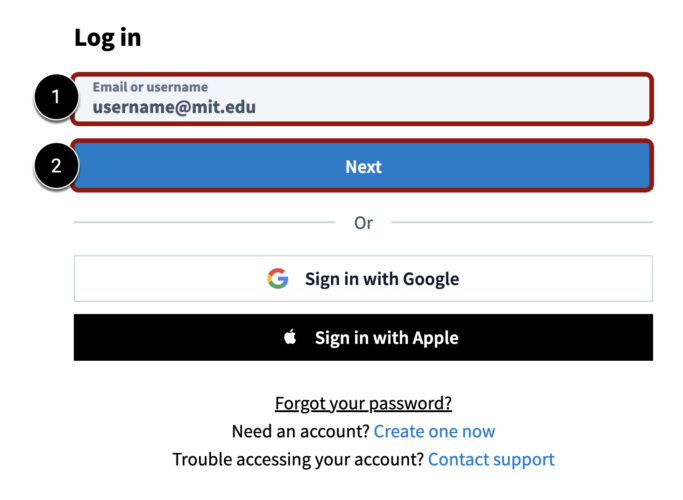
  3. Type your full MIT email address [1] and click the Next button [2].
    ๐Ÿ‘ Enter email address and click Next button
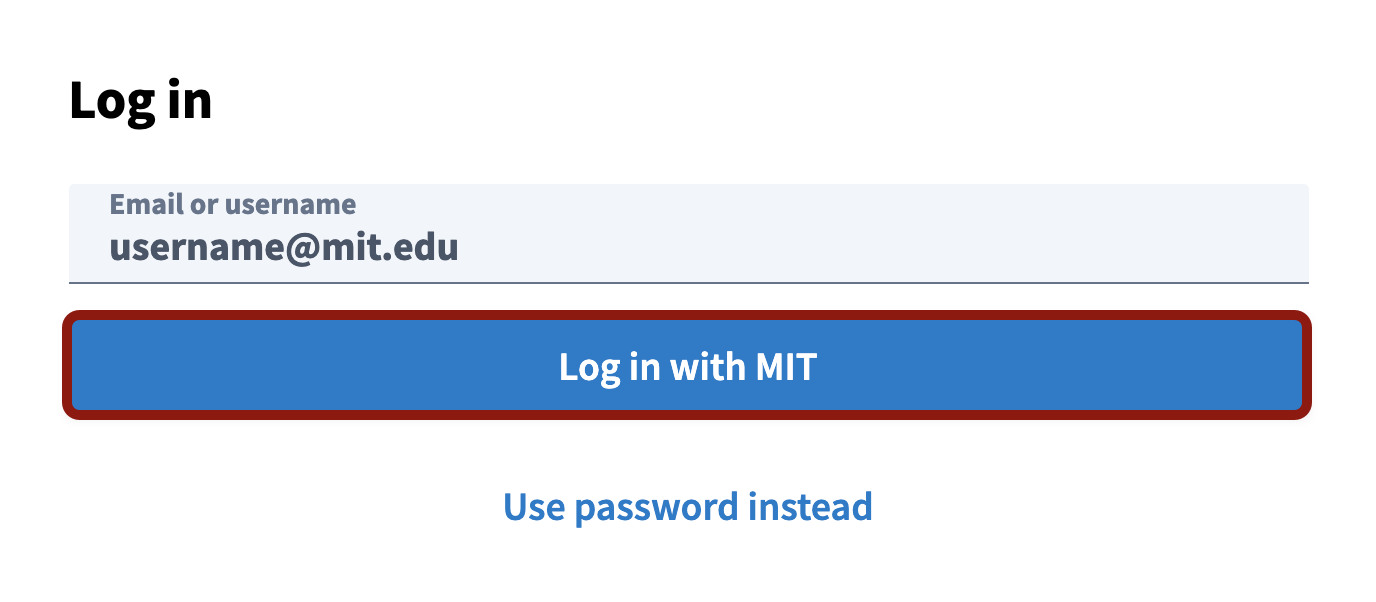
  4. Click the Log in with MIT button.
    ๐Ÿ‘ Screenshot of the Login with MIT button
  5. Enter your MIT username and password, and click Login.
  6. Your Poll Everywhere dashboard where you can create questions, present questions, and perform reporting tasks will appear.
  7. To create a new poll, click the + Activity button.
    ๐Ÿ‘ Image

How to Get Support

Information Systems and Technology (IS&T)

Email polleverywhere@mit.edu for any questions related to Poll Everywhere, including:

  • Presenter licenses
  • Accounts
  • Teams

Poll Everywhere

Poll Everywhere provides end-user support as part of MITโ€™s Enterprise license. If you have questions about using Poll Everywhere and its features, you can contact them directly by:โ€‹

Related Resources

Recent Blog Posts

  • ๐Ÿ‘ Image
    Simulated Personas, Real Insights: An MIT Sloan Studentโ€™s Perspective on AI for User Research August 15, 2025
  • ๐Ÿ‘ Image
    The AI-Ready Canvas Course: Six Steps to Future-Proof Your Teaching May 14, 2025
  • ๐Ÿ‘ Image
    Deep Research: Transforming the Creation of Learning Materials with Research-Backed AI March 26, 2025
  • ๐Ÿ‘ Image
    If AI Canโ€™t Read Your Syllabus, Neither Can Your Students February 27, 2025