|
VOOZH | about |
|
VOOZH | about |
Home » Support » Term Start Checklist
SKIP AHEAD TO
This Term Start Checklist is a road map for teaching teams. It outlines key steps to prepare your course technology so you’re ready to teach on Day 1.
Canvas courses are created before the term starts so that you have time to prepare them. Refer to our calendar for this year’s Canvas course release dates. Once Canvas courses are available, confirm the following:
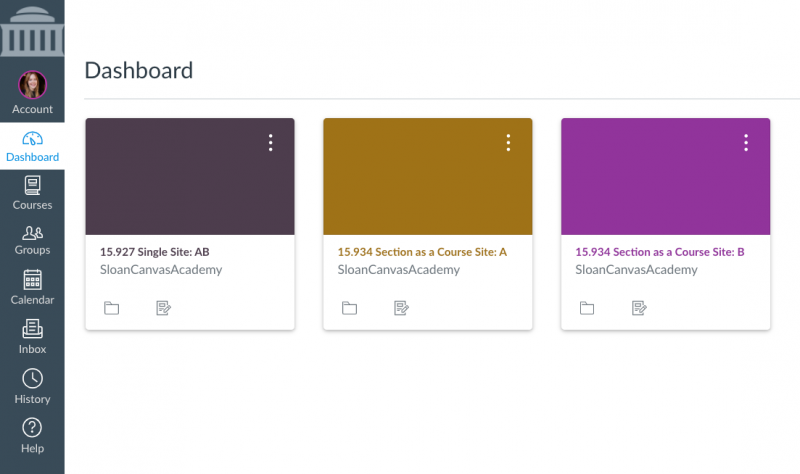
Do you see the courses you expected for the current/upcoming term on your Canvas Dashboard? Note: See How to Access Past Courses in Canvas to learn how to find courses from past terms.
👁 Canvas Dashboard Student View
Need access or want to share a past Canvas site? Teaching teams can add MIT faculty, course admins, and TAs to a past course using the Faculty Observer role—no support ticket needed. This role allows them to view all course content, but not student grades or submissions—ensuring FERPA compliance.
Tip: By default, courses get the same Canvas site configuration from term-to-term unless you request a change. For example, if your two-section course shared a single Canvas site last term, we will give you a single site again this term. However, if you want each section to have its own Canvas site this term, that’s no problem. Contact us to request this change.
The best teaching teams have a plan to divide and conquer. From hiring your TAs correctly to making sure everybody attends training, pre-term preparation makes for a successful course launch. Make sure to do the following:
Tip: Skip the manual work—our team will copy your course for you, bringing over only the content you need and leaving out old announcements, discussions, and calendar events.
The next step is to build your Canvas course according to MIT Sloan’s Gold Standards. These are student- and research-driven best practices developed in a school-wide effort to build consistent and effective Canvas sites that allow students across Sloan to quickly and easily find what they need in all their courses.
Tip: The How to Build a Gold Standard Canvas Course self-paced course takes you step-by-step through the course building process, including how to request to copy content from a previous course in Canvas to your upcoming course site and how to set up a Study.Net course pack. When you’re done building your course, use the Technical & Gold Standards Checklists below to make sure your site is ready for students.
Complete this checklist to make sure the technical details on your course site are ready for launch.
Complete this checklist to ensure a quality student experience in accordance with MIT Sloan’s Gold Standards for building effective Canvas courses.
Tip: We recommend bookmarking our Quick Start Guides for Course Admins and TAs. These guides link to step-by-step instructions for common tasks teaching teams handle throughout the term—from setting up your Canvas site to managing the course roster, assignments, and grading.
They’re designed so you don’t have to dig for answers—everything is in one place when questions come up.
Looking ahead to the end of the term? Review the End-of-Term Canvas Checklist. It highlights the key steps teaching teams often handle—from deciding what students can access after the term ends to exporting final grades for the Registrar.
Some classroom technology needs require advance planning. Contact our team early for:
The process varies by term, so here’s a quick overview of what to expect for livestreaming and classroom recordings for in-person courses in MIT Sloan classrooms (E62, E52, and E51):
Note: Recitations are NOT recorded by default. STS can livestream and record recitations upon request by the teaching team.
© 2026 MIT Sloan Teaching & Learning Technologies.