|
VOOZH | about |
|
VOOZH | about |
Magicis a performing art that entertains audiences by staging tricks or creating illusions of seemingly impossible or supernatural feats using natural means (Source : Wikipedia) . If you understand the last sentence, you will have no challenge leveraging MapReduce routine for solving any kind of data manipulation challenge. In the last two articles, we gave an Introduction to Hadoop and MapReduce. We saw that Map-Reduce can handle big data but has a stringent format. It can only structure data using Mapper and summarize data using the reducer. This article will help you understand how to “trick” Hadoop to see different kind of data manipulation functionality as simple MapReduce function.
Note that this article talks only about MapReduce used along with HDFS, it does not talk about packages such as PIG, HIVE, etc. Using these packages, you might not have to use these “tricks” because these packages will enable you to build simple SQL queries. But as of now, such packages are not widely used and most industries are using the basic Hadoop tool (MapReduce with HDFS).
[stextbox id=”section”] The analogy [/stextbox]
Let’s analyze a situation to better understand this MapReduce functionality.
“Magician prepares for a new trick. Now, he shows a trick to the audience. Audience only looks at what Magician wants to show them. “
Let’s analyze this situation with reference to MapReduce.
Following are the role-play :
Magician : User
Audience : Hadoop
Trick : Data manipulation functionality
Now let’s replace the words used in the last sentence with mapped Hadoop jargons.
“User prepares for a new data manipulation functionality. Now, he (user) executes the data manipulation functionality on Hadoop. Hadoop only looks at what user wants to show to the Hadoop (MapReduce type function).”
Let us demonstrate the concept by taking a few examples – Show time!
[stextbox id=”section”] Example 1 : Word Count [/stextbox]
You have a bunch of text files in your system and would like to count the overall number of occurrences of each word. This example has already been covered in the last article.
[stextbox id=”section”] Example 2 : Removing Duplicates [/stextbox]
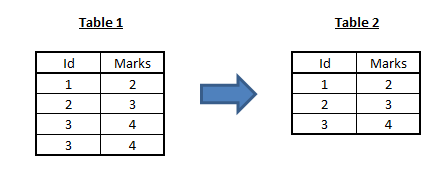
We basically would like to implement the distinct operator: the desired output should contain all of the input values, but values that appear multiple times in input, should appear only once in output.
The solution is simpler than that of word count problem: we use the value itself as the map output key; the reducer associated with a specific key, can then return a single output.
Note that Reducer can select the (id,marks) pair based on any logic. For instance, we might want to know the highest marks scored by any student. In this case, we will take the maximum of all marks on every id.
[stextbox id=”section”] Example 3 : Matrix transpose [/stextbox]
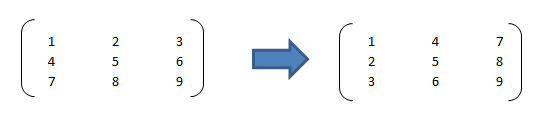
Here we just want to transpose a matrix. Matrix transposition simply means that every element (row, column) comes to the position (column , row).
👁 transpose
Let us denote each of these value with a row,column index. For instance 1 will (1,1), 2 will be (1,2) etc.
[stextbox id=”section”] Example 4 : Merging tables [/stextbox]
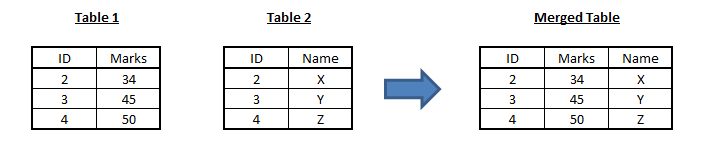
Merging tables is the most frequent data manipulation used in analytics industry. We have two tables : table 1 & table 2. They both have a common variable (id variable) called Name. We need to merge the two tables and find marks corresponding to each names.
👁 merged
First step in this process is to append the two tables together. Then follow the algorithm given below :
[stextbox id=”section”] End Notes [/stextbox]
The list of examples listed in this article is not exhaustive. We need to change the way we look at data manipulation task on Hadoop. We need to start thinking in terms of (key,value) pairs. We saw in this article that Hadoop does restrict the way of coding for the user, but even this restricted style of coding can be exploited to execute several data manipulation processes.
Before I end this article, here is something to scratch your brains: How can you implement matrix multiplication in Hadoop? Do let me know your thoughts / answers / questions / challenges on usage of MapReduce for data manipulation through the comments below.
Tavish Srivastava, co-founder and Chief Strategy Officer of Analytics Vidhya, is an IIT Madras graduate and a passionate data-science professional with 8+ years of diverse experience in markets including the US, India and Singapore, domains including Digital Acquisitions, Customer Servicing and Customer Management, and industry including Retail Banking, Credit Cards and Insurance. He is fascinated by the idea of artificial intelligence inspired by human intelligence and enjoys every discussion, theory or even movie related to this idea.
GPT-4 vs. Llama 3.1 – Which Model is Better?
Llama-3.1-Storm-8B: The 8B LLM Powerhouse Surpa...
A Comprehensive Guide to Building Agentic RAG S...
Top 10 Machine Learning Algorithms in 2026
45 Questions to Test a Data Scientist on Basics...
90+ Python Interview Questions and Answers (202...
8 Easy Ways to Access ChatGPT for Free
Prompt Engineering: Definition, Examples, Tips ...
What is LangChain?
What is Retrieval-Augmented Generation (RAG)?
Hi Vidhya, How can you do the Matrix transpose using hadoop or pig or Hive? Here we just want to transpose a matrix. Matrix transposition simply means that every element (row, column) comes to the position (column , row). 123 456 789 to 147 258 369 Thanks in advance.
Edit
Resend OTP
Resend OTP in 45s