|
VOOZH | about |
|
VOOZH | about |
One of the most common task, every analyst performs multiple times in a project is combining data sets. There are various ways to combine datasets in SAS, which are different from the way datasets are combined in SQL. Due to this, a lot of people with experience in SQL remain confused about how they can combine datasets in SAS.
For the same reason, it is also one of the most commonly asked question in SAS related interviews. Which method to use entirely depends on the business need and business scenario. Let’s look at some test cases to make it clear:
In SAS, we can perform all these operation. Let’s look at these methodology one by one. In this article, we would go into detail of Appending and Concatenation only and will discuss Merging in the next article.
To append one data set at the end of another, we use the APPEND procedure. Append procedure adds the observations of one data set at the end of other data set.
Syntax:-
[stextbox id=”grey”]PROC Append BASE= <Data-Set> DATA=<Data-Set>;
Run;
Here BASE is the data set to which observation of data set DATA is added.
[/stextbox]
Facts:-
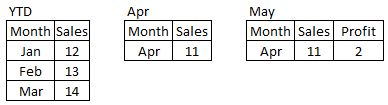
Example – 1 Here we have three data sets YTD, Apr and May.
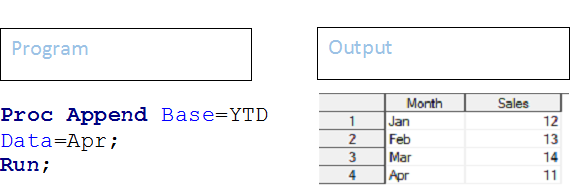
Question -1:- Append Apr data set to YTD:-
Above code has appended Apr data set to YTD.
Question -2:- Append May data set to YTD:-
Proc Append Base=YTD Data=May;
Run;
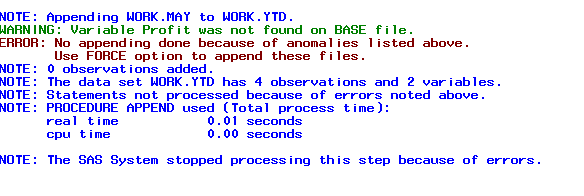
Above code will not append May data set to YTD and you will get an error and a warning message, like shown below:
👁 Append, SAS, Error, Warning
Above error and warning comes because the structure of these two datasets is not similar. May has one additional variable Profit. Now to append May data set to YTD, we need to use FORCE option in PROC append procedure.
Proc Append Base=YTD Data=May Force;
Run;
This will append May dataset to YTD dataset..
Concatenate copies all observations from two or more data sets into a new data set. SET statement in DATA step is used to perform concatenation.
Syntax:-
[stextbox id=”grey”]Data DataSet;
Set DataSet-1 DataSet-2….DataSet-n;
<additional SAS Statements;>
Run;
Facts:-
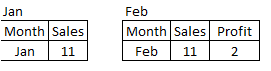
Example -2 Here we have two datasets, one for Jan and another one for Feb. Here Feb dataset has one additional variable Profit.
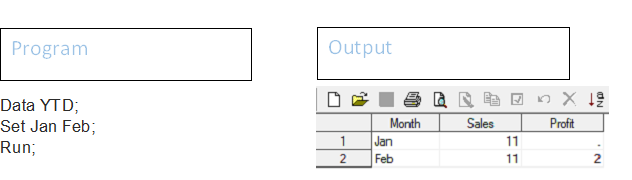
Question 3- Combine datasets Jan and Feb to create YTD data set.
Above you can see that output dataset YTD has 2 observations and 3 variables.
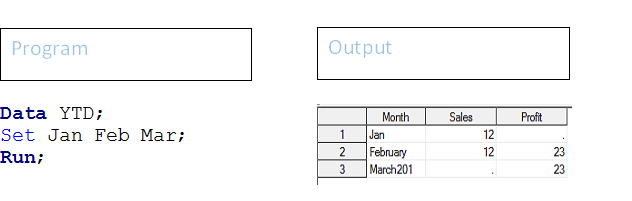
Example -3 We have three data sets Jan, Feb and Mar. All three data sets have different structure. Variable month has different length, Sales is available in Jan and Feb and the field Profit is present Feb and Mar only.
Question 4- Combine data sets Jan, Feb and Mar to create YTD data set.
In output dataset, you can see the following observation:-
Above, we have done concatenation based on position of data sets in SET statement. There is another method to perform concatenation, if all input data sets have one or more common variable and this concatenation is based on that common variable. it is called INTERLEAVING. In this case, we specify the common variable using By statement.
Syntax:-
[stextbox id=”grey”]Data DataSet;
Set DataSet-1 DataSet-2….DataSet-n;
By CommonVariable(s);
<additional SAS Statements;>
Run;
Before using this step, input data sets must be sorted on common variable(s).
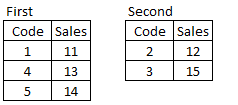
Example -4 We have two data sets First and Second with a common variable Code. Now as we mentioned before both data sets must be sorted, we have used PROC Sort procedure to sort.
👁 Combining_SAS_Data_Sets4
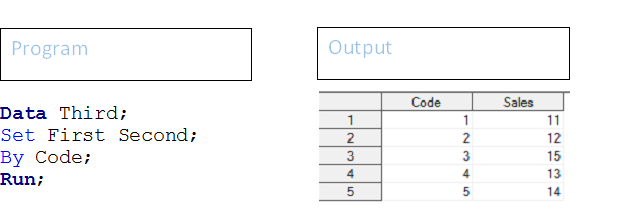
Question 5- Concatenate these two data sets and create a data set THIRD.
Above command has created a dataset THIRD, which has data stored and sorted on the variable CODE.
Let’s look at how the above code works:-
In this article, we looked at various methods to combine data sets namely Appending, Concatenating and Interleaving. Individual methods are explained in detail with examples along with the business scenarios that go with these options. We have also explained, how these methods works and what would be the output if we go with any of these methods. In one of the future posts, we will discuss another way to combine datasets – MERGING.
Hope you found this article useful. We have simplified this topic and have tried to present it in a very simple and lucid manner. If you need any more help with combining data sets, please feel free to ask your questions through comments below.
Sunil Ray is Chief Content Officer at Analytics Vidhya, India's largest Analytics community. I am deeply passionate about understanding and explaining concepts from first principles. In my current role, I am responsible for creating top notch content for Analytics Vidhya including its courses, conferences, blogs and Competitions.
I thrive in fast paced environment and love building and scaling products which unleash huge value for customers using data and technology. Over the last 6 years, I have built the content team and created multiple data products at Analytics Vidhya.
Prior to Analytics Vidhya, I have 7+ years of experience working with several insurance companies like Max Life, Max Bupa, Birla Sun Life & Aviva Life Insurance in different data roles.
Industry exposure: Insurance, and EdTech
Major capabilities: Content Development, Product Management, Analytics, Growth Strategy.
GPT-4 vs. Llama 3.1 – Which Model is Better?
Llama-3.1-Storm-8B: The 8B LLM Powerhouse Surpa...
A Comprehensive Guide to Building Agentic RAG S...
Top 10 Machine Learning Algorithms in 2026
45 Questions to Test a Data Scientist on Basics...
90+ Python Interview Questions and Answers (202...
8 Easy Ways to Access ChatGPT for Free
Prompt Engineering: Definition, Examples, Tips ...
What is LangChain?
What is Retrieval-Augmented Generation (RAG)?
Nice article. Can you also please publish articles on join types with examples in proc sql. BR, Rishabh
i liked the article,it helped me to brushup my knowledge on the concepts of Combining..
Edit
Resend OTP
Resend OTP in 45s