|
VOOZH | about |
|
VOOZH | about |
SQL joins might appear daunting, especially for newcomers. If programming is unfamiliar, comprehending SQL joins and the types of SQL joins could be challenging. Yet, as a data science enthusiast or practitioner, understanding these joins is crucial. They empower efficient data retrieval and manipulation across tables. This article simplifies SQL joins’ learning curve, unveiling their simplicity. In this article you will get to know all about the SQL Join and types of SQL joins.
SQL Joins are used to combine rows from two or more tables based on a related column between them, allowing retrieval of data from multiple tables in a single query. Common types include INNER JOIN, LEFT JOIN, RIGHT JOIN, and FULL JOIN.
Also Read: Top 10 SQL Projects for Data Analysis
Want to learn the basics of what SQL is and how it can be applied in data science? Check out the popular course SQL for Data Science.
Returns rows only when there is a match in both tables, based on a common column. If there are records in one table that do not have matches in the other table, there would be no result set
This is what we covered in the above section. Inner Join returns records that have matching values in both tables:
Let’s see what the output is using the above example:
SELECT * FROM BOYS INNER JOIN MESSI
ON BOYS.id = MESSI.id;Output:
The inner join gives the intersection of two tables, i.e. rows which are common in both the tables.
Returns all rows from the right table, and the matching rows from the left table. If there is no match in the left table, NULL values are returned for the columns of the left table
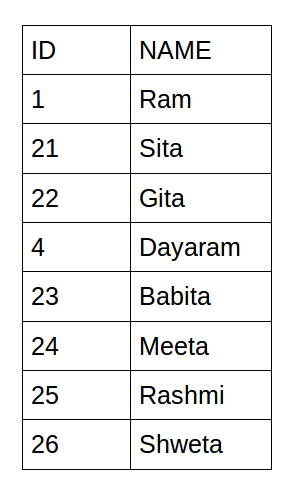
Suppose we want ID and Name of all the people who love watching Messi play. Obviously, there are many ways of writing this query but we’ll understand with the help of joins.
Let’s see what the output is:
SELECT  *  FROM BOYS RIGHT JOIN MESSI
ON BOYS.id = MESSI.id;Output:
Can you figure out what happened here? The right outer join gives us the rows that are common in both the tables as well as extra rows from the Messi table which are not present in the intersection. In other words, a right join returns all records from the right table and the matched records from the left table.
Returns all rows from the left table, and the matching rows from the right table. If there is no match in the right table, NULL values are returned for the columns of the right table
Let’s say we want the list of all the boys who love watching Messi play as well as not love watching Messi play using joins.
I want you to guess the final output before you read further.
SELECT  *  FROM BOYS LEFT JOIN MESSI
ON BOYS.id = MESSI.id;
OUTPUT:
The left outer join gives us the rows that are common in both the tables as well as extra rows from the Boys table which are not present in the intersection. In other words, a left join returns all records from the left table and the matched records from the right table.
Combines the results of both left and right outer joins. The joined table will contain all records from both the tables and fill in NULLs for missing matches on either side
Finally, let’s say we want the list of all the people, including boys who love watching Messi play.
SELECT  *  FROM BOYS FULL OUTER JOIN MESSI
ON BOYS.id = MESSI.id;
Output:
Perfect! A full outer join gives us the rows that are common in both the tables as well as extra rows from both tables which are not present in the intersection. We get all records when there is a match on either the left or the right table.
Matches columns with the same name in both tables. The common columns on which the tables are joined must have the same name and data type across the tables.
Assuming both tables have a column named CustomerID with the same data type:
SELECT *
FROM Customers
NATURAL JOIN Orders;
Output:
| CustomerID | CustomerName | City | OrderID | OrderDate |
| 1 | John | New York | 101 | 2024-01-20 |
| 1 | John | New York | 103 | 2024-03-10 |
| 2 | Alice | London | 102 | 2024-02-15 |
Situation: You’re managing a database for an online store, and you want to analyze sales data along with customer information. The goal is to identify which products are popular among different customer segments.
Use an INNER JOIN when you want to match records that exist in both tables. In this scenario, you’ll retrieve sales data along with customer information for customers who have made purchases.
Example:
SELECT customers.name, products.product_name, sales.quantity

FROM customers

INNER JOIN sales ON customers.id = sales.customer_id

INNER JOIN products ON sales.product_id = products.id;Use a LEFT JOIN when you want to retrieve all records from the left table and matching records from the right. This is useful to see which products have been purchased and by whom, including customers who haven’t made any purchases.
Example:
SELECT customers.name, products.product_name, sales.quantity

FROM customers

LEFT JOIN sales ON customers.id = sales.customer_id

LEFT JOIN products ON sales.product_id = products.id;Use a RIGHT JOIN when you want to retrieve all records from the right table and matching records from the left. This can be helpful to identify products that have been purchased and by whom, including products that haven’t been purchased by any customer.
Example:
SELECT customers.name, products.product_name, sales.quantity

FROM customers

RIGHT JOIN sales ON customers.id = sales.customer_id

RIGHT JOIN products ON sales.product_id = products.id;Use a FULL JOIN when you want to retrieve all records from both tables, including products that have been purchased and by whom, and also customers who haven’t made any purchases.
Example:
SELECT customers.name, products.product_name, sales.quantity

FROM customers

FULL JOIN sales ON customers.id = sales.customer_id

FULL JOIN products ON sales.product_id = products.id;
Select the appropriate join type based on your analysis goals and the relationship between tables to obtain the desired insights from your data.
In conclusion, mastering SQL joins opens the door to powerful data manipulation and analysis capabilities. Whether you’re a budding data enthusiast or a seasoned analyst, understanding the nuances of INNER, LEFT, RIGHT, and FULL joins empowers you to extract valuable insights from complex relational databases. By seamlessly combining data from multiple tables, you gain the ability to unravel intricate relationships, spot trends, and make informed decisions. Embrace the flexibility of SQL joins to efficiently explore your data’s potential, turning raw information into actionable knowledge. With this fundamental skill in your toolkit, you’re well-equipped to navigate the intricate landscape of database management and elevate your data-driven journey.
Do you want to learn how SQL can be used in data science? We highly recommend checking out this amazing course – Structured Query Language (SQL) for Data Science.
A. Joining multiple tables is like connecting puzzle pieces. You start with one table and link the others one by one using join conditions. Each connection adds more information to the combined result. The process is the same regardless of how many tables you’re joining.
A. An inner join returns only matching rows from both tables. A natural join tries to match rows based on identical column names, which can be unreliable. It’s better to explicitly define the join condition with an inner join.
A. A join combines data from two or more tables based on a related column. It lets you retrieve related information from multiple sources in a single query.
A. Yes, we can join two instances of the same table in SQL. It’s termed a self-join, useful when analyzing relationships within a single table, often utilizing aliases to differentiate between the instances.
Aspiring Data Scientist with a passion to play and wrangle with data and get insights from it to help the community know the upcoming trends and products for their better future.With an ambition to develop product used by millions which makes their life easier and better.
GPT-4 vs. Llama 3.1 – Which Model is Better?
Llama-3.1-Storm-8B: The 8B LLM Powerhouse Surpa...
A Comprehensive Guide to Building Agentic RAG S...
Top 10 Machine Learning Algorithms in 2026
45 Questions to Test a Data Scientist on Basics...
90+ Python Interview Questions and Answers (202...
8 Easy Ways to Access ChatGPT for Free
Prompt Engineering: Definition, Examples, Tips ...
What is LangChain?
What is Retrieval-Augmented Generation (RAG)?
What is the difference between right join and select from the second table?
Answer from both the queries will be the same in this case but can differ in another case when the attributes in the first table are not the same as second table then null values have to be introduced in tuples of the second table after performing right join.
in output it should show Gender field as well. Please explain if not then why?
Edit
Resend OTP
Resend OTP in 45s