|
VOOZH | about |
|
VOOZH | about |
The following tutorial assumes some basic knowledge about Python programming language and high school mathematics. No prior knowledge of Deep learning is required. This article covers basic knowledge and working of PyTorch required to get started with Deep Learning. Follow along with the tutorial to get hands-on experience.
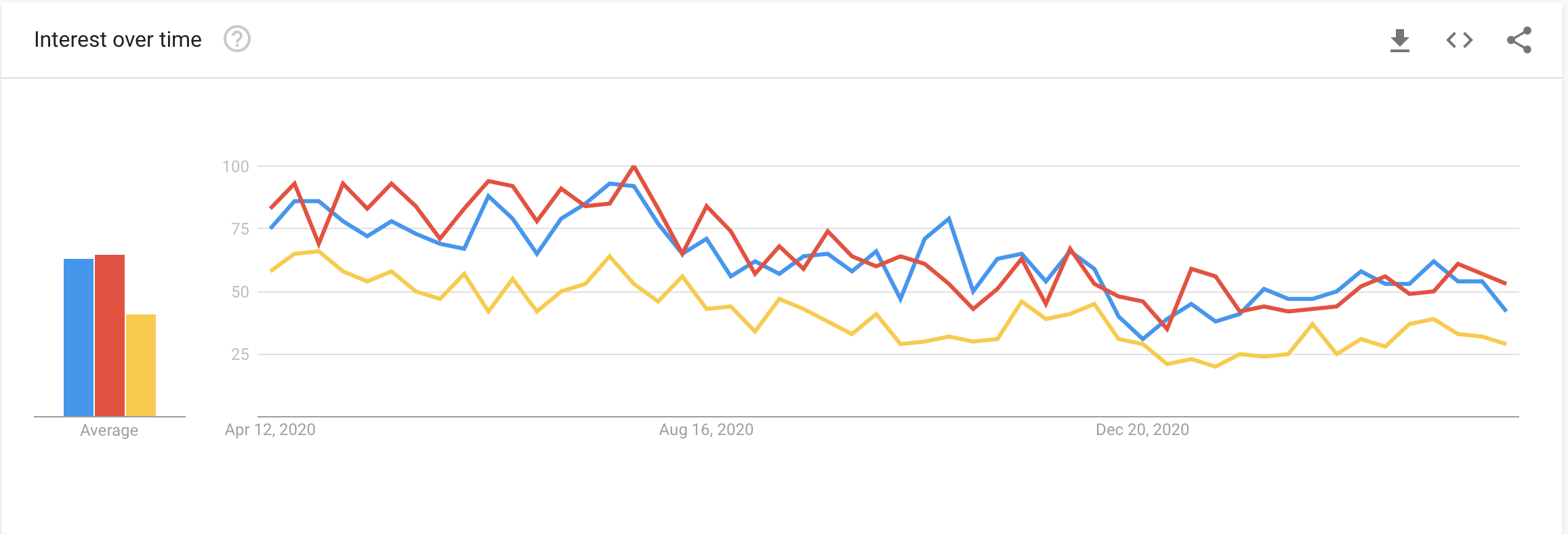
PyTorch is an optimized tensor library primarily used for Deep Learning applications using GPUs and CPUs. It is an open-source machine learning library for Python, mainly developed by the Facebook AI Research team. It is one of the widely used Machine learning libraries, others being TensorFlow and Keras. Here is the Google Search Trends which shows that the popularity of the PyTorch library is relatively higher compared to TensorFlow and Keras.
PyTorch is built based on python and torch library which supports computations of tensors on Graphical Processing Units. Currently is the most favored library for the deep learning and artificial intelligence research community.
Now let’s get hands-on with PyTorch!!
We are using Jupyter Notebooks to run our code. We suggest to follow through the tutorial on Google Colaboratory. It’s a Jupyter notebook environment that requires no setup to use and runs entirely in the cloud. We can also be able to use a GPU for free. You can check out this link for some guidance to use Colab.
PyTorch is a library for processing tensors. A tensor is a fundamental unit of data. It can be a number, vector, matrix, or any n-dimensional array. It is similar to Numpy arrays.
Before getting started we should import the torch module as follows:
import torch
Creating a tensor t1 with a single number as data
# Tensor with Single number
t1 = torch.tensor(5.)
print(t1)
Output : tensor(5.)
5. is shorthand for 5.0. It is used to indicate PyTorch that a tensor is a floating-point number. We can verify the above-using tensor.dtype. If you are using jupyter notebook then you can directly input the variable in the cell and run it to see the results.
print(t1.dtype)
Output: torch.float32
Similarly, we can create tensors of vector type,
# Tensor with 1D vector
t2 = torch.tensor([1, 2, 3., 4])
print(t2)
Output: tensor([1., 2., 3., 4.])
From the above output we can see that even if one of the elements of the vector is a floating-point number, the tensor will convert the data type of all the elements to float.
Now let’s create a 2D tensor,
# Matrix
t3 = torch.tensor([[1., 2, 3],
 [4, 5, 6],
 [7, 8, 9]])
print(t3)
Output: tensor([[1., 2., 3.],
 [4., 5., 6.],
 [7., 8., 9.]])
A 3D tensor,
t4 = torch.tensor([
 [[10. , 11, 12],
 [13, 14, 15]],
 [[16, 17, 18],
 [19, 20, 21]]
])
print(t4)
Output: tensor([[[10., 11., 12.],
 [13., 14., 15.]],
 [[16., 17., 18.],
 [19., 20., 21.]]])
If we observe these tensors are similar to NumPy arrays. So we can check the shape of the the tensors using tensor.shape. The dimension of the array would be the length of the returned shape.
So the shapes of the tensors we defined above would be,
print(t1.shape)
Output: torch.Size([])
As t1 is just a number, its dimension is 0.
print(t2.shape)
Output: torch.Size([4])
As t2 is a vector, its dimension is 1.
print(t3.shape)
Output: torch.Size([3, 3])
As t3 is a matrix of size 3 x 3, its dimension is 2
print(t4.shape)
Output: torch.Size([2, 2, 3])
As t4 is has stacked two tensors of 2 x 3, its dimension is 3
We can perform operations on tensors with the usual arithmetic operations. Also, tensors have a special ability to compute gradients or derivatives of the given expression with respect to all the independent variables. Let’s look at an example,
Define some tensors and then initialize some values,
x = torch.tensor(3.)
w = torch.tensor(4. ,requires_grad=True)
z = torch.tensor(5. ,requires_grad=True)
x , w , z
Output: (tensor(3.), tensor(4., requires_grad=True), tensor(5., requires_grad=True))
In the above code snippet, we created 3 tensors x, w, and z with numbers and for w and z an additional parameter requires_grad set to True.
So now let’s perform an arithmetic operation with these tensors,
y = x*w + z
print(y)
Output: tensor(17., grad_fn=<AddBackward0>)
So according to basic multiplication and addition we got the output as expected i.e. y = 3 * 4 + 5 = 17.
So now let us discuss a unique ability of Pytorch which can automatically compute the derivative of any expression (y in this case) wrt to independent variables which have the parameter requires_grad set to True
This can be done by invoking .backward method on y
#Compute derivatives
y.backward()
We can find the derivatives of y wrt input tensors stored in .grad properties of respective input tensors.
print("dy/dx =", x.grad)
print("dy/dw =", w.grad)
print("dy/dz =", z.grad)
Output : dy/dx = None
 dy/dw = tensor(3.)
 dy/dz = tensor(1.)
We can observe the following:
NumPy is a popular open-source library used for scientific and mathematical computing in python. It also supports operations on large multi-dimensional arrays and computations based on linear algebra, Fourier transforms, and matrices. NumPy has a vast ecosystem of supporting libraries including Pandas, Matplotlib, and OpenCv.
So PyTorch interoperates with NumPy to leverage the tools and libraries of NumPy and then extend the capabilities further.
First, let’s create a NumPy array.
#First create a numpy array
import numpy as np
x  = np.array([1, 2., 3])
print(x)
Output: array([1., 2., 3.])
So we can convert the Numpy arrays to Torch tensors using torch.from_numpy()
#Create a tensor from numpy array
y. = torch.from_numpy(x)
print(y)
Output: tensor([1., 2., 3.], dtype=torch.float64)
We can check the data types using .dtype
print(x.dtype)
print(y.dtype)
Output: float64
 torch.float64
Now we can convert the PyTorch tensors to NumPy arrays using .numpy() method
z = y.numpy()
print(z)
Output: array([1., 2., 3.])
The interoperability with NumPy is required because most of the datasets with which you will be working will most likely be processed in NumPy.
Here you might wonder why we are using Pytorch instead of NumPy since it also provides all the required libraries and utilities required for working with multi-dimensional arrays and perform large calculations. It is mainly for two reasons:
The media shown in this article are not owned by Analytics Vidhya and is used at the Author’s discretion.
Hi,
I am Narasimha Karthik J, a Data Scientist at Boeing Research in Bengaluru. I have experience in fine-tuning language model models (LLMs) for various domain-specific applications and deploying them. Additionally, I am experienced in LLM training, fine-tuning, RAG, and working with the latest frameworks and technologies.
Thanks and Regards,
Narasimha Karthik J
GPT-4 vs. Llama 3.1 – Which Model is Better?
Llama-3.1-Storm-8B: The 8B LLM Powerhouse Surpa...
A Comprehensive Guide to Building Agentic RAG S...
Top 10 Machine Learning Algorithms in 2026
45 Questions to Test a Data Scientist on Basics...
90+ Python Interview Questions and Answers (202...
8 Easy Ways to Access ChatGPT for Free
Prompt Engineering: Definition, Examples, Tips ...
What is LangChain?
What is Retrieval-Augmented Generation (RAG)?
Edit
Resend OTP
Resend OTP in 45s