|
VOOZH | about |
|
VOOZH | about |
“If 80 percent of our work is data preparation, then ensuring data quality is the important work of a machine learning team.” – Andrew Ng
Feature engineering is one of the most important steps in machine learning. It is the process of using domain knowledge of the data to create features that make machine learning algorithms work. Think machine learning algorithm as a learning child the more accurate information you provide the more they will be able to interpret the information well. Focusing first on our data will give us better results than focusing only on models. Feature engineering helps us to create better data which helps the model understand it well and provide reasonable results.
NLP is a subfield of artificial intelligence where we understand human interaction with machines using natural languages. To understand a natural language, you need to understand how we write a sentence, how we express our thoughts using different words, signs, special characters, etc basically we should understand the context of the sentence to interpret its meaning.
If we can use these contexts as features and feed them to our model then the model will be able to understand the sentence better. Some of the common features that we can extract from a sentence are the number of words, number of capital words, number of punctuation, number of unique words, number of stopwords, average sentence length, etc. We can define these features based on our data set we are using. In this blog, we will use a Twitter data set so we can add some others features like the number of hashtags, number of mentions, etc. We will discuss them in detail in the coming sections.
To understand the feature engineering task in NLP, we will be implementing it on a Twitter dataset. We will be using COVID-19 Fake News Dataset. The task is to classify the tweet as Fake or Real. The dataset is divided into train, validation, and test set. Below is the distribution,
| Split | Real | Fake | Total |
| Train | 3360 | 3060 | 6420 |
| Validation | 1120 | 1020 | 2140 |
| Test | 1120 | 1020 | 2140 |
I will be listing out a total of 15 features that we can use for the above dataset, number of features totally depends upon the type of dataset you are using.
Count the number of characters present in a tweet.
def count_chars(text):
 return len(text)
Count the number of words present in a tweet.
def count_words(text):
 return len(text.split())
Count the number of capital characters present in a tweet.
Python Code:
def count_capital_chars(text):
count=0
for i in text:
if i.isupper():
count+=1
return count
Count the number of capital words present in a tweet.
def count_capital_words(text):
 return sum(map(str.isupper,text.split()))
In this function, we return a dictionary of 32 punctuation with the counts, which can be used as separate features, which I will discuss in the next section.
def count_punctuations(text):
 punctuations='!"#$%&'()*+,-./:;<=>?@[\]^_`{|}~'
 d=dict()
 for i in punctuations:
 d[str(i)+' count']=text.count(i)
 return d
The number of words in the single quotation and double quotation.
def count_words_in_quotes(text):
 x = re.findall("'.'|"."", text)
 count=0
 if x is None:
 return 0
 else:
 for i in x:
 t=i[1:-1]
 count+=count_words(t)
 return count
Count the number of sentences in a tweet.
def count_sent(text):
 return len(nltk.sent_tokenize(text))
Count the number of unique words in a tweet.
def count_unique_words(text):
 return len(set(text.split()))
Since we are using the Twitter dataset we can count the number of times users used the hashtag.
def count_htags(text):
 x = re.findall(r'(#w[A-Za-z0-9]*)', text)
    return len(x)
On Twitter, most of the time people reply or mention someone in their tweet, counting the number of mentions can also be treated as a feature.
def count_mentions(text):
 x = re.findall(r'(@w[A-Za-z0-9]*)', text)
 return len(x)
Here we will count the number of stopwords used in a tweet.
def count_stopwords(text):
 stop_words = set(stopwords.words('english'))
 word_tokens = word_tokenize(text)
 stopwords_x = [w for w in word_tokens if w in stop_words]
 return len(stopwords_x)
This can be calculated by dividing the counts of characters by counts of words.
df['avg_wordlength'] = df['char_count']/df['word_count']
This can be calculated by dividing the counts of words by the counts of sentences.
df['avg_sentlength'] = df['word_count']/df['sent_count']
This feature is basically the ratio of unique words to a total number of words.
df['unique_vs_words'] = df['unique_word_count']/df['word_count']
This feature is also the ratio of counts of stopwords to the total number of words.
df['stopwords_vs_words'] = df['stopword_count']/df['word_count']
You can download the dataset from here. After downloading we can start implementing all features we defined above. We will focus more on feature engineering, for this we will keep the approach simple, by using TF-IDF and simple pre-processing. All the code will be available on my GitHub repository https://github.com/ahmadkhan242/Feature-Engineering-in-NLP.
train = pd.read_csv("train.csv")
val = pd.read_csv("validation.csv")
test = pd.read_csv(testWithLabel.csv")

# For this task we will combine the train and validation dataset and then use
# simple train test split from sklern.
df = pd.concat([train, val])
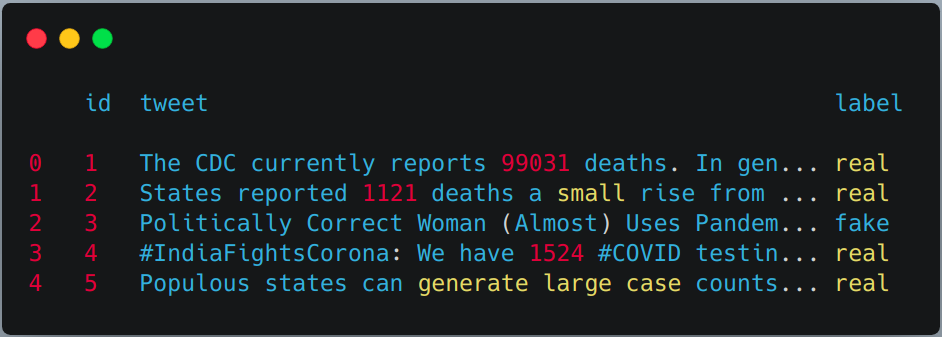
df.head()
df['char_count'] = df["tweet"].apply(lambda x:count_chars(x))
df['word_count'] = df["tweet"].apply(lambda x:count_words(x))
df['sent_count'] = df["tweet"].apply(lambda x:count_sent(x))
df['capital_char_count'] = df["tweet"].apply(lambda x:count_capital_chars(x))
df['capital_word_count'] = df["tweet"].apply(lambda x:count_capital_words(x))
df['quoted_word_count'] = df["tweet"].apply(lambda x:count_words_in_quotes(x))
df['stopword_count'] = df["tweet"].apply(lambda x:count_stopwords(x))
df['unique_word_count'] = df["tweet"].apply(lambda x:count_unique_words(x))
df['htag_count'] = df["tweet"].apply(lambda x:count_htags(x))
df['mention_count'] = df["tweet"].apply(lambda x:count_mentions(x))
df['punct_count'] = df["tweet"].apply(lambda x:count_punctuations(x))
df['avg_wordlength'] = df['char_count']/df['word_count']
df['avg_sentlength'] = df['word_count']/df['sent_count']
df['unique_vs_words'] = df['unique_word_count']/df['word_count']
df['stopwords_vs_words'] = df['stopword_count']/df['word_count']
# SIMILARLY YOU CAN APPLY THEM ON TEST SET
We will create a DataFrame from the dictionary returned by the “punct_count” function and then merge it with the main dataset.
df_punct = pd.DataFrame(list(df.punct_count))
test_punct = pd.DataFrame(list(test.punct_count))

# Merging pnctuation DataFrame with main DataFrame
df = pd.merge(df, df_punct, left_index=True, right_index=True)
test = pd.merge(test, test_punct,left_index=True, right_index=True)
# We can drop "punct_count" column from both df and test DataFrame
df.drop(columns=['punct_count'],inplace=True)
test.drop(columns=['punct_count'],inplace=True)
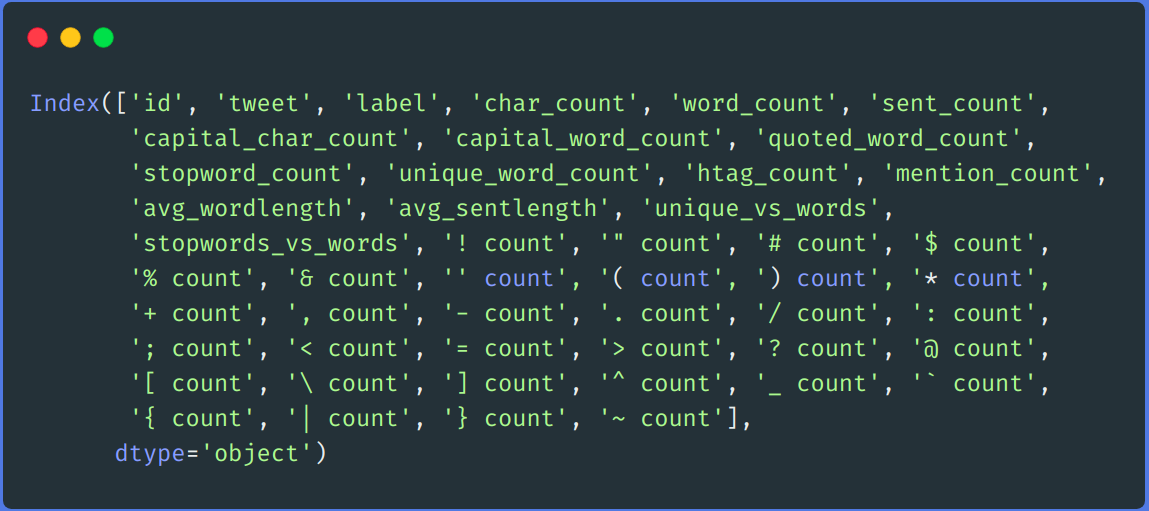
df.columns
Final columns list
We performed a simple pre-processing step, like removing links, removing user name, numbers, double space, punctuation, lower casing, etc.
def remove_links(tweet):
 '''Takes a string and removes web links from it'''
 tweet = re.sub(r'httpS+', '', tweet) # remove http links
 tweet = re.sub(r'bit.ly/S+', '', tweet) # rempve bitly links
 tweet = tweet.strip('[link]') # remove [links]
 return tweet
def remove_users(tweet):
 '''Takes a string and removes retweet and @user information'''
 tweet = re.sub('(RTs@[A-Za-z]+[A-Za-z0-9-_]+)', '', tweet) # remove retweet
 tweet = re.sub('(@[A-Za-z]+[A-Za-z0-9-_]+)', '', tweet) # remove tweeted at
 return tweet
my_punctuation = '!"$%&'()*+,-./:;<=>?[\]^_`{|}~•@'
def preprocess(sent):
 sent = remove_users(sent)
 sent = remove_links(sent)
 sent = sent.lower() # lower case
 sent = re.sub('['+my_punctuation + ']+', ' ', sent) # strip punctuation
 sent = re.sub('s+', ' ', sent) #remove double spacing
 sent = re.sub('([0-9]+)', '', sent) # remove numbers
 sent_token_list = [word for word in sent.split(' ')]
 sent = ' '.join(sent_token_list)
 return sent
df['tweet'] = df['tweet'].apply(lambda x: preprocess(x))
test['tweet'] = test['tweet'].apply(lambda x: preprocess(x))
We will encode our text data using TF-IDF. We first fit transform on our train and test set’s tweet column and then merge it with all features columns.
vectorizer = TfidfVectorizer()
train_tf_idf_features = vectorizer.fit_transform(df['tweet']).toarray()
test_tf_idf_features = vectorizer.transform(test['tweet']).toarray()

# Converting above list to DataFrame
train_tf_idf = pd.DataFrame(train_tf_idf_features)
test_tf_idf = pd.DataFrame(test_tf_idf_features)

# Saparating train and test labels from all features
train_Y = df['label']
test_Y = test['label']

#Listing all features
features = ['char_count', 'word_count', 'sent_count',
 'capital_char_count', 'capital_word_count', 'quoted_word_count',
 'stopword_count', 'unique_word_count', 'htag_count', 'mention_count',
 'avg_wordlength', 'avg_sentlength', 'unique_vs_words',
 'stopwords_vs_words', '! count', '" count', '# count', '$ count',
 '% count', '& count', '' count', '( count', ') count', '* count',
 '+ count', ', count', '- count', '. count', '/ count', ': count',
 '; count', '< count', '= count', '> count', '? count', '@ count',
 '[ count', ' count', '] count', '^ count', '_ count', '` count',
 '{ count', '| count', '} count', '~ count']

# Finally merging all features with above TF-IDF.
train = pd.merge(train_tf_idf,df[features],left_index=True, right_index=True)
test = pd.merge(test_tf_idf,test[features],left_index=True, right_index=True)
For training, we will be using the Random forest algorithm from the sci-kit learn library.
X_train, X_test, y_train, y_test = train_test_split(train, train_Y, test_size=0.2, random_state = 42)
# Random Forest Classifier
clf_model = RandomForestClassifier(n_estimators = 1000, min_samples_split = 15, random_state = 42)
clf_model.fit(X_train, y_train)
_RandomForestClassifier_prediction = clf_model.predict(X_test)
val_RandomForestClassifier_prediction = clf_model.predict(test)
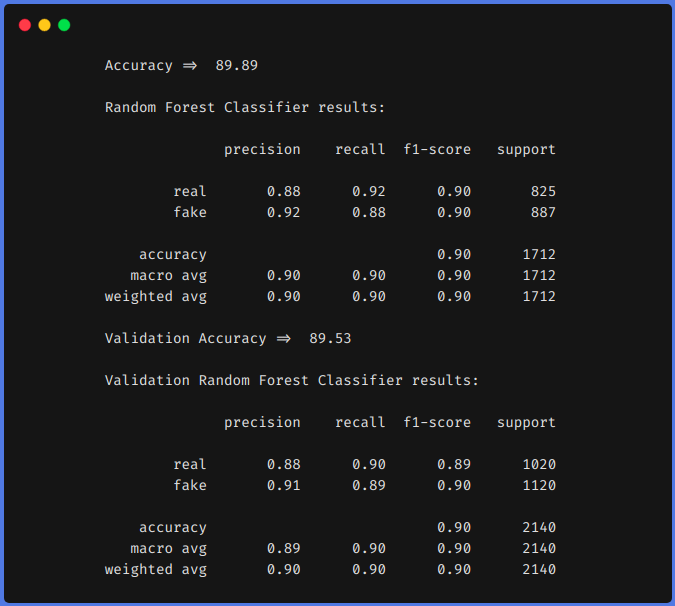
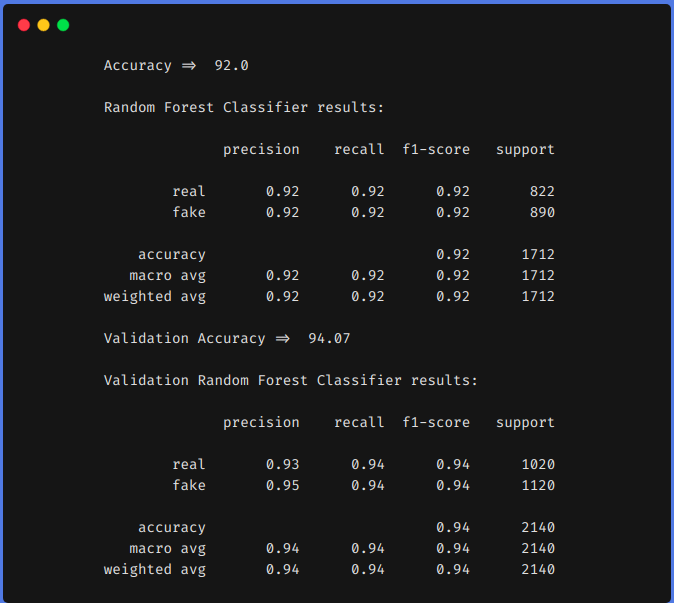
For comparison, we first trained our model on the above dataset by using features engineering techniques and then without using feature engineering techniques. In both approaches, we pre-processed the dataset using the same method as described above and TF-IDF was used in both approaches for encoding the text data. You can use whatever encoding techniques you want to use like word2vec, glove, etc.
From the above results, we can see that feature engineering techniques helped us to increase our f1 from 0.90 to 0.92 in the train set and from 0.90 to 0.94 in the test set.
The above results show that if we do feature engineering, we can achieve greater accuracy using classical Machine learning algorithms. Using a transformer-based model is a time-consuming and resource-expensive algorithms. If we do feature engineering in the right way that is after analyzing our dataset we can get comparable results.
We can also do some other feature engineering like, counting the number of emojis used, type of emojis used, what frequencies of unique words, etc. We can define our features by analyzing the dataset. I hope you have learned something from this blog, do share it with others. Check out my personal Machine learning blog(https://code-ml.com/) for new and exciting content on different domains of ML and AI.
Mohammad Ahmad (B.Tech)
LinkedIn - https://www.linkedin.com/in/mohammad-ahmad-ai/
Personal Blog - https://code-ml.com/
GitHub - https://github.com/ahmadkhan242
Twitter - https://twitter.com/ahmadkhan_242
The media shown in this article are not owned by Analytics Vidhya and is used at the Author’s discretion.
GPT-4 vs. Llama 3.1 – Which Model is Better?
Llama-3.1-Storm-8B: The 8B LLM Powerhouse Surpa...
A Comprehensive Guide to Building Agentic RAG S...
Top 10 Machine Learning Algorithms in 2026
45 Questions to Test a Data Scientist on Basics...
90+ Python Interview Questions and Answers (202...
8 Easy Ways to Access ChatGPT for Free
Prompt Engineering: Definition, Examples, Tips ...
What is LangChain?
What is Retrieval-Augmented Generation (RAG)?
Can't find the dataset on the given website. Please help with some link.
feature engineering is really important especially on creating ml on unseen dataset
Edit
Resend OTP
Resend OTP in 45s