|
VOOZH | about |
|
VOOZH | about |
“The quality of your communication shapes the quality of your life.”, with this beautiful line let’s s begin and understand what we will learn in this article. In my one of the article, I have explained how to automate machine learning problem statement using EvalML. In this article we will look at “is it possible to automate NLP task using EvalML?”.
It is an AutoML library that builds, optimizes, and evaluates machine learning pipelines using domain-specific objective functions. It actually avoids training and tunning of models by hand, it automates everything. Internally it uses data tables, which are 20x faster than data frames. Internally it constructs multiple pipelines that include state-of-the-art preprocessing, feature engineering, feature selection, and a variety of modeling techniques.
Install from PyPI :
pip install evalml
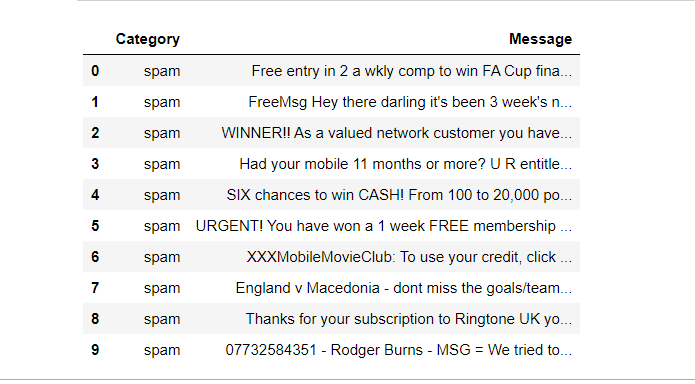
Dataset Description: Here in this article we are using the Spam and Ham Dataset which is available here. This dataset having one dependent feature(Category) and one independent feature(Message). We aim to predict whether the message is spam or ham. A glance at the dataset.
# importing urllib.request to import dataset from hyperlink
from urllib.request import urlopen
import pandas as pd
# storing the csv file in variable
input_data = urlopen('https://featurelabs-static.s3.amazonaws.com/spam_text_messages_modified.csv')
# readinng csv file
data = pd.read_csv(input_data)
data.head()
Finally, we read the data from the CSV file, now we develop a model with the help of EvalML and analyze the best model for our problem statement. Here there is no need to do text featurization manually, all things will be automatically performed by EvalML. Now let’s divide our dataset into dependent and independent features.
# Seperating our dataset into Independent And Dependent Features
X=data.drop('Category',axis=1)
y=data['Category']
Let’s check our dataset is balanced or not :
# Check whether dataset is balanced or not
y.value_counts(normalize=True)
Let’s split our dataset into training and testing part :
import evalml
# split dataset into training and testing part using evalml, here we have to mention problem_type, what kind of problem actually we are trying to solve.
X_train,X_test,y_train,y_test = evalml.preprocessing.split_data(X,y,problem_type='binary')
Check out the documentation to learn more about parameters.
Let’s check out the available problem statement in EvalML :
# printing all problem statement available in evalml library.
evalml.problem_types.ProblemTypes.all_problem_types
# Search best suitable algorithm for our problem statement
automl = AutoMLSearch(X_train=X_train,y_train=y_train,problem_type='binary',max_batches=1,optimize_thresholds=True)
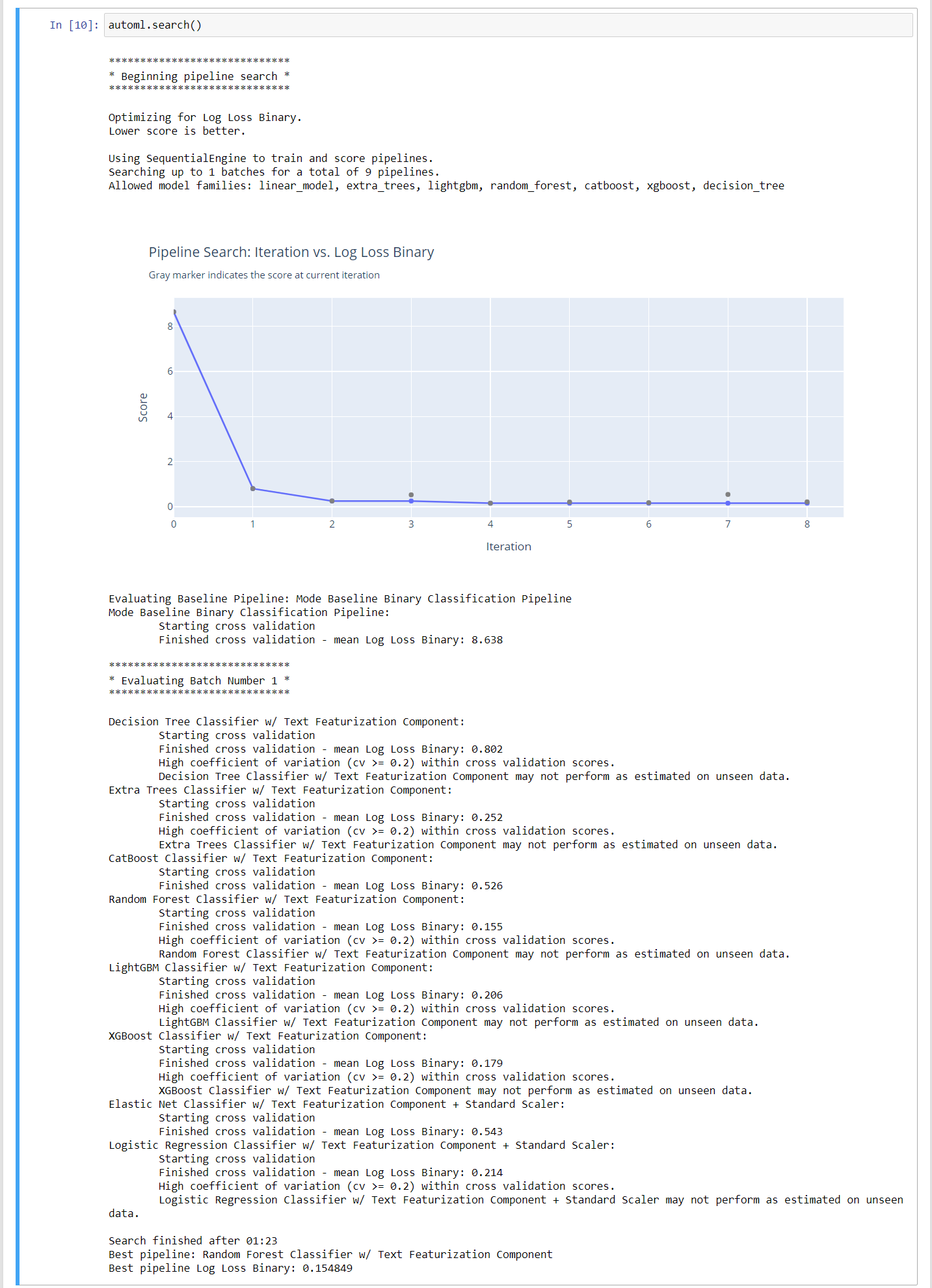
automl.search()
Finally, we get the best algorithm that is working well with our problem statement. Here it takes all the algorithms which are suitable for our problem statement then creates many pipelines automatically and tunes the parameters as well. Among all of the pipelines, it selects the best one, whose accuracy is more. Here we have to pass some parameters, you can deeply dig deeper into it using the documentation available here.
We can also tune our models based on particular objectives. Here objectives mean parameters used to check the efficiency or accuracy of models such as AUC, F1 score, recall, or Precision. You can play with “objectives” and “additional_objectives” parameters. EvalML will more focus on parameter pass to objectives, than additional_objectives. Don’t be confused, it will just train and tune the model in such a way that we will get optimized value for the parameters available in “objectives” and “additional_objectives”. In this problem statement the best pipeline is :
Best pipeline: Random Forest Classifier w/ Text Featurization Component
Best pipeline Log Loss Binary: 0.154849
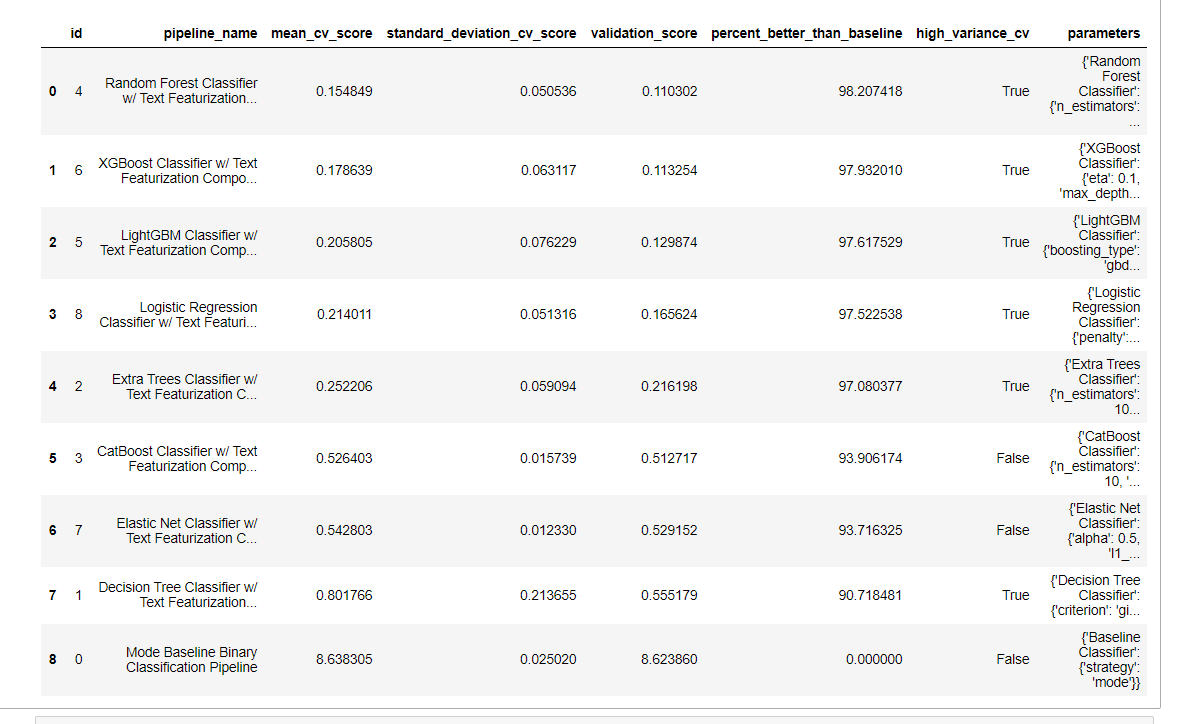
Let’s get the best model based on accuracy and various objectives :
# return a table showing different models based on their ranking
automl.rankings
Let’s get the best pipeline :
# get best pipeline
best_pipeline = automl.best_pipeline

# Output :
# GeneratedPipeline(parameters={'Random Forest Classifier':{'n_estimators': 100, 'max_depth': 6, 'n_jobs': -1},})
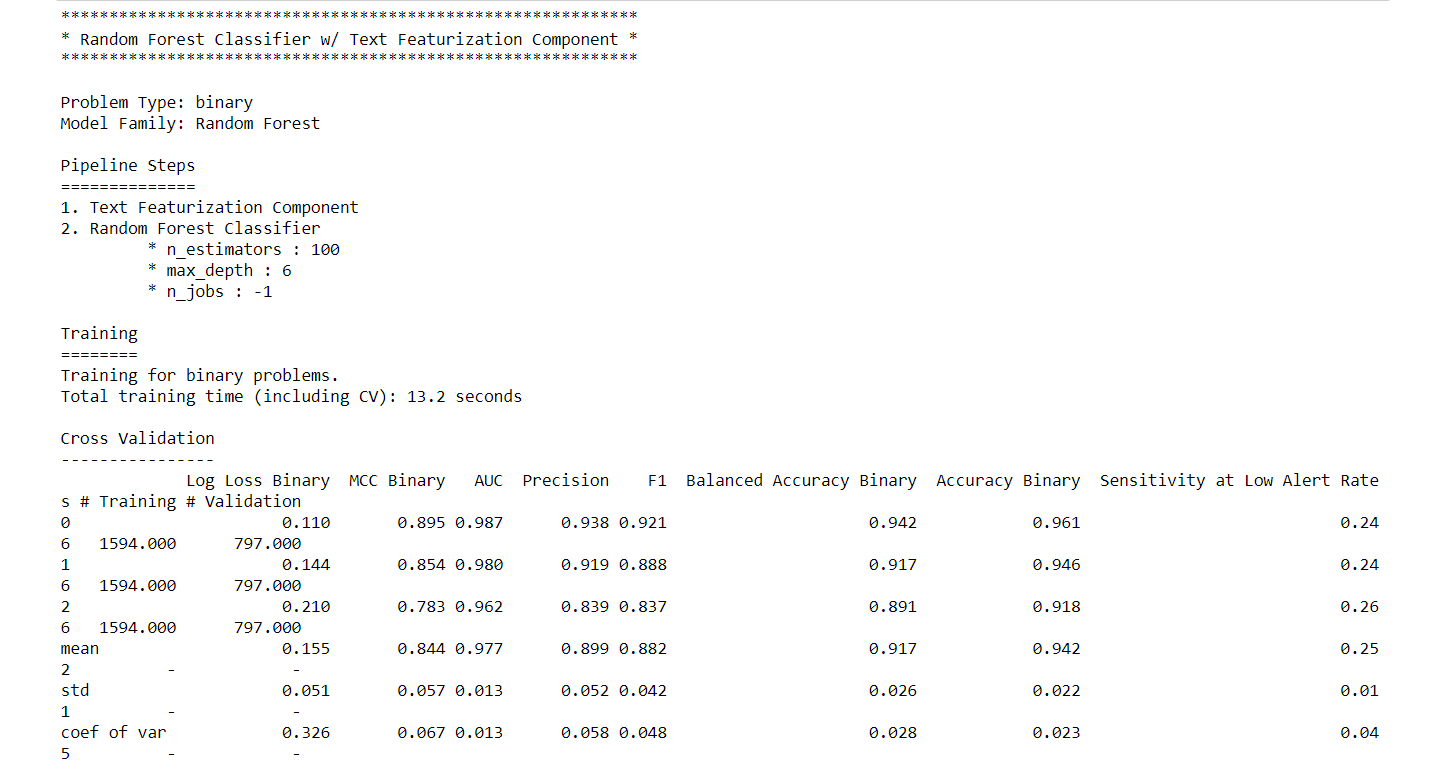
Let’s describe our best pipeline in details :
# describe best pipeline in more detail.
automl.describe_pipeline(automl.rankings.iloc[0]["id"])
Let’s evaluate test data using the best model :
# evalute test data
scores = best_pipeline.score(X_test, y_test, objectives=evalml.objectives.get_core_objectives('binary'))
print(f'Accuracy Binary: {scores["Accuracy Binary"]}')

# OUTPUT :
 Accuracy Binary: 0.9732441471571907
Finally, save the model in a pickle file, and let’s finish this beautiful journey :
# save the model in model.pkl file.
best_pipeline.save("model.pkl")
I hope this article helps you to understand the basics of EvalML and how to use it to get the best suitable model for our problem statements. I believe that “Knowledge shared is knowledge squared.” So if you have any query don’t hesitate to drop a comment below or you can also connect me on LinkedIn. If you want any suggestions related to Data Science, Deep Learning, or Machine Learning don’t hesitate to ping me on LinkedIn, I will try my best to solve your query.
GPT-4 vs. Llama 3.1 – Which Model is Better?
Llama-3.1-Storm-8B: The 8B LLM Powerhouse Surpa...
A Comprehensive Guide to Building Agentic RAG S...
Top 10 Machine Learning Algorithms in 2026
45 Questions to Test a Data Scientist on Basics...
90+ Python Interview Questions and Answers (202...
8 Easy Ways to Access ChatGPT for Free
Prompt Engineering: Definition, Examples, Tips ...
What is LangChain?
What is Retrieval-Augmented Generation (RAG)?
Edit
Resend OTP
Resend OTP in 45s