|
VOOZH | about |
|
VOOZH | about |
“Then world is under you, if you are king of data and information”
As you see above that the following quote has deep-down meaning, The data is a weapon against the world. Everywhere the need for data is increasing. We use data for the train out the ML model which is quite an important step in any DataScience project.
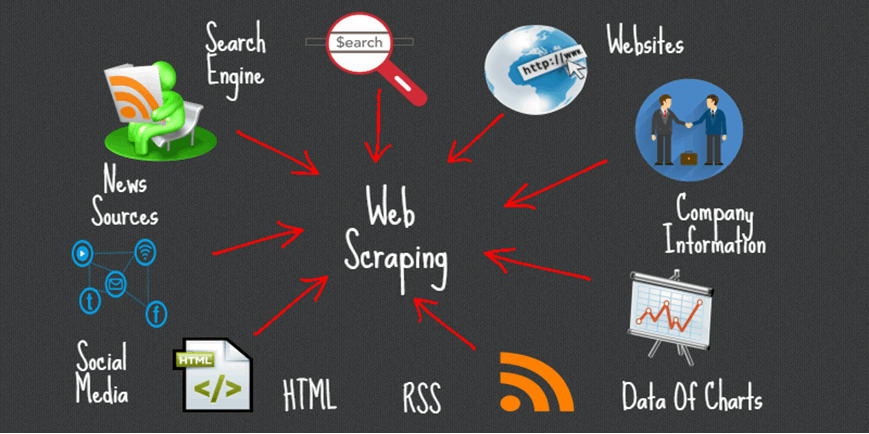
Before We come to our topic, we firstly understand the basic knowledge of web scraping, Web scraping is a fundamental technique that is used for fetching or extracting useful desirable data from the website. It is also termed as ‘crawling’ when we want to extract desirable information from the bulk or a large amount of data into a short size which was structured and labeled according to our criteria.
Web scraping is not a simple task however website comes in very complicated form but there are beautiful libraries in python that will help to extract data from any type of website either it was dynamic or static in an easy way. such libraries are BeautifulSoup, Scrapy, Selenium, etc…
BeautifulSoup is a python library that is used for getting data out HTML, XML, and any other markup language. If you open any website and see there are lots of data that you need to get but the website provider doesn’t provide any way to downloading that data, but BeautifulSoup helps us to extract particular content from the page we have only to do that just we have to remove HTML content and only take needed data. It is a tool for web scraping that helps you clean up and parse the documents you have pulled down from the web.
Now, we will learn about the errors or exceptions faced during writing scripts,
We know that when you are writing the code you definitely stuck on errors, those errors are having their types, As similarly when we use BeautifulSoup for website content scraping then there are also exceptions that occur and they are of several types.
So, basically When we fetch web content then definitely we need to aware there are occur two types of exceptions :
If you start coding web scraping scripts that if you deliver or put the wrong URL to the request then this exception will occur. In easy words, we can say that when we request the wrong website from the server.
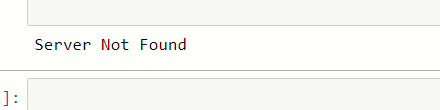
If you saw the exception in the compiler it always shows the server not found error.
Let’s take an example where there is no exception occurs :
import requests
from urllib.error import URLError
LINK = 'https://www.amazon.in/s/ref=nb_sb_ss_ts-doa-p_3_3?url=search-alias%3Daps&field-keywords=basketball&sprefix=bas%2Caps%2C458&crid=3STPJQX67B7GD'
try:
 response = requests.get(LINK)
except URLError as url_error:
 print("Server Not Found")
else:
 print("There is no Error")
As you can see in the output of our program, Here the link we provide to the server is worked fine there is no wrong with the link so it will not produce any URL error. What if we provide the wrong link to the server
Let’s see an example of request the wrong link to the server :
import requests
from urllib.error import URLError
link = 'https://www.amaz.in/s/ref=nb_sb_ss_ts-doa-p_3_3?url=search-alias%3Daps&field-keywords=basketball&sprefix=bas%2Caps%2C458&crid=3STPJQX67B7GD'
try:
 response = requests.get(link)
except URLError as url_error:
 print("Server Not Found")
else:
 print("There is no Error")
output:
Here we do some changes in the link, after that, we saw that the output is changed it will show Server Not Found error.
Now, we will talk about the second one which is the HTTP exception :
What happens when you stuck in any place and you see there is no one, similarly if we provide that link or URL that is not present in the server then obviously we get stuck into an error. In simple words we can say that if we provide the wrong link during request to server after that we execute it then it will show an error or exception Page Not Found.
Let’s take an example to understand what we are talking about:
what happens if we take write URL instead of wrong ? let’s see below:
import requests
from urllib.error import HTTPError
url = 'http://pythonscraping.com/blog/second-edition-changes'
try:
 response = requests.get(url)
except HTTPError as http_error:
 print(http_error)
else:
 print("fine worked")
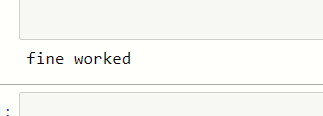
output:
As you can able to see that our provided link is correct and the program runs correctly, there is no exception occurs.
Now, we will change that link and see what will happens:
import requests
from urllib.error import HTTPError
url = 'http://pythonscraping.com/fetch/wrong-URL'
try:
 response = requests.get(url)
except HTTPError as http_error:
 print(http_error)
else:
 print("fine worked")
output:
Here we update the link and then we request that URL then we saw that there is one exception that occurs which was an HTTP exception.
This is the general exception that we all are faced but we didn’t know about it, right? The function of BeautifulSoup is we can easily parse any document into HTML form which is easy to read. During script writing, if we faced this error then don’t be afraid it was overcome by using BeautifulSoup.
This was overcome when we parse that content from the web then we have to use ‘XML-XML‘ or ‘XML‘ in the parameter of the constructor.
It has the basic syntax :-
Syntax :-
soup = BeautifulSoup(response, ‘xml-xml’)
or,
soup = BeautifulSoup(response, ‘xml’)
we use XML and XML-XML in the second parameter of the BeautifulSoup object.
This Exception occurs when we forgot to pass the element which was required in the find() and find_all() function or when we pass an element but it was missing in that HTML document.
Example :
import requests
import bs4
link = 'https://pythonscraping.com/blog/second-edition-changes'
response = requests.get(link)
soup = bs4.BeautifulSoup(response.text,'xml')
result = soup.find('div',class_='doesn't in HTML document')
print(result)
Output:
When we execute the program and if the exception occurs then It sometimes gives the empty bracket [] or None as their output.
The media shown in this article on BeautifulSoup Exception Handling are not owned by Analytics Vidhya and is used at the Author’s discretion.
GPT-4 vs. Llama 3.1 – Which Model is Better?
Llama-3.1-Storm-8B: The 8B LLM Powerhouse Surpa...
A Comprehensive Guide to Building Agentic RAG S...
Top 10 Machine Learning Algorithms in 2026
45 Questions to Test a Data Scientist on Basics...
90+ Python Interview Questions and Answers (202...
8 Easy Ways to Access ChatGPT for Free
Prompt Engineering: Definition, Examples, Tips ...
What is LangChain?
What is Retrieval-Augmented Generation (RAG)?
Kalejdoskop is extinct! Simpelt use lxml, which also supports xpath...
Edit
Resend OTP
Resend OTP in 45s