|
VOOZH | about |
|
VOOZH | about |
This article was published as a part of the Data Science Blogathon
Yesterday I was using my phone’s camera to capture an image. This is the image that I managed to captured using my phone.
I wonder how a smartphone managed to capture such an image just by clicking on the shutter button in the camera app. The answer to this question is functions. For us, when we click the camera shutter button, our phone simply captures the image. But in the backend what’s happening is that a function is invoked in the background the moment we pressed the camera’s shutter button. It eventually communicates with HAL(Hardware Abstraction Layer) of android OS and then our smartphones capture the image.
To put this in a simple world, all our daily activities are powered by functions. For example – Taking pictures using smartphones, booking a cab, using Google maps, etc.
This is going to be the topic for this article. We are going to discuss functions. Now functions are there for every major programming language out there but here we will be discussing functions in python. So without further ado, let’s get started.
“Functions are basically black box”- This is a statement that we will often see if we researched functions.
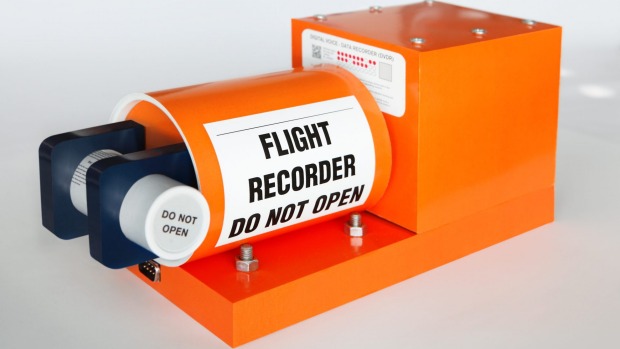
Black Box
You might have a question here. Why there is an image of an orange-colored box here and what is its significance with function here. Well, the image you are seeing here is an image of equipment known as the “black box“. It is there in every modern jetliner nowadays. Its main function is to record detailed information about aircraft performance like engine speed, altitude, etc. Why called black-box then?
The reason being we don’t need to understand how internally it works. It just does what it is designed to do That’s why the name black box.
So simply speaking, functions are basically a kind of black-box. We don’t exactly need to know about how functions work. The only thing which matters is the result which function is returning. From a technical viewpoint, a function is basically a block of code that accepts certain input or in some cases nothing as input and produces some result when called.
The whole idea behind using a function is to modularize our code. Modularization of code results not only in faster development time but also makes debugging of code easier. SImilarily, the use of function saves the overhead of writing the same code again and again.
In this article, we are going to not only learn about functions but also going to implement those functions in python programming languages. Following are the pre-requisite for the same.
1.Anaconda distribution should be installed on the computer
2.Jupyter notebook should be installed on the computer. (This will be automatically installed once anaconda distribution is installed).
Now let’s create our very first function in python. Here we will create a simple “Hello World” function in Python. So let’s get started.
In Python, a function is defined by using keyword def followed by its name. It is then followed by () which is then followed :
In this case, we are going to create a simple function which when invoked is simply going to print “Hello World ” on screen. The function after coding will look like below one:
Creating a simple function to print Hello World in Python:
What we are seeing in the above code is known as a function definition. Here we have defined a function by using a keyword named def which is then followed by function name followed by () and :
Since in this function we are only printing a message “Hello World”, we have done the same in our code by simply using a print statement.
We have defined our function in the previous section. Now it is time to call our function. In order to call a function, we have to specify the name of the function followed by (). That’s it, easy-peasy.
Calling a defined function in Python:
Hello()
Output:
Hello World
As we can see here, once we called our function we are seeing “Hello World” as an output.
Docstrings stands for Documentation strings. The whole point of embedding docstrings in our function is to have a piece of single one-liner information about a function that we are dealing with. Inclusion of docstring in a function is optional however it is a good practice to include those as it eases the work of not only you but also of some fellow future developer who will be accessing your piece of code.
Defining a function with docstring in Python:
def Hello():
 "This is a very first function created in Python"
 print("Hello World")
Hello()
As we can see in this code, our function with docstring is exactly similar to our earlier function that we had created. The only difference here is the embedding of docstring in our function. From a functioning perspective, everything will be similar. So even if we execute this code, we will be seeing exact same result as that of a function that we have seen in the previous section.
Calling function with docstring:
Hello()
Output:
Hello World
Until now, we have seen functions with a print statement only. Now speaking of real-world applications, functions usually have something called a “return” statement. What is this return statement?
To explain it in simple words, return is basically a statement that allows a function to return a specific value. Let’s understand this concept with the help of an example.
Defining function with return statement in Python:
def func1(x1,x2):
    return x1+x2
We can see in the above code that our function is accepting two parameters namely x1 and x2. As a result, it is returning the sum of x1 + x2 essentially an addition. Don’t panic :). What are parameters? we will be seeing this further down in this article. Let’s now call our function with a return statement
Calling function with a return statement:
func1(10,20)
Output:
30
As we can see here, our function has accepted two arguments namely 10 and 20, and return the addition of those two arguments which is 30.
As I promised earlier, now it’s time for us to check concepts regarding parameters and arguments from the function’s perspective.
From my experience, I have seen that there is a lot of confusion regarding these two terms. So let me explain those concepts in a simpler manner.
As we have seen earlier that before we called a function, we have to first define our function.
From a parameter perspective, we only need to remember one thing. Whatever we passed in ( ) while a function are known as Parameters.
Parameters x1 and x2 passed while defining a function:
def func1(x1,x2):
    return x1+x2
As we can see here. we have passed two elements named x1 and x2 while defining a function and those are parameters for our function.
Similarly from an argument’s perspective, only one thing is important. Whatever we passed in ( ) while a function are known as arguments.
Arguments 10 and 20 passed while calling a function:
func1(10,20)
As we can see here, we have passed two elements named 10 and 20 while calling our function and those are arguments for our function.
We are now aware of parameters and arguments from a function perspective. We also know about the difference between parameters and arguments for a function. Now let’s get an understanding of the types of arguments while calling a function.
There are two types of argument used when calling a function.
Those are :
1.Positional Arguments
2.Keyword Arguments
Now let’s understand those concepts with a help of an example.
Defining a function with 3 arguments:
def func2(x,y,z):
     print("First arguments is :",x)
     print("Second arguments is :",y)
     print("Third arguments is :",z)
     return x * y + z
As we can see in this example, we have defined a function named func2. This function is accepting 3 parameters in total namely x,y,z respectively.
Now let’s call our defined function
Calling defined function:
func2(10,20,30)
Output:
First arguments is : 10
Second arguments is : 20
Third arguments is : 30
230
As we can see here that once our function is executed completely, we are seeing the result as 230. Now just focus on the part where we called our function. While calling our function, we have passed 10,20, and 30 arguments respectively, and those are known as positional arguments.
Why called positional arguments? The reason being simple. Here we each of the arguments will be getting associated with parameters x,y, and z respectively based on their positions and hence the name.
Alternatively, let’s also called our function using keyword arguments this time.
Calling Defined function using Keyword arguments:
func2(z = 30,x = 10,y = 20)
Output:
First arguments is : 10
Second arguments is : 20
Third arguments is : 30
230
As we can see here, our function is executed completely and we are seeing the result as 230. Now if we focus on the part where we called our function, we can see that here we not only passed the arguments but also specified to which parameters those arguments need to be mapped and this is what is known as Keyword arguments.
Now here one important thing that needs to be remembered. While calling a function, we can use a combination of Positional and Keyword arguments. However, the important thing to keep in mind here is that Keyword arguments always follow positional arguments.
Calling function with combination of Positional and Keyword arguments:
func2(10,y=20,z=30)
Output:
First arguments is : 10
Second arguments is : 20
Third arguments is : 30
230
As we can see here, the result is exactly similar to that of the previous case.
Now you might have a question. What will happen if we missed this order?
Well, let’s check the result for that as well.
Calling function:
func2(x=10,y=20,30)
Output:
 File "<ipython-input-13-e885894d6f8a>", line 2
 func2(x=10,y=20,30)
 ^
SyntaxError: positional argument follows keyword argument
It is evident from this code that if we missed the order of positional and keyword arguments, we will be getting the above error.
So that’s it. This is everything that you need to know about functions as a beginner.
Please do share this article with your friends and colleagues.
The media shown in this article are not owned by Analytics Vidhya and is used at the Author’s discretion.
My name is Shrish. I have been working as a data scientist at EY. I love technology and during my free time, I try to use my skills to create something awesome in python so that it can be shared on the analyticsvidhya platform
GPT-4 vs. Llama 3.1 – Which Model is Better?
Llama-3.1-Storm-8B: The 8B LLM Powerhouse Surpa...
A Comprehensive Guide to Building Agentic RAG S...
Top 10 Machine Learning Algorithms in 2026
45 Questions to Test a Data Scientist on Basics...
90+ Python Interview Questions and Answers (202...
8 Easy Ways to Access ChatGPT for Free
Prompt Engineering: Definition, Examples, Tips ...
What is LangChain?
What is Retrieval-Augmented Generation (RAG)?
I want to thank you for easily explaining the use of keyword arguments.
Nice article. Your explanation is very clear and informative. As a beginner, I have learnt quite a lot from your article. How can I get more of such tutorials? Thanks
Edit
Resend OTP
Resend OTP in 45s