|
VOOZH | about |
|
VOOZH | about |
This article was published as a part of the Data Science Blogathon
Numpy which stands for Numeric Python is a Python library used for working with arrays. It also has functions for working in the domain of linear algebra, Fourier transform, and matrices.
NumPy was created in 2005 by Travis Oliphant as an open-source project and one can use it freely.
Numpy is a Python library that is written in Python, but the parts that require fast computation are written in C or C++. For this reason, working with Numpy array is much faster than working with Python lists.
Numpy being an open-source project has thousands of contributors working to keep NumPy fast, friendly, and bug-free. Numpy is hugely popular these days due to its use in various fields and tasks.
Numpy has numerous uses. Normal arithmetic and statistical operations are simple to implement Numpy. Various trigonometric calculations can also be done. Other uses are broadcasting, linear algebra, matrix operations, stacking, copying and manipulating arrays.
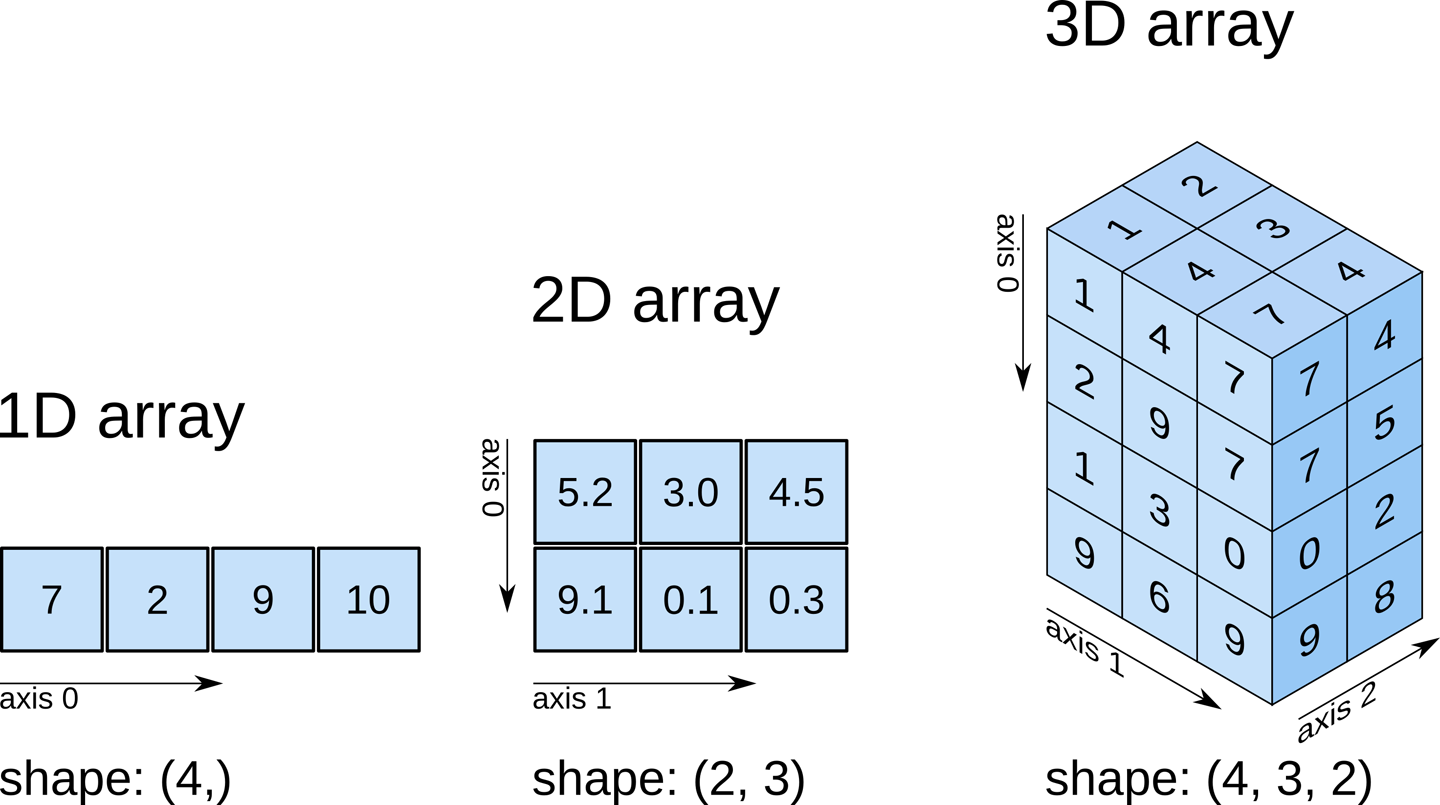
NumPy contains a multi-dimensional array and matrix data structures, making large scale calculations simple and easy.
Numpy has random number generators which can be used for various tasks like noise generation for signals for just random probability generations and other mathematical tasks.
Let us start with the basics of Numpy.
Python Code:
import numpy as np
#numpy array
a= np.array([34,67,8,5,33,90,23])
print(a)
Output: [34 67 8 5 33 90 23]
#type
type(a)
Output: numpy.ndarray
print(a[2])
Output : 8
b=np.array([[77, 38, 9], [10, 11, 12]])
print(b)
Output:
[[77 38 9] [10 11 12]]Now, we look at some interesting functions in NumPy.
Ones: Creates a NumPy array according to the parameters given, with all elements being 1.
np.ones(5)
array([1., 1., 1., 1., 1.])
np.ones([6,7])
Output:
array([[1., 1., 1., 1., 1., 1., 1.],
[1., 1., 1., 1., 1., 1., 1.],
[1., 1., 1., 1., 1., 1., 1.],
[1., 1., 1., 1., 1., 1., 1.],
[1., 1., 1., 1., 1., 1., 1.],
[1., 1., 1., 1., 1., 1., 1.]])
Zeros: Creates a NumPy array according to the parameters given, with all elements being 0.
np.zeros(7)
Output : array([0., 0., 0., 0., 0., 0., 0.])
These functions are simple, they can be used to create sample arrays which are often needed for various computational purposes.
eye: Let us now look at the eye function. This function returns a 2-D array with ones on the diagonal and zeros elsewhere.
np.eye(5)
Output:
array([[1., 0., 0., 0., 0.],
[0., 1., 0., 0., 0.], [0., 0., 1., 0., 0.], [0., 0., 0., 1., 0.], [0., 0., 0., 0., 1.]])Similarly, the diag() function creates a 2D array with the elements passed as diagonal elements and other elements being zero.
y=np.array([6,78,3,56,89])
np.diag(y)
Output:
array([[ 6, 0, 0, 0, 0],
[ 0, 78, 0, 0, 0], [ 0, 0, 3, 0, 0], [ 0, 0, 0, 56, 0], [ 0, 0, 0, 0, 89]])Let us try some more interesting functions. These are self-explanatory.
np.array([1, 2, 3,7] * 3)
Output : array([1, 2, 3, 7, 1, 2, 3, 7, 1, 2, 3, 7])
np.repeat([1, 4, 2, 3], 5)
Output : array([1, 1, 1, 1, 1, 4, 4, 4, 4, 4, 2, 2, 2, 2, 2, 3, 3, 3, 3, 3])
p = np.ones([2, 3], int)
print(p)
Output :
[[1 1 1] [1 1 1]]With vstack(), we can vertically append data, and with hstack(), we can horizontally stack data. Let us try out some examples.
np.vstack([p, 2*p])
Output :
array([[1, 1, 1],
[1, 1, 1], [2, 2, 2], [2, 2, 2]])np.vstack([3*p, 2*p, 6.5*p,4.6*p])
Output :
array([[3. , 3. , 3. ],
[3. , 3. , 3. ], [2. , 2. , 2. ], [2. , 2. , 2. ], [6.5, 6.5, 6.5], [6.5, 6.5, 6.5], [4.6, 4.6, 4.6], [4.6, 4.6, 4.6]])np.hstack([2*p,5.5*p,9*p])
Output:
array([[2. , 2. , 2. , 5.5, 5.5, 5.5, 9. , 9. , 9. ],
[2. , 2. , 2. , 5.5, 5.5, 5.5, 9. , 9. , 9. ]])Let us get onto working with NumPy in various mathematical computations.
import numpy as np
a=np.array([4,6,8])
b=np.array([8,9,7])

c=a+b

print(c)
Output: [12 15 15]
Now, we go for an element by element multiplication.
a=np.array([4,6,8])
b=np.array([8,9,7])

c=a*b

print(c)
Output : [32 54 56]
Element by element division.
a=np.array([4,6,8])
b=np.array([8,9,7])

c=a/b

print(c)
Output: [0.5 0.66666667 1.14285714]
We calculate the dot product now.
c=np.array([6,7,5,8])
d=np.array([4,3,7,8])

ans=c.dot(d) #dot product

print(ans)
Output : 144
Let us now, look at how to create multi-dimensional numpy arrays.
z=np.array([[5,7,5,4,5],[6,2,3,4,6]])

print(z)
Output:
[[5 7 5 4 5] [6 2 3 4 6]]Getting the transpose.
print(z.T)
Output :
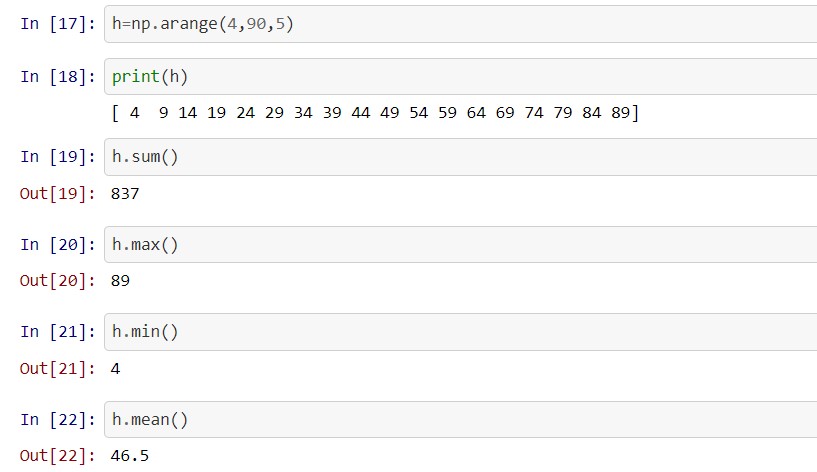
[[5 6] [7 2] [5 3] [4 4] [5 6]]Let us create a list by giving a few parameters. The first and second parameter will be for determining the range and the third will be for the interval.
h=np.arange(4,90,5)
print(h)
Output: [ 4 9 14 19 24 29 34 39 44 49 54 59 64 69 74 79 84 89]
Now, let us look at some standard functions.
Let us carry some computations over multi-dimensional arrays.
test = np.random.randint(0,10,(4,3))
print(test)
Output:
[[5 0 2]Here 0 and 10 indicate the range, and 4,3 is the shape of the matrix/2D array.
test2 = np.random.randint(90,120,(8,3))
test2
Output:
array([[106, 103, 104],
[ 96, 93, 106],
[110, 108, 115],
[117, 106, 114],
[ 91, 102, 103],
[ 98, 104, 92],
[112, 99, 105],
[115, 111, 118]])
for row in test2:
 print(row)
Output:
[106 103 104] [ 96 93 106] [110 108 115] [117 106 114] [ 91 102 103] [ 98 104 92] [112 99 105] [115 111 118]test3 = test2**2 test3
Output:
array([[11236, 10609, 10816],
[ 9216, 8649, 11236],
[12100, 11664, 13225],
[13689, 11236, 12996],
[ 8281, 10404, 10609],
[ 9604, 10816, 8464],
[12544, 9801, 11025],
[13225, 12321, 13924]], dtype=int32)
for i, j in zip(test2, test3):
 print(i,'+',j,'=',i+j)
Output:
[106 103 104] + [11236 10609 10816] = [11342 10712 10920]Thus, we can see that NumPy can be used for various types of mathematical calculations and the important thing is that the computation time is much less than python lists. This helps while working in real-life cases with millions of data points.
Numpy array is also very convenient to use with a lot of data manipulation tricks and methods.
Do connect with me on Linkedin
Thank You.
The media shown in this article are not owned by Analytics Vidhya and is used at the Author’s discretion.
Prateek is a dynamic professional with a strong foundation in Artificial Intelligence and Data Science, currently pursuing his PGP at Jio Institute. He holds a Bachelor's degree in Electrical Engineering and has hands-on experience as a System Engineer at TCS Digital, where he excelled in API management and data integration. Prateek also has a background in product marketing and analytics from his time with start-ups like AppleX and Milkie Way, Inc., where he was involved in growth campaigns and technical blog management. Recognized for his structured thinking and problem-solving abilities, he has received accolades like the Dr. Sudarshan Chakraborty Award for Best Student Performance. Fluent in multiple languages and passionate about technology, Prateek continues to expand his expertise in the rapidly evolving AI and tech landscape.
GPT-4 vs. Llama 3.1 – Which Model is Better?
Llama-3.1-Storm-8B: The 8B LLM Powerhouse Surpa...
A Comprehensive Guide to Building Agentic RAG S...
Top 10 Machine Learning Algorithms in 2026
45 Questions to Test a Data Scientist on Basics...
90+ Python Interview Questions and Answers (202...
8 Easy Ways to Access ChatGPT for Free
Prompt Engineering: Definition, Examples, Tips ...
What is LangChain?
What is Retrieval-Augmented Generation (RAG)?
Edit
Resend OTP
Resend OTP in 45s

.jpg)
.jpg)