|
VOOZH | about |
|
VOOZH | about |
This article was published as a part of the Data Science Blogathon
NumPy is a Python library widely used to handle arrays with arrays. Numpy can handle oversized, multi-dimensional arrays and matrices, along with a large collection of mathematical operations to operate on these arrays. It stands for numerical python. NumPy can provide an array object that is 50 times faster than traditional Python lists.
An array occupies less memory and is extremely convenient to use as compared to python lists. Additionally, it has a mechanism for specifying the data types. NumPy can operate on individual elements in the array without using loops and list comprehensions.
Now, before diving deep into the concept of NumPy arrays, it’s important to note that Python lists can very well perform all the actions that NumPy arrays perform; it is simply the fact that NumPy arrays are faster and more convenient that lists when it comes extensive computations, which make them extremely useful, especially when you are working with a large amount of data.
$ pip install numpy
Once Numpy is successfully installed in your system, you can import NumPy simply by
import numpy as np
where np is an alias used for NumPy so that the NumPy package can be referred to as np instead of numpy.
There are two ways to create NumPy arrays, which are mentioned below:
#Creating a 1D numpy array
arr = np.array([1,2,3,4,5])
#Creating a 2D array
arr = np.array( [  [1,2,3],
                   [4,5,6] ] )
# Creating array of ones
np.ones(5) #1D
np.ones( (3,5) ) #2D
# Change the default dtype of an array
np.ones( (5) ,dtype = np.int) # creating array of integers
np.ones( (5) ,dtype = np.float ) # creating array of floats
# Creating array of random numbers
np.random.random( [3,4] )
#creating an array of numbers 1 to 100 with step of 5
np.arange(1,100,5)
#Creating an array of length 25 between 1 to 10
np.linspace(1,10,25)  # It equally divides 1 to 100 in 25 parts
#creating a array of particular number
np.full( ( 3,3) , 5) #It will create an array of 3x3 of 5's
# To create an array of repeating sequence
np.tile( [1,2,3] , 3 ) # The op will look like [ 1,2,3,1,2,3,1,2,3 ]
# Creating an array of identity matrix
np.eye(3, dtype = int )   # it will create an 3x3 identity matrix
#create a matrix of random integer between a particular range
np.random.randint(0, 10, (3,3))  #3x3 array of random integers ranging from 0 to 9
# creating uninitialized array of specific shape and dtype
np.empty( [3,3] , dtype = int )
#create an array of specific shape filled with zeroes
np.zeros( [3,3] , dtype = int )
# Checking shape of an array
arr = np.array( [1,2,3] )
arr.shape
#checking dimensions of an array
arr.ndim
#checking shape of an array
arr.size
#checking the dtype of an array
np.dtype
arr = np.array( [1,2,3,4,5,6,7,8,9] )
arr.reshape( [3,3]) # convering above array in 3x3 matrix
#flatenning the array
y = np.array( [[1,1], [1,1] ])
y.flatten() # output : [1,1,1,1]
array_1d[2] # Third element
array_1d[2:] # Third element onwards
array_1d[:3] # First three elements
array_1d[2:7] # Third to seventh elements
array_1d[0::2] # Subset starting 0 at increment of 2
print(arr[0]) #it will print first row
print(arr[1]) #it will print second row
print(arr[0][1]) #it will print second element of first row
arr=np.array([[81,19,46,74,94],[69,79,26,7,29],[21,45,12,80,72] ])
print(arr[2][1]) #it will print second element of third
arr=np.array([0,1,2,3,4,5,6,7,8,9,10])
print(arr[:5]) #by default its startindex start from [0 1 2 3 4]
print(arr[5:]) #by default its stopindex go till la [ 5 6 7 8 9 10]
print(arr[4:10:2]) #output : [4 6 8]
print(arr[::]) #by default it startindex is 0 stopin [ 1 2 3 4 5 6 7 8 9 10]
arr=np.array([[1,2,3,4,5,6],[7,8,9,10,11,12],[13,14,15,16,17,18]])
print(arr[0,1:5]) #it select first row and element from 1
#output : [2 3 4 5]
print(arr[1:4,2:4]) #it select row from first to third and
# output : [[ 9 10] [15 16]]
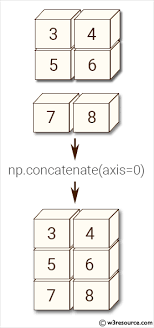
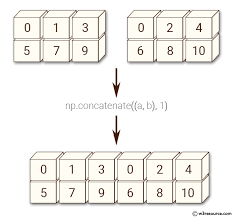
Concatenate() function can join the sequence of arrays that we provide, along with the axis specified. If the axis is not explicitly given, it is taken as 0
#Concatenating 1D array
arr1=np.array([1,2,3])
arr2=np.array([4,5,6])
arr=np.concatenate((arr1,arr2),axis=0)
print(arr)
#output : [1 2 3 4 5 6]
#Concatenating @d array along axis 0
arr1=np.array([[1,1,1],[1,1,1]])
arr2=np.array([[9,9,9,],[9,9,9]])
arr=np.concatenate((arr1,arr2),axis=0)
print(arr)
 #output : [[1 1 1]
 [1 1 1]
 [9 9 9]
 [9 9 9]]
#concatenating along axsi 1
arr1=np.array([[1,1,1],[1,1,1]])
arr2=np.array([[9,9,9,],[9,9,9]])
arr=np.concatenate((arr1,arr2),axis=1)
print(arr)
#output : [[1 1 1 9 9 9]
 [1 1 1 9 9 9]]
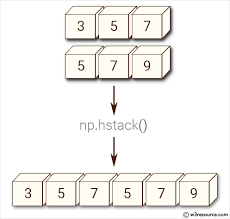
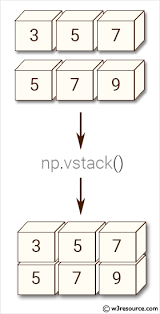
Stacking is the same as concatenation, the only difference is that stacking is done along a new axis.
#stacking two 1D arrays horizontally
arr1=np.array([0,0])
arr2=np.array([1,1])
arr=np.hstack((arr1,arr2))
# Stacking two 2D arrays horizontally
arr1=np.array([[0,0],[0,0]])
arr2=np.array([[1,1],[1,1]])
arr=np.hstack((arr1,arr2))
print(arr)
output : [[0 0 1 1]
 [0 0 1 1]]
#Stacking 1D arrays vertically
arr1=np.array([0,0])
arr2=np.array([1,1])
arr=np.vstack((arr1,arr2))
print(arr)
#output :[[0 0]
 [1 1]]
# Stacking 2D arrays vertically
arr1=np.array([[0,0],[0,0]])
arr2=np.array([[1,1],[1,1]])
arr=np.vstack((arr1,arr2))
print(arr)
#output : [[0 0]
 [0 0]
 [1 1]
 [1 1]]
sorting means simply arranging elements in an ordered sequence.
arr=np.array([3,2,0,1])
print(np.sort(arr))
#output : [0 1 2 3]
array_1 + array_2
np.array([0,1]) + np.array([2,3])
array_1 – array_2
np.array([0,1]) + np.array([2,3])
array_1 * array_2
np.array([0,1]) * np.array([2,3])
some_array ** n , where n is any real number
np.array([0,1])**2 #squaring
np.array([1,2]) ** 1.2 #raising power by 1.2
NumPy provides the functions sin(), cos() and tan()
np.sin(some_array)
np.cos(some_array)
np.tan(some_array)
arr = np.array([1,2,3])
print( np.sin(arr) )
print( np.cos(arr) )
print( np.tan(arr) )
np.exp(some_array)
np.exp(arr)
np.log(some_array)
np.log( arr )
A = np.array([[6, 1, 1], [4, -2, 5], [2, 8, 7]])# Rank of a matrixprint( np.linalg.matrix_rank(A) )# Trace of matrix Aprint( np.trace(A) )# Determinant of a matrixprint(np.linalg.det(A) )# Inverse of matrix Aprint( np.linalg.inv(A) )#raising power of each elt in matrix
print(np.linalg.matrix_power(A, 3)) |
eigen_val, eigen_vec = np.linalg.eig(some_array) # to find eigen value and eigen vectors
End Notes
Thanks for reading!
We did some hands-on NumPy.I hope you enjoyed the article.
Image source links :
Image1:https://cdn.educba.com/academy/wp-content/uploads/2019/04/What-is-NumPy-1.jpg.webp
Image 2: https://www.w3resource.com/w3r_images/numpy-manipulation-concatenate-function-image-1.png
Image 3: https://www.w3resource.com/w3r_images/python-numpy-image-exercise-58.png
Image 4: https://www.w3resource.com/w3r_images/numpy-manipulation-hstack-function-image-1.png
Image 5: https://www.w3resource.com/w3r_images/numpy-manipulation-vstack-function-image-1.png
A Mathematics student turned Data Scientist. I am an aspiring data scientist who aims at learning all the necessary concepts in Data Science in detail. I am passionate about Data Science knowing data manipulation, data visualization, data analysis, EDA, Machine Learning, etc which will help to find valuable insights from the data.
GPT-4 vs. Llama 3.1 – Which Model is Better?
Llama-3.1-Storm-8B: The 8B LLM Powerhouse Surpa...
A Comprehensive Guide to Building Agentic RAG S...
Top 10 Machine Learning Algorithms in 2026
45 Questions to Test a Data Scientist on Basics...
90+ Python Interview Questions and Answers (202...
8 Easy Ways to Access ChatGPT for Free
Prompt Engineering: Definition, Examples, Tips ...
What is LangChain?
What is Retrieval-Augmented Generation (RAG)?
Edit
Resend OTP
Resend OTP in 45s