|
VOOZH | about |
|
VOOZH | about |
This article was published as a part of the Data Science Blogathon
Running data projects takes a lot of time. Poor data results in poor judgments. Running unit tests in data science and data engineering projects assures data quality. You know your code does what you want it to do.
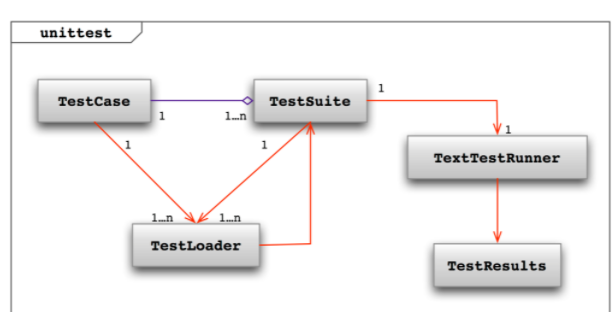
Unit testing is a systematic and reproducible way to test the code. It is a method to validate if units of code are operating as designed. A unit is a small testable part of an application, typically functions and modules. We will use the unit test library, an installed Python module providing a framework containing test functionality.
During code development, we must test each unit. If the test fails, the developer determines the reason and fixes it. Once the unit test passes, we test the unit in a continuous integration delivery test server environment. If the unit test fails the server test, it will return the code to the developer to determine the reason and fix, and the process restarts. Once the unit passes the server test, we merge the unit into the final main codebase.
We are all good at coding and solving problems. While it comes to complexity and error handling, we should check the code for any bugs, so we need a checkpoint to check where our code can pass all the test cases. For this, we use a Python unit test framework that comes with many packages. One among those is the Unittest framework, and it comes pre-installed with the language. We could predict the scenarios where our code could fail or generate a problem. Unit testing makes your code future-proof. Even though we could not expect every situation, you can still handle most of the cases.
Subclassing yields a test case. Methods whose names begin with the letters test define individual tests. This naming standard shows to the test runner which methods constitute tests.
A short script to test three-string methods:
import unittest
class StringMethodstest(unittest.TestCase):
 def test_upper(self):
 self.assertEqual('python'.upper(), 'PYTHON')
 def test_isupper(self):
 self.assertTrue('PYTHON'.isupper())
 self.assertFalse('python'.isupper())
 def test_split(self):
 s = 'hello python'
 self.assertEqual(s.split(), ['hello', 'python'])
 with self.assertRaises(TypeError):
 s.split(2)
if __name__ == '__main__':
 unittest.main()
The core of each test is a call to which checks for an expected result; or , which verifies a condition; or , which verifies that a specified exception is raised or not. We use these techniques in place of the assert statement to allow the test runner to compile all test results and provide a report.
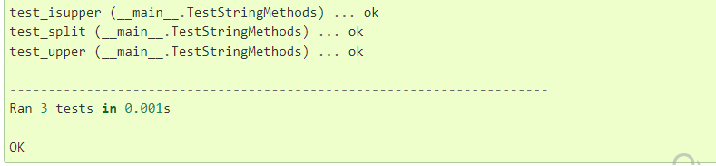
The last section demonstrates a straightforward method for running the tests. gives the test script a command-line interface. When executed from the command line, the above script gives the following output:
open the terminal and type the command:
python -m unittest -v test
Example of unittest in python functions:
First, notice that the filename has test appended to identify it as a unit testing file. Next, we import the unit test library.
Then we import the functions we want to test. Now we can build our unit testing class. First, we create a test class. It is a good naming convention to name the file you are testing and append the test for the class name. Next, we make our class inherit the Test Case class of the unit test library, which allows our class to use methods in the test class.
Example 1:
First, write a python function to find factorial for the number and name it as mymodule1.py:
def factorial(number):
 if number == 0:
 return 1
 else:
 return number * factorial(number-1)
Now we create a function in the test_mymodule class for each function we want to test. We name the functions by prepending the test to the function we want to test. Note that this step is mandatory as only functions that start with the test will process. Finally, we can start creating test cases. We can do it by using the function. Let’s look closer at the assert equal used in the test class. Assert Equal compares two values and determines if they are equal. The method can check if functions are returning the correct values.
Create a test_mymodule1.py to test whether the function returns the expected output,
import unittest
from mymodule1 import factorial
class TestFactorial(unittest.TestCase):
 def test1(self):
 self.assertEqual(factorial(4), 24) # test when 4 is given as input the output is 24.
 self.assertEqual(factorial(5), 120) # test when 5 is given as input the output is 120.
 self.assertEqual(factorial(0), 1)
unittest.main()
After we determined the function of the program, we can write test cases for these four scenarios.
First, we evaluate the function, then compare the two values to see if they are equal. After running our test file, we will get an output like this.
What happens if the function implementation is not correct?
import unittest
from mymodule1 import factorial
class TestFactorial(unittest.TestCase):
 def test1(self):
 self.assertEqual(factorial(4), 24)
 self.assertEqual(factorial(5), 120)
 self.assertNotEqual(factorial(2), 2)
unittest.main()
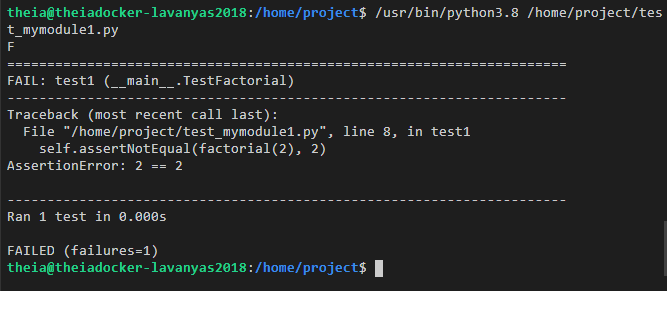
Consider the following functions where factorial implemented is not correct as it cubes a number instead of finding the factorial.
The evaluation of the assertEqual() would look like this resulting in a fail and feeds back an assertion for the failure.
Consider we are writing a function that and a number:
def square(number):
 """
 This function returns the square of a number.
 """
 return number ** 2
def double(number):
 """
 This function returns twice the value of a number.
 """
 return number * 2
The next step is to create a new file and name it test_mymodule.py.
import unittest
from mymodule import square, double, factorial
class TestSquare(unittest.TestCase):
 def test1(self):
 self.assertEqual(square(5), 25) # test when 5 is given as input the output is 25.
 self.assertEqual(square(3.0), 9.0) # test when 3.0 is given as input the output is 9.0.
 self.assertNotEqual(square(-3), -9) # test when -3 is given as input the output is not -9.
class TestDouble(unittest.TestCase):
 def test1(self):
 self.assertEqual(double(2), 4) # test when 2 is given as input the output is 4.
 self.assertEqual(double(-3.1), -6.2) # test when -3.1 is given as input the output is -6.2.
 self.assertEqual(double(0), 0) # test when 0 is given as input the output is 0.
unittest.main()
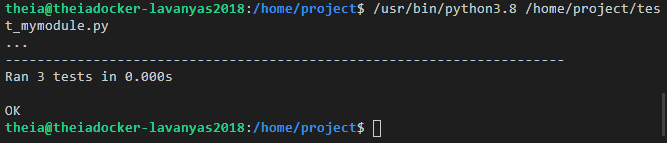
If you are using an IDE, to run tests, select the test_mymodule.py file and click on the Play button.
The unittest module can run tests from modules classes or even individual test methods through the command-line interface. We can pass in a list with any sequence of module names, and fully qualified class or method names.
python -m unittest test_mymodule1 test_module2
python -m unittest test_module.TestClass
python -m unittest test_module.TestClass.test_method
Test modules can also run through the file path. It allows you to use the filename completion to define the test module.
python -m unittest tests/test_mymodule.py
You can run tests with more verbosity by passing in the -v flag:
python -m unittest -v test_mymodule
When executed without arguments, Test Discovery is started:
python -m unittest
For a list of all the command-line options available below command is used:
python -m unittest -h
Skipping a test is as simple as running a Testcase with the skip() decorator or one of its conditional alternatives. can be called from within a or test method, or it can pass directly.
class MyTestCase(unittest.TestCase):
 @unittest.skipUnless(sys.platform.startswith("win"), "requires Windows")
 def test_windows_support(self):
 # windows specific testing code
 pass
 def test_maybe_skipped(self):
 if not external_resource_available():
 self.skipTest("external resource not available")
 # test code that depends on the external resource
 pass
By the way, we can skip classes just like methods:
@unittest.skip("showing class skipping")
class SkippedTestCase(unittest.TestCase):
 def test_not_run(self):
 pass
Expected failures use the decorator to return the expected failure.
class ExpectedFailureTestCase(unittest.TestCase):
 @unittest.expectedFailure
 def test_fail(self):
 self.assertEqual(1, 0, "broken")
When there are just minor variations between your tests, such as certain arguments, unittest allows you to separate them within the body of a test method by utilizing the subTest() function.
class TestNumbers(unittest.TestCase):
 def test_even(self):
 """
 Test that numbers between 0 and 6 are all even.
 """
 for i in range(0, 7):
 with self.subTest(i=i):
 self.assertEqual(i % 2, 0)
Without a subtest, execution would halt after the first failure, and the issue would be more difficult to identify because the value of ‘i’ would not be displayed.
I’m Lavanya, living in Chennai. I am a passionate writer and enthusiastic content maker. I am fond of reading books on deep learning. While reading, I came across many fascinating topics in ML and deep learning. I am currently pursuing my B. Tech in Computer Engineering and have a strong interest in the fields of deep learning. I am seeking forward to your valuable comments and views on my article.
I hope you enjoyed the article, and I am happy if I hear some comments about my article from your side, so feel frank to add them up in the comment section. Thank you for reading.
The media shown in this article are not owned by Analytics Vidhya and are used at the Author’s discretion.
Hello, my name is Lavanya, and I’m from Chennai. I am a passionate writer and enthusiastic content maker. The most intractable problems always thrill me. I am currently pursuing my B. Tech in Computer Engineering and have a strong interest in the fields of data engineering, machine learning, data science, and artificial intelligence, and I am constantly looking for ways to integrate these fields with other disciplines such as science and computer to take further my research goals.
GPT-4 vs. Llama 3.1 – Which Model is Better?
Llama-3.1-Storm-8B: The 8B LLM Powerhouse Surpa...
A Comprehensive Guide to Building Agentic RAG S...
Top 10 Machine Learning Algorithms in 2026
45 Questions to Test a Data Scientist on Basics...
90+ Python Interview Questions and Answers (202...
8 Easy Ways to Access ChatGPT for Free
Prompt Engineering: Definition, Examples, Tips ...
What is LangChain?
What is Retrieval-Augmented Generation (RAG)?
Edit
Resend OTP
Resend OTP in 45s