|
VOOZH | about |
|
VOOZH | about |
This article was published as a part of the Data Science Blogathon.
Apache Spark uses clusters to distribute any pandas operation and speeds up the computation.
Modin comes to the rescue!!!
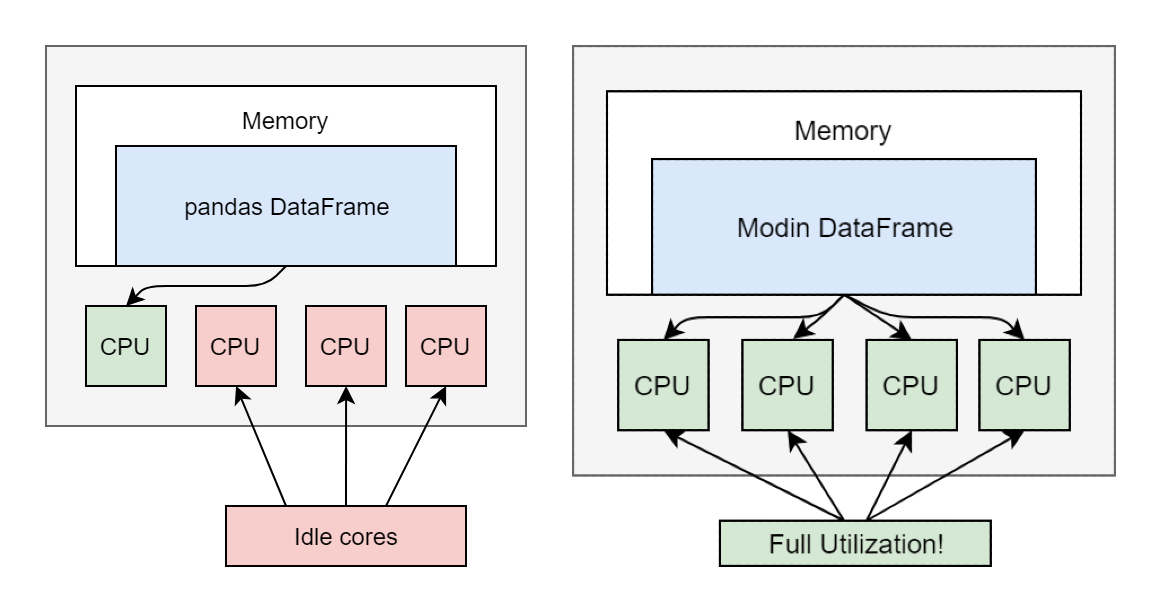
It is a library created by some data scientists at UC Berkeley. It uses parallel computation to process dataframe executions faster.
👁 System View|Python
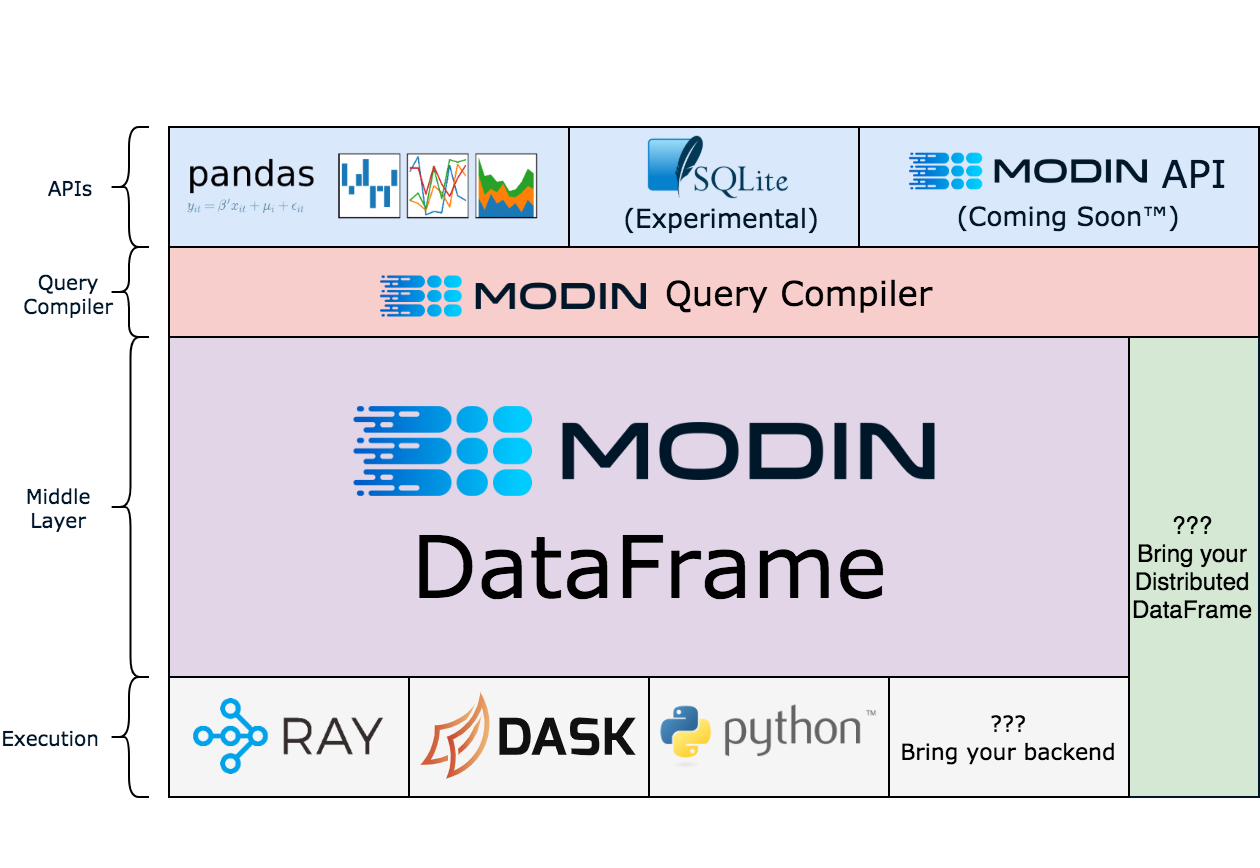
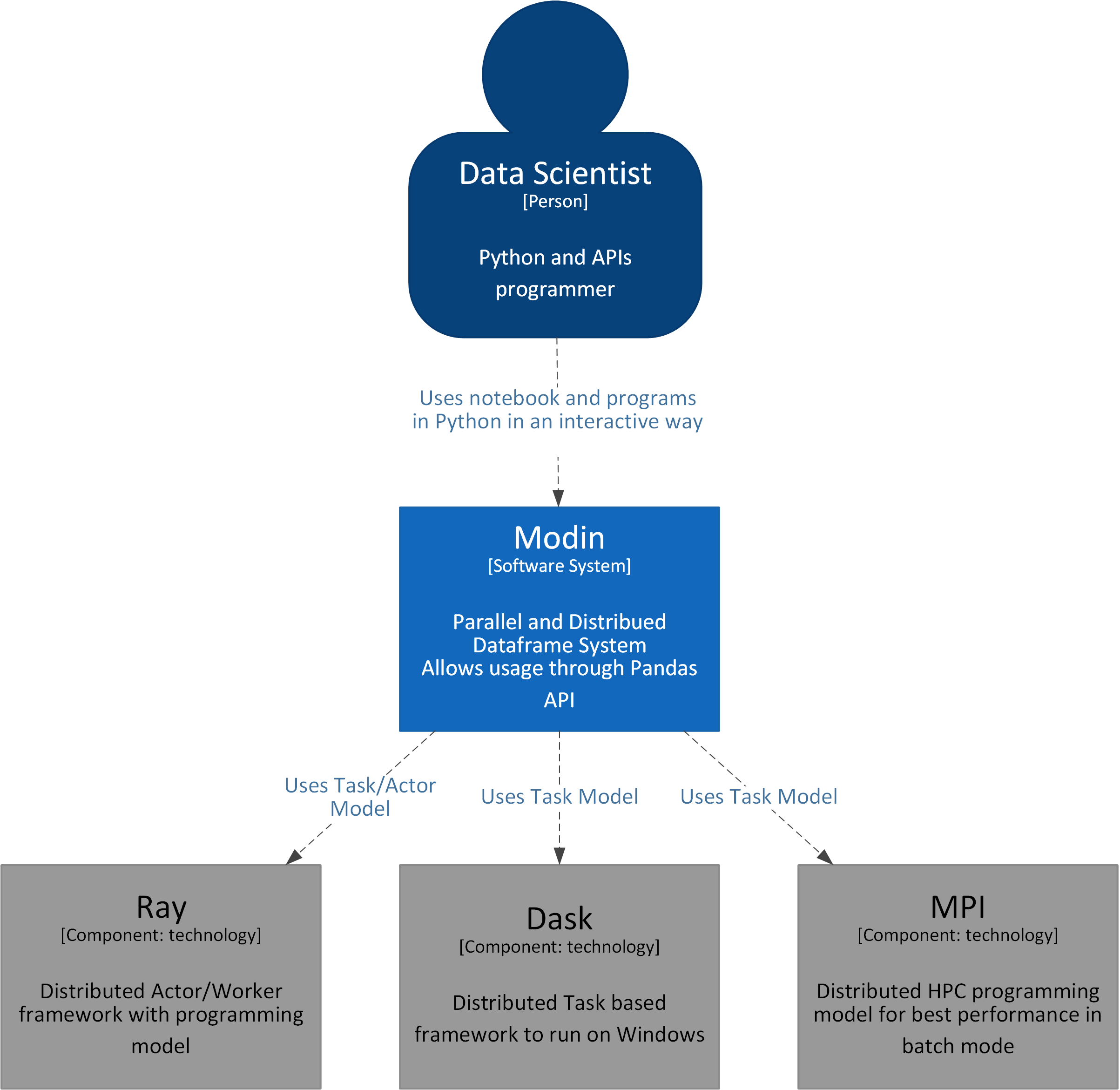
The Data Scientist executes the dataframe operations. In the backend, Modin uses Ray/Dask and distributes the operations parallelly to boost operations.
Let’s look into the code:
We can install Modin using the pip command:
pip install modin[all] # (Recommended) Install Modin with all of Modin's currently supported engines.
Download the sample dataset. We will use the new york yellow trip data. We will download the parquet file (approx 100 Mb).
Import the relevant packages and initialize Ray for modin.
import pandas
import time
import modin.pandas as pd
import ray
ray.init()
Give the path of the parquet file we downloaded in step 2
parquet_path = 'yellow_tripdata_2022-03.parquet'
Run the functions for pandas and Modin.
start = time.time()
pandas_df = pandas.read_parquet(parquet_path)
end = time.time()
pandas_duration = end - start
print("Time to read with pandas: {} seconds".format(round(pandas_duration, 3)))
start = time.time()
modin_df = pd.read_parquet(parquet_path)
end = time.time()
modin_duration = end - start
print("Time to read with Modin: {} seconds".format(round(modin_duration, 3)))
print("Modin is {}x faster than pandas at `read_parquet`!".
 format(round(pandas_duration / modin_duration, 2)))
start = time.time()
pandas_df.isnull()
end = time.time()
pandas_duration = end - start
print("Time with pandas: {} seconds".format(round(pandas_duration, 3)))
start = time.time()
modin_df.isnull()
end = time.time()
modin_duration = end - start
print("Time with Modin: {} seconds".format(round(modin_duration, 3)))
print("Modin is {}x faster than pandas at `is_null()`!".
 format(round(pandas_duration / modin_duration, 2)))
pandas_df.fillna(0)
end = time.time()
pandas_duration = end - start
print("Time with pandas: {} seconds".format(round(pandas_duration, 3)))
start = time.time()
modin_df.fillna(0)
end = time.time()
modin_duration = end - start
print("Time with Modin: {} seconds".format(round(modin_duration, 3)))
print("Modin is {}x faster than pandas at `is_null()`!".
 format(round(pandas_duration / modin_duration, 2)))
start = time.time()
pandas_df["trip_distance"].apply(round)
end = time.time()
pandas_duration = end - start
print("Time with pandas: {} seconds".format(round(pandas_duration, 3)))
start = time.time()
modin_df["trip_distance"].apply(round)
end = time.time()
modin_duration = end - start
print("Time with Modin: {} seconds".format(round(modin_duration, 3)))
print("Modin is {}x faster than pandas at `apply()`!".
 format(round(pandas_duration / modin_duration, 2)))
start = time.time()
pandas_df[["trip_distance"]].applymap(round)
end = time.time()
pandas_duration = end - start
print("Time with pandas: {} seconds".format(round(pandas_duration, 3)))
start = time.time()
modin_df[["trip_distance"]].applymap(round)
end = time.time()
modin_duration = end - start
print("Time with Modin: {} seconds".format(round(modin_duration, 3)))
print("Modin is {}x faster than pandas at `applymap()`!".
 format(round(pandas_duration / modin_duration, 2)))
start = time.time()
pandas.concat([pandas_df for _ in range(20)])
end = time.time()
pandas_duration = end - start
print("Time with pandas: {} seconds".format(round(pandas_duration, 3)))
start = time.time()
pd.concat([modin_df for _ in range(20)])
end = time.time()
modin_duration = end - start
print("Time with Modin: {} seconds".format(round(modin_duration, 3)))
print("Modin is {}x faster than pandas at `concat()`!".
 format(round(pandas_duration / modin_duration, 2)))
start = time.time()
pandas_df.to_csv('Pandas_test.csv')
end = time.time()
pandas_duration = end - start
print("Time with pandas: {} seconds".format(round(pandas_duration, 3)))
start = time.time()
modin_df.to_csv('Mobin_test.csv')
end = time.time()
modin_duration = end - start
print("Time with Modin: {} seconds".format(round(modin_duration, 3)))
print("Modin is {}x faster than pandas at `to_csv()`!".
 format(round(pandas_duration / modin_duration, 2)))
start = time.time()
pandas.merge(pandas_df.head(1000),pandas_df.head(1000),how='inner',
 left_on='VendorID',right_on='VendorID')
end = time.time()
pandas_duration = end - start
print("Time with pandas: {} seconds".format(round(pandas_duration, 3)))
start = time.time()
pd.merge(modin_df.head(1000),modin_df.head(1000),how='inner',
 left_on='VendorID',right_on='VendorID')
end = time.time()
modin_duration = end - start
print("Time with Modin: {} seconds".format(round(modin_duration, 3)))
print("Modin is {}x faster than pandas at `merge()`!".
 format(round(pandas_duration / modin_duration, 2)))
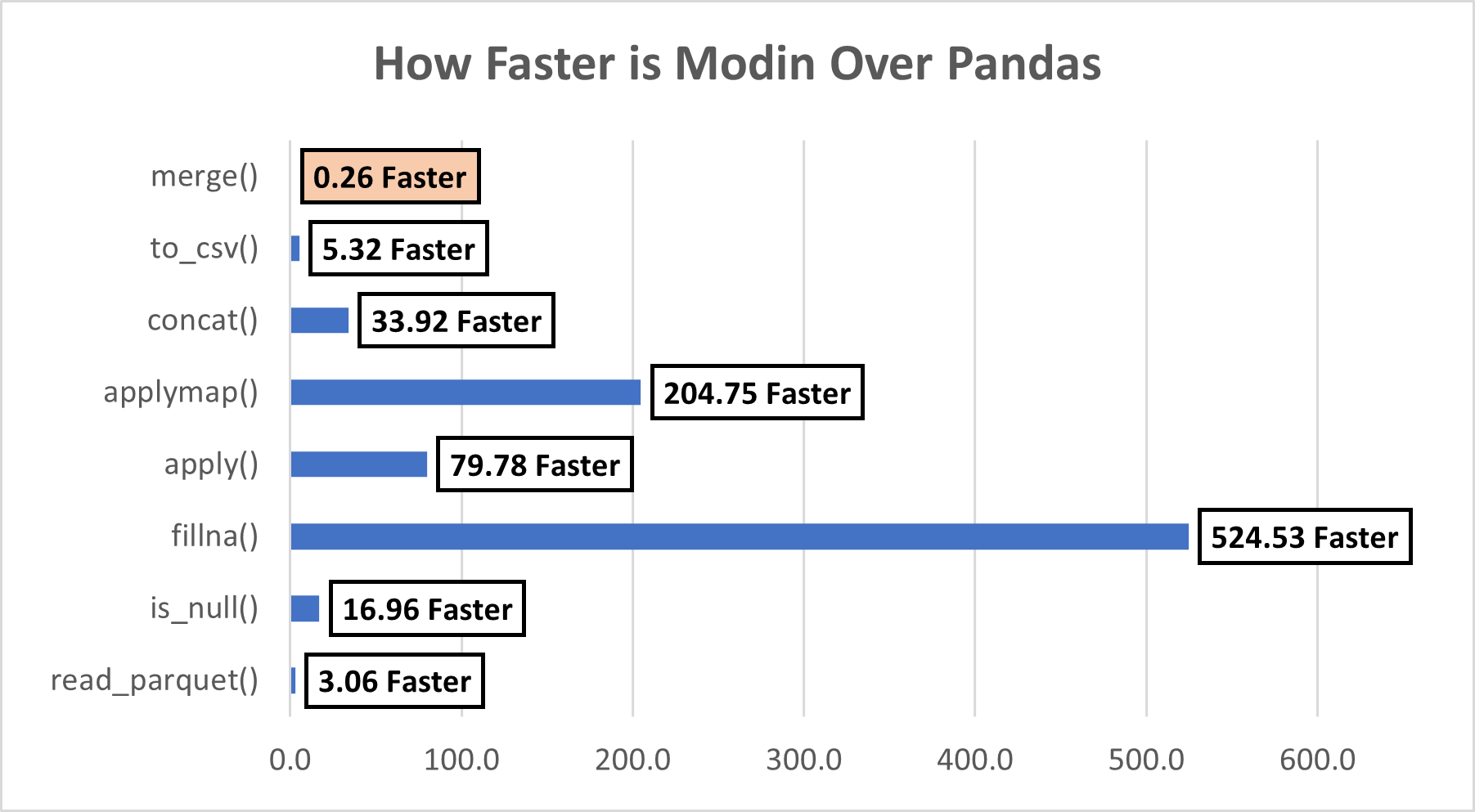
We performed several operations, let’s summarize them and see how faster Modin was our example. We can see that except for the merge() function, Modin beats Pandas in the remaining 7 functions. It seems there are some limitations of Modin, let’s look at those next.
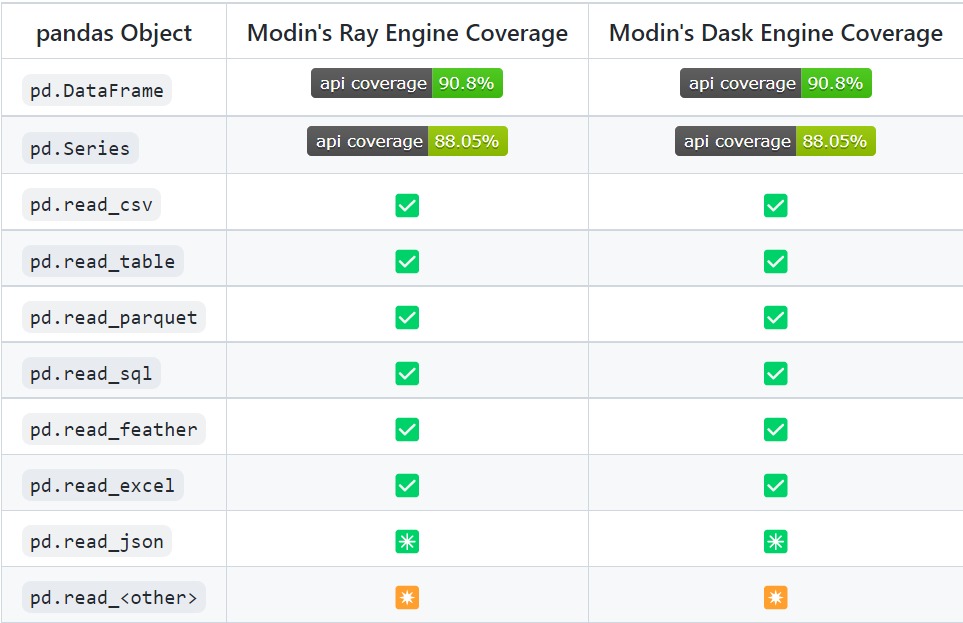
Currently, Modin can cover 90.8% of API methods.
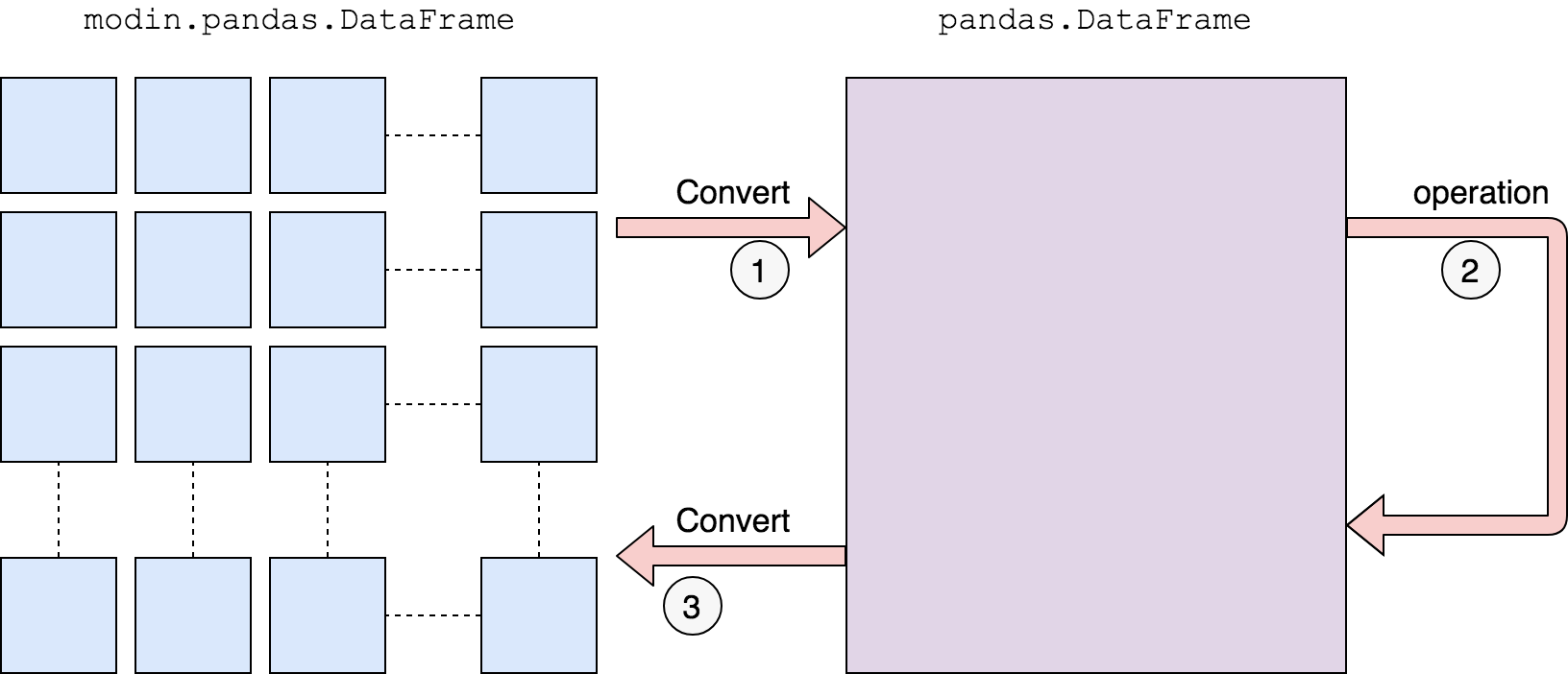
As per this link, currently Modin does not have support for the merge() function. In such cases, it uses the below approach:
We first convert to a pandas DataFrame, then operate. There is a performance penalty for going from a partitioned Modin DataFrame to pandas because of the communication cost and single-threaded nature of pandas. Once the pandas operation has been completed, we convert the DataFrame back into a partitioned Modin DataFrame. This way, operations performed after something defaults to pandas will be optimized with Modin.
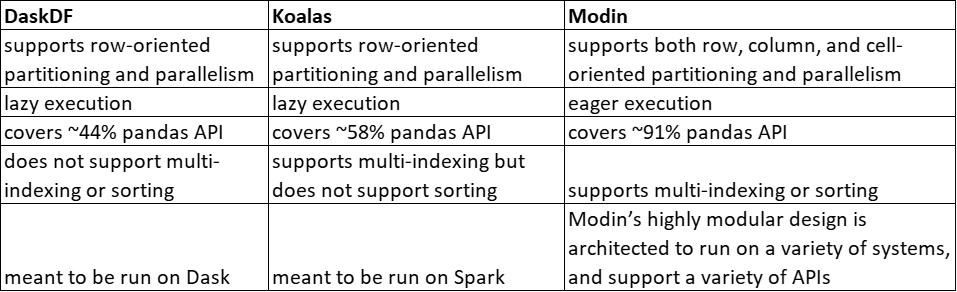
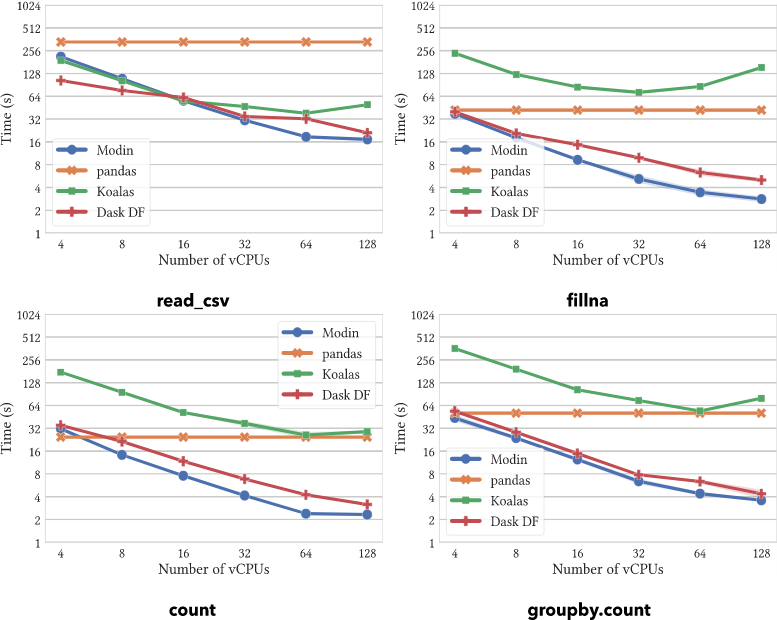
On operations supported by all systems, Modin provides substantial speedups. Modin can take advantage of multiple cores relative to both Koalas and DaskDF to efficiently execute its operations thanks to its optimized design. Notably, Koalasares often slower than pandas, due to the overhead of Spark.
This was a humble attempt to explore ways that can make the pandas’ execution faster.
The media shown in this article is not owned by Analytics Vidhya and is used at the Author’s discretion.
Data Scientist with extensive experience in solving many real world business problems across different domains. Possess fine blend of business knowledge, maths/stats and technology/programming.
Experienced in handling client facing roles, stakeholder management, effective communication with presentation & negotiation skills.
GPT-4 vs. Llama 3.1 – Which Model is Better?
Llama-3.1-Storm-8B: The 8B LLM Powerhouse Surpa...
A Comprehensive Guide to Building Agentic RAG S...
Top 10 Machine Learning Algorithms in 2026
45 Questions to Test a Data Scientist on Basics...
90+ Python Interview Questions and Answers (202...
8 Easy Ways to Access ChatGPT for Free
Prompt Engineering: Definition, Examples, Tips ...
What is LangChain?
What is Retrieval-Augmented Generation (RAG)?
Very Insightful !! ,Will definitely give try it out in my current work !!
Edit
Resend OTP
Resend OTP in 45s