AI support for B2B SaaS: what actually works in 2026


Last edited June 19, 2026
Table of Contents
- Why B2B SaaS support is its own animal
- What "AI support" actually means (three shapes, not one)
- How AI support learns your product before it answers
- The part nobody demos: not shipping a wrong answer
- Build it yourself, or buy it?
- What it costs, and why the pricing model matters more than the price
- Measure it like an SRE, not a vibe
- How to roll it out without betting the company
- Try eesel
Why B2B SaaS support is its own animal
I work the support queue, and the difference between B2B SaaS support and consumer support is not subtle. A consumer ticket is usually "where is my package" or "process my refund." A B2B SaaS ticket is "your API is returning a 429 on our webhook integration but only in the EU region," asked by a paying account that also happens to be up for renewal next quarter.
Three things make these tickets hard:
- They are technical and tiered. A lot of them need product knowledge that lives in docs, past tickets, and engineers' heads, not in a canned macro.
- They are account-specific. The answer depends on which plan the customer is on, which features they have enabled, and what they asked last month.
- The stakes are high. In B2B SaaS, support is retention and expansion. A confidently wrong answer to a strategic account is a churn risk, the kind that shows up in a renewal call months later.
On top of that, most SaaS support teams are badly outnumbered. As Jon Miron, Director of Support and Operations at Yellowdig, put it:
As a fast-growing startup with a small team, our customers far outnumber our employees. It's crucial that we have robust self-service solutions as well as tools to supercharge the efficiency of our client-facing teams.
That is the real job to be done: scale support coverage without scaling headcount at the same rate, and do it without lowering the quality bar. That is also exactly where AI either earns its keep or quietly torches your trust.
What "AI support" actually means (three shapes, not one)
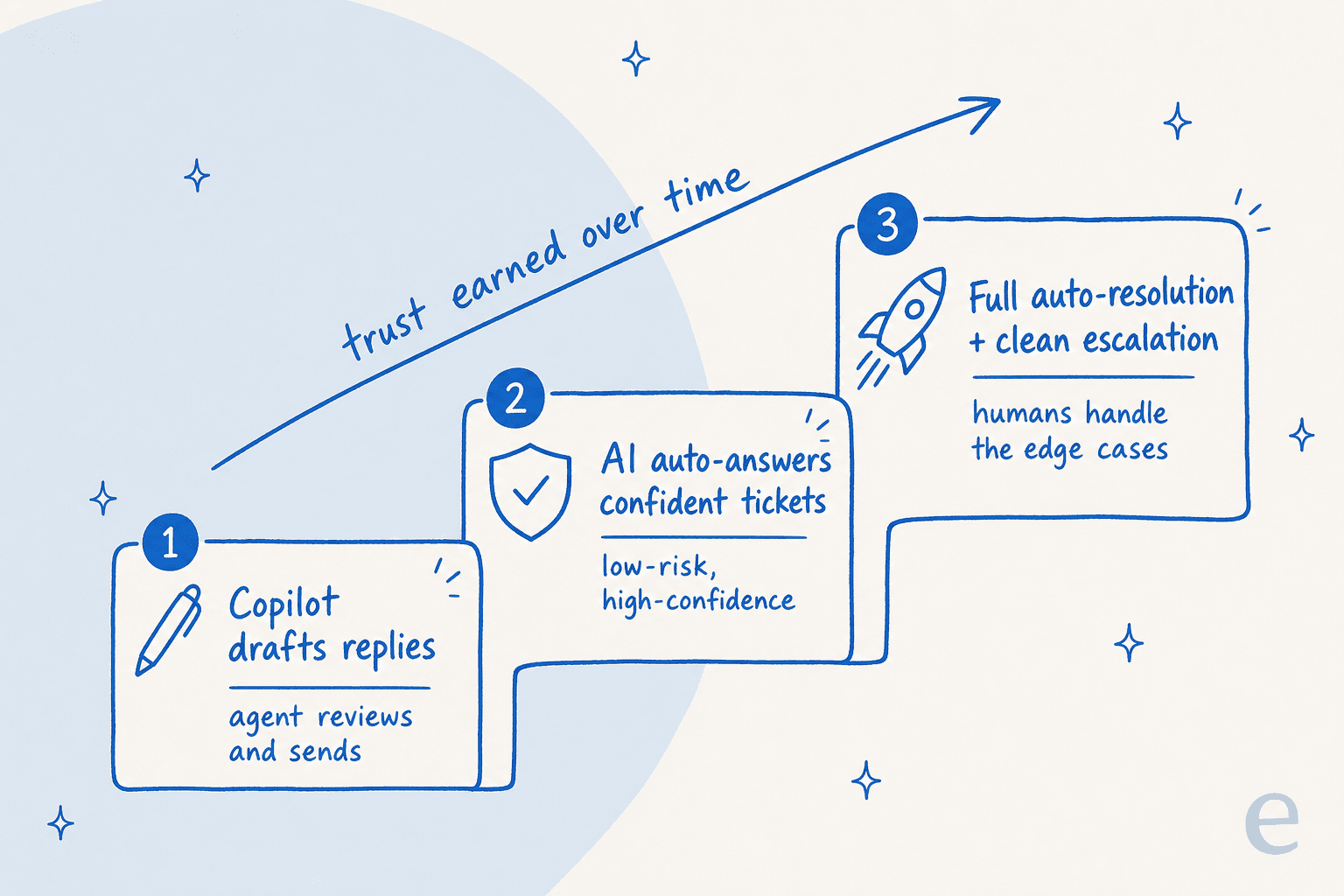
"AI support" gets used as if it is one product. For B2B SaaS it is really three deployment shapes, and you usually want them in this order:
- AI copilot. It drafts a reply inside your helpdesk and a human agent reviews and sends it. This is the safest entry point and the fastest way to see whether the AI actually understands your product.
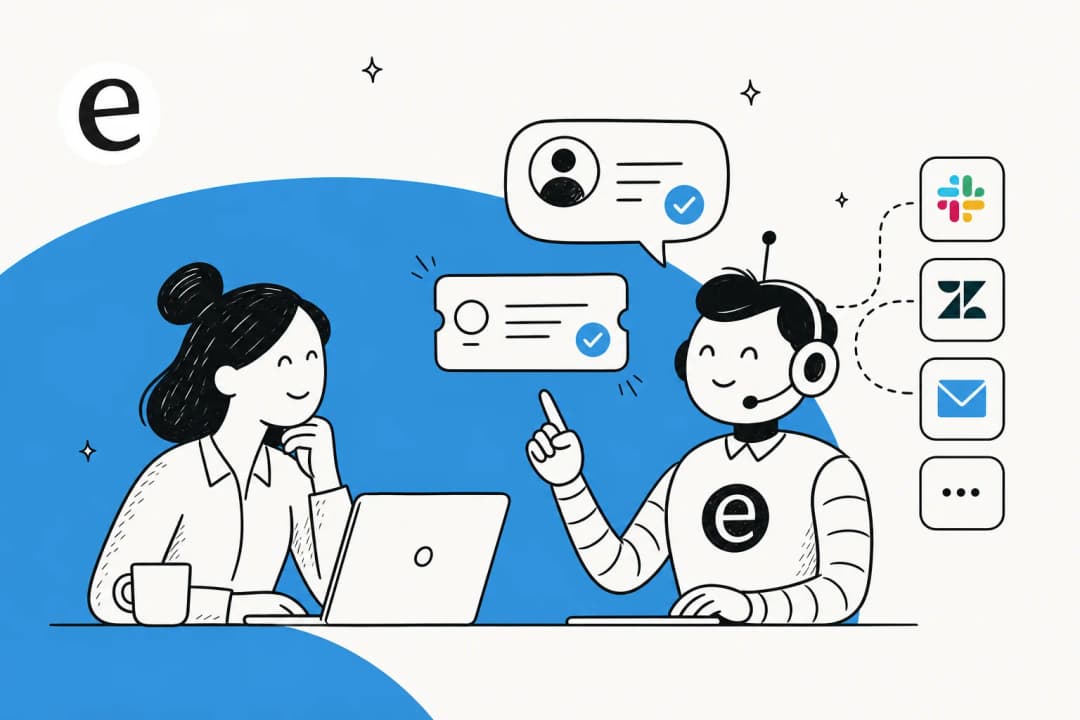
- AI agent. It answers the customer directly through a chat widget or by replying to tickets, then escalates cleanly to a human when it is out of its depth. This is where ticket deflection actually happens.
- Internal helpdesk. The same brain answers your own employees over Slack or Teams from internal docs, which is how teams stand up an AI IT help desk for onboarding and IT questions.
The mistake I see most often is reaching straight for shape two and pointing a raw chatbot at customers on day one. The teams that get burned almost always skipped the copilot step. The ones that succeed treat trust as something the AI earns over time, not something they grant on install.
How AI support learns your product before it answers
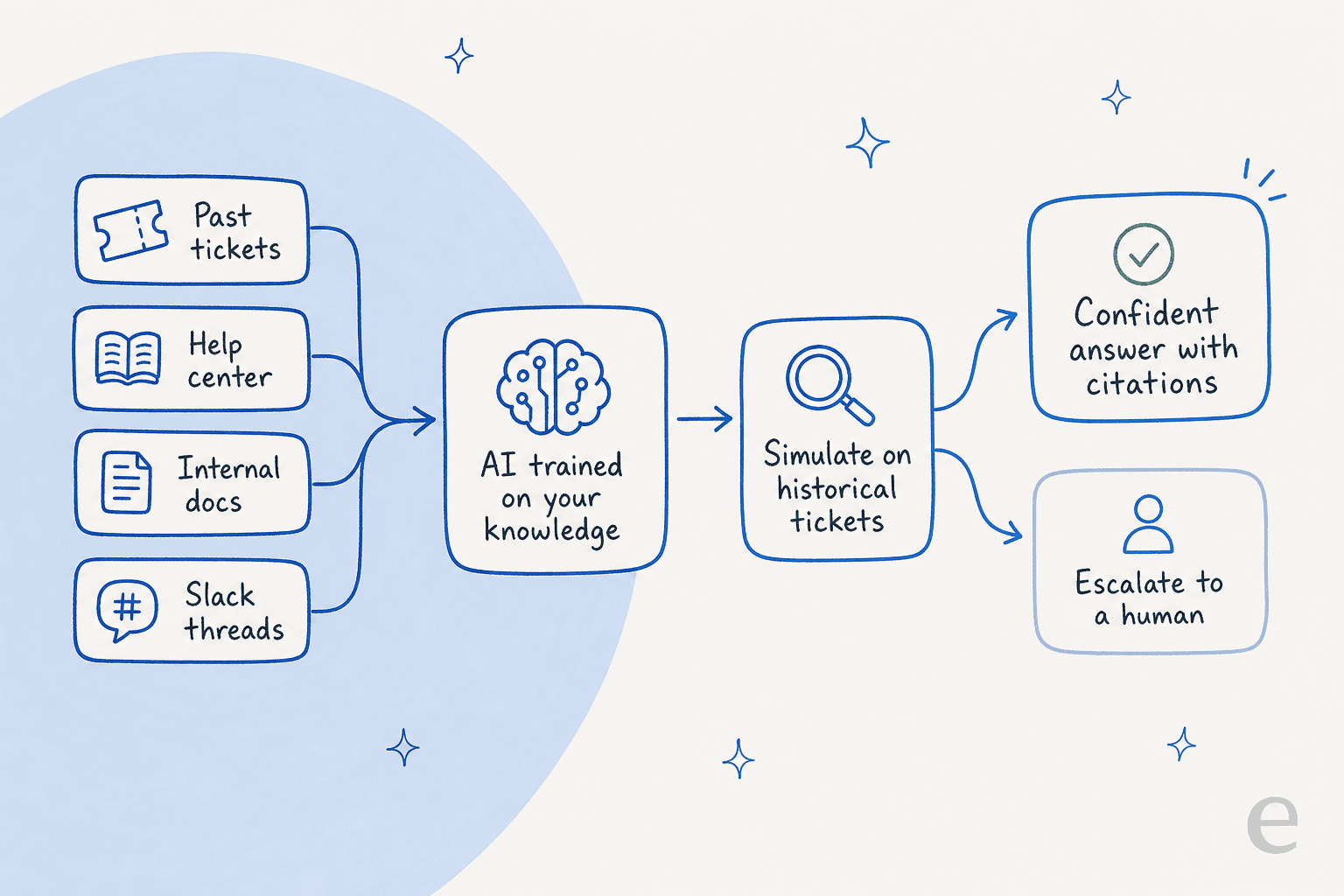
Here is the part that separates AI support that works from a demo that doesn't: where the knowledge comes from. A model fine-tuned on the open internet knows a lot about the world and nothing about your product. For B2B SaaS, the knowledge it needs is scattered across your help center, your internal docs, your Slack threads, and most valuably, the thousands of tickets your team has already answered.
Training on your own historical tickets is the single most important capability for SaaS support, because past tickets are where the real answers live, phrased the way your customers actually ask. It is consistently the thing buyers ask us for first. Filip Miskovski at Recordpoint, a data-governance SaaS, summed up why it matters:
Eesel has greatly improved our speed, providing accurate draft responses on all cases using the awesome training model via past ticket data.
A good setup meshes all of those sources together and cross-references them at answer time, instead of relying on one tidy knowledge base. That matters because of a quiet B2B SaaS problem: your help center is often written for admins, while half your tickets come from confused end-users. The AI has to bridge that gap by pulling from tickets and docs at once.
The part nobody demos: not shipping a wrong answer
I have watched confident-sounding bots quietly give wrong answers, which is the whole reason I am careful about this. In consumer support a wrong answer is annoying. In B2B SaaS it can be a compliance problem or a churned account.
Two mechanisms keep this in check, and you should refuse to buy AI support without both.
The first is confidence-based routing. The AI should only resolve tickets it is sure about and leave the rest for humans, rather than guessing to pad its resolution rate. One CX lead I spoke with, running 7,000 tickets a month, drew the line perfectly: he wanted an AI that only handles the tickets it is confident to handle, and leaves all the others alone. That is the correct instinct.
The second is citations on every answer. Every AI answer should link back to the doc or ticket it came from, so an agent can verify it in two seconds and a customer can trust it. For regulated SaaS this is non-negotiable. A legal-tech co-founder I talked with put it bluntly: in legal tech you cannot afford to get anything wrong, so transparent citations and exact guardrails on sourcing are the entire ballgame. Kellen Brown at Textla described the goal nicely:
It answers confidently but not too confidently, and training it has been super easy.
The way you prove all of this before launch is simulation. Instead of crossing your fingers on go-live, you replay the AI against your historical tickets and read the numbers: what percentage it would have resolved, where it would have escalated, how accurate the drafts were. We run this on every rollout so the decision to go live is grounded in your real ticket history, not a vendor's demo. In one real-traffic trial, that simulation surfaced 93% triage accuracy and 100% spam detection before anything reached a customer.

Build it yourself, or buy it?
Every B2B SaaS team has the same tempting thought: we have engineers, the model APIs are right there, why not just build our own support AI? It is a fair question, and sometimes the answer is yes. But the honest version of the math includes the part nobody budgets for: the maintenance, the retrieval plumbing, the eval harness, the helpdesk integrations, and the ongoing tuning as your product changes.
Karel at GENERAL BYTES landed where most teams do once they price it out:
We could try to write our own LLM application but we didn't want to invest our time into that. We wanted something that we would not have to maintain.
The rule of thumb I use: if support AI is going to be your product, build it. If it is going to support your product, buy it and put your engineering time into the thing customers actually pay you for.
What it costs, and why the pricing model matters more than the price
Pricing is where B2B SaaS buyers get quietly burned, because the sticker price hides the billing unit. The question to ask is not "how much per month," it is "what am I billed per?"
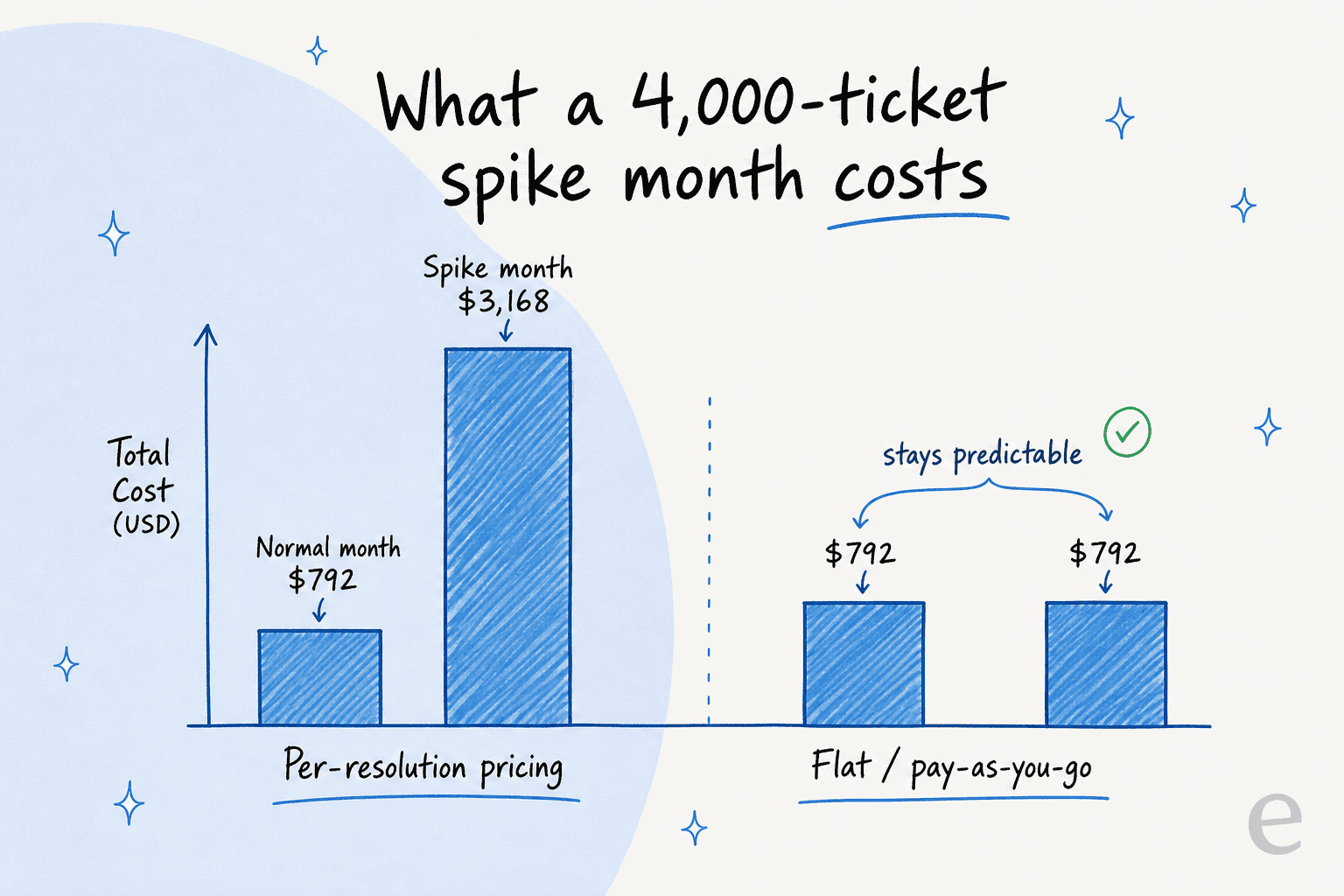
The trap is per-resolution pricing. It sounds fair until you notice it charges you more precisely when you succeed more, and it spikes your bill exactly in your busiest months, the ones where a budget surprise hurts most. A 4,000-ticket spike month can more than quadruple your bill under per-resolution pricing while a flat or pay-as-you-go rate stays put.
eesel prices in the unit B2B finance teams already think in, the ticket, and keeps it flat:
| What you handle | eesel price | Notes |
|---|---|---|
| A support ticket or chat session | $0.40 each | One ticket = one task, no matter how many replies |
| Dashboard questions and simple lookups | Free | Light tasks are not billed |
| Platform fee | $0 | No per-seat fees, no minimum |
| 100 tickets / month | $40 | |
| 1,000 tickets / month | $400 | |
| 2,500 tickets / month | $1,000 | |
| Annual commit (≥$300/mo) | 25% off | Billed monthly at the discounted rate |
| Enterprise | $1,000/mo + usage | SSO, HIPAA, BAA, dedicated solutions engineer |
Source: eesel's pricing page. A couple of B2B-specific things stand out. You can do a gradual rollout and only route some tickets to the AI, so you only pay for those. And the Enterprise tier carries the security and compliance scaffolding that B2B SaaS procurement asks for: SSO, HIPAA, a signed BAA, and EU data residency, the same set Simployer needed.
We needed a turnkey solution for Confluence that met our GDPR requirements and could serve different teams through dedicated Slack bots. eesel AI delivered exactly that, with EU data residency included.
That is Flemming Ottosen, Development Director at Simployer, an EU HR-compliance SaaS, and it is a good reminder that for B2B the security checklist is part of the product, not a footnote.
Measure it like an SRE, not a vibe
Once the AI is live, treat it like any other part of your service: instrument it. The metrics that matter for B2B SaaS support are resolution rate (what share the AI fully closed), deflection rate (what share never reached a human), escalation accuracy (did it hand off the right ones), and time saved per ticket.

Real numbers from SaaS teams give you a sense of what good looks like. Gridwise, a gig-economy analytics SaaS on Zendesk, saw the AI handle a large share of tier-1 work fast:
In the first month, eesel is resolving 73% of our tier 1 requests. Our team implemented and achieved results quickly during our 7-day trial.
That is Kim Simpson at Gridwise. On the internal side, Jason Loyola, Head of IT at InDebted, runs eesel as the first responder on Jira Service Management tickets and is climbing from 15% toward a 55% deflection target:
We use it to be the first responder to our Helpdesk tickets in Jira. It essentially acts just like an agent would.
And on time saved, Alex Capurro, Chief Innovation Officer at Global Pay, reports up to 80% time savings once agents had instant, cited answers to pull from. The point of citing these is not that your numbers will match exactly, it is that you should expect to measure in resolution and deflection percentages, not vibes, and your tool should make those numbers easy to read.
How to roll it out without betting the company
If I were standing up AI support on a B2B SaaS product tomorrow, here is the order I would do it in:
- Connect your helpdesk and knowledge. Plug in whatever you run on, whether that is Zendesk, Freshdesk, Help Scout, Front, or Jira, then add your help center, past tickets, and docs in Notion or Confluence.
- Simulate on historical tickets. Read the resolution and accuracy numbers before anyone goes live. If they are not good enough, fix the knowledge gaps and rerun.
- Start as a copilot. Let it draft, let agents send. Watch where it is strong and where it whiffs.
- Graduate confident ticket types to auto-resolution. Turn on full automation for the categories the simulation proved out, with a confidence threshold and clean escalation everywhere else.
- Instrument and expand. Track resolution and deflection, then widen the scope and add the internal Slack or Teams use case.
The whole arc is designed so you are never betting a paying account on an unproven answer. You move one notch at a time, and every notch is backed by a number.
Try eesel
If you run support for a B2B SaaS product, eesel is built for exactly this. It plugs into your existing helpdesk in a few minutes and trains on your past tickets and help center. It can run as an AI copilot that drafts for your agents, or as a customer-facing agent that answers directly. The differentiator that matters for SaaS is simulation mode: you see the accuracy and resolution rate on your own historical tickets before a single customer is affected, so going live is a decision you can defend with numbers.
It is free to try on your own data, with $50 of usage and no credit card to start, so you can prove it out before you commit. Try eesel or book a demo if you want to walk through it on your own stack.
Frequently Asked Questions

Share this article

Article by
Riellvriany Indriawan
Riell is a designer and writer at eesel AI with about two years of experience researching CX platforms, AI chatbots, and helpdesk software. She combines her design background with a sharp eye for how these tools actually look and feel in practice — making her comparisons unusually visual and user-focused.