The strategic guide to chatbot FAQ automation in 2025


Last edited October 14, 2025

Table of Contents
- What is chatbot FAQ automation?
- The three essentials for great chatbot FAQ automation
- The real perks of chatbot FAQ automation (besides saving money)
- The hidden headaches of chatbot FAQ automation (and how to dodge them)
- A quick look at chatbot FAQ automation pricing
- The bottom line: Picking the right platform is everything
Let’s be real for a second. Your support team is probably worn out from answering the same questions every single day. "What's your return policy?" "How do I reset my password?" "Where is my order?" These repeat questions jam up the queue, make wait times longer, and pull your agents away from the tricky issues where you really need their brainpower.
This is where chatbot FAQ automation comes into play. It’s a way to instantly handle those common questions, freeing up your human agents to deal with more complex problems. But here’s the catch: not all automation is created equal. The wrong tool can cause more headaches than it solves, locking you into clunky workflows and leaving customers frustrated.
This guide will walk you through what a good FAQ automation strategy looks like. We’ll cover the real benefits, the hidden challenges to watch out for, and how to choose a platform that works with your team, not against it.
What is chatbot FAQ automation?
At its heart, chatbot FAQ automation is about using AI-powered software to automatically answer frequently asked questions. This happens through a chat window on your website, in your app, or on platforms like Facebook Messenger. Instead of forcing customers to dig through a help center, they can just ask a question and get an answer right away.
It helps to know these chatbots come in two main flavors:
-
Rule-based chatbots: Think of these as the old-school version. They follow a strict, pre-programmed script, kind of like a phone tree. If a user asks a question in a way the bot doesn't recognize, the conversation just stops. They’re simple, but they can feel robotic and break easily.
-
AI-powered (NLP) chatbots: The modern bots use something called Natural Language Processing (NLP) to figure out the intent behind a user's question, even if there are typos, slang, or weird phrasing. This makes the conversation feel much more natural, because the bot can understand what the person actually means.
The goal isn’t to replace your support team. It’s to build a solid first line of defense that can handle the predictable, high-volume stuff, letting your agents focus their time and energy on conversations that really need a human touch.
The three essentials for great chatbot FAQ automation
A good FAQ automation setup isn't just about flipping a switch on a bot. It’s built on three key things. Getting these right is the difference between a helpful assistant and a dead-end that frustrates your customers.
1. Unifying your knowledge sources
A chatbot is only as smart as the information you give it. Most basic bots are trained on a list of questions and answers that you have to upload by hand. The problem? That’s a total pain to keep up with. Every time a policy changes or a new product comes out, you have to remember to update the bot’s brain, your official help center, and who knows how many internal docs. It's a messy system that leads to conflicting answers.
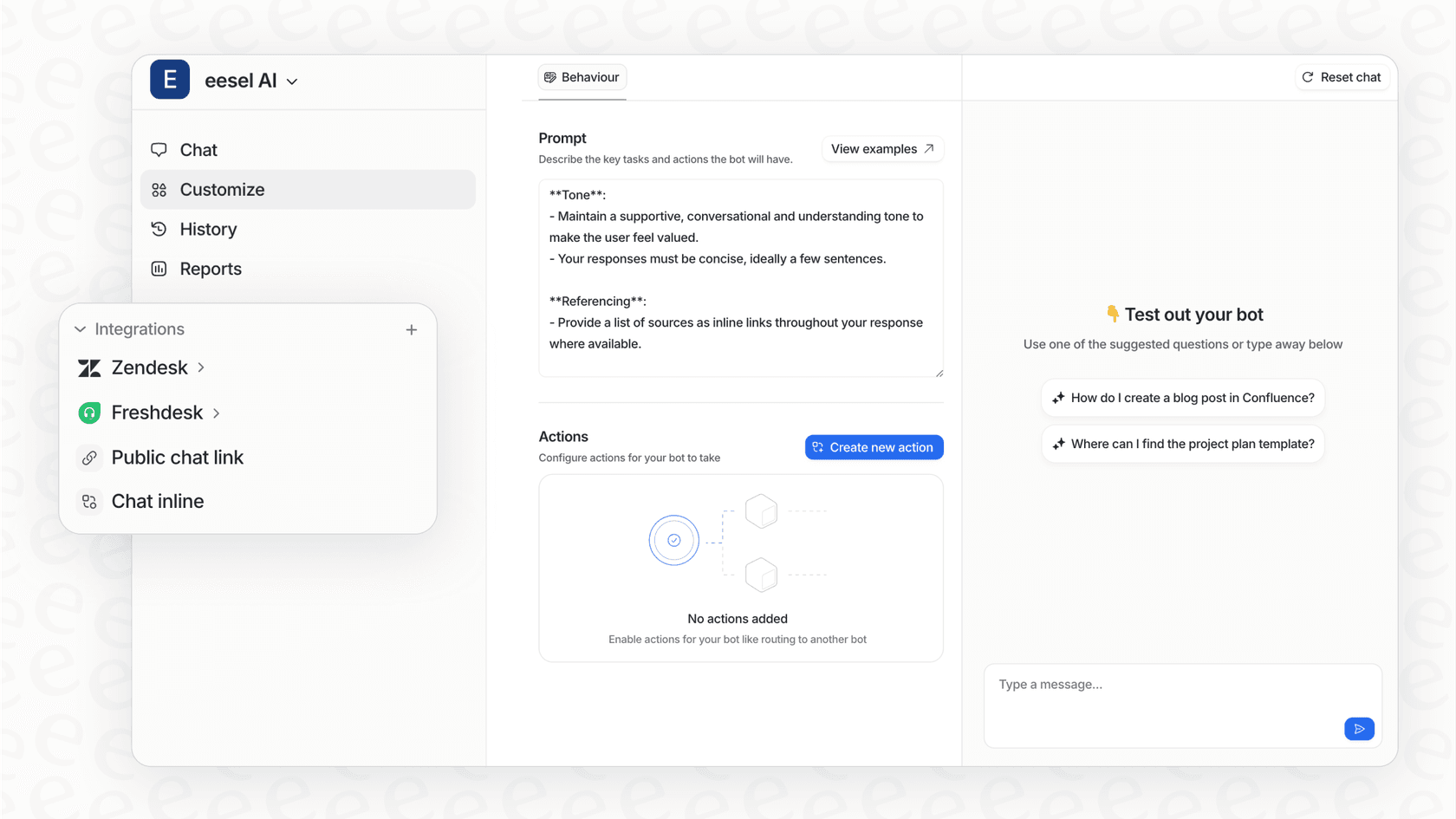
A much better way is to connect your chatbot directly to all your existing knowledge, creating one source of truth. The bot should learn from everything your team has already written down. Platforms like eesel AI are great at this because they integrate not just with your help center, but also with internal wikis like Confluence and Google Docs. It can even learn from your team's past ticket resolutions in helpdesks like Zendesk or Freshdesk, so it knows how your best agents actually solve problems.

2. Understanding what users really mean with AI
The "brain" of a modern chatbot is its AI model. This is what lets it understand context, forgive typos, and figure out that "my login isn't working" and "how do I reset my password?" are the same basic question. Many platforms use rigid systems where you have to manually list out every possible way a question could be asked. It's tedious work that still misses things, leading to that dreaded "Sorry, I don't understand" response.
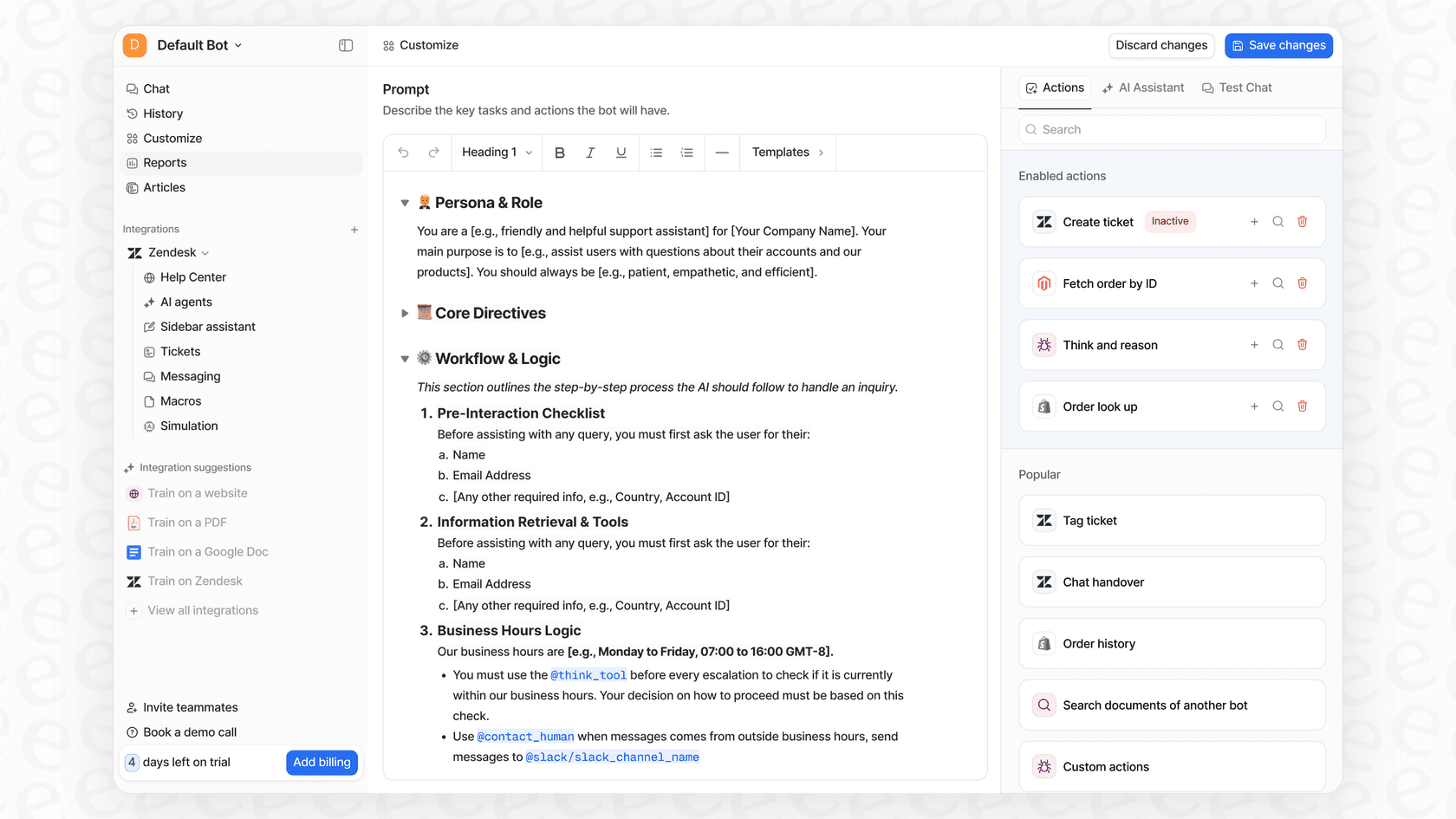
A truly smart system learns and adapts. It should be easy to guide without needing a team of developers. What really sets some tools apart is the ability to tweak the AI's personality and logic. For instance, with eesel AI, you can use a simple prompt editor to define your bot's tone of voice and give it specific instructions, making sure it always sounds like your brand and knows when to hand off a conversation.
3. Integrating with the tools you already use
A chatbot that only answers questions is a missed opportunity. To be genuinely useful, it needs to fit into your support workflow. It should be able to do things and hand off conversations to human agents without a hitch. Unfortunately, a lot of chatbot tools are standalone products that don’t work well with others. This creates awkward transitions where the customer has to repeat their whole story to a live agent, which defeats the entire point.
The best tools plug right into your current setup. A great chatbot should do more than just talk; it should be able to tag tickets, send conversations to the right department, and hand off to a live agent with the full chat history ready to go. The most capable chatbots can even take custom actions, like looking up an order status in Shopify or creating a new issue in Jira Service Management. This is a core part of how eesel AI is designed, offering deep integrations that let you build a complete workflow, not just an answering machine.
The real perks of chatbot FAQ automation (besides saving money)
While cutting support costs is often the main reason people look into FAQ automation, the real value goes way deeper. A well-designed chatbot can improve your customer experience, make your employees happier, and give you some incredibly useful business insights.
Deliver instant, 24/7 support
In today's world, customers don’t just have problems between 9 AM and 5 PM. In fact, more than half of consumers expect businesses to be available around the clock. An FAQ chatbot makes that possible without needing a 24/7 support team. Whether it's late at night or on a holiday, customers can get immediate answers. This doesn't just make them happier; it stops them from getting frustrated and leaving because they had to wait until the next business day for help.
Free up your agents for more meaningful work
Nobody gets into customer support because they dream of answering the same five questions over and over again. That kind of repetitive work leads to boredom, burnout, and a revolving door of employees. By automating those simple questions, you’re not just making your team more efficient, you’re making their jobs better.
When bots handle the easy stuff, agents can use their skills on complex, emotional, or high-stakes customer issues that really need a human touch. Their work becomes more interesting, has a bigger impact, and is ultimately more satisfying. This changes your support team's role from simple problem-solvers to true customer advocates.
Get honest feedback from customer questions
Every chat a customer has with your bot is a piece of feedback. When you put all those conversations together, you get a goldmine of insights. By looking at what your customers are asking, you can uncover a ton of useful information.
You can spot things like:
-
Common points of confusion: Are tons of people asking how to use a certain feature? That's a huge hint that you need to improve your UI or your onboarding process.
-
Gaps in your knowledge base: If the bot constantly gets asked a question it can’t answer, you’ve just found the topic for your next help article.
-
New trends and issues: A sudden spike in questions about a specific error message can tip you off to a bug before it turns into a major problem.
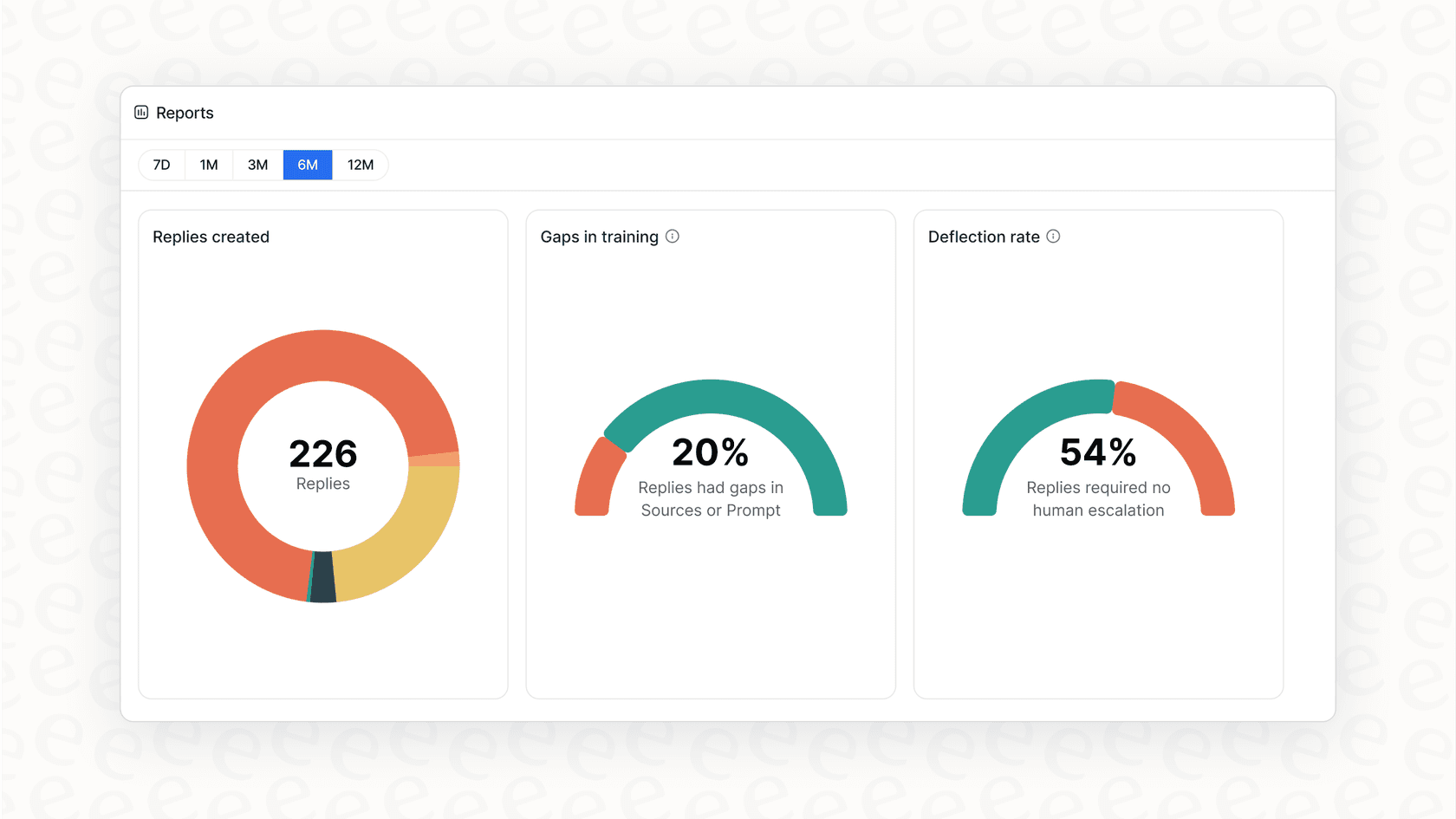
Smarter platforms like eesel AI offer reports that automatically point out these knowledge gaps, giving you a clear to-do list for improving your support content, your product, and the entire customer experience.
The hidden headaches of chatbot FAQ automation (and how to dodge them)
Setting up an FAQ chatbot sounds dreamlike on paper, but many companies hit frustrating and expensive bumps in the road. These problems usually come from picking a platform that looks good at first but creates big issues later on. Here’s what to look out for.
The "rip and replace" migration nightmare
One of the biggest hidden costs is what I call the "rip and replace" problem. Many chatbot platforms, especially the ones built into all-in-one helpdesks, make you move your entire support operation to their system. This means ditching tools your team knows and loves, like Zendesk, losing years of ticket history, and retraining everyone from scratch. It's a huge, messy project that can take months and wreck your team's productivity.
The solution: Choose a platform that’s designed to integrate with your current tools, not replace them. eesel AI, for example, offers one-click integrations that plug directly into your existing helpdesk in minutes. It adds to your setup without causing any disruption, letting you keep the tools and workflows your team already relies on.
The "black box" AI you can't control
A common fear for support managers is handing over the reins to a "black box" AI you can't control that might give wrong, off-brand, or just plain weird answers. Many chatbot platforms don't offer much in the way of customization. You feed them some documents, cross your fingers, and hope it works. When the bot makes a mistake, there's no obvious way to fix its behavior.
The solution: Look for a platform that gives you full control. With eesel AI, you can use specific rules to define exactly which types of tickets the AI should handle. You can tweak its personality with a simple prompt and even limit its knowledge to certain documents for different scenarios. This lets you start small, maybe automating just one or two topics, and then expand with confidence as you see the results.
The risk of launching without proper testing
Unleashing a half-baked chatbot on your customers is a recipe for disaster. One bad interaction can ruin trust and make your company look unprofessional. The issue is that most platforms don't give you a way to really test how the bot will perform before it goes live. A pre-recorded demo might look great, but it tells you nothing about how the bot will handle your unique, real-world customer questions.
The solution: The best-case scenario is a powerful simulation mode. eesel AI offers just that, letting you test your entire setup on thousands of your own past support tickets. You can see exactly how the bot would have answered real customer chats, get accurate predictions on resolution rates, and fine-tune its performance before a single customer ever talks to it. It’s a risk-free way to build, test, and launch.

A quick look at chatbot FAQ automation pricing
When you're shopping around for platforms, the price tag can be tricky. How a company charges you can have a big impact on your total cost and whether you can even predict your budget.
There are two common pricing models you should be wary of:
-
Pay-per-resolution: Some vendors, especially the AI add-ons from major helpdesks, charge you for every single ticket the AI resolves. This model leads to totally unpredictable costs and basically penalizes you for doing well. If you have a busy month and the bot deflects thousands of tickets, you could get hit with a surprisingly huge bill.
-
Mysterious enterprise contracts: Many advanced AI platforms hide their pricing behind a "Contact Sales" button. This usually means a long sales process, a high price tag, and a mandatory annual contract just to get started. There's often no way to try the product without sitting through a demo and a long negotiation.
This is where a clear, predictable model makes all the difference.
| Feature | Typical Competitors | eesel AI |
|---|---|---|
| Pricing Model | Per resolution or per agent seat | Flat monthly fee based on interaction volume |
| Cost Predictability | Low (scales with ticket volume) | High (fixed, predictable cost) |
| Onboarding | Requires sales calls, demos | Self-serve, get started in minutes |
| Contract Terms | Often requires annual commitment | Flexible monthly plans available |
With eesel AI's pricing, you get all the core features included in one simple plan with a clear monthly interaction limit. There are no surprise fees for resolving too many tickets. You know exactly what you'll pay each month, and you can even start with a flexible month-to-month plan and cancel anytime.
The bottom line: Picking the right platform is everything
chatbot FAQ automation is more than just a buzzword; it's a solid strategy for scaling your support, making customers happier, and improving your agents' day-to-day work. But its success depends entirely on choosing the right platform. A tool that forces you to migrate, gives you little control, or has unpredictable costs will only create more problems than it solves.
When looking at your options, find a solution that integrates smoothly with your existing tools, gives you plenty of control, lets you test without risk, and has transparent, predictable pricing. Adopting the right tool means you can automate with confidence, knowing you're building a better experience for both your customers and your team.
Ready to see how easy chatbot FAQ automation can be? Try eesel AI and go live in minutes, not months. You can simulate its performance on your own data and see the potential return before you even commit.
Frequently asked questions

Share this article

Article by
Kenneth Pangan
Writer and marketer for over ten years, Kenneth Pangan splits his time between history, politics, and art with plenty of interruptions from his dogs demanding attention.