A practical guide to Chatwoot AI: Features & limitations (2025)

Last edited September 21, 2025
If you’re in the customer support world, you've probably heard of Chatwoot. It’s carved out a great spot for itself as the open-source alternative to big names like Zendesk. Teams love it because it’s flexible, you can host it yourself, and you stay in control of your own data.
Now that AI has moved from a buzzword to a genuine tool in customer support, Chatwoot has, of course, built its own solution to keep up.
But what can it actually do? This guide gives you a complete, no-fluff look at Chatwoot AI. We'll break down the features, walk through how it works, and talk about some key limitations you need to know, especially if you're planning to grow your support team.
What is Chatwoot AI?
First things first, Chatwoot AI isn't one single thing you turn on. It's really a set of AI features baked into the platform. They’ve had a basic OpenAI integration for a bit (think reply suggestions and conversation summaries), but the real star of the show now is an AI agent named "Captain."
Captain is built to be your first line of support. The idea is for it to handle the repetitive questions, help your human agents move faster, and learn from your help docs and past chats. It's Chatwoot's answer to the need for smarter, more automated support. You can think of it as the brain powering all the new AI features inside the platform.
Core features of the Chatwoot AI agent
Captain wears a few different hats to help streamline your support workflow. It breaks down into four main jobs.
The Chatwoot AI assistant: Automated customer conversations
The Assistant is the part of Captain that talks directly to your customers. It’s the chatbot on the front lines, fielding those initial questions. It pulls answers from your knowledge base to solve common problems on its own, aiming to shrink the number of simple tickets that land in your team's queue. When a question gets too tricky, it knows its limits and escalates the conversation to a human.
The Chatwoot AI co-pilot: AI for your human agents
While the Assistant helps customers, the Co-pilot is there to give your support team a hand. It works behind the scenes, helping your agents draft replies in a consistent tone, translate messages to get past language barriers, and quickly find relevant info from old conversations. This helps your team respond faster and more accurately, which is a win for everyone.
Chatwoot AI FAQs and memories: Learning and personalization
This is where the AI starts to get a little smarter over time. Captain can look at resolved conversations and spot recurring questions that aren't covered in your current help articles. When it finds these knowledge gaps, it suggests new FAQs for you to approve, helping you build out your knowledge base without all the guesswork.
The "Memories" feature adds a nice personal touch. It saves key details that customers share, like their company size, their subscription plan, or a technical issue they’ve had before. This context gets saved so the next time they write in, your team (and the AI) already has a better idea of who they are and what they might need.
How to set up and train your Chatwoot AI
Getting your Chatwoot AI up and running really depends on where your knowledge is stored and which version of the platform you’re using.
The AI primarily learns from two places:
-
Help center articles: You give it a public URL to your help center, and Captain reads the pages to build its knowledge. It’s a pretty direct approach, but it’s currently limited to just that URL. If your knowledge lives in PDFs or internal wikis, you’re out of luck for now.
-
Past conversations: The AI can also sift through your conversation history to learn about common problems, your brand’s tone of voice, and what a good resolution looks like.
The actual setup process can be quite different depending on your plan:
-
Cloud version: If you're on a paid Chatwoot Cloud plan, it's fairly simple. You can switch Captain on in your settings, create an assistant, and point it to the inboxes you want it to help with.
-
Self-hosted version: For teams running their own instance of Chatwoot, it’s a bit more of a DIY project. You'll need to head into the Super Admin Console and plug in your own API key from an OpenAI-compatible service. This "Bring Your Own Key" (BYOK) approach gives you more control, but it definitely requires some technical confidence.
Pro Tip: An AI is only as good as the data it learns from. If your help center is a mess of outdated articles or your past conversation data isn't clean, Captain is going to struggle from day one. Garbage in, garbage out.
Key limitations and considerations
While Chatwoot AI is a solid effort, there are some important limits to think about before you commit. These are the kinds of things that might not bother a small team but can become real headaches as you start to scale.
Limited knowledge source integrations
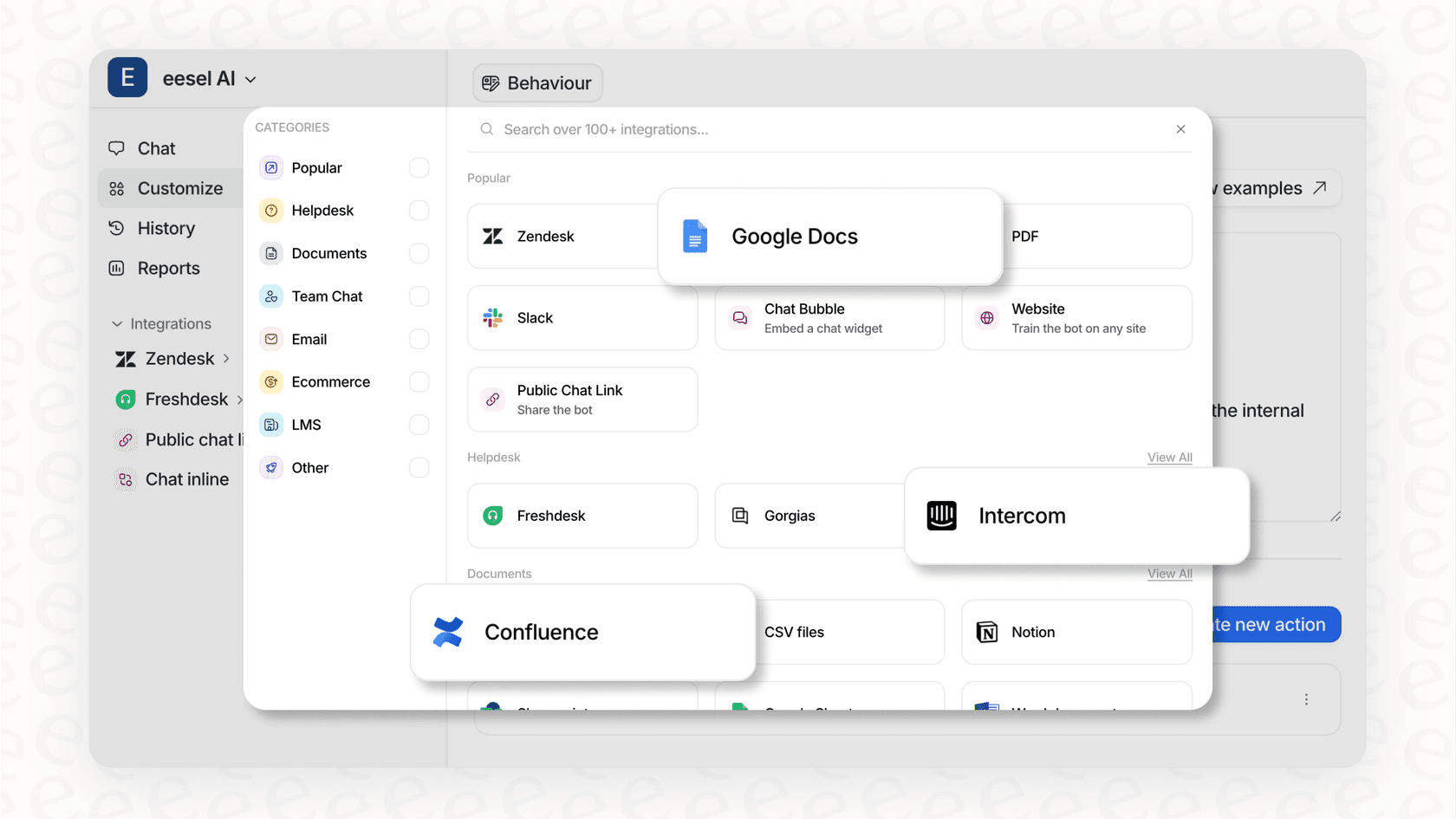
Chatwoot AI mostly learns from a public help center URL and its own conversation history. That sounds okay on the surface, but then you think about where most companies actually keep their knowledge. It's usually scattered all over the place: internal guides in Confluence, product specs in Google Docs, troubleshooting notes in Notion, and quick updates buried in Slack.
Expecting teams to copy all of that information over to a public-facing help center just to train a bot isn't really practical. This is a big gap, because the AI misses out on a huge amount of useful context. This is where the difference shows compared to a tool like eesel AI, which was built to connect to all your existing knowledge sources, wherever they live, with just a few clicks.
Lack of advanced workflow and triage automation
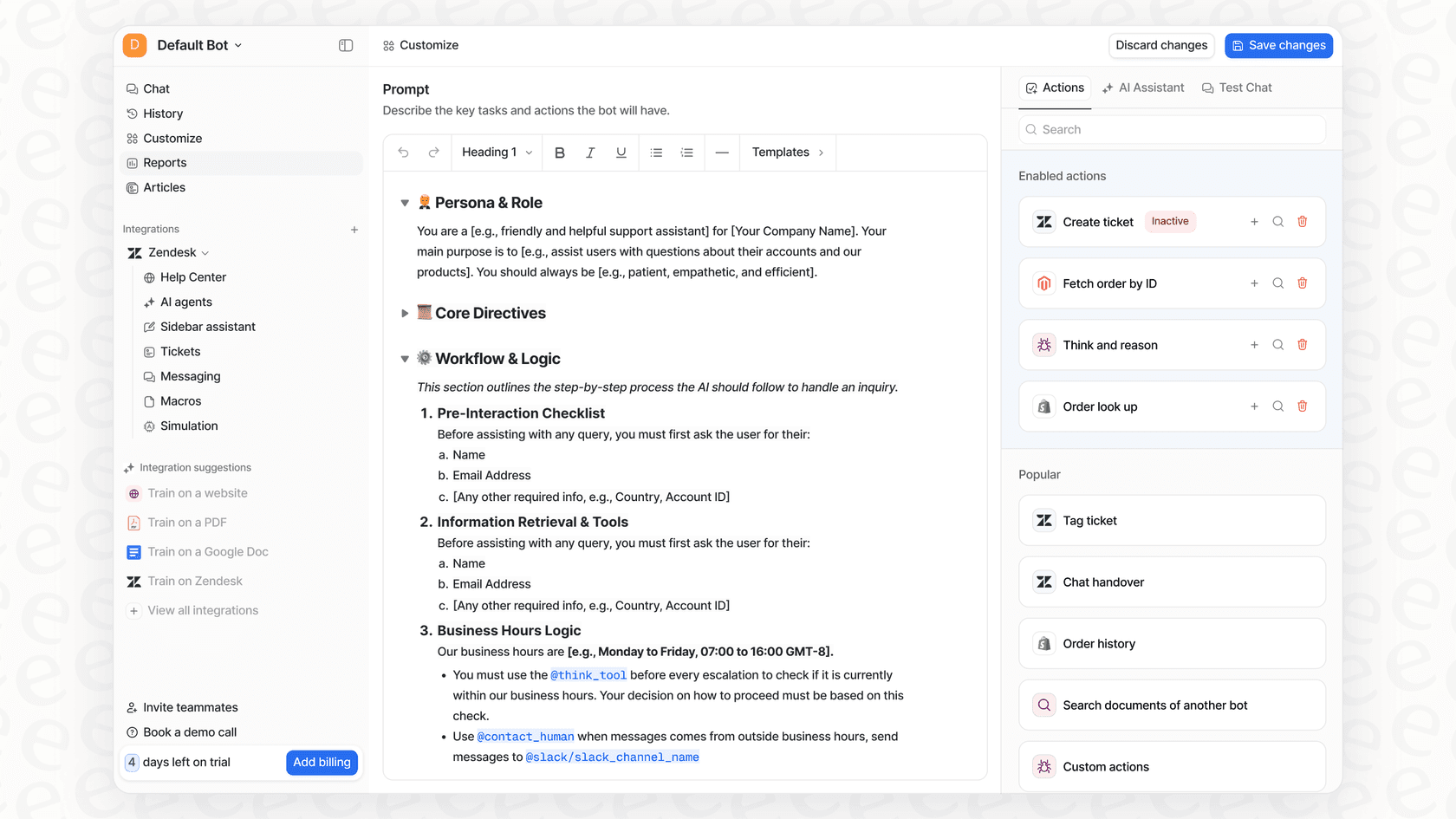
Captain can answer questions and pass conversations to agents, but its automation skills are fairly basic. It doesn't have a slick, self-serve workflow builder for creating custom automations.
Want the AI to look up an order status in Shopify, check a subscription detail, or create a ticket in Jira? That’s not something you can easily set up yourself. The same goes for more advanced triage, like automatically routing tickets based on a customer's tone or specific keywords. You're mostly stuck with a simple answer-then-escalate flow. For that kind of automation, you'd need a more powerful tool like eesel AI's AI Triage, which lets you build complex rules to tag, route, and manage tickets automatically.
No risk-free simulation mode
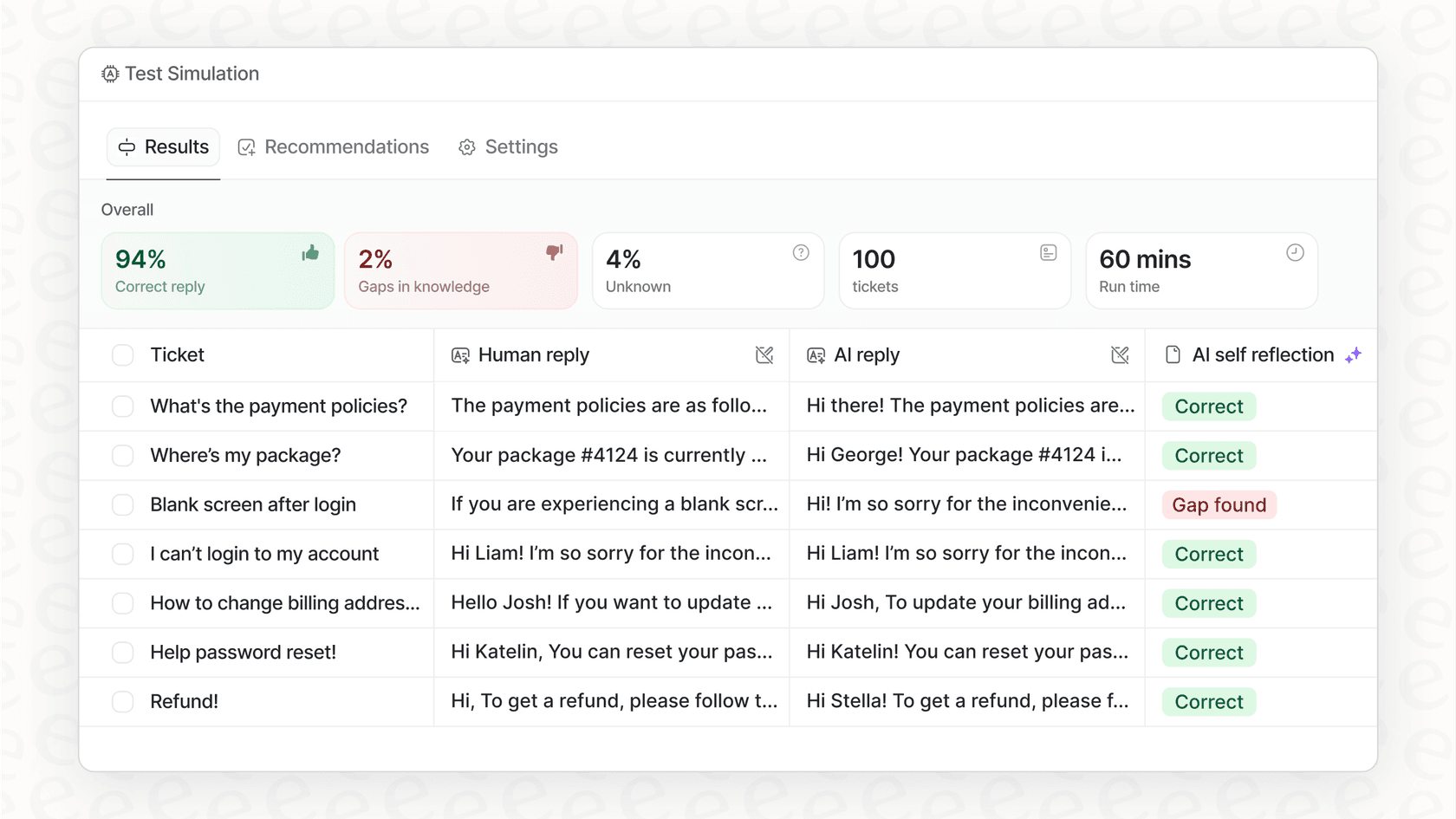
How can you be sure your AI is ready for prime time? Chatwoot gives you a "playground" to test instructions, but it doesn't let you simulate how the AI would perform against your actual past conversations.
This makes it incredibly hard to predict your potential return on investment, guess how many tickets the AI could realistically solve, or spot the topics it struggles with before it starts talking to customers. You’re essentially launching blind and hoping for the best. Platforms like eesel AI solve this with a powerful simulation mode. You can run your AI against thousands of your past tickets to see exactly how it would have performed, giving you the data and confidence you need before going live.
Data privacy and model flexibility concerns
As some users on Hacker News have pointed out, Chatwoot's reliance on OpenAI means your data (and your customers' data) gets sent to a third party. For businesses with strict data privacy or compliance requirements, this could be a deal-breaker. There’s also no built-in way to use other large language models or self-hosted alternatives, which ties your hands a bit.
Even if you self-host Chatwoot, the AI part is still connected to an external service. For comparison, eesel AI offers EU data residency and tight security controls to make sure your data is never used for training generalized models, giving you more peace of mind.
The better alternative to Chatwoot AI for comprehensive AI support
Chatwoot AI is a respectable starting point, especially for teams that are all-in on the Chatwoot ecosystem. But if you're serious about using AI to really improve your support, its limitations around integrations, automation, and testing will probably slow you down.
For teams that need a powerful AI that works with the tools they already have, eesel AI is a better fit. It’s designed to plug into your existing helpdesk, learn from all your scattered knowledge in minutes, and give you the tools to build custom automations with confidence.
Here’s a quick comparison:
| Feature | Chatwoot AI (Captain) | eesel AI |
|---|---|---|
| Setup Time | Hours to Days | Minutes |
| Integrations | Limited to Help Center URLs | 100+ (Confluence, GDocs, Notion, etc.) |
| Workflow Automation | Basic Handoffs | Fully Customizable (API calls, triage, etc.) |
| Pre-Launch Testing | Basic Playground | Full Simulation on Historical Tickets |
| Tool Compatibility | Requires using Chatwoot | Plugs into your existing helpdesk (Zendesk, etc.) |
| Pricing Model | Per Response Add-on | Predictable Monthly/Annual Tiers |
Is Chatwoot AI right for you?
So, what's the final verdict? The Chatwoot AI agent, Captain, offers a decent set of foundational AI features. If you're already a dedicated Chatwoot user and just want to automate a small chunk of simple, repetitive questions, it can certainly help.
However, if your company's knowledge is spread across multiple platforms, or if you need automations that do more than just answer basic questions, you'll probably hit a ceiling pretty quickly. The lack of deep integrations, a proper workflow engine, and a trustworthy simulation mode means you might spend more time finding workarounds than enjoying the benefits.
For a powerful and self-serve AI solution that improves your current helpdesk instead of making you switch to a new one, it’s worth looking at a platform built for that job from the ground up.
Ready to see what a truly integrated AI support agent can do? Start your free trial with eesel AI and see for yourself.
Frequently asked questions

Share this article

Article by
Kenneth Pangan
Writer and marketer for over ten years, Kenneth Pangan splits his time between history, politics, and art with plenty of interruptions from his dogs demanding attention.