A complete guide to Customer.io pricing in 2025


Last edited October 12, 2025

Picking a customer engagement platform is a huge deal, and let's be honest, the price tag is a massive part of that decision. You’ve probably heard of Customer.io. It’s a seriously powerful tool for sending personalized emails, texts, and push notifications. But trying to figure out its pricing can feel like a full-time job.
You’re not alone. That’s why we put together this guide to break down the real story behind Customer.io pricing. We’ll walk through each plan, shine a light on the not-so-obvious costs like overage fees and that tricky "high-watermark" billing, and help you figure out what you’re actually getting for your money. By the end, you’ll have a much clearer picture of whether it’s the right move for your team’s budget.
What is Customer.io?
Before we get into the numbers, let's quickly cover what Customer.io actually does. This isn't your standard email newsletter tool. Think of it more like a mission control center for all your customer messaging, built for companies that are comfortable with data and want to use it cleverly.
It works by connecting directly to your app or website, so you can send messages based on what people are actually doing. For example, you could automatically send an email to a user who just used a new feature for the first time, or a push notification to someone who hasn't logged in for a week.

It’s designed for teams who want to get granular with their customer journeys. If you have the data and want to build intricate, automated workflows based on real-time user behavior, Customer.io gives you the keys to the kingdom. It's less about batch-and-blast emails and more about creating highly specific, triggered conversations.
Customer.io pricing plans
Customer.io structures its pricing in three main tiers: Essentials, Premium, and Enterprise. Each one is built for a different size and stage of business, so the features (and the cost) scale up pretty quickly. Let’s take a look at them side-by-side.
| Feature | Essentials | Premium | Enterprise |
|---|---|---|---|
| Starting Price | $100/month | $1,000/month (billed annually) | Custom |
| Target Audience | Small companies gaining momentum | Rapidly growing companies | Companies scaling globally |
| Profiles | Starts at 5,000 | Custom volume | Custom volume |
| Monthly Emails | 1 million | Custom volume | Custom volume |
| Support | Email & community | Premium chat & email, 90-day onboarding | Priority support, Dedicated CSM |
| Integrations | Basic | Basic & Premium | Basic & Premium |
| Workspaces | 2 | Unlimited | Unlimited |
| HIPAA Compliance | No | Yes | Yes |
| Dedicated IPs | No | Yes | Yes |
| Audit Logging | No | No | Yes |
1. The Essentials plan
The Essentials plan is where most smaller companies start, kicking off at $100 per month. It's designed for teams who are getting serious about automating their marketing but don't quite need the entire suite of enterprise features just yet.
For that price, you get a solid toolkit to begin with. This includes up to 5,000 "profiles" (which can be a user, an account, or another object), a generous sending limit of 1 million emails a month, and access to their core visual workflow builder. You can also connect to a handful of common tools to pull in your customer data. For support, you're looking at email and community forums.
It's a good entry point, but you'll feel the guardrails. Live chat support isn't included, and you won't be able to use premium integrations for tools like Salesforce or data warehouses. It's a great way to get your feet wet, but if you're growing fast, you might outgrow it sooner than you think.
2. The Premium plan
The Premium plan is a major leap. Starting at $1,000 per month and billed annually, it’s a minimum commitment of $12,000 right out of the gate. This plan is aimed at companies hitting a serious growth spurt who need more power, better support, and advanced features.
So, what does that extra cash get you? For starters, your profile and email limits become custom, tailored to what you actually need. You also get premium chat and email support for faster help, plus a 90-day onboarding program to make sure you're set up for success. This is also where you unlock the really powerful integrations to data warehouses like Snowflake and BigQuery. And for businesses in the healthcare space, this is the first tier that offers HIPAA compliance.
This is the plan where you can really see what Customer.io is capable of. But that high price and annual lock-in mean you need to be very sure it's the right tool before you sign on the dotted line.
3. The Enterprise plan
The Enterprise plan is the top-tier, custom-priced option for large organizations with seriously complex needs. You'll have to chat with their sales team to even get a price range. This tier includes everything from Premium and adds on white-glove services and features for security and infrastructure.
We’re talking about a dedicated Customer Success Manager who acts as a strategic partner, priority technical support that bumps you to the front of the queue, and even dedicated hardware for peak performance. You also get advanced security features like audit logging, which is essential for large, regulated companies. This plan is for businesses operating at a massive scale that need the highest level of service and control.
The hidden costs of Customer.io pricing
Here’s where things get interesting. The monthly price on the website is rarely the final number on your invoice. Customer.io has a few billing quirks that can lead to some unwelcome surprises if you’re not paying close attention.
High-watermark billing for profiles
This is probably the single most important thing to understand about Customer.io pricing. They use a method called high-watermark billing. As their own documentation explains, you are billed for the maximum number of profiles that exist in your account at any point during the month.

Let's make that real. Say you start the month with 5,000 profiles. You run a great campaign and add 1,000 new sign-ups. Awesome! Then, you do some list cleaning and delete 500 inactive profiles. You might assume you'd end the month with 5,500 profiles. But Customer.io will bill you for 6,000, because that was the highest point your profile count reached. This makes it tough to predict your costs, especially if your user list fluctuates a lot.
How overage fees add up
On the Essentials plan, if you go over your profile limit, you get hit with overage fees. The charge is $0.009 per extra profile. That sounds like practically nothing, right? Almost a rounding error. But those tiny fees can multiply in a hurry.
Let’s stick with our example. Your Essentials plan includes 5,000 profiles, but your growth is taking off and you hit 15,000 profiles one month. That’s 10,000 profiles over your limit.
10,000 profiles x $0.009/profile = $90 in overages.
Suddenly, your $100 plan costs you $190 for the month. It has nearly doubled. As your list continues to grow, those fees can easily push you into a spot where you have no choice but to upgrade to the much more expensive Premium plan.
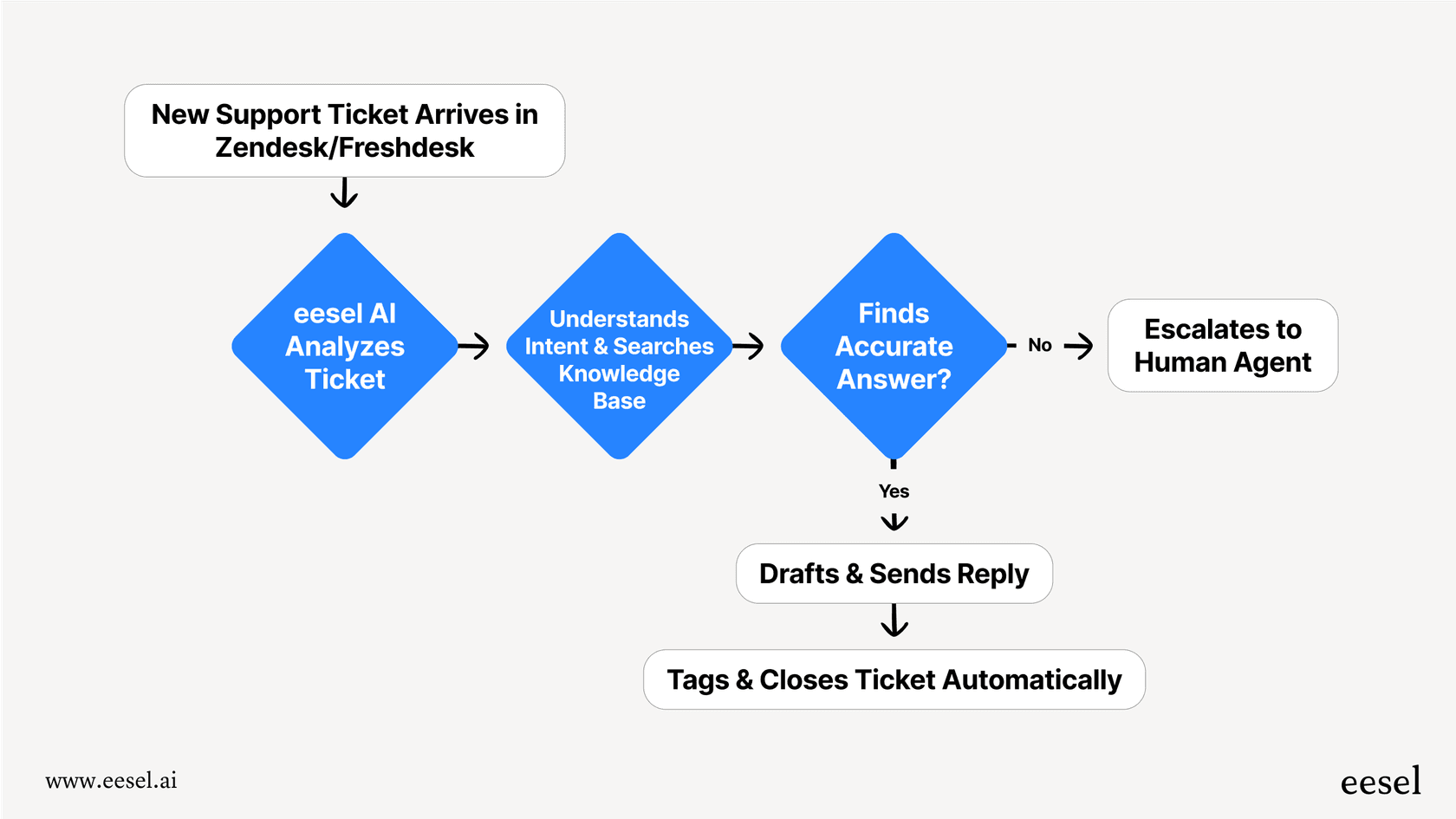
This kind of unpredictable billing is a common headache with usage-based models. It's a totally different approach from tools like eesel AI, where plans are transparently based on AI interactions, not per-resolution fees. You know exactly what you’re paying each month, which is a huge relief when you're trying to manage a budget.
Features locked behind expensive plans
This is a classic SaaS playbook. You get started on an affordable plan, but the one or two features that would really move the needle for your business are only available on the pricier tiers.
-
Advanced Integrations: Want to connect Customer.io to your data warehouse or Salesforce? You’ll have to pony up for the Premium plan.
-
Better Support: If you need help faster than an email can provide, you have to upgrade. Live chat and dedicated onboarding are reserved for Premium customers.
-
Compliance: For industries that handle sensitive data, HIPAA compliance is a non-negotiable, and it only becomes available at the Premium level.
This tiered system often means that to get the platform to do what you really need it to do, you're pushed into a much bigger financial commitment than you originally anticipated.
Is Customer.io pricing a good value for your money?
So, after all that, is Customer.io pricing worth it? The honest answer is: it depends entirely on who you are and what you need.
Customer.io is probably a great fit for:
-
Product-led SaaS companies: If your business lives and breathes event-based data from your product, you'll find Customer.io incredibly powerful for turning that data into action.
-
Companies with developers on hand: Let’s be real, to get the most out of this tool, you'll likely need some engineering help for the setup and ongoing data management.
-
Teams craving deep customization: If your goal is to build complex, multi-branched customer journeys, the workflow builder gives you all the flexibility you could ask for.
However, you might want to pump the brakes if:
-
You just need something simple: If all you want to do is send a weekly newsletter or a basic welcome series, the complexity and cost are way more than you need.
-
You're on a tight budget: The costs can escalate very quickly, and the unexpected fees can be a nightmare for small businesses trying to stick to a plan.
-
You don't have technical backup: Without a developer to help you out, you could struggle to implement the more advanced features and get your money's worth.
That setup process alone can be a real roadblock. While Customer.io is powerful, it's not a plug-and-play solution. This is where a lot of modern AI tools are changing the game. Something like eesel AI is built so you can get it running yourself in an afternoon, not over several weeks. With one-click helpdesk integrations, you can connect your existing tools instantly without needing to schedule a developer's time, offering a much faster and simpler path to seeing results.
Final thoughts on Customer.io pricing
Customer.io is a seriously robust platform for companies that are ready to get deep into data-driven customer messaging. The power it gives you to build detailed workflows and segment users with precision is top-notch.
But its pricing model is just as complex as its features. The high-watermark billing, sneaky overage fees, and the way key features are gated behind expensive annual plans mean it's not a tool to adopt lightly. You need to go in with a clear-eyed view of your budget, your technical capabilities, and what you’ll need a year from now.
And remember, when you're sending all those perfectly timed messages, you're going to get replies. All that engagement often leads to a higher volume of support tickets. A tool like eesel AI can automate your frontline support by learning from your knowledge base and past tickets. It plugs right into your helpdesk to answer common questions instantly, freeing up your team to focus on the conversations that really matter, all with a simple setup and predictable pricing.
Frequently asked questions

Share this article

Article by
Kenneth Pangan
Writer and marketer for over ten years, Kenneth Pangan splits his time between history, politics, and art with plenty of interruptions from his dogs demanding attention.